
Scorta 0100024-2
Manuale utente del rilevatore radar laser Escort MAX 360
Marca: Escort | Modello: 0100024-2
Introduzione
The Escort MAX 360 is an advanced laser radar detector designed to provide comprehensive driver awareness and protection. It features GPS capabilities, directional alerts, dual front and rear antennas for 360-degree detection, Bluetooth connectivity for integration with the Escort Live app, voice alerts, and an OLED display. This device is compatible with Apple CarPlay and Android Auto, enhancing its utility by allowing alerts to be viewed on your vehicle's display.
The MAX 360 leverages Digital Signal Processing (DSP) for rapid and accurate threat detection. It also includes a preloaded Defender Database of red light and speed camera locations and connects to the Drive Smarter community for real-time shared alerts from other users, providing a robust layer of protection and awareness.
Cosa è incluso
Upon unboxing your Escort MAX 360, please verify that all the following components are present:
- Escort MAX 360 Radar/Laser Detector Unit
- Magnetic StickyCup Mount
- USB SmartCord (con pulsante muto)
- Custodia da viaggio

Figura 1: Complete Package Contents of the Escort MAX 360. This image displays the main radar detector unit, a magnetic StickyCup mount for easy installation, the USB SmartCord which includes a mute button for convenient operation, and a protective travel case for portability and storage.
Prodotto finitoview e Caratteristiche
The Escort MAX 360 is engineered with advanced features to provide superior detection and driver awareness. Below are the key components and functionalities of the device:

Figura 2: Davanti view of the Escort MAX 360, showcasing its sleek design, prominent OLED display, and accessible control buttons for various functions.
Caratteristiche principali:
- Extreme Range and Precision: Equipped with front and rear antennas, the MAX 360 scans rapidly in all directions, utilizing Digital Signal Processing (DSP) for fast and accurate threat identification.
- Directional Alert Display: Directional arrows on the OLED display indicate the location of threats (front, rear, or side), providing immediate awareness.
- Defender Database: Preloaded with thousands of red light and speed camera locations across North America, offering protection beyond conventional radar and laser threats.
- Intelligenza AutoLearn™: GPS-based software intelligently learns your route and automatically rejects repeated false alert locations, such as automatic door openers.
- IVT Filtering: Reduces false alerts from In-Vehicle Technology (IVT) sources like collision avoidance systems and adaptive cruise control, ensuring a quieter ride.
- Escort Live App Connectivity: Bluetooth connectivity allows instant access to the Escort Live app, enabling shared alerts from other users and access to local speed limit data.
- Compatibilità con Apple CarPlay e Android Auto: View your route and interact with alerts directly on your vehicle's infotainment display.
- Avvisi vocali: Clear voice prompts announce detected threats and device status, allowing you to keep your eyes on the road.
- Display OLED: High-resolution graphic display shows signal type, strength, quantity, and real-time speed limit data.

Figura 3: Visual representation of key intelligent features: True 360° Awareness with directional arrows, the Defender® Database for speed and red light cameras, and AutoLearn™ Intelligence for false alert reduction.

Figura 4: Illustration of advanced features: IVT Filtering for reduced distractions, Maximized Awareness through shared alerts, and compatibility with the M2 Dash Cam for a complete driver alert system.
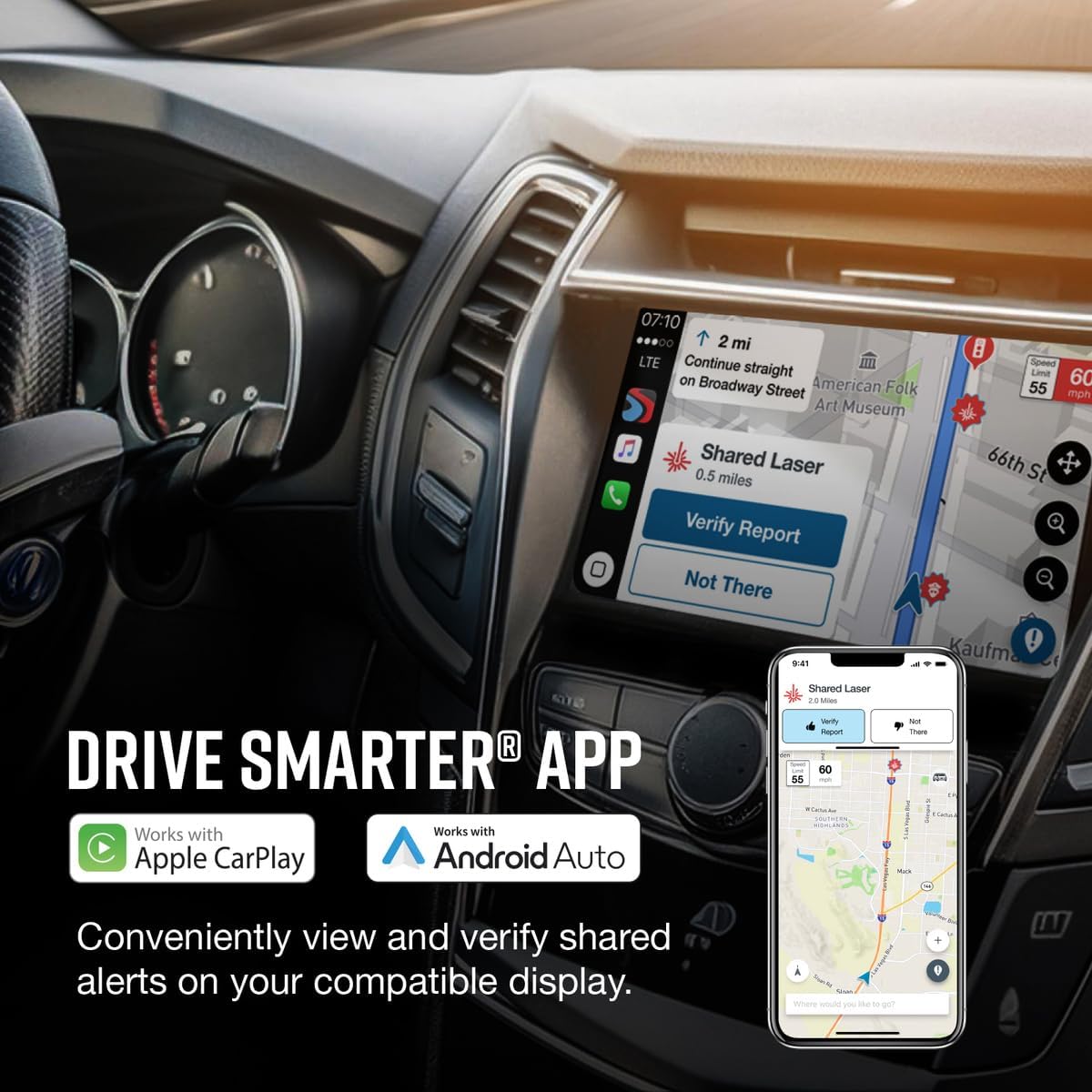
Figura 5: The Drive Smarter® App interface, demonstrating how shared alerts can be conveniently viewed and verified on compatible in-car displays (Apple CarPlay & Android Auto) and smartphones.
Configurazione e installazione
Proper installation of your Escort MAX 360 is crucial for optimal performance. Follow these steps for setup:
1. Montaggio del rilevatore:
The MAX 360 comes with a Magnetic StickyCup Mount for secure attachment to your windshield. Choose a location that provides a clear view of the road ahead and behind, typically in the center of the windshield, ensuring the detector is level.
- Clean the chosen area on your windshield thoroughly to ensure good adhesion.
- Attach the StickyCup Mount to the windshield by pressing firmly and flipping the lever to create suction.
- Slide the Escort MAX 360 onto the mounting bracket until it magnetically locks into place.

Figura 6: The Escort MAX 360 detector mounted on a vehicle's windshield, illustrating a typical installation position for optimal detection and visibility.
2. Collegamento elettrico:
Connect the supplied USB SmartCord to the power input on the MAX 360 and plug the other end into your vehicle's 12V accessory socket (cigarette lighter). The device will power on automatically with the vehicle's ignition.
3. Configurazione iniziale e associazione dell'app:
For full functionality, it is recommended to pair your MAX 360 with the Escort Live app on your smartphone.
- Download the "Drive Smarter" app from your smartphone's app store (available for iOS and Android).
- Assicurati che il Bluetooth sia abilitato sul tuo smartphone.
- Open the Drive Smarter app and follow the on-screen instructions to pair with your Escort MAX 360.
- Once paired, the app will provide access to community alerts, speed limit data, and allow for easy management of device settings and firmware updates.
Istruzioni per l'uso
Understanding the controls and display of your Escort MAX 360 will allow you to maximize its performance and benefit from its advanced features.
Figura 7: Detailed diagram of the Escort MAX 360, highlighting the functions of each button and the information displayed on the OLED screen.
Pulsanti di controllo:
- Pulsante di accensione: Press to turn the MAX 360 on or off.
- Volume (+/-): Press and hold the + or - buttons to adjust the alert volume.
- Tasto muto: Press to mute an alert. Press three times to lock out a false alert; press twice while receiving a locked-out alert to unlock.
- BRT (Brightness) Button: Press to adjust display brightness (Min, Med, Max, Auto, Dark).
- SEN (Sensitivity) Button: Press to adjust detector sensitivity (Auto, Auto NoX, AutoLoK, and Highway).
- MRK (Mark Location) Button: Press to mark a location for future alerts. Press MRK twice, then VOL + or - to select the type of marker, then MRK again to confirm. Press twice while receiving a marker alert to unmark.
Visualizza informazioni:
- Alert Area: The OLED display shows the type, strength, and quantity of signals detected. Escort MAX 360 offers seven different settings for displaying front and rear alerts. Refer to Preferences for details.
- Threat-Direction Arrows: Arrows on the display indicate the direction from which a threat is approaching (front, side, or rear).
- Velocità attuale: Shows your vehicle's current speed, derived from GPS data, when Speed Display is active.
- Over Speed Alert/Posted Speed Limit: This setting can be adjusted in Preferences. Displays a Bluetooth icon when paired to a phone, and the posted speed limit for your current location when connected to ESCORT Live.
Manutenzione
To ensure the longevity and optimal performance of your Escort MAX 360, follow these maintenance guidelines:
- Pulizia: Pulire regolarmente l'esterno del rilevatore con un panno morbido e asciutto.amp cloth. Avoid using abrasive cleaners or solvents, as they may damage the casing o display.
- Cura delle lenti: Keep the front and rear sensor lenses clean and free of dust or smudges. Use a microfiber cloth specifically designed for optics to gently clean the lenses.
- Magazzinaggio: When not in use for extended periods, store the MAX 360 in its provided travel case in a cool, dry place, away from direct sunlight and extreme temperatures.
- Ispezione dei cavi: Periodically check the USB SmartCord for any signs of wear, fraying, or damage. Replace if necessary to ensure a reliable power connection.
Risoluzione dei problemi
If you encounter issues with your Escort MAX 360, refer to the common problems and solutions below:
| Problema | Possibile causa/soluzione |
|---|---|
| Frequenti falsi allarmi |
|
| Nessuna alimentazione / Dispositivo non acceso |
|
| No GPS Signal / Location Issues |
|
| Problemi di connettività Bluetooth |
|
Specifiche
Detailed technical specifications for the Escort MAX 360 Laser Radar Detector:
| Caratteristica | Dettaglio |
|---|---|
| Dimensioni del prodotto | 1.36 x 5.43 x 3.6 pollici (3.45 x 13.79 x 9.14 cm) |
| Peso dell'articolo | 1.75 once (49.6 grammi) |
| Numero di modello | 0100024-2 |
| ASIN | B01669UNR8 |
| Caratteristiche speciali | Bluetooth, GPS Based |
| Caratteristiche dello schermo | Wireless, OLED Display |
| Colore | Nero |
| Dispositivi compatibili | Smartphone (via Drive Smarter App) |
| Fonte di alimentazione | CC (12 Volt) |
| Produttore | Radar di scorta |
| Codice UPC | 737795002420 |
Garanzia e supporto
For detailed warranty information and customer support, please refer to the official Escort website or the documentation included with your product. You can also find additional resources and frequently asked questions through the Drive Smarter app.
Manuale utente ufficiale (PDF): Scarica il manuale utente
Guida utente ufficiale (PDF): Scarica Guida per l'utente
Ask a question about this manual
Ask about setup, troubleshooting, compatibility, parts, safety, or missing instructions. Manuals+ will review the question and use this page’s manual context to help answer it.