
Introduzione
This manual provides comprehensive instructions for the Mesqool Projection Alarm Clock with FM Radio. Designed for convenience and reliability, this device features a large LED display, adjustable time projection, dual alarms, FM radio with presets, a sleep timer, and a built-in USB charging port. Please read this manual thoroughly to ensure proper operation and to fully utilize all features.

Figure 1: Mesqool Projection Alarm Clock with a phone connected for charging.
Impostare
1. Collegamento elettrico
Connect the provided power adapter to the DC input port on the back of the alarm clock and plug it into a standard wall outlet. The clock will power on automatically.
2. Installazione della batteria di backup (facoltativa ma consigliata)
For retaining time and alarm settings during power outages, install two 1.5V AAA batteries (not included) into the battery compartment on the back of the unit. Ensure correct polarity (+/-) as indicated inside the compartment.

Figura 2: Posteriore view of the alarm clock showing the battery compartment for backup power.
Istruzioni per l'uso
1. Impostazione dell'ora
- Premere il tasto TEMPO IMPOSTATO una volta il pulsante. Le cifre dell'ora lampeggeranno.
- Utilizzare il ORA pulsante per regolare l'ora.
- Utilizzare il MINIMO pulsante per regolare i minuti.
- Premere TEMPO IMPOSTATO nuovamente per confermare e uscire dalla modalità di impostazione dell'ora.
- Per passare dal formato 12 ore a quello 24 ore, premere il tasto TU+ button during normal time display.
- To adjust for Daylight Saving Time (DST), press the Ora legale pulsante.

Figure 3: The clock supports 24-hour, 12-hour, and DST time formats.
2. Impostazione degli allarmi
L'orologio supporta due sveglie indipendenti (Sveglia 1 e Sveglia 2).
- Premere il tasto ALARM1 or ALARM2 pulsante. L'ora della sveglia lampeggerà.
- Utilizzare il ORA E MINIMO pulsanti per impostare l'orario desiderato per la sveglia.
- Premere il tasto ALARM1 or ALARM2 button again to select the alarm sound: Buzzer or FM Radio.
- Press the respective alarm button one more time to confirm and activate the alarm. An alarm icon will appear on the display.
- Per disattivare una sveglia attiva, premere il tasto corrispondente SVEGLIA DISATTIVATA pulsante.
Regolazione del volume dell'allarme
The alarm volume can be adjusted from Level 1 to 5. Level 5 provides a loud 106dB sound, suitable for heavy sleepers. Use the volume buttons on the side of the unit to adjust the alarm volume.

Figure 4: Visual representation of adjustable alarm volume levels.
Funzione snooze
Quando suona la sveglia, premere il tasto grande OK/SNOOZE/SLEEP button to activate the 9-minute snooze function. The alarm will sound again after 9 minutes.

Figure 5: The large button for activating the snooze function.
3. Funzionamento della radio FM
The FM radio operates within the 87.5–108 MHz frequency range and can store up to 20 preset stations.
- Premere il tasto RADIO pulsante per accendere la radio FM.
- Utilizzare il ORA or MINIMO buttons to tune into the desired radio channel.
- Per salvare una stazione preimpostata, tenere premuto il tasto MEM/M+ pulsante.
- Premere il tasto OK/SNOOZE/SLEEP button to confirm storing the channel.
- Per spegnere la radio, premere il AUTORADIO SPENTO pulsante.
Timer di spegnimento
Mentre la radio è accesa, premere il tasto OK/SNOOZE/SLEEP button repeatedly to set the sleep timer (10-90 minutes). The radio will automatically turn off after the set time.

Figure 6: Step-by-step guide for FM radio operation and setting presets.
4. Funzione di proiezione
The 180° adjustable projector allows you to display the time onto a wall or ceiling.
- To activate or deactivate the projection, use the PROIEZIONE ON/FLIP/OFF interruttore.
- Rotate the projector lens to adjust the projection angle.
- Adjust the focus ring on the projector to achieve a clear image.
- The projected image can be flipped 180° for optimal viewing.
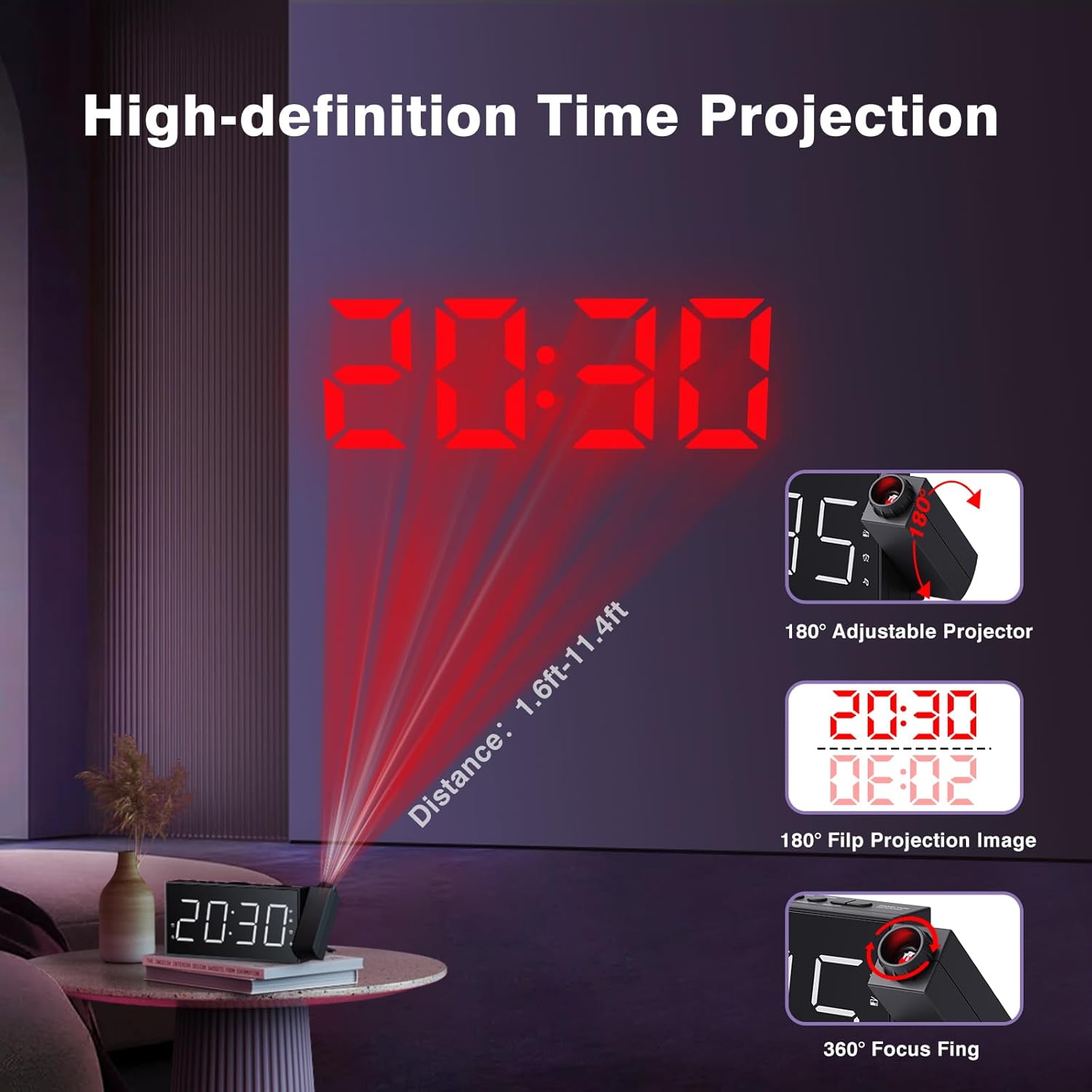
Figure 7: Time projected onto a wall from the alarm clock.

Figure 8: Demonstrating the 180-degree adjustable projection angle.
5. Regolazione della luminosità del display
The 7-inch LED display offers 5 dimming levels to suit your preference for day or night viewing. premi il DIMENSIONATORE ripetutamente il pulsante per scorrere i livelli di luminosità.

Figure 9: The clock display showing different brightness levels from 20% to 100%.
6. Porta di ricarica USB
A built-in USB charging port is located on the back of the unit, allowing you to charge your mobile devices. Simply connect your device's USB charging cable to the port.

Figura 10: Posteriore view of the clock highlighting the USB output and DC input ports.
Manutenzione
To maintain your Mesqool Projection Alarm Clock, regularly wipe the unit with a soft, dry cloth. Avoid using abrasive cleaners or solvents, as these may damage the surface. Ensure the projector lens is clean for optimal clarity.
Risoluzione dei problemi
| Problema | Possibile causa | Soluzione |
|---|---|---|
| Il display dell'orologio è vuoto. | Nessun potere o potere outage. | Check power adapter connection. Ensure battery backup is installed and functional during outages. |
| L'allarme non suona. | Alarm not set, volume too low, or alarm deactivated. | Verify alarm settings, increase alarm volume, and ensure alarm is activated (icon visible). |
| La proiezione è sfocata o poco chiara. | Focus not adjusted, or projection surface too far/bright. | Adjust the focus ring on the projector. Ensure the projection surface is within optimal distance (1.6ft-11.4ft) and sufficiently dark. |
| FM Radio static or poor reception. | Segnale debole o antenna non estesa. | Adjust the position of the clock or extend the antenna for better reception. |
| La ricarica USB non funziona. | Problema con il cavo o dispositivo non compatibile. | Prova un cavo USB diverso. Assicurati che il dispositivo sia compatibile con la ricarica USB standard. |
Specifiche
- Marca: Mesqol
- Modello: FBA_MQL-AC-01
- Tipo di visualizzazione: LED digitale
- Dimensioni del prodotto: 7.99"L x 3.58"A x 1.18"P
- Fonte di energia: AC Powered (with Battery Backup)
- Batteria di backup: 2 batterie AAA (non incluse)
- Frequenza radio FM: 87.5-108 MHz (20 stazioni preimpostate)
- Proiezione: 180° adjustable, focusable
- Luminosità dello schermo: 5 livelli regolabili
- Volume allarme: 5 levels adjustable (up to 106dB)
- Uscita USB: For charging mobile devices
- Materiale: Acrilonitrile Butadiene Stirene (ABS)
Garanzia e supporto
Mesqool provides a one-year warranty for this product, along with a 30-day free return policy. For technical support or warranty claims, please refer to the contact information provided in the original product packaging or visit the official Mesqool websito.
È inoltre disponibile per il download una Guida utente ufficiale (PDF): Scarica Guida per l'utente