
Introduzione
This manual provides instructions for the setup, operation, maintenance, and troubleshooting of your Soundcandy Rave Ball Light Show Bluetooth Speaker. Please read this manual thoroughly before using the device to ensure proper function and longevity.
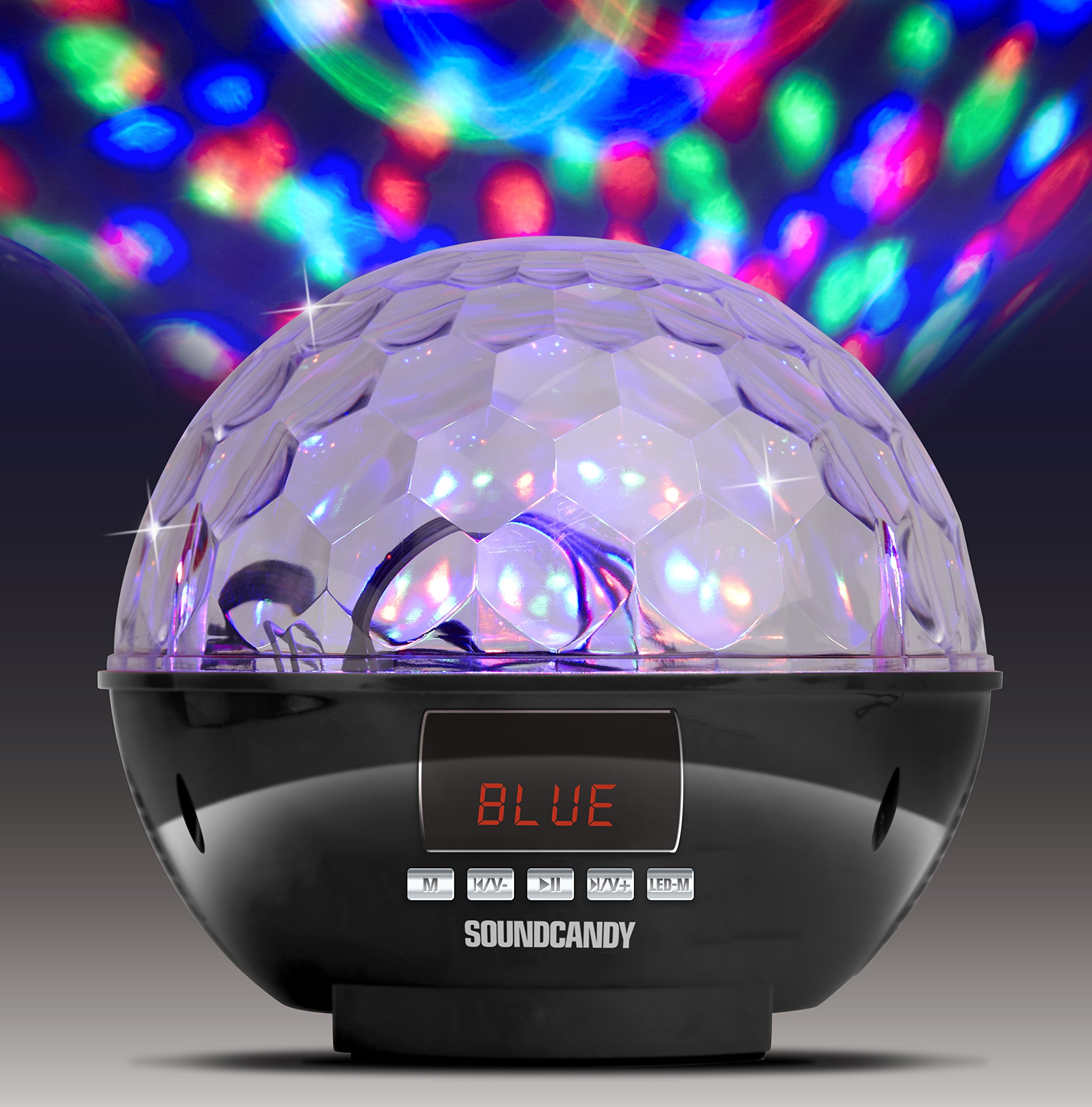
Image: The Soundcandy Rave Ball Light Show Bluetooth Speaker, a spherical device with a faceted top surface designed to project light patterns. The base contains control buttons and input ports.
Cosa c'è nella scatola
Dopo aver disimballato il prodotto, assicurarsi che siano presenti tutti i componenti:
- Altoparlante per balli rave
- Cavo di ricarica USB (Nota: alcuni pacchetti potrebbero non includere questo cavo.)
- 3.5mm Audio Cable (Nota: alcuni pacchetti potrebbero non includere questo cavo.)
If any items are missing, please contact customer support.
Impostare
1. Ricarica dell'altoparlante
- Individua la porta di ricarica sull'altoparlante.
- Connect the provided USB charging cable to the speaker and a compatible USB power adapter (not included) or computer USB port.
- La spia di carica si illuminerà. Per una carica completa saranno necessarie circa 2-3 ore.
- Una carica completa garantisce fino a 4 ore di riproduzione.
2. Accensione/Spegnimento
- To power on, press and hold the Power button until the device activates.
- Per spegnere, tenere premuto nuovamente il pulsante di accensione finché il dispositivo non si spegne.
Istruzioni per l'uso
1. Accoppiamento Bluetooth
- Ensure the speaker is powered on and in Bluetooth mode (indicated by a specific light or display).
- Sul tuo dispositivo mobile, attiva il Bluetooth e cerca i dispositivi disponibili.
- Select "Soundcandy Rave Ball" from the list of devices.
- Once paired, the speaker will emit an audible confirmation, and you can begin playing audio from your device.
2. Playing Music from USB Drive or Micro SD Card
- Insert a USB drive or Micro SD card containing MP3 audio files nella porta corrispondente sull'altoparlante.
- L'altoparlante rileverà automaticamente il dispositivo di archiviazione e inizierà a riprodurre la musica.
- Use the control buttons on the speaker to navigate tracks (next/previous) and adjust volume.
3. Using Aux-in Connection
- Connect one end of a 3.5mm audio cable (if included) to the Aux-in port on the speaker.
- Connect the other end of the cable to the headphone jack or audio output of your external device (smartphone, radio, etc.).
- The speaker will automatically switch to Aux-in mode. Play audio from your external device.
4. Funzionamento della radio FM
- Imposta l'altoparlante sulla modalità Radio FM.
- Use the control buttons to scan for available radio stations. The digital LCD display will show the station frequency.
- Regola il volume secondo necessità.
5. Modalità spettacolo di luci
- The speaker features a built-in rotation motor that creates a spinning light effect.
- There are four different light modes with various rotating lighting effects and colors.
- Press the "Light Mode" button (or similar, refer to device markings) to cycle through the available light patterns.
- The light effects are designed to fill a room with dynamic visuals.
Manutenzione
Pulizia
Per preservare l'aspetto e la funzionalità del tuo altoparlante:
- Pulire le superfici esterne con un panno morbido e asciutto.
- Non utilizzare detergenti abrasivi, solventi o prodotti chimici aggressivi.
- Evitare che l'umidità penetri nelle aperture.
Cura della batteria
- Per prolungare la durata della batteria, evitare di scaricarla completamente frequentemente.
- Se si conserva l'altoparlante per un periodo prolungato, caricarlo fino a circa il 50% ogni pochi mesi.
Risoluzione dei problemi
| Problema | Possibile causa | Soluzione |
|---|---|---|
| Nessun potere | La batteria è scarica. | Caricare l'altoparlante tramite il cavo di ricarica USB. |
| Impossibile effettuare l'associazione tramite Bluetooth | L'altoparlante non è in modalità di associazione o è troppo lontano dal dispositivo. | Ensure speaker is in Bluetooth mode. Move device closer to speaker. Restart both devices. |
| Nessun suono | Volume too low, incorrect input mode, or faulty connection. | Increase volume on both speaker and connected device. Verify correct input mode (Bluetooth, USB, Aux, FM). Check cable connections. |
| Lo spettacolo di luci non funziona | Light mode is off or device malfunction. | Press the "Light Mode" button to activate or change patterns. If issue persists, contact support. |
Specifiche
| Caratteristica | Dettaglio |
|---|---|
| Numero di modello | SC3002BKB-BT |
| Marca | soundcandy |
| Colore | Argento |
| Forma | Girare |
| Materiale | Plastica |
| Tipo di finitura | Argento metallizzato |
| Tipo di sorgente luminosa | Diodo ad emissione luminosa (LED) |
| Fonte di alimentazione | Alimentato a batteria, elettrico con cavo |
| Tipo di batteria | 1 batteria ai polimeri di litio (inclusa) |
| Durata della batteria | Fino a 4 ore di gioco |
| Tipo di montaggio | Montaggio a spina |
| Caratteristiche speciali | Light Modes, FM Radio, Rechargeable Battery, Bluetooth Connectivity, USB/Micro SD Playback, Aux-in |
| Numero di sorgenti luminose | 4 |
| Peso dell'articolo | 1.2 libbre |
| Produttore | Gluten Free Palace - HPC |
| Codice UPC | 814092020231 |
| ASIN | B017DV02P6 |
Garanzia e supporto
Informazioni sulla garanzia
This product comes with a standard manufacturer's warranty. Please retain your proof of purchase for warranty claims. For specific warranty terms and conditions, refer to the documentation included with your purchase or contact the manufacturer directly.
Assistenza clienti
If you encounter any issues not covered in the troubleshooting section or require further assistance, please contact Soundcandy customer support. Contact details can typically be found on the product packaging or the official Soundcandy websito.