
Modello M337
Manuale utente del mouse Bluetooth Logitech M337
Modello: M337
Introduzione
The Logitech M337 Bluetooth Mouse is a versatile wireless mouse designed for seamless connectivity and comfortable use. It features a 10-meter wireless range, a laser-grade optical sensor for precise tracking, and an LED indicator light. Powered by a single AA battery, it offers extended battery life for up to 10 months.
This manual provides detailed instructions for setting up, operating, and maintaining your M337 Bluetooth Mouse, along with troubleshooting tips and product specifications.
Contenuto della confezione
- Mouse Bluetooth Logitech M337
- 1 batteria AA (preinstallata o inclusa)
- Documentazione utente
Impostare
1. Installazione della batteria
The Logitech M337 mouse uses one AA battery. If the battery is not pre-installed, follow these steps:
- Individuare il coperchio del vano batteria sul lato inferiore del mouse.
- Far scorrere il coperchio per aprirlo.
- Inserire una batteria AA, assicurandosi che i terminali positivo (+) e negativo (-) siano allineati correttamente con gli indicatori all'interno del vano.
- Chiudere saldamente il coperchio del vano batterie.

Immagine: Lato inferiore view of the Logitech M337 mouse, illustrating the location of the battery compartment and power switch.
2. Accensione del mouse
Locate the On/Off switch on the underside of the mouse. Slide the switch to the "On" position. An LED indicator light on the top of the mouse will illuminate briefly.
3. Accoppiamento Bluetooth
The M337 mouse connects via Bluetooth. Follow these steps to pair it with your device:
- Assicurati che il tuo dispositivo (computer, tablet, smartphone) abbia il Bluetooth abilitato.
- Nella parte inferiore del mouse, tieni premuto il tasto Pulsante Connetti (often located near the optical sensor or power switch) for a few seconds until the LED indicator on the top of the mouse starts blinking rapidly. This indicates the mouse is in pairing mode.
- Sul tuo dispositivo, vai alle impostazioni Bluetooth e cerca nuovi dispositivi.
- Select "Logitech M337" from the list of available devices.
- Follow any on-screen prompts to complete the pairing process. Once successfully paired, the LED indicator on the mouse will stop blinking and remain solid for a moment, then turn off.
Il mouse è ora pronto per l'uso.
Utilizzo del mouse
Funzioni di base
- Clic sinistro: Pulsante principale per selezionare elementi, aprire link, ecc.
- Clic destro: Pulsante secondario per menu contestuali e opzioni aggiuntive.
- Rotella di scorrimento: Scorrere verso l'alto o verso il basso i documenti e web pagine. La rotellina di scorrimento funziona anche come pulsante centrale.
- Pulsante multifunzione: Located below the scroll wheel. This button's function can vary depending on your operating system and installed Logitech software. It often defaults to a gesture button for Windows (e.g., Task View) or Mac (e.g., Mission Control).
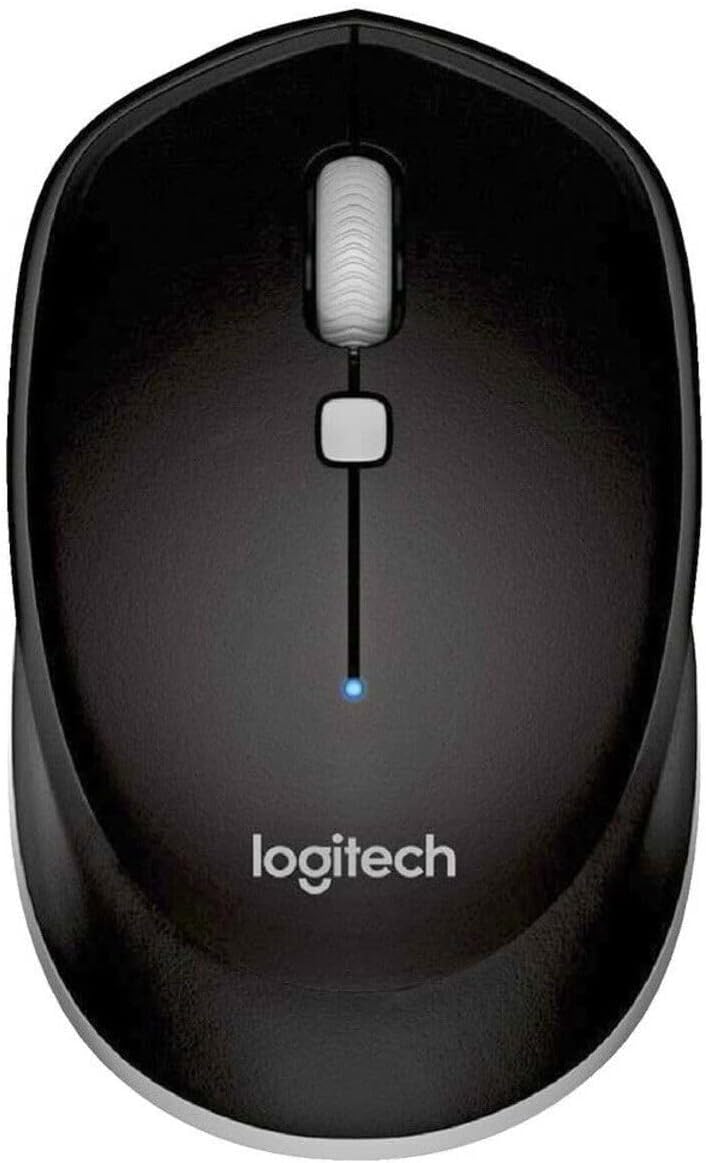
Immagine: dall'alto verso il basso view of the Logitech M337 mouse, highlighting the left and right click buttons, scroll wheel, and multi-function button.
Design ambidestro
The M337 mouse features a symmetrical design, making it comfortable for both left-handed and right-handed users. Its contoured shape fits naturally in the palm of your hand.

Image: A person using the Logitech M337 mouse alongside a laptop on a wooden desk, demonstrating its compact size and comfortable grip.

Image: A woman using the Logitech M337 mouse with her laptop at a cafe table, showcasing its portability and suitability for various environments.
Manutenzione
Pulizia
To clean your mouse, gently wipe it with a soft, damp panno. Evitare l'uso di prodotti chimici aggressivi o detergenti abrasivi, poiché possono danneggiare la superficie.
Durata della batteria
The M337 mouse is designed for long battery life, up to 10 months with typical use. Battery life may vary based on usage and computing conditions. When the battery is low, the LED indicator on the mouse may flash to alert you. Replace the AA battery when necessary.
Magazzinaggio
When not in use for extended periods, it is recommended to turn off the mouse using the On/Off switch on the underside to conserve battery life.
Risoluzione dei problemi
- Il mouse non risponde:
- Assicurarsi che il mouse sia acceso.
- Controllare la batteria. Sostituirla se necessario.
- Assicurati che il Bluetooth sia abilitato sul tuo dispositivo.
- Prova ad associare nuovamente il mouse al tuo dispositivo.
- Move the mouse closer to your device to ensure it's within the 10-meter range.
- Movimento del cursore lento o irregolare:
- Assicurarsi che il mouse sia posizionato su una superficie pulita e non riflettente.
- Verificare la presenza di interferenze da altri dispositivi wireless.
- Re-pair the mouse.
- Aggiorna i driver Bluetooth del tuo dispositivo.
- Cannot pair the mouse:
- Ensure the mouse is in pairing mode (LED blinking rapidly).
- Remove any previous pairings of the M337 from your device's Bluetooth settings and try again.
- Riavvia il dispositivo e il mouse.
Specifiche
| Caratteristica | Dettaglio |
|---|---|
| Numero di modello | Numero di modello: M337 |
| Connettività | Bluetooth senza fili |
| wireless Range | Fino a 10 metri (33 piedi) |
| Tecnologia | Laser-grade Optical Tracking |
| Tipo di batteria | 1 batteria AA |
| Durata della batteria | Fino a 10 mesi |
| Dimensioni (L x P x A) | 7.32 x 4.96 x 3.27 pollici |
| Peso | 2.89 once |
| Colore | Nero |
| Produttore | GAXIWILO (Brand: Logitech) |
| Prima data disponibile | 21 gennaio 2016 |
Garanzia e supporto
Per informazioni sulla garanzia e supporto tecnico, fare riferimento al sito ufficiale Logitech webo contattare il servizio clienti Logitech. Conservare la prova d'acquisto per eventuali reclami in garanzia.
You can find additional support resources, FAQs, and driver downloads by visiting the Pagina di supporto Logitech.
Ask a question about this manual
Ask about setup, troubleshooting, compatibility, parts, safety, or missing instructions. Manuals+ will review the question and use this page’s manual context to help answer it.