1. Introduzione
This manual provides essential information for the safe and effective use of your Pioneer AVH-X4800BS 2-DIN Receiver. Please read it thoroughly before installation and operation, and keep it for future reference. This receiver features a 7-inch motorized display, built-in Bluetooth, Siri Eyes Free, and AppRadio compatibility, offering a comprehensive in-car audio and visual experience.
2. Prodotto finitoview
The Pioneer AVH-X4800BS is a versatile 2-DIN A/V receiver designed for enhanced in-car entertainment and connectivity. It supports various audio and video sources and integrates seamlessly with smartphones.

Figura 2.1: Fronte view of the Pioneer AVH-X4800BS receiver with included remote control.

Figure 2.2: Close-up of the 7-inch motorized display showing the main interface.
3. Configurazione e installazione
Un'installazione corretta è fondamentale per prestazioni ottimali. Si raccomanda di affidare l'installazione a un professionista qualificato.
3.1 Contenuto della confezione
- Pioneer AVH-X4800BS 2-DIN Receiver
- Cablaggio elettrico
- Telecomando
- Microfono
- Hardware di montaggio

Figure 3.1: Included accessories: wiring harness, remote control, microphone, and mounting screws.
3.2 Collegamenti di cablaggio
Connect the wiring harness to your vehicle's electrical system. Ensure all connections are secure and insulated. Refer to the detailed wiring diagram in the separate installation manual for specific connections.
- Alimentazione/Terra: Connect to vehicle's power and ground.
- Uscite altoparlanti: Collegare agli altoparlanti del veicolo.
- Pre-out RCA: Per l'esterno ampdiffusori (anteriore, posteriore, subwoofer).
- Ingresso USB: Per la connessione allo smartphone e la riproduzione multimediale.
- Ingresso telecamera posteriore: Per collegare una telecamera di retromarcia.
- Ingresso microfono: Per chiamate in vivavoce e comandi vocali.
- Porte HDMI: Two ports for external video sources.

Figura 3.2: Posteriore view of the receiver showing various input/output ports for power, speakers, RCA, USB, and camera connections.
4. Funzionamento di base
4.1 Accensione/spegnimento
Premere il tasto ENERGIA button on the unit or remote control to turn the receiver on or off.
4.2 Selezione della sorgente
Tocca il FONTE icon on the touchscreen or use the remote control to select desired audio/video sources such as Radio, Bluetooth Audio, USB, iPod, AUX, or AppRadio.
4.3 Controllo del volume
Adjust the volume using the volume buttons on the unit or the remote control.
4.4 Motorized Display
The 7-inch display is motorized. Use the dedicated buttons on the unit to adjust the display angle or eject discs (if applicable).
5. Caratteristiche audio
5.1 Equalizzatore grafico a 13 bande
Customize your audio experience with the built-in 13-band graphic equalizer. Adjust frequency bands to fine-tune the sound output to your preference.
5.2 Subwoofer Control
Manage subwoofer output levels and crossover frequencies directly from the receiver's menu for optimized bass performance.
6. Connettività
6.1 Bluetooth integrato
Pair your smartphone via Bluetooth for hands-free calling and wireless audio streaming. The included microphone ensures clear voice transmission during calls.
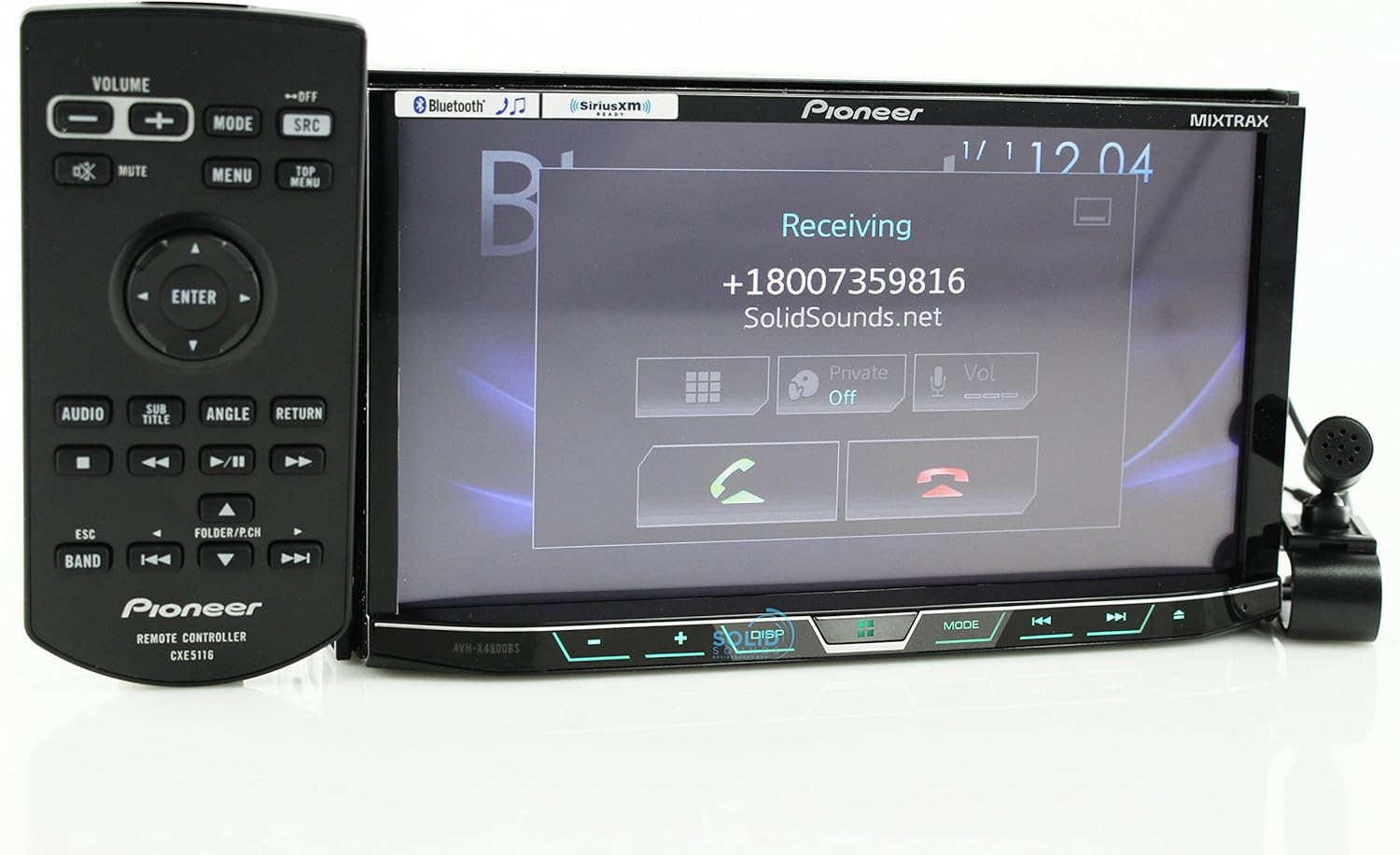
Figure 6.1: Display showing an incoming Bluetooth call.
6.2 Siri Eyes Free & AppRadio
Utilize Siri Eyes Free for voice control of your iPhone functions without taking your eyes off the road. AppRadio Mode allows for seamless integration with compatible smartphone apps directly on the receiver's display.
6.3 Spotify & Pandora Control
Directly control Spotify and Pandora applications from the receiver's touchscreen when your smartphone is connected, providing access to your favorite music and podcasts.
7. Manutenzione
7.1 Pulizia dello schermo
Use a soft, dry cloth to clean the touchscreen. For stubborn smudges, lightly dampPulisci il panno con acqua o un detergente per schermi. Evita materiali abrasivi o sostanze chimiche aggressive.
7.2 Aggiornamenti software
Controllare periodicamente il Pioneer website for available firmware updates to ensure optimal performance and access to the latest features. Follow the instructions provided with the update package carefully.
8. Risoluzione Dei Problemi
- Nessun potere: Controllare i collegamenti elettrici e la scatola dei fusibili del veicolo. Assicurarsi che l'accensione sia inserita.
- Nessun suono: Verificare i collegamenti degli altoparlanti e amplifier status. Check volume levels and mute settings.
- Problemi di connettività Bluetooth: Ensure Bluetooth is enabled on both the receiver and your smartphone. Delete previous pairings and attempt to re-pair.
- Touchscreen non reattivo: Perform a system reset (refer to the full owner's manual for reset procedure).
- Malfunzionamento dello schermo: Check wiring connections to the display unit. If the issue persists, contact Pioneer support.
9. Specifiche
| Dimensioni del prodotto | 11 x 9.5 x 6 pollici |
| Peso dell'articolo | 0.01 once |
| Numero modello articolo | AVH-X4800BS |
| Tecnologia di connettività | Bluetooth |
| Tipo di controllore | iOS |
| Caratteristica speciale | Spottizzare |
| Dispositivi compatibili | Smartphone (Android, iOS) |
| Porte HDMI totali | 2 |
| Tipo di connettore | Presa da 2.5 mm |
| Codifica audio | Stereo |
| Modalità di uscita audio | Stereo |
| Configurazione del canale audio surround | 4 canale |
10. Garanzia e supporto
Per informazioni sulla garanzia e supporto tecnico, fare riferimento alla scheda di garanzia inclusa con il prodotto o visitare il sito ufficiale Pioneer websito. Conserva la ricevuta d'acquisto come prova d'acquisto.