
1. Introduzione
This manual provides essential instructions for the installation, operation, maintenance, and troubleshooting of the APC Smart-UPS SRT3000RMXLT 3kVA 208V Rackmount Uninterruptible Power Supply (UPS). Please read this manual thoroughly before installing or operating the equipment to ensure proper usage and safety.
2. Informazioni sulla sicurezza
Rispettare tutte le avvertenze e le istruzioni operative contenute nel presente manuale. La mancata osservanza di tali avvertenze può causare lesioni personali o danni all'apparecchiatura.
- Sicurezza elettrica: Questa unità contiene voltages. Non tentare di smontare l'UPS. La manutenzione deve essere eseguita solo da personale qualificato.
- Sicurezza della batteria: Le batterie possono presentare un rischio di scosse elettriche e di elevata corrente di cortocircuito. Togliere orologi, anelli o altri oggetti metallici prima di maneggiare le batterie. Utilizzare utensili con manici isolati.
- Peso: L'UPS è pesante. Utilizzare tecniche di sollevamento adeguate e garantire un supporto adeguato durante l'installazione.
- Ambiente: Install the UPS indoors in a controlled environment, free from excessive dust, moisture, and extreme temperatures.
3. Contenuto della confezione
Carefully unpack the UPS and inspect for shipping damage. The package should contain the following items:
- APC Smart-UPS SRT3000RMXLT Unit
- Power Supply (Built-In)
- Hardware per il montaggio su rack
- CD di documentazione
- Cavo USB
- Cavo seriale
4. Impostazione
4.1 Installazione fisica
The SRT3000RMXLT is designed for rack installation. Ensure the rack is stable and capable of supporting the UPS weight (approximately 69 pounds).
- Mount the UPS into a standard 19-inch rack using the provided rack-mounting hardware.
- Assicurare un adeguato flusso d'aria attorno all'unità. Non ostruire le aperture di ventilazione.

Figura 4.1: Fronte view of the APC Smart-UPS SRT3000RMXLT. This image shows the front panel with the display and ventilation grille.
4.2 Collegamento dell'UPS
Connect the UPS to the utility power and your equipment.
- Connect the UPS input power cord to a dedicated 208V AC outlet. The UPS uses a Type B - 3 pin (North American) power plug.
- Connect your equipment to the output receptacles on the rear of the UPS. The unit provides 12 IEC 320 C13/C14 outlets.
- For communication, connect the USB cable or serial cable from the UPS to your computer or network management card.
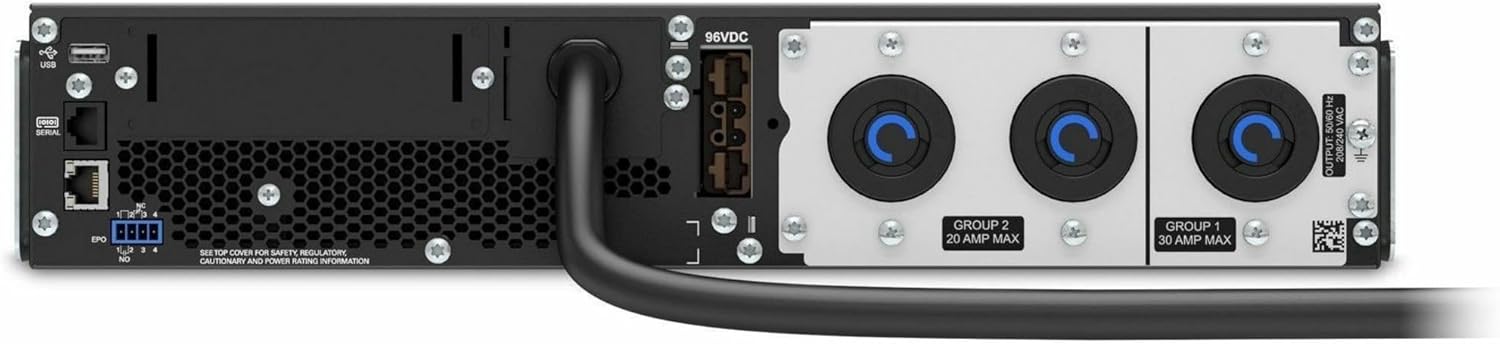
Figura 4.2: Posteriore view of the APC Smart-UPS SRT3000RMXLT. This image displays the various input and output ports, including USB, serial, EPO, and the 12 output receptacles, along with the main power input.
4.3 Accensione iniziale
After all connections are secure:
- Premere il pulsante di accensione sul pannello frontale per accendere l'UPS.
- The UPS will perform a self-test and the display will show the current status.
- Allow the batteries to charge for at least 6 hours before relying on them for extended backup time.
5. Funzionamento dell'UPS
5.1 Display e controlli del pannello frontale
The front panel features an LCD display and control buttons for monitoring and configuring the UPS.
- Schermo LCD: Shows real-time status, load, battery charge, input/output voltage, and event logs.
- Pulsante ESC: Esce dal menu corrente o annulla un'operazione.
- Pulsante OK: Conferma una selezione o accede a un menu.
- Frecce su/giù: Naviga tra le opzioni del menu o modifica le impostazioni.
5.2 Funzionamento di base
- Accensione: Tenere premuto il pulsante di accensione finché il display non si illumina.
- Disattivazione: Press and hold the power button until the UPS powers down. Ensure all connected equipment is safely shut down first.
- Modalità batteria: In caso di mancanza di correntetage, the UPS will automatically switch to battery power. The display will indicate 'On Battery'.
- Test di autoverifica: Initiate a manual self-test through the front panel menu to verify battery and UPS functionality.
6. Manutenzione
6.1 Sostituzione della batteria
The UPS uses sealed lead-acid batteries. Battery life is typically 3-5 years, depending on environmental conditions and usage. Replace batteries when the UPS indicates a 'Battery Fault' or 'Replace Battery' warning.
- Contact APC support or a certified service technician for battery replacement.
- Always use genuine APC replacement battery cartridges (RBCs) to ensure compatibility and optimal performance.
- Recycle old batteries responsibly.
6.2 Pulizia
Keep the UPS free from dust and debris to ensure proper ventilation.
- Use a soft, dry cloth to clean the exterior of the UPS.
- Non utilizzare detergenti liquidi o solventi.
- Assicurarsi che le aperture di ventilazione siano libere da ostruzioni.
7. Risoluzione Dei Problemi
Questa sezione fornisce soluzioni ai problemi più comuni. Per problemi più complessi, contattare l'assistenza tecnica.
| Problema | Possibile causa | Soluzione |
|---|---|---|
| L'UPS non si accende | No input power; Battery disconnected or discharged | Check power cord connection; Ensure utility power is present; Allow batteries to charge. |
| L'UPS emette segnali acustici continui | On battery power; Overload condition | Check utility power; Reduce connected load. |
| Indicatore "Sostituisci batteria" | Batteria quasi esaurita | Order and replace the battery cartridge. |
| UPS not providing power to outlets | Output circuit breaker tripped; UPS in fault mode | Reset circuit breaker; Check display for fault codes and consult manual. |
8. Specifiche
Key technical specifications for the APC Smart-UPS SRT3000RMXLT.
| Caratteristica | Specificazione |
|---|---|
| Numero di modello | SRT3000RMXLT |
| Marca | APC |
| Capacità di potenza in uscita | 3000 VA / 2700 Watt |
| Potenza nominale Voltage | 208 V CA |
| Ingresso nominale Voltage | 208 V CA / 230 V CA |
| Frequenza di ingresso | Frequenza 60 Hz |
| Connessioni di uscita | 12 x IEC 320 C13/C14 |
| Tipo di batteria | Piombo acido |
| Tempo di ricarica tipico | 6 ore |
| Tempo di backup tipico (carico completo) | 4 minuti |
| Fattore di forma | Cremagliera |
| Dimensioni (A x L x P) | 9 x 23 x 34 pollici |
| Peso | 69 libbre |
| Temperatura di esercizio | 0 - 40 °C (32 - 104 °F) |
9. Garanzia e supporto
9.1 Informazioni sulla garanzia
APC provides a standard warranty for this product. Please refer to the warranty card included with your product or visit the official APC websito per termini e condizioni di garanzia dettagliati specifici per la tua regione.
9.2 Supporto tecnico
For technical assistance, product information, or troubleshooting beyond the scope of this manual, please contact APC customer support. Have your model number (SRT3000RMXLT) and serial number ready when contacting support.
- Visita l'APC ufficiale websito per risorse di supporto, FAQ e informazioni di contatto.
- Online resources often include updated manuals, firmware, and diagnostic tools.