
Introduzione
The Reflexion PS07BT is a versatile mobile karaoke system designed for portable entertainment. This unit combines powerful audio output with various connectivity options, including Bluetooth, USB, and AUX-in, along with microphone and guitar inputs. It features integrated light effects and a rechargeable battery, making it suitable for both indoor and outdoor use. This manual provides essential information for the safe and effective operation of your PS07BT system.
Informazioni sulla sicurezza
Leggere attentamente tutte le istruzioni di sicurezza prima di utilizzare il dispositivo. Conservare il presente manuale per riferimento futuro.
- Non esporre l'unità a pioggia, umidità o temperature estreme.
- Evitare di posizionare l'unità vicino a fonti di calore come termosifoni, stufe o altri apparecchi che producono calore.
- Utilizzare solo l'alimentatore fornito con l'unità.
- Non aprire il casing. Affidare tutti gli interventi di manutenzione a personale qualificato.
- Tenere l'unità lontana da forti campi magnetici.
- Assicurare una ventilazione adeguata e non ostruire le aperture di ventilazione.
- Handle the microphone and cables with care to prevent damage.
Contenuto della confezione
Verificare che tutti gli articoli siano presenti nel pacco:
- Reflexion PS07BT Mobile Karaoke System
- Microfono
- Manuale d'uso
- Power Adapter (not explicitly listed but implied for charging)
Prodotto finitoview
Familiarize yourself with the components and controls of your Reflexion PS07BT system.

Figura 1: Fronte view of the Reflexion PS07BT Mobile Karaoke System, showcasing the speaker grille and blue LED light effects.

Figura 2: Oltreview of the PS07BT system, highlighting its dimensions (49cm height, 20cm width), LCD display, and karaoke function.
Pannello di controllo
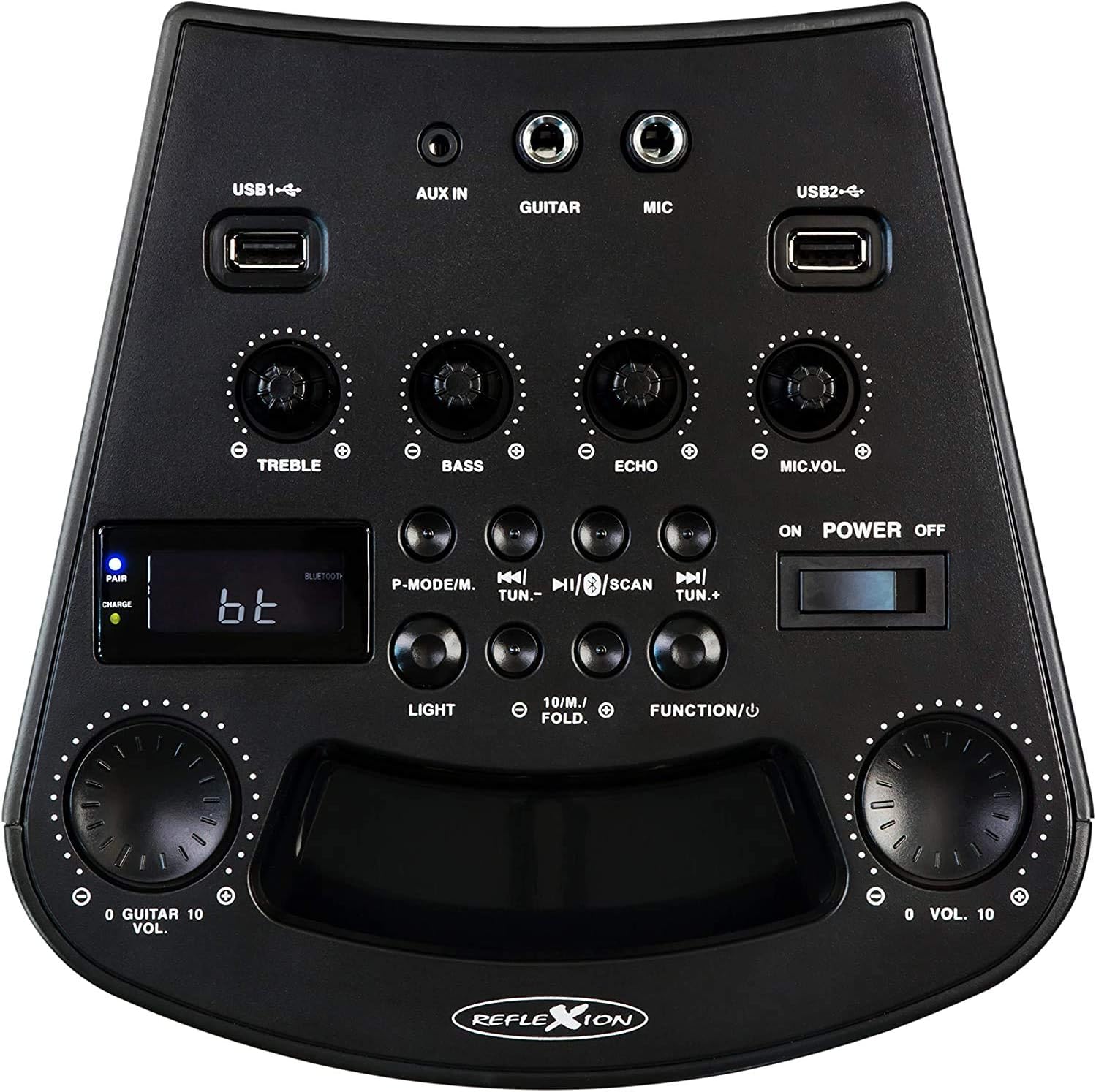
Figura 3: dettagliata view of the PS07BT control panel, showing input ports, sound adjustment knobs, and function buttons.
- USB1 / USB2 Ports: Per riprodurre audio da dispositivi di archiviazione USB.
- INGRESSO AUX: Ingresso da 3.5 mm per sorgenti audio esterne.
- CHITARRA: 6.3mm input for connecting a guitar.
- MICROFONO: 6.3mm input for connecting the microphone.
- Manopola TREBLE: Regola il suono ad alta frequenza.
- Manopola BASSO: Regola i suoni a bassa frequenza.
- Manopola ECO: Regola l'effetto eco per l'ingresso del microfono.
- Manopola MIC.VOL: Regola il volume del microfono.
- P-MODE/M Button: Program mode / Mode selection.
- TUN.- / TUN.+ Buttons: Tune down / Tune up for FM radio.
- Pulsante SCAN: Esegue la scansione delle stazioni radio FM.
- Tasto LUCE: Controlla gli effetti luminosi dei LED.
- FUNCTION/U Button: Passa da una modalità di ingresso all'altra (Bluetooth, USB, AUX, FM).
- Manopola VOL.: Controllo del volume principale.
- Interruttore di accensione/spegnimento: Accende o spegne l'unità.
- Schermo LCD: Mostra la modalità corrente, le informazioni sulla traccia o la frequenza FM.
- PAIR/CHARGE Indicators: Bluetooth pairing status and battery charging status.
Pannello posteriore

Figure 4: Rear panel of the PS07BT, displaying the AC power input and product information label.
- Ingresso alimentazione CA: Connect the power adapter here for charging and operation.
- Etichetta del prodotto: Contiene il numero del modello, il numero di serie e le specifiche elettriche.
Impostare
Carica della batteria
The PS07BT features a built-in rechargeable battery. Before first use, fully charge the unit.
- Connect the supplied power adapter to the AC power input on the rear of the unit.
- Collegare l'adattatore di corrente a una presa a muro.
- The CHARGE indicator light will illuminate during charging.
- A full charge takes approximately 4 hours. The CHARGE indicator may change or turn off once fully charged (refer to specific indicator behavior in the quick start guide if available).
Una batteria completamente carica garantisce fino a 4 ore di riproduzione.
Collegamento di microfono e chitarra
To use the karaoke or instrument features:
- Inserire il cavo del microfono nel Microfono input on the control panel.
- If connecting a guitar, insert its cable into the CHITARRA ingresso.
- Regolare il VOL.MIC E ECO knobs as desired during operation.
Istruzioni per l'uso
Accensione/spegnimento
Fai scorrere il ACCENSIONE/SPEGNIMENTO switch to the 'ON' position to turn on the unit. Slide it to 'OFF' to power down.
Selecting Input Mode
Premere il tasto FUNCTION/U button repeatedly to cycle through available input modes: Bluetooth (bt), USB, AUX, and FM Radio.
Connessione Bluetooth
- Turn on the PS07BT and select 'bt' mode using the FUNCTION/U button. The 'PAIR' indicator will flash, indicating it's ready for pairing.
- Abilita il Bluetooth sul tuo dispositivo mobile (smartphone, tablet, ecc.).
- Cercare available devices and select 'Reflexion PS07BT' from the list.
- Once connected, the 'PAIR' indicator will stop flashing and remain solid. You can now play audio from your device through the PS07BT.
Riproduzione USB
- Inserire un dispositivo di archiviazione USB (ad esempio, un'unità flash USB) contenente file audio files in entrambi i USB1 or USB2 porta.
- Selezionare la modalità 'USB' utilizzando il FUNCTION/U pulsante.
- L'unità inizierà automaticamente a riprodurre l'audio files from the USB device. Use the track control buttons (usually combined with TUN.-/TUN.+) to navigate tracks.
Connessione AUX-In
- Connect an external audio source (e.g., MP3 player, laptop) to the AUX IN porta utilizzando un cavo audio da 3.5 mm.
- Selezionare la modalità 'AUX' utilizzando il FUNCTION/U pulsante.
- Play audio from your external device. The volume can be controlled via both the external device and the PS07BT's master volume knob.
Funzionamento della radio FM
- Selezionare la modalità 'FM' utilizzando il FUNCTION/U pulsante.
- Premere il tasto SCANSIONE pulsante per eseguire la scansione e salvare automaticamente le stazioni radio FM disponibili.
- Utilizzare il TUN.- E TUN.+ buttons to manually tune to stations or select saved stations.
Funzione karaoke
With a microphone connected to the Microfono input, you can sing along to music playing from any source (Bluetooth, USB, AUX, FM). Adjust the VOL.MIC knob to control your voice volume and the ECO knob for an echo effect.
Effetti di luce
Premere il tasto LEGGERO button to activate or change the integrated blue LED light effects, which can synchronize with the music beat.
Regolazioni del volume e dell'audio
- Volume principale: Utilizzare il grande Italiano: knob to adjust the overall sound output level.
- Alti/Bassi: Utilizzare il ALTI E BASS manopole per regolare con precisione le alte e basse frequenze dell'audio.
Manutenzione
Pulizia
Pulire l'unità con un panno morbido e asciutto. Non utilizzare detergenti abrasivi, cere o solventi poiché potrebbero danneggiare la finitura. Assicurarsi che l'unità sia spenta e scollegata prima di pulirla.
Magazzinaggio
When not in use for extended periods, store the unit in a cool, dry place, away from direct sunlight and extreme temperatures. It is recommended to fully charge the battery before storing and to recharge it every few months to maintain battery health.
Risoluzione dei problemi
If you encounter issues with your PS07BT, refer to the following common problems and solutions:
| Problema | Possibile soluzione |
|---|---|
| Nessun potere | Ensure the power adapter is securely connected and plugged into a working outlet. Check if the battery is charged. Slide the POWER switch to ON. |
| Nessun suono | Increase the master VOL. knob. Check the volume on your connected audio source (e.g., phone). Ensure the correct input mode (Bluetooth, USB, AUX, FM) is selected. Check all cable connections. |
| Il Bluetooth non si connette | Ensure the unit is in 'bt' mode and the 'PAIR' indicator is flashing. Turn off and on Bluetooth on your device. Move your device closer to the PS07BT. Forget the device from your phone's Bluetooth list and try pairing again. |
| Il microfono non funziona | Ensure the microphone is securely plugged into the MIC input. Increase the MIC.VOL knob. Check if the microphone has its own ON/OFF switch and is turned on. |
| Problemi di riproduzione USB | Ensure the USB device is formatted correctly (FAT32 recommended) and contains compatible audio files. Prova un dispositivo USB diverso. |
Specifiche
Technical details for the Reflexion PS07BT Mobile Karaoke System:
- Nome modello: PS07BT
- Dimensioni (L x P x A): Dimensioni: 20.2 x 49 x 20.1 cm
- Peso: 2 chilogrammi
- Potenza massima in uscita dell'altoparlante: 320 Watt
- Tecnologia di connettività: Bluetooth
- Modalità di uscita audio: Stereo
- Materiale: Plastica
- Tipo di altoparlante: Subwoofer
- Caratteristiche speciali: Bluetooth, USB Port
- Durata media della batteria: 4 ore
- Tempo di ricarica: 4 ore
- Metodo di controllo: Touch (referring to buttons/knobs)
- Total USB 2.0 Ports: 2
- Colore: Nero
- Fonte di energia: Elettrico con cavo / Batteria

Figure 5: The PS07BT's integrated handle allows for easy portability.
Garanzia e supporto
The Reflexion PS07BT comes with a spare parts availability period of 1 year. For technical support or warranty inquiries, please contact your retailer or the manufacturer's customer service. Keep your proof of purchase for warranty claims.