
Introduzione
Thank you for choosing the Baseus Encok W02 True Wireless Bluetooth Earbuds. This manual provides essential information for the proper setup, operation, and maintenance of your new earbuds. Please read it thoroughly before use to ensure optimal performance and longevity of the product.
Prodotto finitoview
The Baseus Encok W02 earbuds offer a true wireless audio experience with advanced features designed for comfort and superior sound quality. They are equipped with touch controls and noise cancellation technology.
Caratteristiche principali:
- Stereo senza fili (TWS): Enjoy a completely wireless audio experience with independent left and right earbuds.
- Vestibilità comoda: Designed with three silicone ear tips for a secure and comfortable in-ear fit, reducing strain during extended use.
- Qualità del suono superiore: Multi-channel components and precise technology deliver excellent audio performance.
- Controllo touch: Intuitive touch-sensitive surfaces for managing music playback and calls.
- Cancellazione del rumore: Integrated noise cancellation feature for an immersive listening experience.
- Utilizzo flessibile: Per un suono stereo, puoi utilizzare entrambi gli auricolari oppure un singolo auricolare in modo indipendente.
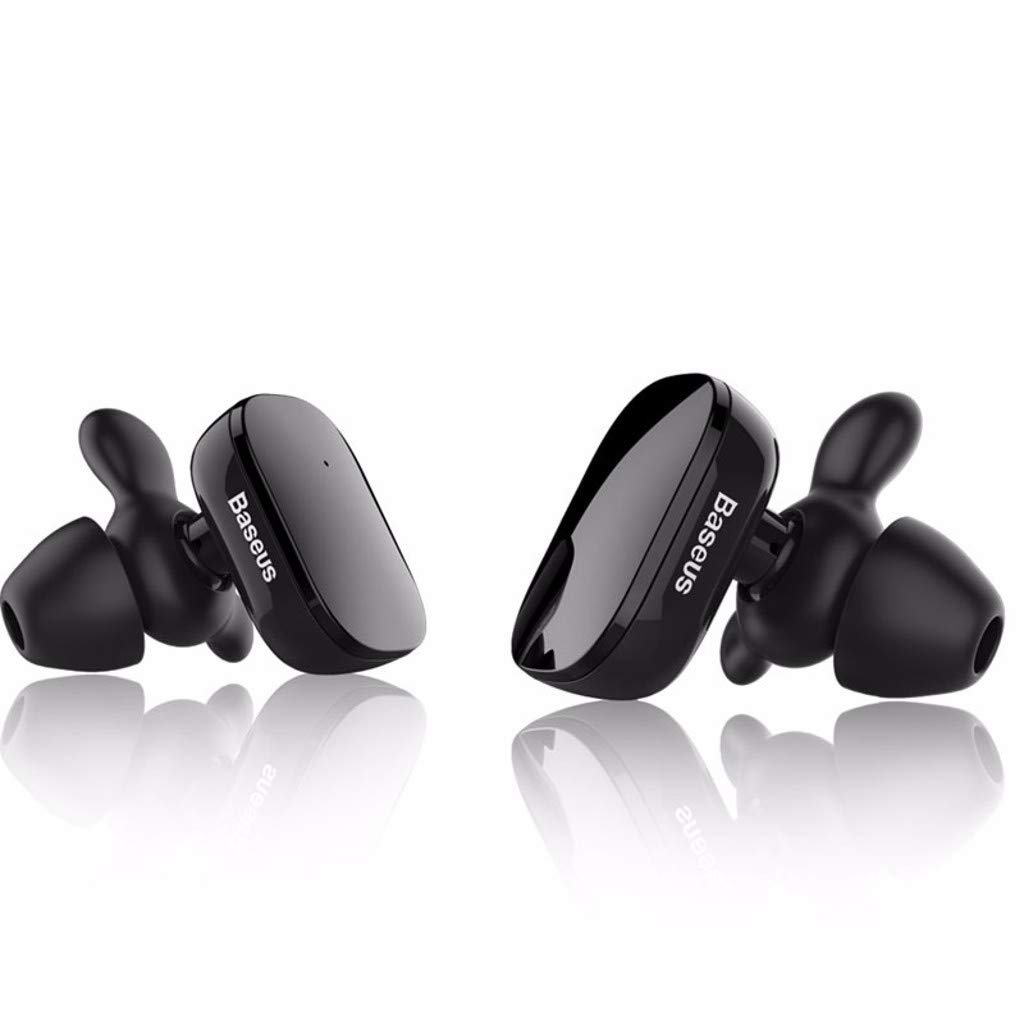
Image: The Baseus Encok W02 True Wireless Bluetooth Earbuds in white, showcasing their ergonomic design and compact form factor.

Immagine: Un esploso view illustrating the internal multi-channel components of the Baseus Encok W02 earbud, contributing to its sound quality.
Impostare
1. Disimballaggio e ispezione iniziale
Dopo aver aperto la confezione, assicurarsi che siano presenti tutti i componenti:
- Baseus Encok W02 True Wireless Bluetooth Earbuds (Left and Right)
- Custodia di ricarica
- Cavo di ricarica USB
- Diverse misure di gommini auricolari in silicone
- Manuale dell'utente (questo documento)
2. Ricarica degli auricolari
Prima del primo utilizzo, caricare completamente gli auricolari e la custodia di ricarica.
- Inserire gli auricolari nella custodia di ricarica. Assicurarsi che siano posizionati correttamente.
- Collega la custodia di ricarica a una fonte di alimentazione utilizzando il cavo USB in dotazione.
- The indicator lights on the case and/or earbuds will show the charging status. Refer to the LED indicator section for details.
- Una carica completa richiede circa 1.5 ore.

Image: Black Baseus Encok W02 earbuds placed within their compact charging case, ready for charging or storage.
3. Associazione con un dispositivo Bluetooth
Follow these steps to pair your earbuds with your smartphone or other Bluetooth-enabled device:
- Assicurati che gli auricolari siano carichi e rimossi dalla custodia di ricarica. Entreranno automaticamente in modalità di associazione.
- Sul tuo dispositivo, vai alle impostazioni Bluetooth e abilita il Bluetooth.
- Cercare available devices. You should see "Baseus Encok W02" or a similar name appear in the list.
- Select the earbuds from the list to connect. Once connected, a voice prompt will confirm successful pairing.
- If pairing fails, turn off the earbuds, disable Bluetooth on your device, and repeat the steps.
The earbuds support simultaneous connection to one mobile phone, and each earbud can also be used independently.
Istruzioni per l'uso
The Baseus Encok W02 earbuds feature intuitive touch controls for easy management of audio and calls.
Accensione/spegnimento
- Accensione: Remove the earbuds from the charging case. They will automatically power on. Alternatively, press and hold the touch area on both earbuds for approximately 3 seconds.
- Spegni: Place the earbuds back into the charging case. They will automatically power off. Alternatively, press and hold the touch area on both earbuds for approximately 5 seconds.
Riproduzione musicale
- Riproduci/Pausa: Toccare una volta l'area touch di uno degli auricolari.
- Traccia successiva: Tocca due volte l'area touch sull'auricolare destro.
- Traccia precedente: Tocca due volte l'area touch sull'auricolare sinistro.
Gestione delle chiamate
- Rispondi/Termina chiamata: Toccare una volta l'area touch di uno degli auricolari.
- Rifiuta chiamata: Press and hold the touch area on either earbud for approximately 2 seconds.
Assistente vocale
- Attiva l'assistente vocale: Tocca tre volte l'area touch di uno degli auricolari.
Uso di un auricolare singolo
Either earbud can be used independently. Simply remove one earbud from the charging case, and it will automatically connect to the last paired device. The other earbud can remain in the case or be powered off.
Manutenzione
Proper maintenance ensures the longevity and optimal performance of your Baseus Encok W02 earbuds.
Pulizia
- Pulisci regolarmente gli auricolari, in particolare i gommini e i contatti di ricarica, con un panno morbido, asciutto e privo di lanugine.
- Non utilizzare detergenti abrasivi, alcol o solventi chimici.
- Rimuovere i gommini auricolari e pulirli separatamente con acqua e sapone neutro, se necessario, assicurandosi che siano completamente asciutti prima di riattaccarli.
Magazzinaggio
- Quando non li usi, riponi sempre nella custodia di ricarica per proteggerli da polvere, sporco e danni fisici.
- Store the charging case and earbuds in a cool, dry place, away from direct sunlight and extreme temperatures.
Cura della batteria
- Avoid fully discharging the battery frequently. Charge the earbuds when the battery is low.
- If storing for an extended period, charge the earbuds and case to about 50% every few months to prevent deep discharge.
Risoluzione dei problemi
If you encounter issues with your Baseus Encok W02 earbuds, refer to the following common solutions:
| Problema | Possibile causa | Soluzione |
|---|---|---|
| Gli auricolari non si associano al dispositivo. | Bluetooth is off; earbuds are out of range; earbuds not in pairing mode; interference. | Ensure Bluetooth is enabled on your device. Place earbuds closer to the device (within 10m). Power cycle earbuds and device. Forget the device in Bluetooth settings and re-pair. |
| Nessun suono da uno o entrambi gli auricolari. | Earbuds not connected; low battery; volume too low; earbud blocked. | Check Bluetooth connection. Charge earbuds. Increase device volume. Clean earbud mesh. Try re-pairing both earbuds. |
| Gli auricolari non si caricano. | Poor contact with charging pins; faulty cable/charger; charging case low on battery. | Ensure earbuds are correctly seated in the case. Clean charging contacts on earbuds and case. Try a different USB cable or power adapter. Charge the charging case. |
| I controlli touch non rispondono. | Earbuds are wet; software glitch; dirty touch surface. | Ensure earbuds are dry. Power cycle the earbuds. Clean the touch surface. |
Factory Reset (if applicable)
If issues persist, a factory reset may resolve them. (Note: Specific reset instructions are not provided in the product data. Typically, this involves holding a button on the case or earbuds for an extended period while they are in the case. Refer to the manufacturer's official support for precise steps if needed.)
Specifiche
Detailed technical specifications for the Baseus Encok W02 True Wireless Bluetooth Earbuds:
| Caratteristica | Specificazione |
|---|---|
| Marca | Baseo |
| Modello | Encok W02 (NGW02-01) |
| Opzioni colore | Nero, Bianco |
| Tipo di indossare | In-ear (Bud) |
| Materiale | Silicone, ABS+, TPE+ |
| Connettività | Wireless (Bluetooth) |
| Versione Bluetooth | 4.2 |
| Distanza di trasmissione | Fino a 10 metri |
| Microfono | SÌ |
| Controllo del rumore | Cancellazione attiva del rumore |
| Tipo di controllo | Controllo touch, controllo vocale |
| Controllo cablato | Non supportato |
| Sensibilità | 105 ± 5 dB |
| Risposta in frequenza | 20 - 20,000 Hz (20 - 20 kHz) |
| Capacità della batteria | 2 x 60 mAh, 3.7V (Earbuds) |
| Tempo di ricarica | Circa 1.5 ore |
| Tempo di conversazione | Circa 5 ore |
| Tempo di riproduzione | Circa 3 ore |
| Tempo di standby | Circa 120 ore |
| Resistenza all'acqua | Non resistente all'acqua |
| Dispositivi compatibili | Telefoni cellulari |
Garanzia e supporto
Baseus products are designed and manufactured to the highest quality standards. For information regarding warranty coverage, terms, and conditions, please refer to the warranty card included with your product or visit the official Baseus websito.
For technical support, troubleshooting assistance beyond this manual, or to inquire about replacement parts, please contact Baseus customer service through their official channels. Keep your purchase receipt as proof of purchase for warranty claims.