
1. Introduzione
Grazie per l'acquistoasing the ipega PG-9057 Wireless Game Controller. This manual provides detailed instructions for setting up, operating, and maintaining your device. Please read this manual carefully before use to ensure optimal performance and longevity of your controller.
2. Caratteristiche del prodotto
- Connettività wireless: Enjoy gaming freedom with wireless connection technology.
- Compatibilità multipiattaforma: Supports Android devices (smartphones, tablets, TV boxes) and Windows PCs.
- Pulsanti ad alta resistenza: Equipped with high-quality, durable buttons for extended gaming sessions.
- Controlli di precisione: Features a D-pad with pressure sensitivity and a 360-degree joystick with no dead zone for accurate input.
- Design ergonomico: Designed for comfortable grip and prolonged use.
- Supporto per telefono integrato: Conveniently mount your smartphone for mobile gaming.
3. Contenuto della confezione
Si prega di controllare il contenuto della confezione dopo averla disimballata:
- Controller di gioco wireless ipega PG-9057
- Cavo di ricarica USB
- Manuale utente (versione giapponese inclusa)
4. Impostazione
4.1. Ricarica del controller
Before first use, fully charge the controller using the provided USB cable. Connect the small end of the USB cable to the controller's charging port and the other end to a USB power source (e.g., PC, USB wall adapter).
4.2. Device Compatibility Overview
The ipega PG-9057 controller supports various devices and connection methods as shown below:

This image displays the ipega PG-9057 Wireless Game Controller, highlighting its compatibility with various devices including smartphones, tablets, personal computers, and VR headsets.
4.3. Connection Methods and System Environment
The controller offers multiple connection options depending on your device and operating system. Refer to the table below for detailed compatibility.

This table outlines the system requirements and connection methods for the ipega PG-9057 controller, detailing compatibility with Android smartphones, tablets, and TV boxes via Bluetooth 4.0 or USB, and PCs via USB.
4.3.1. Bluetooth Connection (Android Devices)
- Assicurati che il controller sia carico.
- Premere e tenere premuto il tasto CASA pulsante e il A button simultaneously until the indicator light flashes rapidly. This puts the controller into pairing mode.
- Sul tuo dispositivo Android, vai alle impostazioni Bluetooth e attiva il Bluetooth.
- Cercare available devices and select "ipega PG-9057" (or similar name) from the list.
- Una volta effettuata l'associazione, la spia luminosa sul controller diventerà fissa.
4.3.2. USB Wired Connection (Windows PC / Android Devices)
- Connect the controller to your Windows PC or Android device using the USB cable.
- The device should automatically recognize the controller. No special drivers are usually required for basic functionality.
5. Istruzioni per l'uso
5.1. Controlli di base
The ipega PG-9057 features standard gamepad controls for intuitive gaming.

Un dettagliato view of the ipega PG-9057 controller's D-pad, joystick, and A/B/X/Y buttons, illustrating their high sensitivity and precise input capabilities.
- Tasto direzionale: For directional input, offering pressure sensitivity.
- Joystick sinistro/destro: 360-degree movement with no dead zone for precise control.
- Pulsanti A/B/X/Y: Standard action buttons with zero delay response.
- L1/R1, L2/R2 Triggers: Shoulder buttons and triggers for various in-game actions.
- Pulsanti SELECT/START: Per la navigazione nei menu e le azioni nel gioco.
- Tasto CASA: To power on/off the controller or return to the main menu.
5.2. Using with a Smartphone
The controller includes an integrated holder for smartphones, allowing for a portable gaming experience.
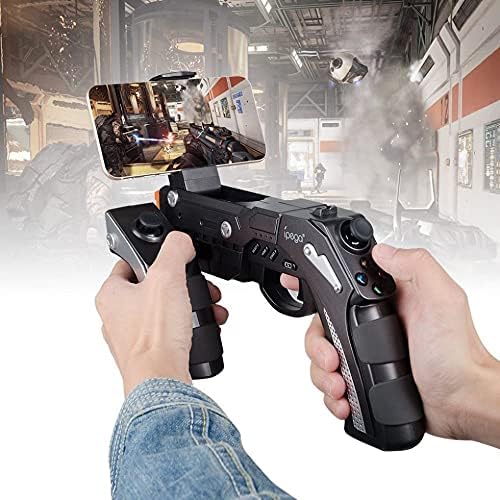
A user is shown holding the ipega PG-9057 Wireless Game Controller with a smartphone securely attached, actively engaged in mobile gaming.
- Extend the phone holder located on the top of the controller.
- Posizionare con attenzione lo smartphone nel supporto, assicurandosi che sia ben saldo.
- Connect the controller to your smartphone via Bluetooth as described in Section 4.3.1.
- Launch your desired game and configure controller settings if necessary.
6. Manutenzione
Per garantire la longevità e le prestazioni ottimali del tuo controller ipega PG-9057, segui queste linee guida per la manutenzione:
- Pulizia: Use a soft, dry cloth to wipe the surface of the controller. Do not use harsh chemicals or abrasive cleaners.
- Magazzinaggio: Conservare il controller in un luogo fresco e asciutto, lontano dalla luce solare diretta e da temperature estreme.
- Evitare gocce: Protect the controller from drops and impacts, as this can damage internal components.
- Ricarica: Non sovraccaricare la batteria. Scollegare il cavo di ricarica una volta che il controller è completamente carico.

The ipega PG-9057 Wireless Game Controller is shown, emphasizing its construction from high-quality, durable ABS material.
7. Risoluzione Dei Problemi
Se riscontri problemi con il tuo controller, fai riferimento alle seguenti soluzioni comuni:
- Il controller non si connette:
- Assicurarsi che il controller sia completamente carico.
- Verify that Bluetooth is enabled on your device and the controller is in pairing mode.
- Prova a riavviare sia il controller che il dispositivo.
- If using USB, ensure the cable is securely connected and try a different USB port.
- I pulsanti o i joystick non rispondono:
- Controlla che il controller sia collegato correttamente al tuo dispositivo.
- Restart the controller and reconnect.
- Assicurati che il gioco a cui stai giocando supporti i controller esterni.
- Ritardo o ritardo di input:
- Ensure there are no obstructions or excessive distance between the controller and your device.
- Ridurre al minimo le interferenze provenienti da altri dispositivi wireless.
- For critical gaming, consider using a wired USB connection if supported by your device.
8. Specifiche
| Specificazione | Valore |
|---|---|
| Marca | iPEGA |
| Modello | PG-9057 |
| Dispositivi compatibili | Androide, Finestre |
| Tipo di controllore | Tastiera di gioco |
| Tecnologia di connessione | Senza fili |
| Caratteristiche | Senza fili |
| Articoli compatibili | Androide, Finestre |
| Metodo di connessione | Senza fili |
| Caratteristiche speciali | Senza fili |
| Piattaforma hardware | Decoder |
| Fonte di alimentazione | Alimentato a batteria |
| Number of Package Items | 1 |
| Codice UPC | 602747571722 |
| ASIN | B018TSBFE4 |
| Codice GTIN | 602747571722 |
9. Garanzia e supporto
For warranty information and customer support, please refer to the documentation provided with your purchase or visit the official ipega websito. Conservare la prova d'acquisto per eventuali reclami in garanzia.