
1. Introduzione
The Perixx PERIDUO-712B is a compact wireless keyboard and mouse combo designed for efficiency and convenience. This set includes a space-saving mini keyboard and a 3-button optical mouse, ideal for various environments such as home, office, or travel. It features a stable 2.4 GHz wireless connection and plug-and-play setup for immediate use.

Image 1.1: The Perixx PERIDUO-712B Wireless Mini Keyboard and Mouse Set, showcasing its compact design and included nano receiver.
Contenuto della confezione:
- Tastiera wireless 1 x
- Mouse senza fili 1 x
- 1 x ricevitore nano USB
- 1 x Manuale utente (questo documento)
2. Per iniziare (installazione)
Follow these steps to set up your Perixx PERIDUO-712B wireless keyboard and mouse set.
2.1 Installazione della batteria
- Tastiera: Locate the battery compartment on the underside of the keyboard. Insert two (2) AA alkaline batteries (not included), ensuring correct polarity.
- Topo: Locate the battery compartment on the underside of the mouse. Insert one (1) AA alkaline battery (not included), ensuring correct polarity.
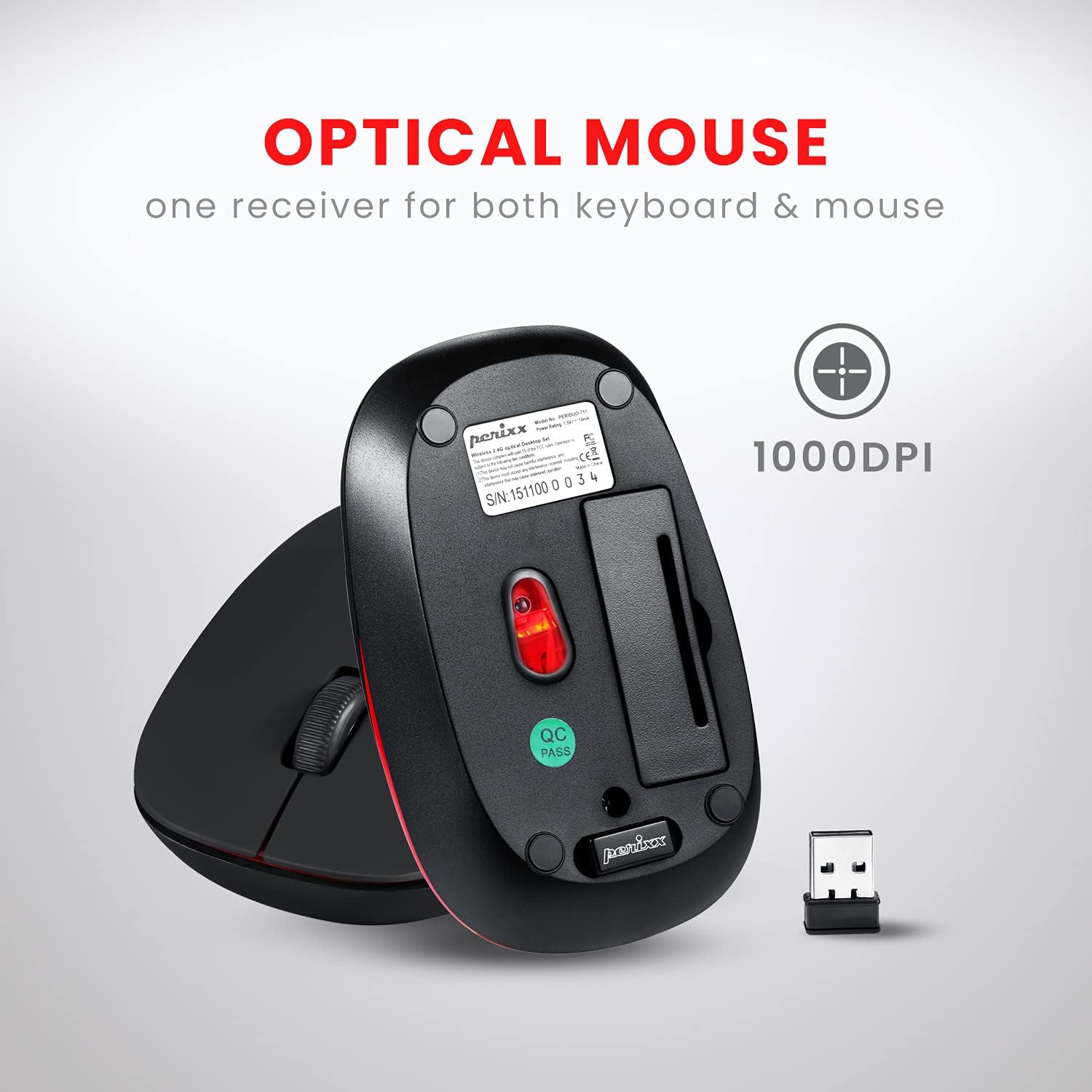
Image 2.1: Underside of the mouse, indicating the battery compartment and the storage slot for the USB nano receiver.
2.2 Collegamento del ricevitore
The USB nano receiver connects both the keyboard and mouse to your computer.
- Remove the USB nano receiver from its storage slot on the underside of the mouse.
- Collega il nano-ricevitore USB a una porta USB disponibile sul tuo computer.
- Your computer will automatically detect and install the necessary drivers. No additional software is required.
- La tastiera e il mouse sono ora pronti per l'uso.
3. Istruzioni per l'uso
3.1 Utilizzo della tastiera
La tastiera è dotata di un design low-profile design with membrane switches for comfortable and quiet typing. It has a standard US English QWERTY layout.

Image 3.1: Detailed diagram illustrating the keyboard layout, including standard keys and function key assignments.
Multimedia Function Keys (Fn + F1-F12):
The keyboard includes 12 integrated multimedia hotkeys for quick access to various functions. To activate these functions, press and hold the Fn tasto, quindi premere il tasto corrispondente Tasto F (F1-F12).
- Fn+Esc: Lettore multimediale
- Fn+F1: Traccia precedente
- Fn+F2: Riproduci/Pausa
- Fn+F3: Traccia successiva
- Fn+F4: Muto
- Fn+F5: Abbassa il volume
- Fn+F6: Alza il volume
- Fn+F7: Casa
- Fn+F8: Cerca
- Fn+F9: E-mail
- Fn+F10: Calcolatrice
- Fn+F11: Preferiti
- Fn+F12: Il mio computer

Image 3.2: Visual guide to the multimedia function keys and their corresponding actions.
3.2 Uso del mouse
The 3-button optical mouse provides precise tracking and a comfortable grip with its soft rubber coating. It operates at 1000 DPI.
- Clic sinistro: Selezione e attivazione standard.
- Clic destro: Context menu access.
- Rotella di scorrimento: Scorrere i documenti e web pagine. Può anche essere premuto per la funzionalità del clic centrale.

Image 3.3: The Perixx mouse, highlighting its ergonomic design, nano receiver, 3-button functionality, 30 ft operating range, and 75g weight.
4. Cura e manutenzione
- Pulizia: Utilizzare un panno morbido e asciutto per pulire la tastiera e il mouse. Per lo sporco ostinato, leggermente dampPulire il panno con acqua o una soluzione detergente delicata. Evitare prodotti chimici aggressivi o materiali abrasivi.
- Sostituzione della batteria: Replace batteries when performance degrades. Always use fresh alkaline batteries of the specified type (AA).
- Magazzinaggio: When not in use for extended periods, remove batteries to prevent leakage. Store the USB nano receiver in its dedicated slot on the mouse to prevent loss.
- Ambiente: Evitare di esporre i dispositivi a temperature estreme, alla luce solare diretta o a umidità eccessiva.
5. Risoluzione Dei Problemi
If you encounter issues with your PERIDUO-712B set, refer to the following common solutions:
| Problema | Soluzione |
|---|---|
| La tastiera o il mouse non rispondono |
|
| Connessione intermittente o ritardo |
|
| Problemi di tracciamento del mouse |
|
| Caps Lock indicator light behaves erratically |
|
6. Specifiche tecniche

Image 6.1: Technical drawing showing precise dimensions of the keyboard and mouse.
| Caratteristica | Dettaglio |
|---|---|
| Modello | PERIDUO-712B |
| Connettività | Wireless a 2.4 GHz |
| Campo di funzionamento | Fino a 30 piedi (10 m) |
| Dimensioni della tastiera | 11.46 × 5.43 × 0.77 pollici (291 x 138 x 19.5 mm) |
| Peso della tastiera | 0.78 libbre (circa 354 g) |
| Disposizione della tastiera | US English QWERTY, 84 keys |
| Dimensioni del mouse | 4.09 × 2.44 × 1.33 pollici (104 x 62 x 34 mm) |
| Peso del mouse | Circa 75 g |
| DPI del mouse | 1000 DPI |
| Fonte di alimentazione | Keyboard: 2 x AA batteries; Mouse: 1 x AA battery (not included) |
| Sistema operativo compatibile | Windows 7, 8, 10, 11 (and older versions like XP, Vista) |
7. Garanzia e supporto
7.1 Informazioni sulla garanzia
The Perixx PERIDUO-712B Wireless Mini Keyboard and Mouse Set is backed by a Garanzia limitata di 12 mesi. This warranty covers manufacturing defects from the date of purchase. Please retain your proof of purchase for warranty claims.
7.2 Assistenza clienti
For technical assistance, warranty claims, or general inquiries, please visit the official Perixx website or contact their customer support directly. Information regarding spare USB receivers can also be found on the Perixx website or Amazon.
Produttore: Perixx Computer GmbH
Per maggiori informazioni, visita: Negozio Perixx su Amazon