
1. Introduzione
The Aduro Amplify LED Wireless Speaker, model BSP15, is a portable audio device designed for wireless music playback and hands-free calling. It features integrated LED lighting with multiple settings to enhance the audio experience. This manual provides instructions for the proper setup, operation, and maintenance of your speaker.
Cosa c'è nella scatola:
- Aduro Amplify LED Wireless Speaker (BSP15)
- Cavo di ricarica
2. Informazioni sulla sicurezza
- Do not expose the speaker to water or moisture. This product is not water-resistant.
- Avoid extreme temperatures. Do not place near heat sources or in direct sunlight for extended periods.
- Do not attempt to disassemble or modify the speaker. This may void the warranty and cause damage.
- Utilizzare solo il cavo di ricarica fornito o un equivalente certificato.
- Tenere fuori dalla portata dei bambini.
3. Caratteristiche del prodotto
- Connettività wireless: Connects to smartphones, tablets, and other Bluetooth-enabled devices.
- Easy-Touch Pairing: Simplifies the process of connecting to your device.
- Microfono integrato: Allows for hands-free phone calls.
- Uscita audio di alta qualità: Offre un audio chiaro e forte.
- Multiple LED Settings: Offers various light modes to complement your audio experience.
4. Controlliview
The Aduro Amplify speaker features intuitive controls located on the top panel for easy access to functions.
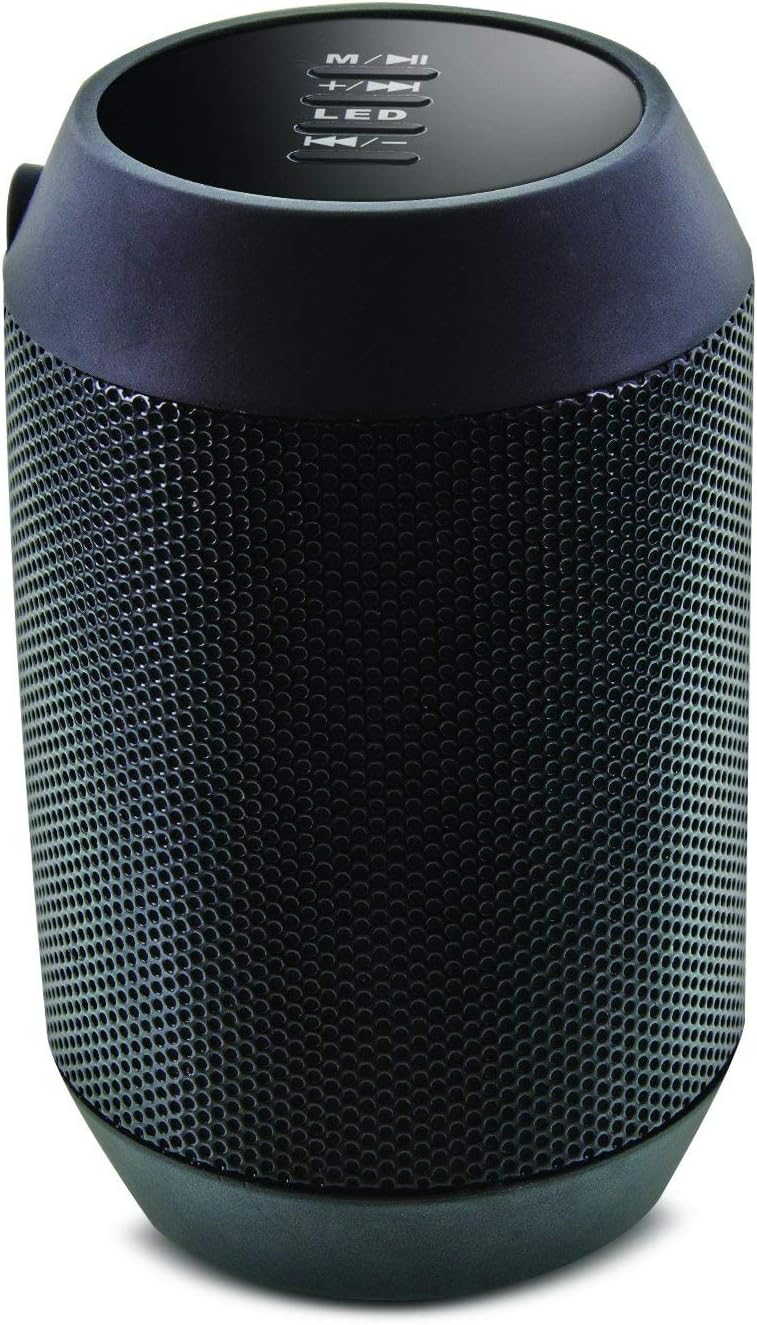
Immagine: in alto view of the Aduro Amplify speaker, highlighting the control panel. From top to bottom, buttons include: M/▶█ (Mode/Play/Pause), +/▶▶ (Volume Up/Next Track), LED (LED Mode Control), ◀◀/- (Volume Down/Previous Track).
- M/▶█ Button: Press to switch between modes (e.g., Bluetooth, AUX). Press and hold to power on/off. Short press to Play/Pause music.
- +/▶▶ Button: Short press to increase volume. Press and hold to skip to the next track.
- Pulsante LED: Premere per scorrere le diverse modalità di illuminazione LED.
- ◀◀/- Button: Short press to decrease volume. Press and hold to go to the previous track.
5. Istruzioni per l'installazione
5.1 Ricarica dell'altoparlante
Before first use, fully charge the speaker. Connect the provided charging cable to the speaker's charging port and the other end to a USB power source (e.g., computer USB port, USB wall adapter). The LED indicator will show charging status and turn off or change color when fully charged.
5.2 Accensione/Spegnimento
- Per accendere: Premere e tenere premuto il tasto M/▶█ button for approximately 3 seconds until you hear an audible prompt or see the LED indicator light up.
- Per spegnere: Premere e tenere premuto il tasto M/▶█ button for approximately 3 seconds until you hear an audible prompt or the LED indicator turns off.
5.3 Associazione Bluetooth
Per connettere l'altoparlante a un dispositivo abilitato Bluetooth:
- Ensure the speaker is powered on and in Bluetooth pairing mode. The LED indicator will typically flash rapidly, indicating it is ready to pair.
- On your smartphone, tablet, or other device, navigate to the Bluetooth settings.
- Abilita il Bluetooth e cerca i dispositivi disponibili.
- Select "Aduro BSP15" (or similar name) from the list of found devices.
- Once paired, the speaker will emit an audible confirmation, and the LED indicator will typically stop flashing and remain solid.
- Una volta acceso, l'altoparlante tenterà automaticamente di riconnettersi all'ultimo dispositivo associato.
5.4 Connessione cablata (AUX)
For devices without Bluetooth, you can use a 3.5mm audio cable (not included) to connect to the speaker's AUX input port. Once connected, the speaker should automatically switch to AUX mode. If not, press the M/▶█ button to cycle to AUX mode.
6. Istruzioni per l'uso
6.1 Riproduzione dell'audio
- Riproduci/Pausa: Premere brevemente il tasto M/▶█ pulsante.
- Aumenta volume: Premere brevemente il tasto +/▶▶ pulsante.
- Volume basso: Premere brevemente il tasto ◀◀/- pulsante.
- Traccia successiva: Premere e tenere premuto il tasto +/▶▶ pulsante.
- Traccia precedente: Premere e tenere premuto il tasto ◀◀/- pulsante.
6.2 Chiamate in vivavoce
Se connesso tramite Bluetooth, il microfono integrato nell'altoparlante consente di effettuare chiamate in vivavoce.
- Rispondi alla chiamata: Premere brevemente il tasto M/▶█ pulsante quando squilla una chiamata in arrivo.
- Termina chiamata: Premere brevemente il tasto M/▶█ pulsante durante una chiamata.
- Rifiuta chiamata: Premere e tenere premuto il tasto M/▶█ pulsante quando squilla una chiamata in arrivo.
6.3 Impostazioni della luce LED
Premere il tasto GUIDATO button to cycle through the available light modes. The speaker offers various visual effects, including pulsating lights that react to music.
7. Manutenzione
7.1 Pulizia
Pulisci l'altoparlante con un panno morbido e asciutto. Non utilizzare detergenti abrasivi, alcol o altri solventi chimici, poiché potrebbero danneggiarne la superficie.
7.2 Conservazione
Quando non viene utilizzato per lunghi periodi, conservare l'altoparlante in un luogo fresco e asciutto, lontano dalla luce solare diretta e da temperature estreme. Si consiglia di caricare periodicamente la batteria per preservarne la durata.
8. Risoluzione Dei Problemi
- L'altoparlante non si accende:
Assicurarsi che la batteria sia carica. Collegare il cavo di ricarica e riprovare dopo qualche minuto. - Impossibile associare il dispositivo Bluetooth:
Ensure the speaker is in pairing mode (LED flashing). Make sure Bluetooth is enabled on your device and it is within range (typically 10 meters/30 feet). Turn both devices off and on again, then try pairing. Ensure no other devices are currently connected to the speaker. - Nessun suono o volume basso:
Check the volume levels on both the speaker and your connected device. Ensure the speaker is correctly paired or the AUX cable is fully inserted. If using AUX, ensure the correct mode is selected. - Le luci LED non funzionano:
Press the LED button to cycle through modes. If still unresponsive, power cycle the speaker.
9. Specifiche

Immagine: Lato view of the Aduro Amplify LED Wireless Speaker, showing its cylindrical design and speaker grille.
| Nome del modello | Codice articolo: BSP15 |
| Numero modello articolo | LU4-01-BSP15 |
| Marca | Aduro |
| Materiale | Plastica |
| Tipo di altoparlante | Subwoofer |
| Caratteristiche speciali | Built-in Microphone, Portable |
| Tecnologia di connettività | Wireless (Bluetooth) |
| Comunicazione senza fili | Bluetooth |
| Modalità di uscita audio | Stereo |
| Potenza massima in uscita dell'altoparlante | 5 Watt |
| Metodo di controllo | Tocco |
| Dimensioni del prodotto | 6"P x 3.8"L x 3.5"A |
| Peso dell'articolo | 6.7 once |
| Livello di resistenza all'acqua | Non resistente all'acqua |
| Fonte di alimentazione | Elettrico con cavo (per la ricarica) |
10. Garanzia e supporto
10.1 Garanzia limitata
This Aduro product is covered by a limited warranty against defects in materials and workmanship under normal use. The duration and terms of the warranty may vary. Please refer to the warranty card included with your purchase or contact Aduro customer support for specific details.
10.2 Assistenza clienti
For technical assistance, warranty claims, or product inquiries, please contact Aduro customer support. Contact information can typically be found on the manufacturer's official websito o sulla confezione del prodotto.
Manufacturer: Aduro