
1. Introduzione
The Philips DPM-8000 Digital Pocket Memo is a professional voice recorder designed for efficient dictation. It features advanced 3D Mic technology for superior audio quality and integrates with SpeechExec Pro software for streamlined data management. This manual provides essential information for setting up, operating, maintaining, and troubleshooting your device.
2. Contenuto della confezione
Verifica che tutti gli articoli elencati di seguito siano presenti nel tuo pacco:
- Philips DPM-8000 Digital Pocket Memo
- Stazione di attracco
- Scheda di memoria
- Batteria ricaricabile (ioni di litio)
- Cavo USB
- SpeechExec Pro Dictation Software
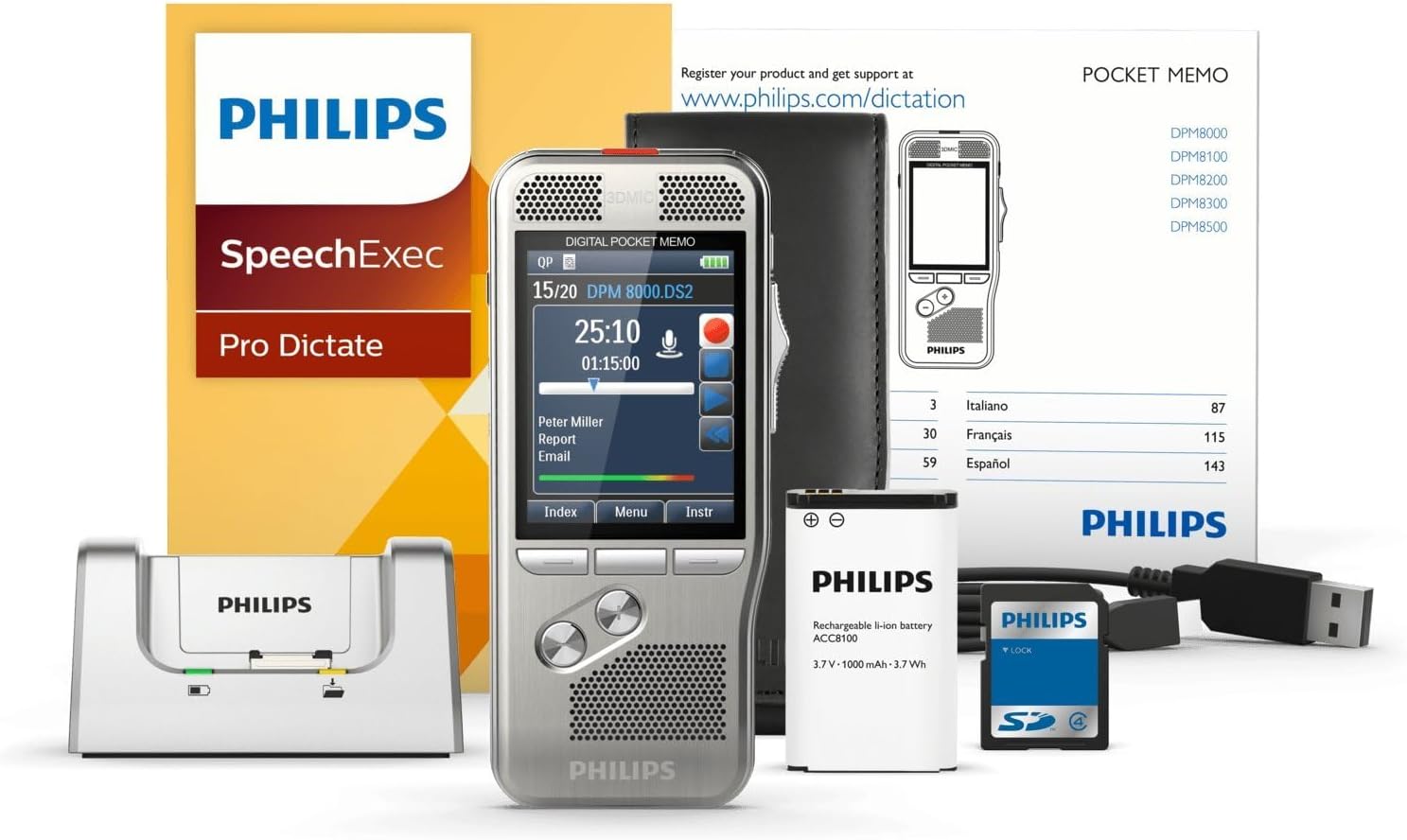
Image: The Philips DPM-8000 Digital Pocket Memo, docking station, battery, USB cable, and software packaging.
3. Impostazione
3.1 Installazione e ricarica della batteria
- Aprire il coperchio del vano batteria sul retro del dispositivo.
- Insert the supplied Lithium Ion rechargeable battery, ensuring correct polarity.
- Chiudere il coperchio del vano batterie.
- Connect the USB cable to the docking station and then to a power source or computer.
- Place the Digital Pocket Memo into the docking station to begin charging. The charging indicator will illuminate.

Image: The Philips DPM-8000 Digital Pocket Memo placed in its docking station for charging or data transfer.
3.2 Software Installation (SpeechExec Pro)
The SpeechExec Pro Dictation Software is essential for managing your dictations. Insert the software CD into your computer's optical drive or download the latest version from the official Philips websito. Seguire le istruzioni sullo schermo per completare l'installazione.
4. Istruzioni per l'uso
4.1 Registrazione di base
- To power on the device, slide the power switch to the ON position.
- Premere il tasto Documentazione button (red circle) to start recording. The 3D Mic system will automatically adjust for optimal audio capture.
- Speak clearly into the microphone. The built-in motion sensor helps in automatic microphone selection for best results.
- Premere il tasto Fermare button to pause or end the recording.
- The device utilizes light and motion sensors to optimize battery life during operation.

Immagine: Un dettaglio view of the Philips DPM-8000, highlighting its display and control buttons.
4.2 Riproduzione
- Select the desired dictation file from the device's menu.
- Premere il tasto Giocare button to listen to the recording.
- Use the navigation buttons to fast forward, rewind, or adjust volume.
4.3 Transferring Dictations to Computer
To transfer your recorded dictations to your computer for transcription or archiving:
- Ensure the SpeechExec Pro software is running on your computer.
- Place the Digital Pocket Memo into the docking station, or connect it directly via the USB cable.
- The software will automatically detect the device and begin transferring new dictations. Follow any prompts within the SpeechExec Pro application.

Image: An individual dictating into the Philips DPM-8000 while another person transcribes on a computer, illustrating the workflow.
5. Manutenzione
5.1 Pulizia del dispositivo
- Pulisci il dispositivo con un panno morbido e asciutto.
- Non utilizzare detergenti abrasivi o solventi, poiché potrebbero danneggiare la superficie.
- Keep the microphone and speaker grilles free from dust and debris.
5.2 Cura della batteria
- Caricare regolarmente la batteria per mantenere prestazioni ottimali.
- Evitare di esporre il dispositivo a temperature estreme, che possono influire sulla durata della batteria.
- Se il dispositivo non verrà utilizzato per un periodo prolungato, conservarlo con una batteria parzialmente carica.
5.3 Aggiornamenti software
Periodically check the Philips website for updates to the SpeechExec Pro software and device firmware to ensure optimal performance and access to new features.
6. Risoluzione Dei Problemi
6.1 Problemi comuni e soluzioni
-
Il dispositivo non si accende:
- Assicurarsi che la batteria sia installata correttamente e carica.
- Connect the device to the docking station or USB cable to check for charging.
-
Scarsa qualità di registrazione:
- Assicurarsi che il microfono non sia ostruito.
- Check recording settings (e.g., sensitivity, format) in the device menu.
- Record in a quiet environment.
-
Dictations not transferring to computer:
- Verify the USB cable connection between the docking station/device and the computer.
- Ensure SpeechExec Pro software is running and updated.
- Riavviare sia il dispositivo che il computer.
-
Breve durata della batteria:
- Assicurarsi che la batteria sia completamente carica prima dell'uso.
- Reduce screen brightness or disable unnecessary features.
- Consider replacing the battery if it is old or frequently used.
7. Specifiche
| Marca | Philips |
| Numero di modello | DPM8000 |
| Peso dell'articolo | 4.1 once (116 grammi) |
| Dimensioni del prodotto | 4.8 x 2.1 x 0.6 pollici (12.2 x 5.3 x 1.5 cm) |
| Batterie | 1 batteria agli ioni di litio (necessaria) |
| Capacità di archiviazione della memoria | 32 GB |
| Dimensioni dello schermo | 2.4 pollici |
| Tempo di registrazione digitale | Fino a 1168 ore |
| Interfaccia Hardware | USB |
| Fattore di forma del microfono | Incorporato |
| Presa per cuffie | 3.5 millimetri |
8. Garanzia e supporto
Per informazioni dettagliate sulla garanzia, fare riferimento alla scheda di garanzia inclusa con il prodotto o visitare il sito Web ufficiale Philips. website. For technical support, software downloads, and frequently asked questions, please visit www.philips.com/dictation.