
Introduzione
This manual provides detailed instructions for the setup, operation, and maintenance of your A4tech Bloody Light Strike B314 Gaming Keyboard. Please read this manual thoroughly before using the product to ensure optimal performance and longevity.
Caratteristiche principali
- Bloody 4 Light Strike Mechanical Switches: Experience ultra-fast response times of 0.2ms with infrared optic switches, providing a competitive edge in gaming.
- Maggiore durata: Designed for intensive use, featuring A,S,D,W silicon keys with a convex shape for improved control and longevity.
- Neon Glare System LED Backlighting: Customize your gaming environment with vibrant LED backlighting, making keys easy to locate in low-light conditions.
- 9 tasti programmabili: Personalize your gaming experience by assigning custom functions to 9 individually programmable keys.
- Double Secure Water-Resistance: The keyboard is electronically sealed with a water drain hole, protecting it from accidental spills and extending its lifespan.
Contenuto della confezione
Verificare che tutti gli articoli siano presenti nel pacco:
- Bloody Light Strike B314 Gaming Keyboard
- Manuale dell'utente (questo documento)

Image: The retail packaging for the Bloody Light Strike B314 Gaming Keyboard, showing the keyboard with LED backlighting and key features highlighted.
Guida all'installazione
- Collegare la tastiera: Collega il connettore USB della tastiera a una porta USB disponibile sul tuo computer.
- Installazione del driver: The keyboard is typically plug-and-play. Your operating system should automatically detect and install the necessary drivers. If prompted, follow the on-screen instructions.
- Installazione del software (opzionale): For advanced customization, including programming keys and managing backlighting, download and install the official Bloody software from the A4tech websito.
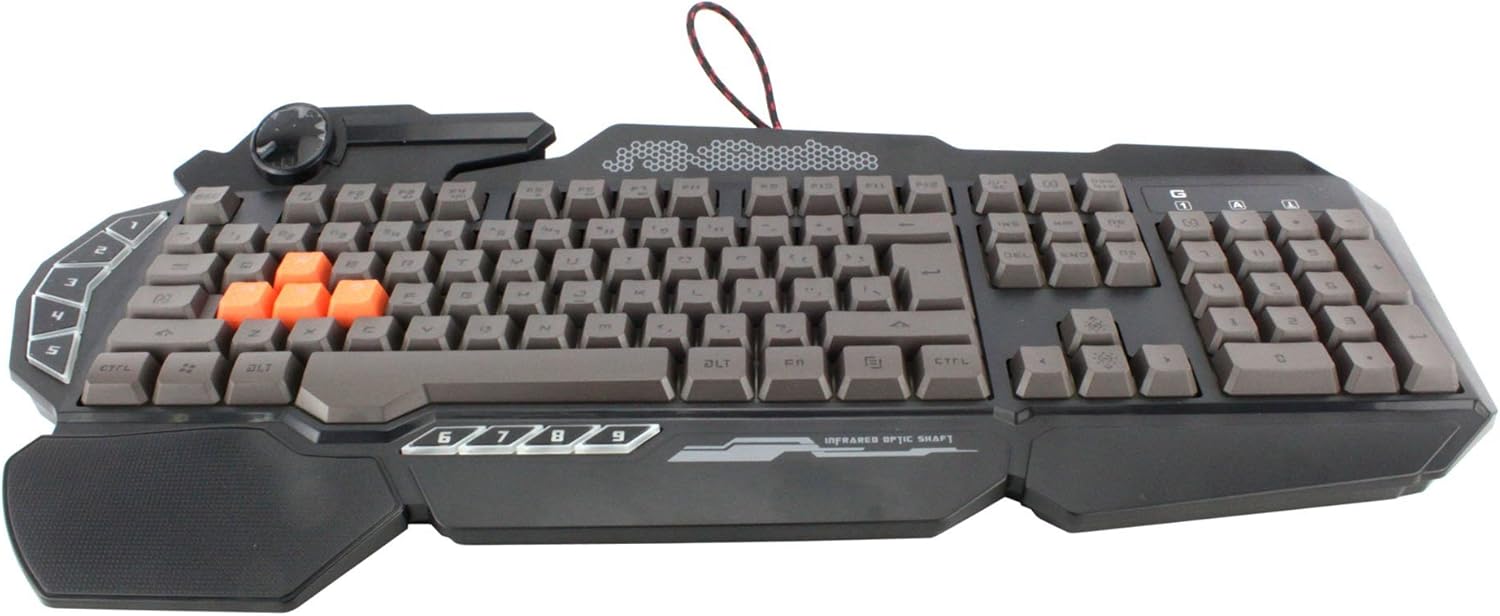
Immagine: dall'alto verso il basso view of the Bloody Light Strike B314 Gaming Keyboard, showcasing the full QWERTY layout with orange WASD keys and dedicated macro keys on the left.
Istruzioni per l'uso
Utilizzo di base
The Bloody B314 functions as a standard QWERTY keyboard for everyday typing and gaming. Its infrared mechanical switches provide a fast and responsive typing experience.
Tasti programmabili
The keyboard features 9 programmable keys, typically located on the left side. To customize these keys:
- Install the official Bloody software from the A4tech websito.
- Launch the software and navigate to the key customization section.
- Select the desired programmable key (e.g., G1-G9 or similar).
- Assign macros, key functions, or multimedia controls as needed.
- Salva il tuo profile per applicare le modifiche.
Controllo della retroilluminazione a LED
The Neon Glare System LED backlighting can be adjusted using function key combinations:
- Fn+F12: Cycle through different backlighting modes (e.g., static, breathing, off).
- Fn + Freccia su/giù: Regola la luminosità della retroilluminazione.
- Fn + Freccia sinistra/destra: Adjust backlight speed or direction (if applicable to the mode).
Modalità di gioco
Activate Game Mode to disable the Windows key and prevent accidental interruptions during gameplay.
- Fn+F8: Attiva/disattiva la modalità di gioco.

Immagine: Un angolo view of the Bloody Light Strike B314 Gaming Keyboard, highlighting the ergonomic wrist rest and the distinct orange WASD keys.
Manutenzione
Pulizia
- Scollegare la tastiera dal computer prima di pulirla.
- Utilizzare un morbido, damp panno per pulire la superficie della tastiera. Evitare prodotti chimici aggressivi o materiali abrasivi.
- Per rimuovere polvere e detriti tra i tasti, utilizzare aria compressa.
- The water-resistant design helps protect against spills, but it is still recommended to clean up liquids promptly.
Magazzinaggio
Quando non viene utilizzata per lunghi periodi, conservare la tastiera in un luogo fresco e asciutto, lontano dalla luce solare diretta e da temperature estreme.
Risoluzione dei problemi
La tastiera non risponde
- Assicurarsi che il cavo USB sia collegato saldamente sia alla tastiera che al computer.
- Prova a collegare la tastiera a una porta USB diversa.
- Riavvia il computer.
- Check if the keyboard is recognized in your computer's Device Manager (Windows) or System Information (macOS).
Retroilluminazione non funzionante
- Ensure the backlighting is not turned off using the Fn + F12 combination.
- Adjust brightness using Fn + Up Arrow.
- Se si utilizza un professionista personalizzatofiles, ensure the backlighting settings are correctly configured in the Bloody software.
Tasti programmabili non funzionanti
- Verify that the Bloody software is installed and running.
- Ensure your custom profiles are loaded and active within the software.
- Check for any software updates for the Bloody keyboard utility.
Specifiche
| Caratteristica | Dettaglio |
|---|---|
| Marca | A4tech |
| Numero di modello | A4TKLA45173 |
| Tecnologia di connettività | Infrarossi |
| Descrizione della tastiera | Meccanico |
| Tipo di interruttore | Mechanical (Light Strike Optic) |
| Caratteristica speciale | Backlit, Programmable Keys, Water Resistant |
| Colore | Nero |
| Supporto del colore della retroilluminazione della tastiera | RGB (Neon Glare System) |
| Numero di chiavi | 104 |
| Pulsanti programmabili | 9 |
| Livello di resistenza all'acqua | Resistente all'acqua |
| Peso dell'articolo | 2.9 libbre |
Garanzia e supporto
Per informazioni sulla garanzia e supporto tecnico, fare riferimento al sito ufficiale A4tech webo contattare direttamente il servizio clienti. Conservare la ricevuta d'acquisto come prova d'acquisto per eventuali reclami in garanzia.
A4tech ufficiale Websito: www.a4tech.com