
1. Prodotto finitoview
This manual provides instructions for the RC4WD Z-E0076 1/10 Baja Designs Stealth LED Light Bar. This product is designed to provide illumination for scale models. It features a durable billet aluminum construction, a molded housing, and 18 individual LED bulbs for efficient lighting.
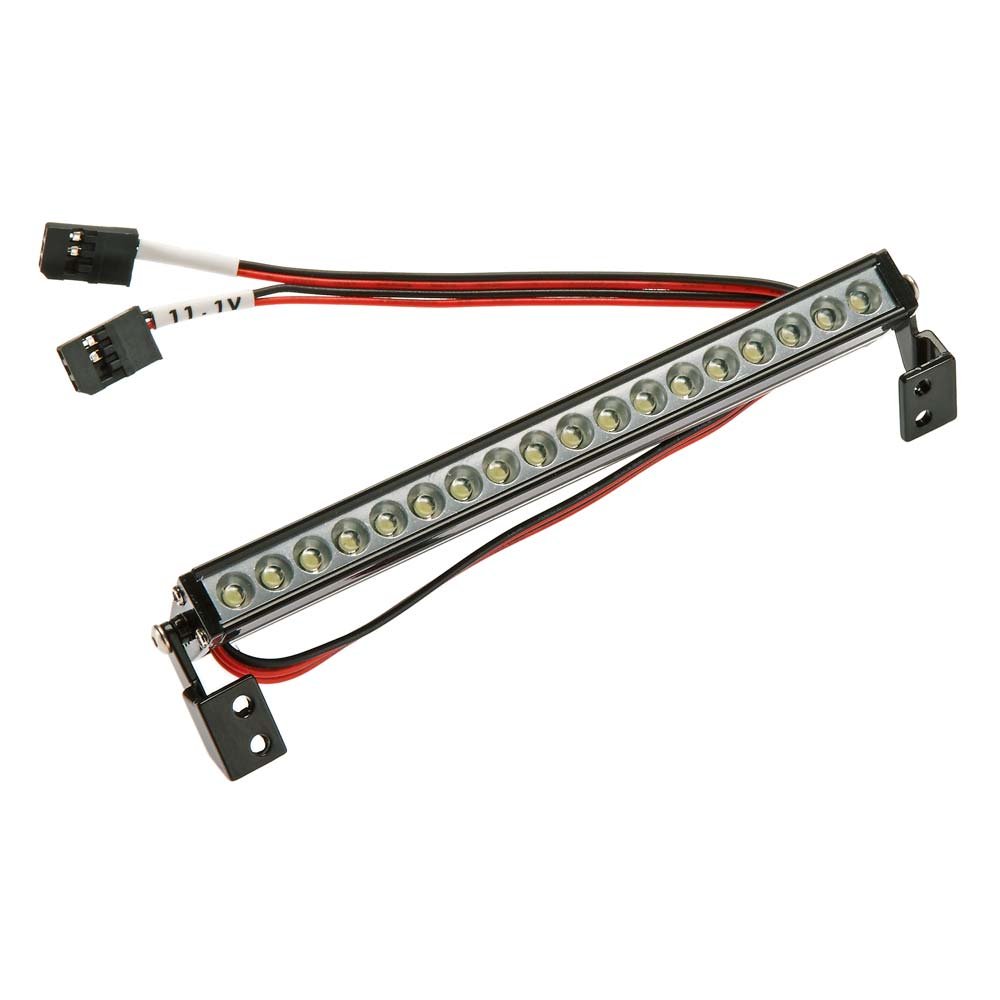
Image: The RC4WD Z-E0076 1/10 Baja Designs Stealth LED Light Bar, showcasingrazie al suo design compatto e alla serie di LED.
2. Contenuto della confezione
Verificare che tutti gli elementi elencati di seguito siano presenti nella confezione:
- 1x RC4WD 1/10 Baja Designs S8 LED Light Bar (120mm)
- 1x Baja Designs Decal Sheet
3. Impostazione
The RC4WD Z-E0076 LED Light Bar requires no assembly. Follow these steps for installation:
- Montaggio: Securely attach the light bar to your scale model using appropriate hardware (not included). Ensure the mounting location provides a clear path for light and does not obstruct other components.
- Collegamento elettrico: Connect the light bar's power cable to a compatible 7.4 Volt power source on your model. Ensure correct polarity to prevent damage.
- Gestione dei cavi: Route the power cable away from moving parts and secure it to prevent snagging or damage during operation.
Importante: This light bar is designed for 7.4 Volts. Connecting it to a higher voltage power source may cause irreversible damage.
4. Istruzioni per l'uso
Once properly installed and connected to a 7.4 Volt power source, the light bar will illuminate when power is supplied. Operation is typically controlled via your model's existing power system or a dedicated switch, if installed.
- Accensione: Activate the power supply to your model. The LED light bar should illuminate.
- Spegni: Deactivate the power supply to your model. The LED light bar will turn off.
5. Manutenzione
Regular maintenance ensures optimal performance and longevity of your LED light bar.
- Pulizia: Gently wipe the light bar's lens and housing with a soft, dry cloth to remove dust and debris. For stubborn dirt, use a slightly damp cloth and ensure the unit is completely dry before reconnecting power.
- Ispezione: Periodically inspect the wiring for any signs of wear, fraying, or damage. Check mounting points to ensure the light bar remains securely attached.
- Magazzinaggio: When not in use for extended periods, store the light bar in a clean, dry environment away from direct sunlight and extreme temperatures.
6. Risoluzione Dei Problemi
If you encounter issues with your LED light bar, refer to the following troubleshooting guide:
| Problema | Possibile causa | Soluzione |
|---|---|---|
| Light bar does not illuminate | Nessuna alimentazione Polarità del cablaggio errata Damaged wiring or LEDs | Ensure power source is active Verificare i collegamenti positivi (+) e negativi (-) corretti Inspect wiring for breaks; if LEDs are damaged, replacement may be necessary |
| La luce è fioca o tremolante | Volume insufficientetage Collegamento allentato Partial LED failure | Confirm power source provides 7.4 Volts Controllare tutti i collegamenti per la tenuta If individual LEDs are failing, contact support for options |
7. Specifiche
| Marca | RC4WD |
| Numero di modello | Z-E0076 |
| Tipo di sorgente luminosa | GUIDATO |
| Voltage | 7.4 Volt |
| Posizione della parte automatica | Centro |
| Dimensioni articolo (L x P x A) | 6.13 x 1 x 3 pollici |
| Codice UPC | 812115027694 |
| Conteggio unità | 1 Conteggio |
| Assemblaggio richiesto | NO |
| Produttore | Distribuzione HRP |
8. Garanzia e supporto
This product is sold without a manufacturer's warranty. Please refer to the retailer's return policy for any issues upon receipt.
For additional product information or support, please visit the official RC4WD store: RC4WD Store