
1. Introduzione
This manual provides detailed instructions for the installation, operation, and maintenance of your Pyle PLDNAND621 In-Dash GPS Navigation System. Please read this manual thoroughly before using the product to ensure proper functionality and to prevent damage.
1.1 Prodotto finitoview
The Pyle PLDNAND621 is an advanced in-dash audio/video system featuring a 6-inch multi-touch capacitive display. It integrates GPS navigation with preloaded maps, Bluetooth connectivity, and multimedia playback capabilities, including CD/DVD, USB, and microSD. The system is designed to enhance your driving experience with turn-by-turn navigation and various entertainment options.
1.2 Caratteristiche principali
- 6-inch Multi-Touch Capacitive Display (800 x 480 resolution)
- Integrated GPS Navigation with Preloaded Maps
- Bluetooth per chiamate in vivavoce e streaming audio
- Lettore CD / DVD
- AM/FM Tuner with 30 Station Memory
- USB and MicroSD Card Slots for Media Playback
- Support for various audio, video, and image file formats (MP3, MP4, AVI, WAV, JPEG)
- Posterioreview Supporto per telecamera di backup
- Supporto per il controllo dei pulsanti sul volante
- Anti-Shock Mechanism (ESP Function)
- Internet connectivity via Wi-Fi (tethering or hotspot)
- Access to Android applications
2. Informazioni sulla sicurezza
Per evitare lesioni o danni all'unità, osservare le seguenti norme di sicurezza:
- Non utilizzare il sistema in modo da distrarti dalla guida. Dai sempre priorità alla sicurezza stradale.
- Ensure proper installation by a qualified professional to avoid electrical hazards or vehicle damage.
- Non smontare o modificare l'unità. Ciò potrebbe causare malfunzionamenti o scosse elettriche.
- Mantieni il volume a un livello che ti consenta di sentire i rumori del traffico esterno.
- Pulisci lo schermo con un panno morbido e asciutto. Evita detergenti abrasivi.
- Ensure the parking brake is engaged when watching videos or accessing certain features to comply with safety regulations.
3. Contenuto della confezione
Verificare che tutti gli articoli siano presenti nella scatola:

Figura 3.1: Components included in the Pyle PLDNAND621 package.
This image displays the Pyle PLDNAND621 Android Stereo Receiver (rear view shown), power and wiring harness, Bluetooth microphone, two USB extension cables, mounting brackets and hardware, and a remote control.
- Pyle PLDNAND621 Android Stereo Receiver
- Alimentazione e cablaggio
- Microfono Bluetooth
- (2) USB Extension Cables
- Staffe di montaggio e hardware
- Telecomando
- Antenna GPS
- Manuale dell'utente (questo documento)
4. Installazione
Installation of the Pyle PLDNAND621 requires technical knowledge and should ideally be performed by a professional installer. Incorrect installation can lead to damage to the unit or your vehicle.
4.1 Schema elettrico
Refer to the detailed wiring diagram provided with the unit's physical manual for specific connections. Key connections typically include:
- Energia: 12 V costanti (giallo), 12 V accessori (rosso), massa (nero).
- Relatori: Connect to vehicle's speaker wires (Front Left, Front Right, Rear Left, Rear Right).
- Antenna: Connect the radio antenna and GPS antenna.
- Ingressi/uscite ausiliari: RCA connections for external audio/video devices, subwoofer output.
- Ingresso telecamera posteriore: Connect to a rearview telecamera per la visualizzazione automatica in retromarcia.
- Controllo del volante: Collegare all'interfaccia di controllo del volante del veicolo (se applicabile).
- Porte USB: Per dispositivi USB e ricarica.
4.2 Montaggio
Use the provided mounting brackets and hardware to secure the unit into your vehicle's dashboard. Ensure the unit is firmly seated and does not obstruct any vehicle controls or airbags.
5. Configurazione iniziale
After installation, power on the unit and follow the on-screen prompts for initial configuration.
5.1 Impostazioni di lingua e ora
Navigate to the system settings to select your preferred language, set the correct time zone, and adjust the date and time.
5.2 Connessione Wi-Fi
To access online features and download applications, connect the unit to a Wi-Fi network. This can be done via a mobile hotspot from your smartphone or a local Wi-Fi network.
- Vai a Impostazioni.
- Selezionare Wifi.
- Attiva il Wi-Fi On.
- Seleziona la rete desiderata e inserisci la password se richiesta.
5.3 Calibrazione GPS
Assicurarsi che l'antenna GPS sia installata correttamente e abbia una visuale libera view of the sky. The system will automatically acquire satellite signals. For optimal navigation, allow the system to calibrate its position upon first use.
6. Istruzioni per l'uso
This section details the primary functions and how to operate your Pyle PLDNAND621 system.
6.1 Interfaccia touch screen

Figura 6.1: Main interface of the Pyle PLDNAND621 with touch interaction.
This image displays the 6-inch touch screen display of the Pyle PLDNAND621, featuring various application icons such as DVR, Downloads, DVD, Email, Music, Explorer, YouTube, Bluetooth, and Video. A hand is shown interacting with the screen, demonstrating its touch functionality.
The unit features a responsive multi-touch capacitive display. Navigate through menus and applications by tapping, swiping, and pinching gestures, similar to a smartphone or tablet.
6.2 Navigazione GPS

Figura 6.2: Pyle PLDNAND621 highlighting key features including GPS.
This image displays the Pyle PLDNAND621 unit with graphical icons representing its core functionalities: USB connectivity, CD/DVD playback, GPS navigation, Radio tuner, Android operating system, and Full HD 1080 video support.
The system comes with preloaded maps and supports turn-by-turn navigation. Access the navigation application from the main screen.
- Tocca il Navigazione icona sulla schermata principale.
- Inserisci la tua destinazione utilizzando la tastiera sullo schermo.
- Seleziona il percorso preferito e avvia la navigazione.
- Follow the voice prompts and on-screen directions.
6.3 Connettività Bluetooth
Collega il tuo smartphone o altri dispositivi abilitati Bluetooth per effettuare chiamate in vivavoce e riprodurre contenuti audio in streaming.
- Vai a Impostazioni e seleziona Bluetooth.
- Attiva il Bluetooth On.
- On your mobile device, search for available Bluetooth devices and select "Pyle PLDNAND621".
- Confermare il codice di associazione su entrambi i dispositivi.
- Once paired, you can make/receive calls and stream audio through the unit.
6.4 Multimedia Playback (CD/DVD, USB, MicroSD)
The unit supports various media sources for audio and video playback.
- Formato CD/DVD: Insert a disc into the slot. The system will automatically switch to the CD/DVD player mode.
- USB: Connect a USB flash drive to one of the USB ports. Access media fileattraverso il Musica or Video applicazioni.
- MicroSD: Insert a microSD card into the designated slot. Media files can be accessed similarly to USB.
6.5 Radio Tuner (AM/FM)
Accedi al Radio application to listen to AM/FM broadcasts.
- Utilizzare i controlli sullo schermo per cercare le stazioni, sintonizzarle manualmente o selezionarle tra quelle preimpostate salvate.
- The unit has memory for up to 30 stations.
6.6 Applications and Internet Access

Figura 6.3: Pyle PLDNAND621 demonstrating app download and web capacità di navigazione.
This image illustrates the Pyle PLDNAND621's ability to "Surf the WEB & download Apps." It shows the unit's display with various app icons and mentions compatibility with both Apple App Store and Google Play for downloading applications.
The PLDNAND621 operates on an Android platform, allowing you to download and use various applications. Connect to Wi-Fi to access the internet and the Google Play Store.
- Aprire il Negozio Google Play applicazione.
- Sfoglia o cerca le applicazioni desiderate.
- Download and install apps as you would on an Android smartphone.
6.7 Mirror Link / Air Play
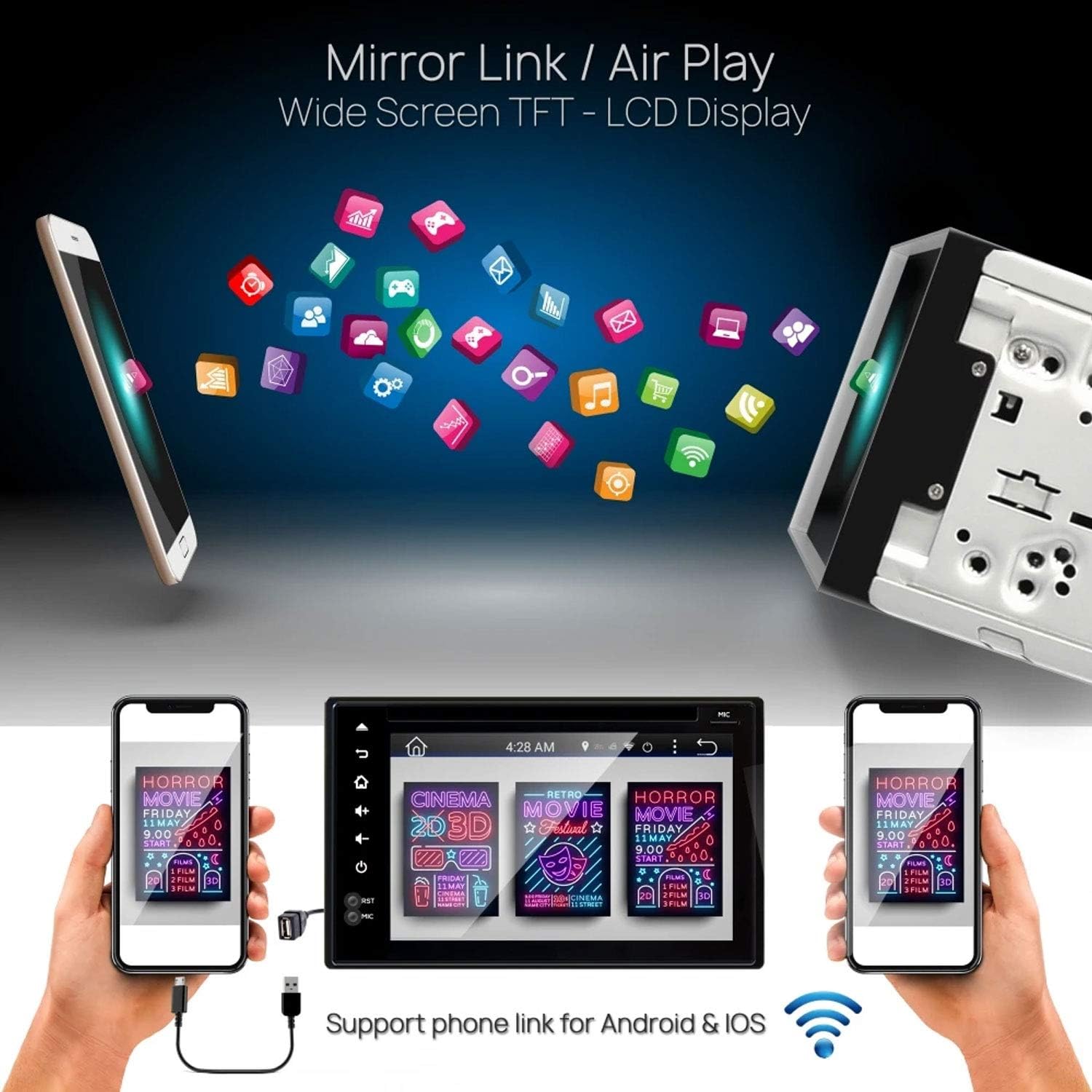
Figura 6.4: Pyle PLDNAND621 supporting Mirror Link / Air Play functionality.
The image shows the Pyle PLDNAND621 unit connected to both Android and iOS smartphones, illustrating its "Mirror Link / Air Play" feature. This allows content from the phone to be displayed on the unit's wide-screen TFT-LCD display.
The unit supports Mirror Link (for Android) and Air Play (for iOS) to mirror your smartphone's screen onto the unit's display. This feature allows you to view compatible apps and content from your phone on the larger screen.
- Connect your smartphone to the unit via USB or Wi-Fi (refer to specific app instructions on your phone).
- Activate the Mirror Link or Air Play function on the unit.
- Seguire le istruzioni sullo schermo per stabilire la connessione.
6.8 Posterioreview Supporto per telecamera di backup

Figura 6.5: Pyle PLDNAND621 with active rearview backup camera display.
This image shows the Pyle PLDNAND621 unit installed in a car dashboard, displaying a live feed from a rearview backup camera. Green and red guidelines are visible on the screen, assisting with parking and maneuvering.
Se un posteriore compatibileview Una volta collegata la telecamera, il display passerà automaticamente alla visualizzazione delle immagini della telecamera quando il veicolo viene inserito nella retromarcia. Questa funzione facilita il parcheggio e le manovre in sicurezza.
6.9 Controllo dei pulsanti sul volante

Figura 6.6: Pyle PLDNAND621 highlighting Steering Wheel Button Control and Anti-Shock features.
The image depicts the Pyle PLDNAND621 unit alongside an icon representing steering wheel controls, indicating compatibility. Below, an illustration shows the unit with a cracked ground effect, emphasizing its "Anti-Shock Mechanism-ESP Function" for durability.
The unit supports connection to your vehicle's existing steering wheel controls. This allows you to operate basic functions like volume, track change, and mode selection without taking your hands off the steering wheel. Configuration may be required in the system settings.
7. Manutenzione
Proper maintenance ensures the longevity and optimal performance of your Pyle PLDNAND621.
- Pulizia dello schermo: Utilizzare un panno morbido e privo di lanugine per pulire delicatamente lo schermo. Per macchie ostinate, leggermente dampPulisci il panno con acqua o un detergente per schermi. Evita prodotti chimici aggressivi o materiali abrasivi.
- Pulizia dell'unità: Pulire la parte esterna dell'unità con un panno morbido e asciutto.
- Aggiornamenti software: Periodically check for software updates through the system settings or Pyle's official websito per assicurarti di disporre delle funzionalità e delle correzioni di bug più recenti.
- Cura del disco: Handle CDs/DVDs by their edges to avoid fingerprints and scratches. Keep discs clean and store them in their cases when not in use.
8. Risoluzione Dei Problemi
If you encounter issues with your Pyle PLDNAND621, refer to the following common problems and solutions:
| Problema | Possibile causa | Soluzione |
|---|---|---|
| L'unità non si accende. | Cablaggio errato, fusibile bruciato, problema alla batteria del veicolo. | Check power connections (Yellow, Red, Black wires). Inspect vehicle fuses. Ensure vehicle battery is charged. |
| Nessun suono dagli altoparlanti. | Cablaggio degli altoparlanti errato, volume troppo basso, modalità muto attivata, sorgente audio errata. | Verificare i collegamenti degli altoparlanti. Aumentare il volume. Verificare che la modalità mute sia attiva. Selezionare la sorgente audio corretta. |
| Segnale GPS perso o impreciso. | Antenna GPS ostruita o collegata in modo errato. | Assicurarsi che l'antenna GPS abbia una visuale libera view del cielo. Controllare il collegamento dell'antenna. |
| L'associazione Bluetooth non riesce. | Dispositivo non in modalità di associazione, password errata, interferenza. | Ensure both devices are in pairing mode. Re-enter password. Move closer to the unit. Restart Bluetooth on both devices. |
| Il touch screen non risponde. | Blocco del sistema, problema software temporaneo. | Perform a soft reset (refer to manual for reset button location, often a small pinhole). If persistent, consult support. |
| Il DVD/CD non viene riprodotto. | Disc dirty, scratched, or incompatible format. | Clean the disc. Try a different disc. Ensure disc format is supported. |
9. Specifiche
Detailed technical specifications for the Pyle PLDNAND621:
- Numero modello: PLDNAND621
- Tipo di visualizzazione: LCD, Multi-Touch Capacitive
- Dimensioni dello schermo: 6 pollici
- Risoluzione: 800 x 480 pixel
- Tecnologia di connettività: Bluetooth, USB, Wi-Fi, Micro SD, Auxiliary Input
- Riproduzione multimediale: CD, DVD, USB Flash Drive, Micro SD Card
- Sintonizzatore radio: AM/FM with 30 station memory
- Caratteristiche speciali: GPS Navigation, Touchscreen, Bluetooth, Rearview Camera Support, Steering Wheel Control Support, Anti-Shock Mechanism (ESP)
- Dimensioni (prodotto): 25.4 x 18.42 x 31.12 cm (10 x 7.25 x 12.25 pollici)
- Peso (prodotto): 2.27 kg (5 libbre)
- Produttore: PYLE-CAR AUDIO/VIDEO
10. Garanzia e supporto
Per informazioni sulla garanzia e supporto tecnico, fare riferimento alla scheda di garanzia inclusa con il prodotto o visitare il sito Web ufficiale Pyle websito. Conserva la ricevuta d'acquisto come prova d'acquisto.
Ufficiale Pyle Websito: www.pyleusa.com
Contact customer service for assistance with installation, troubleshooting, or product inquiries not covered in this manual.