
1. Introduzione
The AVerMedia AW330 Wireless Voice Amplifier is a portable audio system designed to enhance vocal clarity and projection in various settings such as classrooms, training sessions, meetings, and public speaking events. Its lightweight design, wireless microphone, and powerful speaker ensure your voice is heard clearly and effortlessly.
Caratteristiche principali:
- Design portatile: Lightweight and compact for easy transport and use.
- Microfono senza fili: 2.4 GHz wireless lavalier microphone for stable 360° transmission.
- Suono potente: Built-in 20W speaker delivers loud, clear audio.
- Batteria a lunga durata: Rechargeable lithium polymer battery provides 4 to 5 hours of use, or up to 8 hours of continuous use (depending on volume and usage).
- Connettività multimediale: Audio input port for connecting smartphones, tablets, or laptops.
- Quick Smart Pairing: Automatic microphone-to-speaker pairing for simple setup.
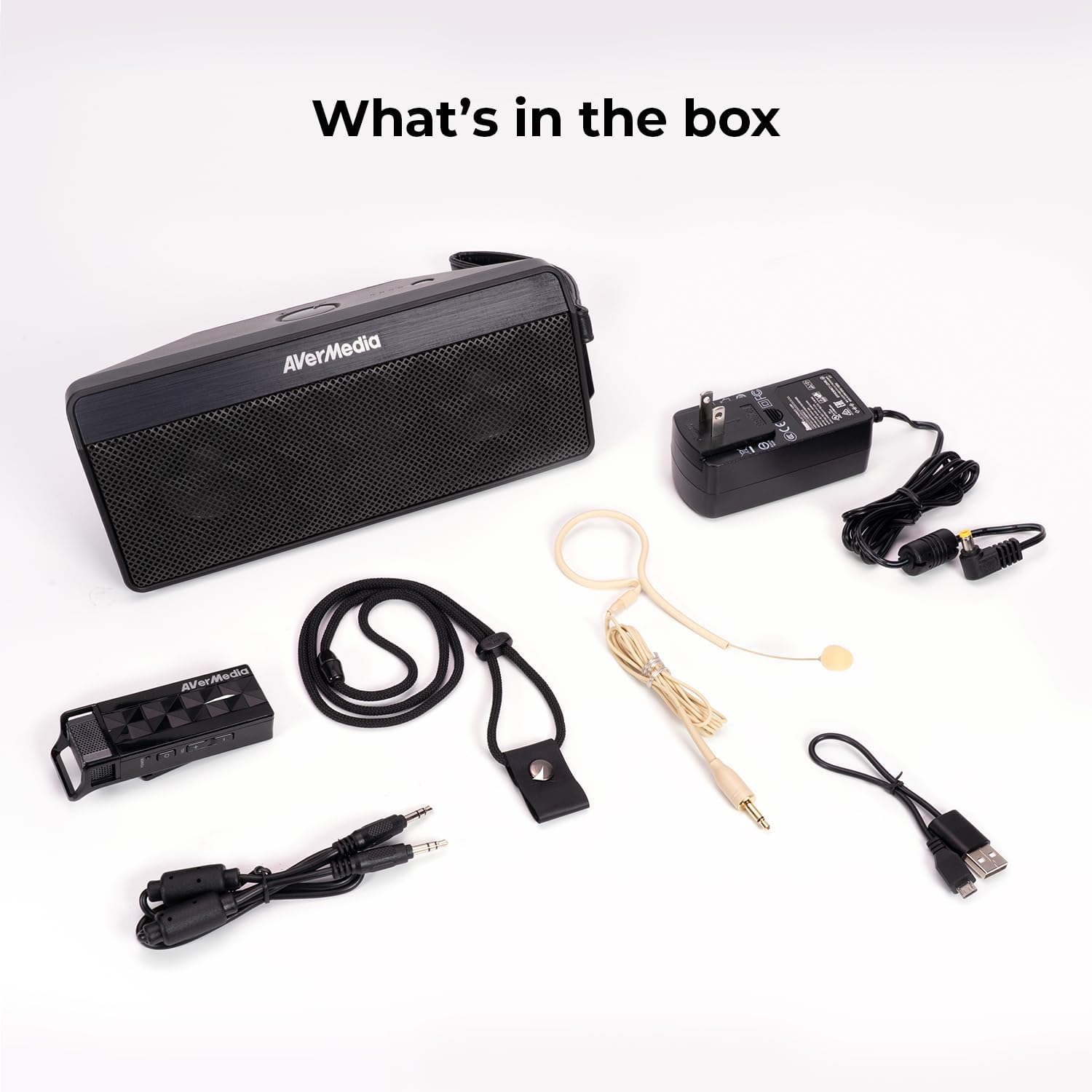
2. Cosa c'è nella scatola
- Microphone & Headset Mic
- Oratore
- AC Power Adapter & USB Power Cable
- Cavo audio da 3.5 mm
- Lanyard & Buckle
3. Prodotto finitoview
Unità altoparlante

The main speaker unit features a power button, volume controls, and an audio input port for connecting external devices. It also includes a clip for attaching to clothing or a strap.
Microfono senza fili
The wireless microphone includes a flexible gooseneck boom with a windscreen, volume controls, and a power button. It can be worn as a headset or clipped onto clothing.

4. Impostazione
- Carica i dispositivi: Before first use, fully charge both the speaker unit and the wireless microphone using the provided AC power adapter and USB power cable. The microphone uses a USB-C connection.
- Collegare il microfono: Plug the headset microphone into the wireless microphone unit.
- Accensione: Turn on the speaker unit by pressing its power button. Turn on the wireless microphone unit by pressing its power button.
- Abbinamento: The speaker microphone system features automatic microphone-to-speaker pairing for hassle-free setup. They should pair automatically upon powering on.
- Regola volume: Adjust the volume on both the speaker and the microphone to your desired level.
5. Istruzioni per l'uso
- Voce Amplificazione: Once paired, speak into the microphone. Your voice will be amplified through the speaker. Adjust volume as needed.
- Ingresso audio esterno: To play multimedia audio alongside your voice, connect your smartphone, tablet, or laptop to the speaker unit's Audio In port using the 3.5 mm audio cable.
- Opzioni di utilizzo: Utilize the clip on the speaker to attach it to your clothing, or use the lanyard and buckle for hands-free operation. The microphone can be worn as a headset or clipped directly.
- Risparmio energetico: If the microphone is turned off, the speaker will automatically turn off after five minutes to conserve battery.

6. Manutenzione
- Pulizia: Use a soft, dry cloth to clean the surfaces of the speaker and microphone. Do not use liquid cleaners or aerosols.
- Magazzinaggio: Conservare il dispositivo in un luogo fresco e asciutto, lontano dalla luce solare diretta e da temperature estreme.
- Cura della batteria: Per prolungare la durata della batteria, evitare di scaricarla completamente frequentemente. Ricaricare il dispositivo regolarmente, anche se non utilizzato per periodi prolungati.
- Evitare l'acqua: Il dispositivo non è impermeabile. Tenerlo lontano da acqua e umidità.
7. Risoluzione Dei Problemi
- Nessun suono:
- Ensure both the speaker and microphone are powered on and fully charged.
- Check that the microphone and speaker are successfully paired.
- Increase the volume on both the speaker and the microphone.
- Feedback/Squealing Sound:
- Reduce the volume on the speaker or microphone.
- Aumentare la distanza tra il microfono e l'altoparlante.
- Assicurarsi che il microfono non sia puntato direttamente verso l'altoparlante.
- Scarsa qualità del suono:
- Check for obstructions between the microphone and speaker.
- Assicurati che il microfono sia posizionato correttamente vicino alla bocca.
- Verify that the microphone windscreen is properly attached.
- Dispositivo non in carica:
- Ensure the charging cables are securely connected to both the device and the power source.
- Prova una presa di corrente o una porta USB diversa.
8. Specifiche
| Caratteristica | Specificazione |
|---|---|
| Marca | AVerMedia |
| Numero di modello | AW330 |
| Potenza massima in uscita dell'altoparlante | 20 Watt |
| Tecnologia di connettività | Wifi bluetooth |
| Modalità di uscita audio | Mono |
| Tipo di montaggio | Supporto da tavolo |
| Caratteristiche aggiuntive | Controllo del volume |
| Tipo di controllore | Alimentato a batteria |
| Durata media della batteria | 4 Hours (up to 8 hours continuous use) |
| Portata massima | 60 piedi |
| Metodo di controllo | Tocco |
| Peso dell'articolo | 2.6 libbre |
| Usi specifici per il prodotto | Educational/Classroom |
9. Garanzia e supporto
The AVerMedia AW330 Wireless Voice Amplifier viene fornito con un Garanzia del produttore di 3 anni. For technical support, troubleshooting, or warranty claims, please contact AVerMedia customer service.
10. Video di prodotto
Sistema audio wireless per aule AVerMedia AW330
Video: An official product video from AVerMedia showcasing the AW330 Wireless Classroom Audio System. It highlights its features and benefits in a classroom environment, demonstrating how teachers can use it to project their voice clearly and effectively to students.