
1. Introduzione
Grazie per l'acquistoasing the Caliber HPG415BT/B Portable Bluetooth Speaker. This manual provides important information regarding the safe and efficient operation of your device. Please read it thoroughly before use and retain it for future reference.
Contenuto della confezione
- Caliber HPG415BT/B Portable Bluetooth Speaker
- USB to Mini USB Charging Cable
- Cavo audio da 3.5 mm
- Telecomando
- Manuale di istruzioni
2. Informazioni sulla sicurezza
Per garantire un funzionamento sicuro ed evitare danni, osservare le seguenti linee guida di sicurezza:
- Non esporre il dispositivo a pioggia, umidità o temperature estreme.
- Avoid placing the speaker near heat sources such as radiators, stoves, or other heat-producing appliances.
- Non smontare, riparare o modificare l'unità autonomamente. Per qualsiasi intervento di assistenza, rivolgersi a personale qualificato.
- Use only the specified charging cable and power adapter (5V USB) to charge the battery.
- Tenere il dispositivo lontano da forti campi magnetici.
- Pulire il dispositivo solo con un panno asciutto e morbido. Non utilizzare detergenti liquidi.
3. Caratteristiche del prodotto
The Caliber HPG415BT/B speaker offers a range of features for versatile audio playback:
- Tecnologia Bluetooth senza fili: Connect wirelessly to compatible devices within a 10-meter range (Bluetooth version 2.1, supports A2DP and AVRCP profileS).
- Molteplici opzioni di riproduzione: Play audio from USB drives and SD cards (up to 32GB).
- FM Radio: Enjoy your favorite radio stations with automatic search and storage functions.
- Display a LED: Provides clear information on current mode and status.
- High Power Sound: Equipped with 2x 3W speakers for a total of 6W RMS output.
- Batteria ricaricabile integrata: Offers up to 5 hours of continuous playback.
- Comandi intuitivi: Features buttons for previous/next track, play/pause, mode selection, EQ adjustment, and volume control.
- Ingresso audio da 3.5 mm: Connect external audio devices via the included audio cable.
- Telecomando: Utilizza comodamente l'altoparlante a distanza.
4. Controlli e collegamenti
Familiarizzare con i comandi e le porte di connessione dell'altoparlante:
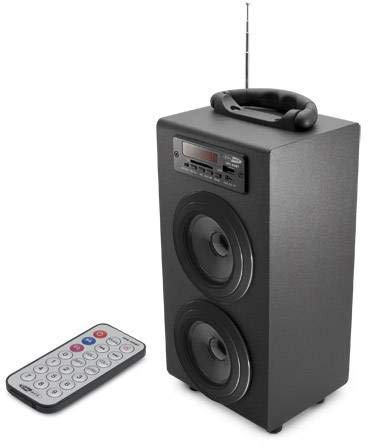
Image 1: Caliber HPG415BT/B Portable Bluetooth Speaker. This image shows the overall design of the speaker, featuring a tubular shape, front-facing speakers, and a control panel on the top or front.
Pannello di controllo (layout tipico)
- Pulsante MODE: Passa tra le modalità Bluetooth, radio FM, USB, SD e AUX.
- Pulsante RIPRODUCI/PAUSA: Avvia o mette in pausa la riproduzione.
- PREVIOUS/NEXT Buttons: Skips tracks in media modes or changes radio stations in FM mode.
- Pulsanti VOLUME +/-: Regola il livello di uscita audio.
- Pulsante EQ: Scorre i preset dell'equalizzatore.
- Interruttore di accensione/spegnimento: Located typically on the rear or side.
Connection Ports (Typical Layout)
- Porta USB: Per collegare unità flash USB.
- Slot per scheda SD: Per inserire schede di memoria SD.
- Ingresso AUX (3.5 mm): Per collegare dispositivi audio esterni tramite cavo.
- Porta di ricarica mini USB: Per collegare il cavo di ricarica.
5. Impostazione
5.1 Carica iniziale
- Before first use, fully charge the speaker's internal battery.
- Connect the supplied Mini USB cable to the speaker's charging port.
- Connect the other end of the USB cable to a 5V USB power source (e.g., a computer USB port or a USB wall adapter, not included).
- The LED indicator will show charging status. Once fully charged, the indicator may change color or turn off.
5.2 Accensione/Spegnimento
- To power on, slide the Power ON/OFF switch to the 'ON' position. The LED display will light up.
- Per spegnere, far scorrere l'interruttore di accensione/spegnimento in posizione "OFF".
6. Istruzioni per l'uso
6.1 Modalità Bluetooth
- Accendi l'altoparlante. Entrerà automaticamente in modalità di associazione Bluetooth, indicata dall'icona Bluetooth lampeggiante sul display LED.
- Abilita il Bluetooth sul tuo smartphone, tablet o altro dispositivo abilitato Bluetooth.
- Cercare available Bluetooth devices and select "HPG415BT" from the list.
- Una volta effettuato l'accoppiamento, l'altoparlante emetterà un suono di conferma e l'icona Bluetooth sul display smetterà di lampeggiare.
- You can now play audio from your connected device through the speaker. Use the PLAY/PAUSE and PREVIOUS/NEXT buttons on the speaker or remote to control playback.
6.2 Modalità radio FM
- Premere il tasto MODALITÀ ripetutamente il pulsante finché sul display LED non compare la scritta "FM".
- To perform an automatic station scan, press and hold the RIPRODUCI/PAUSA pulsante. L'altoparlante eseguirà la scansione e salverà le stazioni FM disponibili.
- Utilizzare il PRECEDENTE SUCCESSIVO pulsanti per navigare tra le stazioni salvate.
6.3 Riproduzione da scheda USB/SD
- Inserire una chiavetta USB nella porta USB o una scheda SD nello slot per schede SD.
- L'altoparlante passerà automaticamente alla modalità USB o SD e inizierà a riprodurre l'audio files. In caso contrario, premere il tasto MODALITÀ pulsante per selezionare la sorgente corretta.
- Utilizzare il RIPRODUCI/PAUSA E PRECEDENTE SUCCESSIVO pulsanti per controllare la riproduzione.
6.4 Modalità di ingresso AUX
- Connect one end of the supplied 3.5mm audio cable to the speaker's AUX input port.
- Collegare l'altra estremità del cavo alla presa delle cuffie o all'uscita audio del dispositivo audio esterno.
- Premere il tasto MODALITÀ ripetutamente il pulsante finché sul display LED non compare la scritta "AUX".
- Controlla la riproduzione e il volume direttamente dal tuo dispositivo audio esterno.
7. Carica della batteria
When the battery is low, the speaker may emit an audible warning or the LED indicator will show a low battery status. To charge:
- Connect the Mini USB charging cable to the speaker's charging port.
- Connect the USB end to a 5V USB power source.
- The charging indicator will illuminate. Charging typically takes several hours.
- Once fully charged, the indicator will change or turn off. Disconnect the charging cable.
8. Manutenzione
- Pulizia: Utilizzare un panno morbido e asciutto per pulire l'esterno dell'altoparlante. Non utilizzare detergenti abrasivi, cere o solventi.
- Magazzinaggio: Quando non viene utilizzato per lunghi periodi, conservare l'altoparlante in un luogo fresco e asciutto, lontano dalla luce solare diretta e da temperature estreme.
- Cura della batteria: Per prolungare la durata della batteria, evitare di scaricarla completamente frequentemente. Caricarla regolarmente, anche se non in uso.
9. Risoluzione Dei Problemi
| Problema | Possibile causa | Soluzione |
|---|---|---|
| Nessun potere | La batteria è scarica; l'interruttore di alimentazione è spento. | Charge the battery; Slide the power switch to ON. |
| Nessun suono | Il volume è troppo basso; è stata selezionata una modalità errata; il dispositivo non è collegato correttamente. | Increase volume; Press MODE to select correct source; Reconnect device. |
| Il Bluetooth non si connette | Altoparlante non in modalità di associazione; Bluetooth del dispositivo disattivato; Altoparlante troppo lontano dal dispositivo. | Ensure speaker is in Bluetooth mode and flashing; Enable Bluetooth on your device; Move devices closer (within 10m). |
| Radio FM statica | Segnale debole; interferenza. | Relocate the speaker for better reception; Perform an auto-scan again. |
10. Specifiche
- Modello: HPG415BT/B
- Potenza di uscita: 6 W RMS (2x 3 W)
- Versione Bluetooth: 2.1
- Intervallo operativo Bluetooth: Fino a 10 metri
- Connettività: Bluetooth, USB, SD Card, 3.5mm AUX Input
- Supporti supportati: USB drives, SD cards (up to 32GB)
- FM Radio: Yes, with auto-scan
- Display: GUIDATO
- Tipo di batteria: Integrated Rechargeable
- Durata della batteria: Fino a 5 ore
- Ricarica: USB 5V
- Dimensioni (L x P x A): Dimensioni: 140 x 120 x 280 mm
- Peso: Circa 1.04 kg (2.29 libbre)
- Tipo di controllo: Pulsanti, telecomando
11. Garanzia e supporto
Caliber products are designed and manufactured to the highest quality standards. For warranty information or technical support, please refer to the warranty card included with your product or visit the official Caliber websito per i contatti.