
1. Introduzione
This user manual provides comprehensive instructions for the ASUS K31AN-IN006D Desktop PC. It covers setup, operation, maintenance, and troubleshooting to ensure optimal performance and longevity of your device. Please read this manual thoroughly before using your desktop PC.

Figura 1: Fronte view of the ASUS K31AN-IN006D Desktop PC.
2. Contenuto della confezione
Verifica che tutti gli articoli siano presenti nel pacco. Se qualche articolo risulta mancante o danneggiato, contatta il rivenditore.
- ASUS K31AN-IN006D Desktop PC
3. Impostazione
3.1 Collegamento delle periferiche
Before powering on your desktop PC, connect all necessary peripherals such as the monitor, keyboard, mouse, and network cable.
- Collegare il monitor: Connect your monitor to the appropriate video output port (VGA, HDMI) on the rear panel of the desktop PC.
- Collegare tastiera e mouse: Plug your USB keyboard and mouse into the available USB ports on the rear or front panel.
- Connetti rete (facoltativo): If using a wired network connection, connect an Ethernet cable from your router or modem to the LAN port on the rear panel.
- Connetti alimentazione: Connect the power cord to the power input on the rear panel of the desktop PC, then plug the other end into a power outlet.

Figure 2: Rear panel connectivity ports including USB, LAN, VGA, and HDMI.
3.2 Accensione
After connecting all peripherals and power, press the power button located on the front panel of the desktop PC. The system will initiate the boot process.
4. Sistema operativo
The ASUS K31AN-IN006D Desktop PC comes pre-installed with DOS (Disk Operating System). Upon initial boot, you may need to install a preferred operating system such as Windows or Linux to utilize the full functionality of the hardware. Refer to the installation guide of your chosen operating system for detailed steps.
4.1 Pannello frontale sopraview
The front panel provides convenient access to frequently used ports and drives.
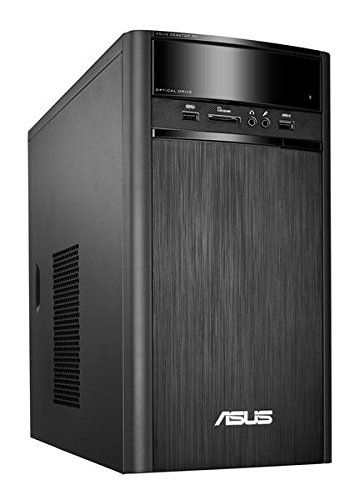
Figure 3: Front panel showing optical drive, USB ports, and audio jacks.
- Unità ottica: Per leggere e scrivere CD/DVD.
- Porte USB: Connect USB devices such as flash drives or external hard drives.
- Jack audio: Porte per cuffie e microfono per ingresso/uscita audio.
- Lettore di schede: Per leggere vari formati di schede di memoria.
5. Manutenzione
Regular maintenance helps ensure the longevity and stable operation of your desktop PC.
- Mantienilo pulito: Regularly clean the exterior of the PC with a soft, dry cloth. Use compressed air to clear dust from ventilation grilles to prevent overheating.
- Garantire una ventilazione adeguata: Place the desktop PC in a well-ventilated area, ensuring that air vents are not obstructed.
- Aggiornamenti software: Once an operating system is installed, regularly update it and your drivers to maintain security and performance.
- Backup dei dati: Eseguire periodicamente il backup dei dati importanti su un'unità esterna o su un archivio cloud per evitare la perdita di dati.
6. Risoluzione Dei Problemi
Questa sezione affronta i problemi più comuni che potresti riscontrare con il tuo PC desktop.
- Nessun potere:
- Verificare che il cavo di alimentazione sia collegato saldamente sia al PC sia alla presa di corrente.
- Assicurarsi che la presa di corrente sia funzionante.
- Nessuna visualizzazione:
- Verify that the monitor is powered on and the video cable is securely connected to both the PC and the monitor.
- Assicurati che sul tuo monitor sia selezionata la sorgente di input corretta.
- Rallentamento del sistema:
- Check for excessive background programs or processes.
- Assicurarsi che ci sia spazio libero sufficiente sul disco rigido.
- Consider running a disk cleanup or defragmentation tool (if applicable for your OS).
- Periferica non rilevata:
- Prova a collegare la periferica a una porta USB diversa.
- Ensure necessary drivers are installed for the peripheral (after OS installation).
7. Specifiche
Below are the technical specifications for the ASUS K31AN-IN006D Desktop PC.
| Caratteristica | Specificazione |
|---|---|
| Marca | Asus |
| Nome del modello | K31AN IN006D |
| Sistema operativo | Da fare |
| Modello CPU | Pentium J2900 |
| Velocità della CPU | 2.41 GHz |
| Dimensione della memoria RAM installata | 4 GB |
| Tecnologia della memoria RAM | DDR3 |
| Descrizione del disco rigido | Serial ATA (1TB 7200rpm) |
| Coprocessore grafico | Grafica Intel HD (integrata) |
| Connettività di rete | Cablato, Wi-Fi |
| Dimensioni dell'articolo | 39 x 18 x 35 centimetri |
| Peso dell'articolo | 5300 grammi |
| Componenti inclusi | Scrivania |
8. Garanzia e supporto
The ASUS K31AN-IN006D Desktop PC comes with a Garanzia del produttore di 3 anni from the date of purchase. For technical support, warranty claims, or service inquiries, please contact ASUS customer support through their official website or designated service centers. Keep your proof of purchase for warranty validation.
For the most up-to-date support information, visit the official ASUS support websito.


