
1. Prodotto finitoview
The Mount-It! Full Motion TV Wall Mount (Model MI-3991B) is designed to securely hold flat-screen televisions ranging from 26 to 55 inches. This articulating bracket offers versatile viewing options with swivel, tilt, and extension capabilities, allowing you to optimize your viewing experience from various angles in a room. It features a robust alloy steel construction and includes cable management for a tidy installation.

Image: Mount-It! Full Motion TV Wall Mount with a television displaying a frog on a leaf, viewvisto da un'angolazione.
Caratteristiche principali:
- Universal TV Mount: Compatible with VESA patterns 75x75mm, 100x100mm, 200x100mm, 200x150mm, 200x200mm, 300x200mm, 300x300mm, 400x200mm, 400x300mm, and 400x400mm.
- Capacità di movimento completo: Articulating arms allow 90-degree left and right swivel, 15-degree downward tilt, and 10-degree upward tilt.
- Rotazione regolabile: Features 3-degree rotation for post-installation level adjustment.
- Extending Arm: Retracts to 2.5 inches from the wall and extends up to 17 inches.
- Gestione dei cavi: Integrated clips on the arms help keep cables organized and out of sight.
- Costruzione: Made from durable alloy steel.
- Capacità di peso: Supports TVs up to 77 lbs.
2. Guida all'installazione
This section provides step-by-step instructions for mounting your TV wall bracket and attaching your television. Ensure you have all necessary tools and hardware before beginning. A bubble level is included for accurate installation.
2.1 Montaggio della piastra a parete
- Segnare i fori pilota: Use the mounting plate as a template to mark the desired pilot hole locations on your wall. Ensure the location is on a single wall stud for secure installation.
- Praticare i fori pilota: Drill pilot holes at the marked locations. The appropriate drill bit size will depend on your wall material and chosen hardware.
- Inserire l'hardware: Insert the appropriate hardware (e.g., lag bolts for wood studs, anchors for concrete/brick) into the pilot holes.
- Piastra di sicurezza a muro: Attach the wall plate of the mount to the wall using the provided hardware, ensuring it is level and securely fastened.

Image: Technical diagram of the MI-3991B mount showing its components, swivel points, and cable management clips.

Image: The TV mount arm in its compressed position (2.25 inches from wall) and extended position (17 inches from wall).

Image: Detailed dimensions of the Mount-It! TV wall mount components.
2.2 Fissaggio del televisore al supporto
- Install Mounting Brackets on TV: Attach the vertical mounting brackets to the back of your television using the appropriate screws and spacers for your TV's VESA pattern. Ensure they are securely tightened.
- Hook TV onto Wall Plate: Carefully lift the television and hook the brackets attached to the TV onto the wall plate.
- Secure with Safety Screws: Engage the safety screw bracket locking system to prevent accidental dislodgement of the TV from the mount.
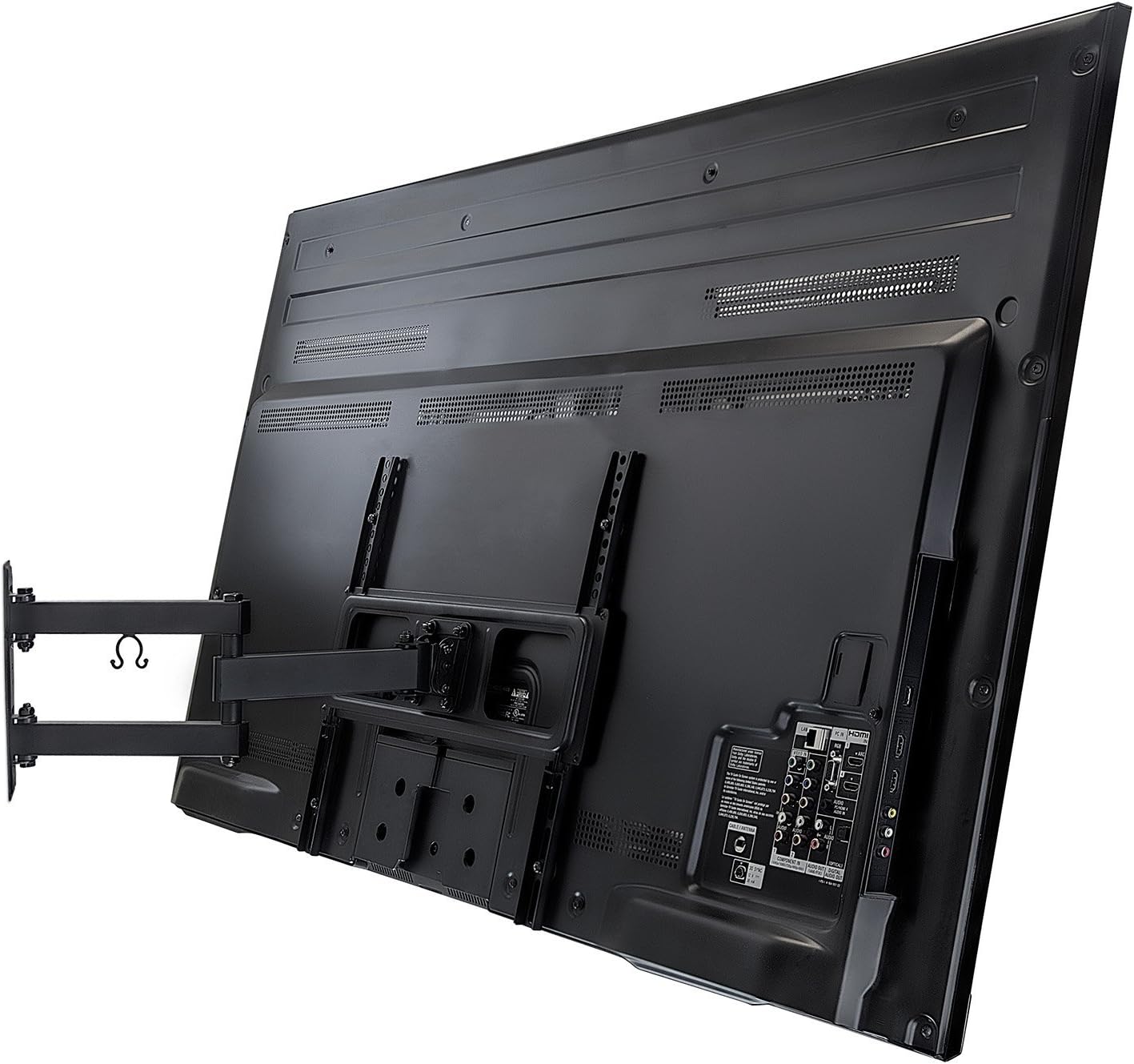
Immagine: Posteriore view of a television with the vertical mounting brackets attached, ready to be hung on the wall plate.
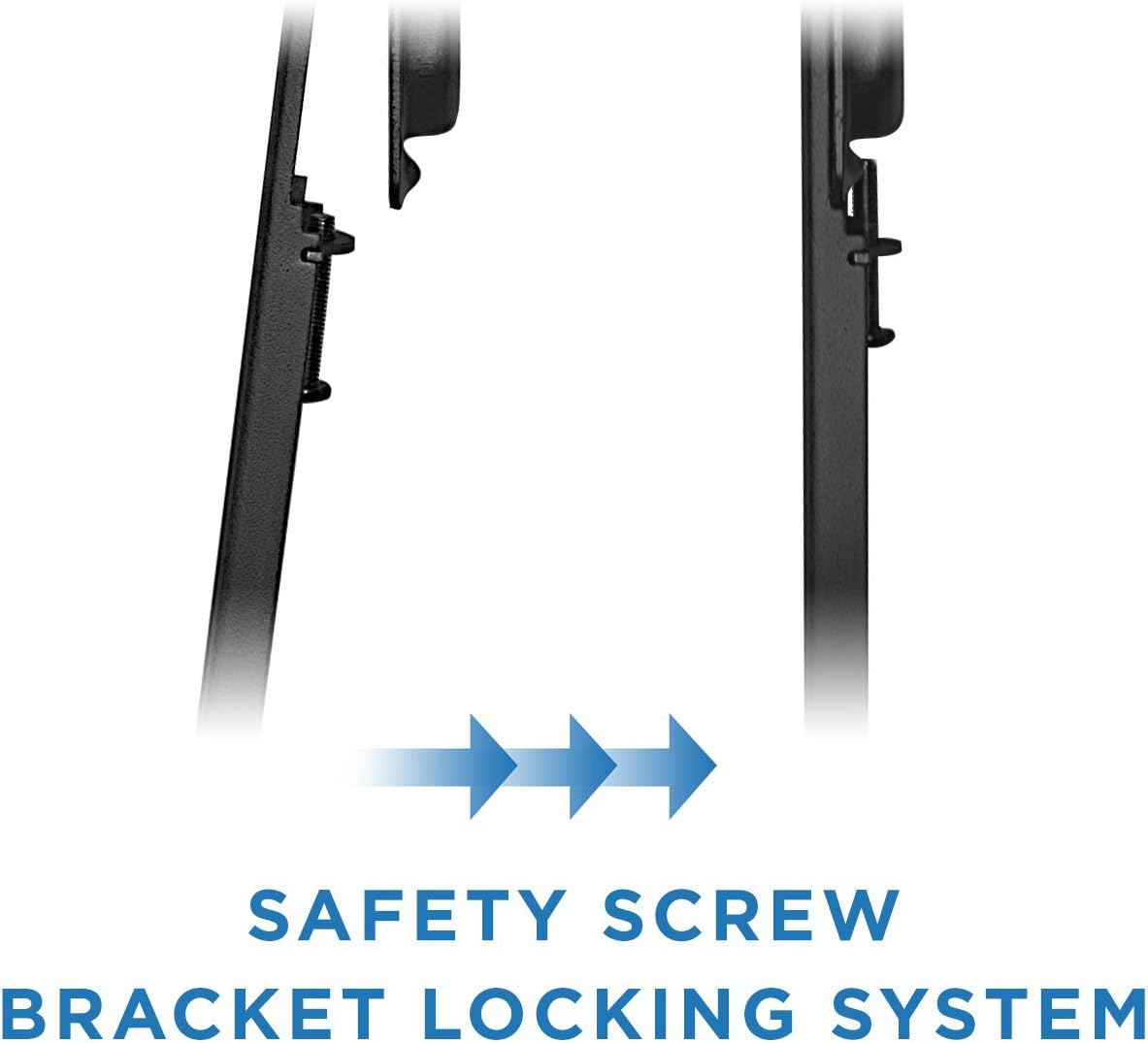
Image: Diagram illustrating the safety screw bracket locking system to secure the TV to the wall mount.

Image: A television screen with a diagonal arrow, indicating the mount fits most flat panel televisions up to 55 inches.

Image: Diagram showing VESA compliant arm brackets that fit VESA patterns up to 400mm x 400mm.
2.3 Video di installazione
Per una guida visiva al processo di installazione, fare riferimento al video ufficiale del prodotto qui sotto:
Video: Official Mount-It! installation guide for the MI-3991B articulating TV mount. This video demonstrates how to mount the bracket to the wall and attach the TV, including marking pilot holes, drilling, securing hardware, and hooking the TV onto the mount.
3. Istruzioni per l'uso
The Mount-It! Full Motion TV Wall Mount provides flexible positioning for your television. Adjustments should be made carefully to avoid damage to the TV or mount.
- Girevole: The articulating arms allow the TV to swivel 90 degrees left and right. Gently push or pull the TV to achieve the desired horizontal viewangolo di ing.
- Inclinazione: The mount supports a 15-degree downward tilt and a 10-degree upward tilt. This feature helps reduce glare and optimize viewing from different heights. Adjust the tilt by loosening the tilt mechanism, setting the angle, and then re-tightening.
- Estensione/Retrazione: The arm can extend up to 17 inches from the wall for maximum flexibility and retract to 2.5 inches to save space. Gently pull the TV forward or push it back towards the wall.
- Regolazione del livello: After installation, a 3-degree rotation feature allows for minor post-installation level adjustments to ensure your TV is perfectly horizontal.
- Gestione dei cavi: Utilize the built-in cable management clips on the arms to route and secure your TV cables, maintaining a clean and organized appearance.

Immagine: Lato view of a television mounted on the articulating wall mount, demonstrating its ability to extend and swivel away from the wall.
4. Manutenzione
To ensure the longevity and safe operation of your Mount-It! TV wall mount, follow these maintenance guidelines:
- Ispezione regolare: Controllare periodicamente tutte le viti e i bulloni per assicurarsi che siano ben serrati. Collegamenti allentati possono compromettere la stabilità.
- Pulizia: Wipe the mount with a soft, dry cloth to remove dust. Avoid using abrasive cleaners or solvents, which may damage the finish.
- Lubrificazione: The articulating joints are designed for smooth movement. If any stiffness occurs, a small amount of silicone-based lubricant can be applied to the moving parts, avoiding contact with the TV screen.
- Limite di peso: Never exceed the maximum weight capacity of 77 lbs. Overloading can lead to structural failure and damage.
5. Risoluzione Dei Problemi
Questa sezione affronta i problemi più comuni che potresti riscontrare con il supporto da parete per TV.
- La TV non è in piano: Use the 3-degree rotation adjustment feature to fine-tune the TV's horizontal position. Ensure the wall plate itself was installed level.
- Il supporto sembra allentato: Re-check all wall mounting bolts and TV attachment screws. Tighten any loose fasteners. If the issue persists, consult a professional installer.
- Difficoltà nell'adattamento del movimento: Ensure no cables are snagged or obstructing movement. Check if any locking mechanisms (if present) are fully disengaged. Applying a small amount of silicone lubricant to the joints may help.
- TV does not fit VESA pattern: Verify your TV's VESA pattern against the mount's supported patterns (75x75mm to 400x400mm). If your TV's pattern is outside this range, the mount is not compatible.
6. Specifiche
| Specificazione | Dettaglio |
|---|---|
| Numero di modello | MI-3991B |
| Marca | Montalo! |
| Tipo di montaggio | Montaggio a parete |
| Tipo di movimento | Articolazione, rotazione, rotazione, inclinazione |
| Materiale | Acciaio legato |
| Colore | Nero |
| Dispositivi compatibili | Televisione (26-55 pollici) |
| Compatibilità VESA | 75x75mm, 100x100mm, 200x100mm, 200x150mm, 200x200mm, 300x200mm, 300x300mm, 400x200mm, 400x300mm, 400x400mm |
| Angolo di inclinazione massimo | 15 Degrees (down), 10 Degrees (up) |
| Angolo di rotazione | 90 gradi sinistra/destra |
| Regolazione della rotazione | 3 gradi |
| Estensione del braccio | Da 2.5 pollici (retratto) a 17 pollici (esteso) |
| Peso dell'articolo | 6.59 libbre |
| Dimensioni del prodotto | 19.2 x 9.3 x 2.8 pollici |
| Codice UPC | 684758420008 |
7. Garanzia e supporto
For warranty information or technical support regarding your Mount-It! Full Motion TV Wall Mount, please contact Mount-It! directly through their official websito o tramite i canali di assistenza clienti. Conservare la ricevuta d'acquisto come prova d'acquisto per eventuali reclami in garanzia.
Manufacturer: Mount-It!