
Ampire DVX104
AMPIRE DVX104 DVD Player with USB Interface User Manual
Model: DVX104 | Brand: Ampira
1. Introduzione
Grazie per aver scelto il AMPIRE DVX104 DVD Player with USB Interface. This compact 3/4 DIN unit is designed to provide versatile media playback in various installations, supporting a wide range of audio and video formats. This manual provides essential information for proper installation, operation, and maintenance of your device. Please read it thoroughly before use.
2. Informazioni sulla sicurezza
- Ensure the device is installed by a qualified professional to prevent damage or injury.
- Non esporre l'unità a umidità, pioggia o temperature estreme.
- Scollegare l'alimentazione prima di eseguire qualsiasi operazione di manutenzione o installazione.
- Utilizzare solo l'alimentatore specificato (12 V CC).
- Non ostruire le aperture di ventilazione.
- Tenere fuori dalla portata dei bambini.
3. Contenuto della confezione
Si prega di verificare che tutti gli articoli siano presenti nel pacco:
- AMPIRE DVX104 DVD Player Unit
- Telecomando IR
- Ricevitore IR esterno
- Staffe di montaggio e viti
- Manuale dell'utente (questo documento)

Image: Included mounting brackets and various screws for installation.
4. Prodotto finitoview
4.1 Pannello frontale

Immagine: Il AMPIRE DVX104 DVD player, showing the disc slot, USB port, and control buttons with blue illumination.
The front panel features the disc slot, a USB port, and essential control buttons for power, play/pause, stop, source selection, track navigation, and disc eject. The buttons are illuminated with a blue night design.
4.2 telecomando
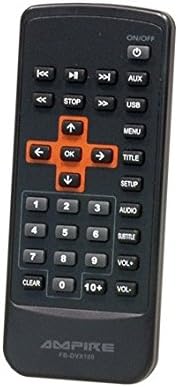
Image: The infrared remote control for the DVX104, featuring navigation, playback, volume, and menu buttons.
The included IR remote control provides full functionality, allowing you to control playback, navigate menus, adjust volume, and select input sources from a distance. Ensure the external IR receiver is positioned correctly for optimal signal reception.
5. Configurazione e installazione
The DVX104 is designed for flexible installation, supporting both vertical and horizontal mounting positions. It is a 3/4 DIN size unit, suitable for various integration scenarios, including automotive or home entertainment systems.

Immagine: Example installation of the DVX104 unit discreetly integrated into a vehicle's center console.
5.1 Montaggio
- Choose a suitable location for installation, considering ventilation and accessibility for disc insertion/removal.
- Use the provided mounting brackets and screws to secure the unit. The unit can be mounted vertically or horizontally.
- Ensure the mounting surface is stable and can support the unit's weight (approx. 1.6 kg).
5.2 Collegamenti di cablaggio
- Collegamento elettrico: Connect the unit to a 12V DC power source. The maximum power consumption is 15W. The unit consumes 0W when the ignition is off.
- Uscita AV: Connect the 1 AV output to your display device (e.g., television, monitor) using appropriate cables. The video signal is 1Vp-p, and the audio signal is 6Vss (2.1V RMS).
- Ricevitore IR esterno: Plug in the external IR receiver and position it where it has a clear line of sight to your remote control.
6. Istruzioni per l'uso
Riproduzione di dischi 6.1
- Insert a compatible disc (DVD, SVCD, MVCD, MSVCD, VCD1.0/2.0, CD-DA) into the disc slot. The unit will automatically begin playback.
- Use the remote control or front panel buttons for Play/Pause, Stop, and track navigation.
- The unit features a "last position memory" function for disc operation, allowing you to resume playback from where you left off (not applicable for MPEG4 fileS).
6.2 Riproduzione multimediale USB
- Insert a USB stick (up to 8GB) or a 2.5-inch hard drive (up to 80GB, FAT32 formatted) into the USB port.
- If the hard drive is not recognized, it may require an external power supply.
- Use the "SRC" (Source) button on the front panel or remote to switch to USB input.
- Naviga tra i tuoi media files (MPEG4, WMA, MP3, JPEG) using the remote control.
6.3 Menu di visualizzazione su schermo (OSD)
The unit features a German on-screen operating menu. Use the remote control's navigation buttons to access and adjust settings such as audio output, video settings, and system preferences.
6.4 Formati supportati
- Video: DVD, SVCD, MVCD, MSVCD, VCD1.0, VCD2.0, MPEG4 (Video encoding: MPEG-2)
- Audio: WMA, CD-DA, MP3, Dolby Digital Audio format
- Immagini: Formato JPEG
7. Manutenzione
- Clean the unit's exterior with a soft, dry cloth. Do not use abrasive cleaners or solvents.
- Keep the disc slot free from dust and debris.
- Garantire un'adeguata ventilazione intorno all'unità per evitare il surriscaldamento.
8. Risoluzione Dei Problemi
| Problema | Possibile causa | Soluzione |
|---|---|---|
| Nessun potere | Incorrect power connection; Blown fuse | Check 12V DC power supply and connections. Verify fuse. |
| Nessuna riproduzione del disco | Disc is dirty or scratched; Incompatible disc format | Clean the disc. Ensure the disc format is supported (DVD, VCD, CD-DA). |
| Dispositivo USB non riconosciuto | Incorrect format (not FAT32); Device requires external power; USB device capacity too large | Ensure USB device is FAT32 formatted. For HDDs, try with external power. Check capacity limits (8GB for sticks, 80GB for HDDs). |
| Nessuna risposta del telecomando | Batteries are dead; IR receiver blocked or misplaced | Replace remote control batteries. Ensure IR receiver has a clear line of sight to the remote. |
| Nessuna uscita video | AV cable not connected properly; Incorrect input selected on display device | Check AV cable connections. Select the correct AV input on your television/monitor. |
9. Specifiche
| Caratteristica | Dettaglio |
|---|---|
| Modello | DVX104 |
| Dimensioni (L x A) | 159 x 43 millimetri |
| Profondità di installazione | 164 millimetri |
| Peso | 1.6 kg |
| Volume di eserciziotage | 12V CC |
| Consumo energetico massimo | 15W |
| Power Consumption (Ignition Off) | 0W (0.0 Ampqui) |
| Segnale video | 1Vp-p |
| Segnale audio | 6Vss (2.1V RMS) |
| Modalità di uscita audio | Surround (2.0 canali) |
| Supporto USB | USB sticks up to 8GB, 2.5" HDDs up to 80GB (FAT32) |
| Formati di dischi supportati | DVD, SVCD, MVCD, MSVCD, VCD1.0, VCD2.0, CD-DA |
| Formati multimediali supportati | MPEG4, WMA, MP3, JPEG |
| Conformità | RoHS compliant, E8 10R-03 1242 |
10. Garanzia e supporto
This product is licensed and approved. For warranty information and technical support, please refer to the documentation provided with your purchase or contact your local Ampire dealer. Keep your proof of purchase for warranty claims.
Ask a question about this manual
Ask about setup, troubleshooting, compatibility, parts, safety, or missing instructions. Manuals+ will review the question and use this page’s manual context to help answer it.