
Vogel's MA4000
Vogel's MA4000 Flat Screen Wall Mount Instruction Manual
Model: MA4000 (8554000)
Introduzione
This manual provides comprehensive instructions for the safe and proper installation, operation, and maintenance of your Vogel's MA4000 Flat Screen Wall Mount. Please read all instructions carefully before installation and retain this manual for future reference.
The Vogel's MA4000 is designed to securely mount flat screen televisions ranging from 40 to 80 inches (102-203 cm) with a maximum weight capacity of 80 kg (176 lbs). It features a slim profile and a tilt function to optimize viewangoli di visione e ridurre l'abbagliamento.
Informazioni sulla sicurezza
AVVERTIMENTO:
- Assicurarsi che la superficie di montaggio possa sostenere in modo sicuro il peso combinato del supporto e del televisore.
- Always use appropriate tools and follow all installation steps precisely.
- Non superare la capacità di peso massima di 80 kg (176 libbre).
- Verify VESA compatibility with your television before installation.
- In caso di dubbi su qualsiasi parte dell'installazione, consultare un professionista qualificato.
Contenuto della confezione
Before beginning installation, please verify that all components are present and undamaged. Refer to the included parts list in your product packaging for a complete inventory.

Descrizione dell'immagine: Un overhead view of the Vogel's MA4000 Flat Screen Wall Mount, showing the main wall plate and the two vertical TV brackets. The mount is black and designed for flat panel televisions.
The image above displays the primary components of the Vogel's MA4000 wall mount: the wall plate and the two TV interface bars. Additional hardware such as screws, washers, and spacers are included in the retail package.
Specifiche
| Numero di modello | MA4000 (8554000) |
| Marca | Di Vogel |
| Tipo di montaggio | Flat, Tilting |
| Materiale | Acciaio inossidabile |
| Colore | Nero |
| Dimensioni TV compatibili | 40 - 80 pollici (102 - 203 cm) |
| Capacità massima di peso | 80 kg (176 libbre) |
| Compatibilità VESA | Min 100x100 mm, Max 600x400 mm |
| Angolo di inclinazione massimo | 12 gradi |
| Distanza dal muro | Circa 30 mm (1.2 pollici) |
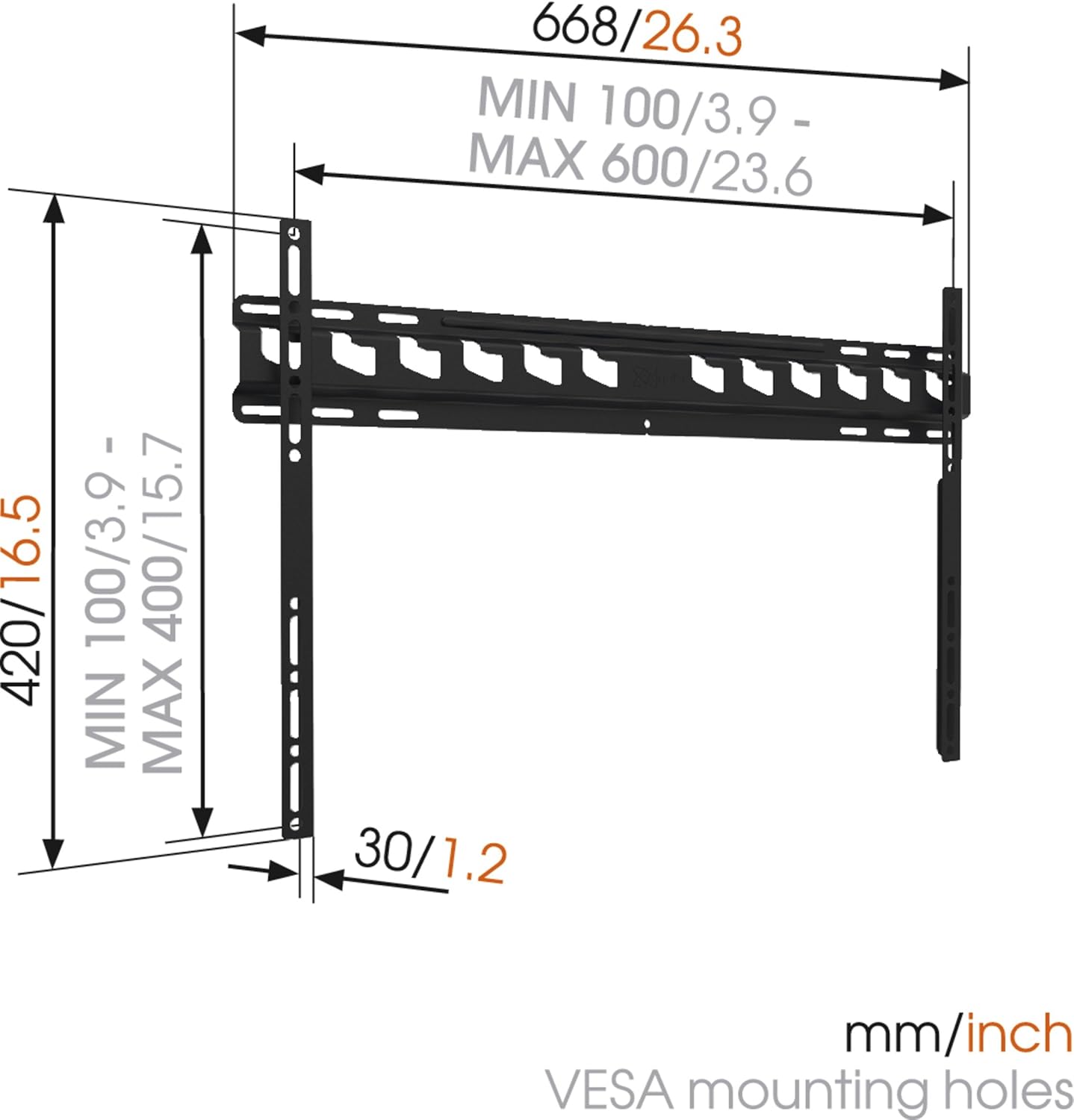
Descrizione dell'immagine: A technical diagram illustrating the dimensions of the Vogel's MA4000 wall mount. It shows the overall width (668mm / 26.3 inches), height (420mm / 16.5 inches), and the minimum and maximum VESA mounting hole patterns (100-600mm horizontally, 100-400mm vertically). The distance from the wall is indicated as 30mm (1.2 inches).
Configurazione e installazione
This section outlines the general steps for installing your Vogel's MA4000 wall mount. Always refer to the detailed graphical instructions included with your product for specific drilling templates and hardware usage.
Strumenti necessari (non inclusi):
- Trapano
- Drill bits appropriate for your wall type (wood, concrete, brick, etc.)
- Rilevatore di montanti (per pareti con montanti in legno)
- Livello
- Matita
- Nastro di misurazione
- Cacciavite o chiave inglese
Fasi di installazione:
- Determinare la posizione di montaggio: Choose a suitable location on your wall, ensuring it is structurally sound and free from electrical wires or plumbing. Use a stud finder if mounting to wood studs.
- Segnare i fori di perforazione: Hold the wall plate against the wall at the desired height and use a level to ensure it is straight. Mark the drilling holes with a pencil.
- Fori di perforazione: Drill pilot holes according to the marked positions and your wall type. Insert wall anchors if required.
- Fissare la piastra a muro: Secure the wall plate to the wall using the provided screws and washers. Ensure it is firmly attached and level.
- Fissare le staffe TV alla TV: Attach the two vertical TV interface bars to the back of your television using the appropriate screws, washers, and spacers from the hardware kit. Ensure the brackets are centered and securely fastened to the VESA mounting points.
- Montaggio della TV sulla piastra a muro: Carefully lift the television and hook the TV brackets onto the wall plate. Ensure both brackets are properly seated.
- TV sicura: Engage the safety locking mechanism (if applicable) to prevent the TV from accidentally dislodging from the wall plate.

Descrizione dell'immagine: Un lato profile view of a flat screen television mounted flush against a white wall, demonstrating the slim design and minimal wall distance achieved with the Vogel's MA4000 wall mount. The mount itself is barely visible behind the television.
Operating Instructions (Tilting Function)
The Vogel's MA4000 wall mount allows for a slight tilt to optimize your viewing experience and reduce glare.
- Regolazione dell'inclinazione: Gently push or pull the bottom edge of the television to achieve the desired tilt angle. The mount supports a maximum tilt of 12 degrees.
- Securing Tilt: Some models may have a locking mechanism for the tilt. Refer to your product's specific instructions for details on securing the tilt position if available.
Manutenzione
The Vogel's MA4000 wall mount requires minimal maintenance to ensure long-term performance and safety.
- Ispezione regolare: Controllare periodicamente tutte le viti e i collegamenti per assicurarsi che siano ben serrati. Serrare nuovamente se necessario.
- Pulizia: Pulisci la montatura con un panno morbido e asciutto. Evita detergenti abrasivi o solventi che potrebbero danneggiare la finitura.
- Limite di peso: Never exceed the maximum weight capacity of 80 kg (176 lbs).
Risoluzione dei problemi
| Problema | Possibile causa | Soluzione |
|---|---|---|
| La TV non è in piano dopo il montaggio. | La piastra a muro non è stata installata a livello. | Remove TV, adjust wall plate, and remount. Ensure a level is used during installation. |
| La TV sembra instabile sul supporto. | Screws are loose; TV not properly seated; safety lock not engaged. | Ensure all screws are tightened. Verify TV brackets are fully engaged with the wall plate. Engage safety lock. Do not exceed weight capacity. |
| Cannot achieve desired tilt angle. | Obstruction; maximum tilt angle reached. | Check for cables or other obstructions. The mount has a maximum tilt of 12 degrees. |
Garanzia e supporto
For warranty information and customer support, please refer to the documentation included with your product or visit the official Vogel's websito. Conservare la prova d'acquisto per eventuali reclami in garanzia.
Vogel's Official Websito: www.vogels.com
Ask a question about this manual
Ask about setup, troubleshooting, compatibility, parts, safety, or missing instructions. Manuals+ will review the question and use this page’s manual context to help answer it.