
1. Introduzione
This manual provides detailed instructions for the operation and maintenance of your Supersonic SC-1495BT Bluetooth AM/FM Boombox. Please read this manual thoroughly before using the device to ensure proper function and to maximize your listening experience.
2. Informazioni sulla sicurezza
- Non esporre l'unità alla pioggia o all'umidità per evitare incendi o scosse elettriche.
- Non ostruire le aperture di ventilazione. Assicurarsi che vi sia spazio sufficiente attorno all'unità per un corretto flusso d'aria.
- Evitare di posizionare l'unità vicino a fonti di calore come radiatori, bocchette di riscaldamento, stufe o altri apparecchi (inclusi amplificatori) che producono calore.
- Utilizzare solo gli accessori specificati dal produttore.
- Scollegare l'apparecchio durante i temporali o quando non viene utilizzato per lunghi periodi.
- Affidare tutte le operazioni di manutenzione a personale di assistenza qualificato. L'assistenza è necessaria quando l'apparecchio è stato danneggiato in qualsiasi modo.
3. Contenuto della confezione
Dopo aver disimballato, assicurarsi che siano presenti tutti gli articoli elencati di seguito:
- Supersonic SC-1495BT Bluetooth AM/FM Boombox
- Cavo di alimentazione CA
4. Caratteristiche del prodotto
The Supersonic SC-1495BT Boombox offers a variety of features for versatile audio playback:
- Bluetooth Version 3.0 for wireless music streaming
- Built-in USB input for media playback
- Built-in SD card and Micro SD card slot for media playback
- 3.5 mm Line-in (AUX) jack for external audio devices
- Four-band radio: AM, FM, SW1, SW2
- Integrated rechargeable battery for portable use
- Display LCD chiaro
- Fast forward and rewind functions for media playback
- 360-degree rod antenna for enhanced radio reception
- Controllo del volume rotante
- Presa per auricolari per ascolto privato
- AC/DC operation for flexible power options
5. Controlli e collegamenti
Familiarize yourself with the various controls and connection ports on your boombox.
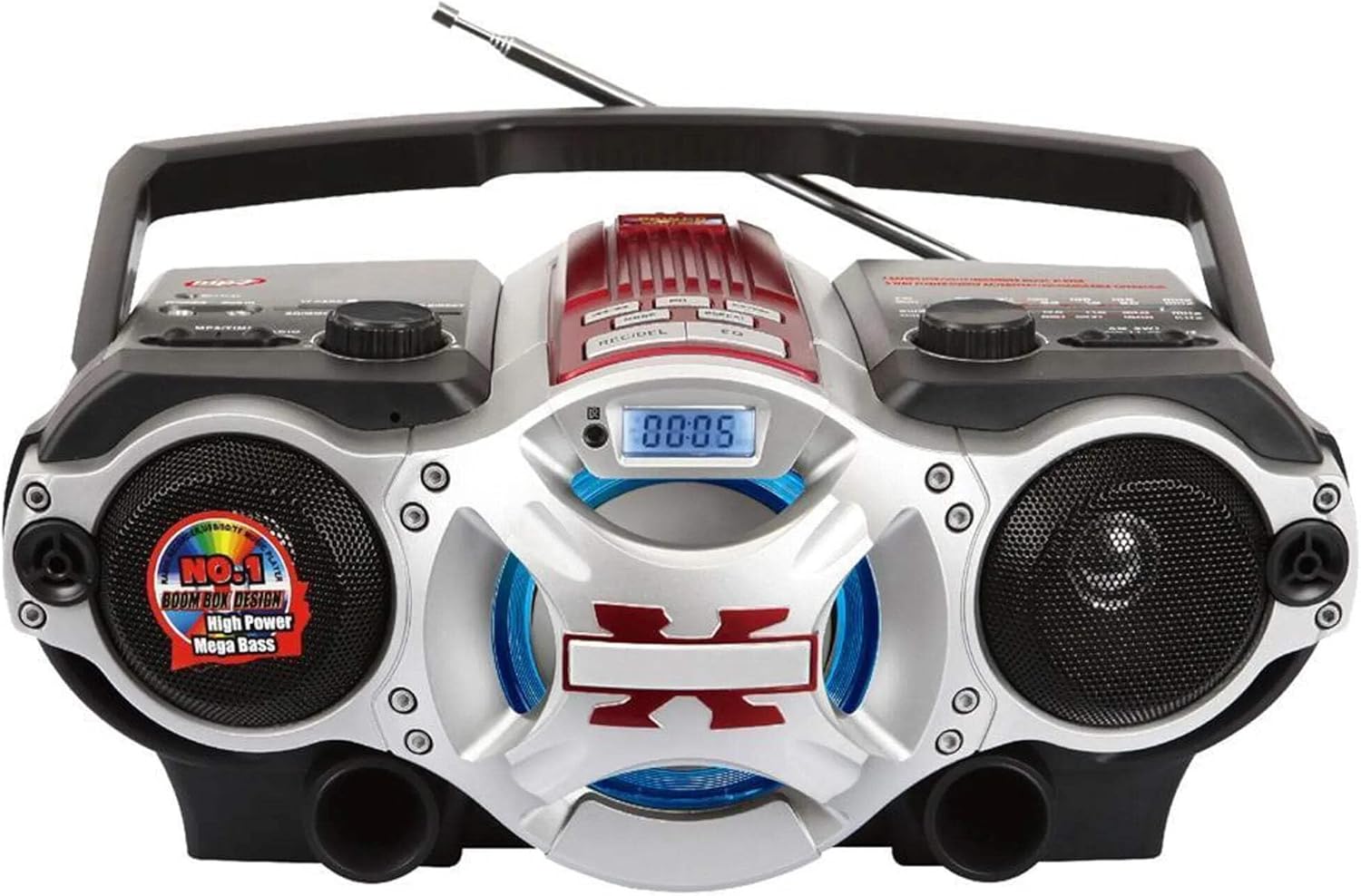
Figura 1: Davanti view of the Supersonic SC-1495BT Boombox, showing the speakers, central display, and main control area.

Figura 2: Left side controls, including USB input, SD/Micro SD card slot, AUX IN, PHONES jack, BT/MP3/RADIO mode switch, and Rotary Volume control.

Figura 3: Right side controls, featuring the AM/FM/SW1/SW2 band selector, TUNING knob, and playback control buttons (Play/Pause, Skip, Mode, Clock, EQ).
6. Impostazione
6.1 Collegamento di alimentazione
- Alimentazione CA: Connect the included AC power cord to the AC input on the back of the boombox and then plug it into a standard wall outlet. The internal rechargeable battery will begin charging.
- DC Power (Battery): The boombox has a built-in rechargeable battery. Ensure it is charged before portable use. The unit can also operate on DC power from the internal battery when not connected to AC.
6.2 Regolazione dell'antenna
Extend the 360-degree rod antenna for optimal radio reception, especially for FM and SW bands. Adjust its position for the clearest signal.
7. Istruzioni per l'uso
7.1 Accensione/spegnimento e selezione della modalità
- To power on the unit, slide the BT/MP3/RADIO switch to the desired mode (BT, MP3, or RADIO).
- Per spegnere, far scorrere l'interruttore in posizione OFF.
7.2 Funzionamento Bluetooth
- Far scorrere l'interruttore della modalità su BT (Bluetooth). The LCD display will indicate Bluetooth mode, and the unit will enter pairing mode.
- Sul tuo dispositivo abilitato Bluetooth (smartphone, tablet, ecc.), attiva il Bluetooth e cerca i dispositivi disponibili.
- Select "SC-1495BT" from the list of devices. Once paired, the unit will emit a confirmation sound.
- You can now play audio from your device through the boombox. Use your device or the boombox's playback controls (Play/Pause, Skip) to manage music.
7.3 Radio Operation (AM/FM/SW1/SW2)
- Far scorrere l'interruttore della modalità su RADIO.
- Select the desired band (AM, FM, SW1, or SW2) using the band selector switch.
- Extend and adjust the rod antenna for optimal reception.
- Ruotare il ACCORDATURA knob to scan for radio stations. The frequency will be displayed on the LCD.
7.4 Riproduzione da scheda USB/SD
- Far scorrere l'interruttore della modalità su MP3.
- Insert a USB flash drive into the USB input or an SD/Micro SD card into the corresponding slot. Ensure the card is inserted correctly.
- The unit will automatically detect and begin playing MP3 audio filedal supporto inserito.
- Use the playback control buttons (Play/Pause, Skip, Fast Forward, Rewind) to navigate tracks.
7.5 Ingresso ausiliario (AUX)
- Far scorrere l'interruttore della modalità su MP3.
- Collegare un dispositivo audio esterno (ad esempio, lettore MP3, smartphone) al AUX IN jack utilizzando un cavo audio da 3.5 mm (non incluso).
- Play audio from your external device. The sound will be routed through the boombox speakers. Control playback from your external device.
7.6 Controllo del volume
Ruotare il VOLUME manopola in senso orario per aumentare il volume e in senso antiorario per diminuirlo.
7.7 Jack per auricolari
For private listening, plug standard 3.5mm earphones (not included) into the TELEFONI jack. The main speakers will be muted.
8. Manutenzione
- Pulizia: Utilizzare un panno morbido e asciutto per pulire l'esterno dell'unità. Non utilizzare detergenti abrasivi o solventi.
- Magazzinaggio: Quando non lo si utilizza per lunghi periodi, conservare il boombox in un luogo fresco e asciutto, lontano dalla luce solare diretta e da temperature estreme.
- Cura della batteria: To prolong the life of the built-in rechargeable battery, avoid fully discharging it frequently. Charge the unit regularly, even if not in use.
9. Risoluzione Dei Problemi
If you encounter issues with your boombox, refer to the following common problems and solutions:
| Problema | Possibile causa | Soluzione |
|---|---|---|
| Nessun potere | AC cord not connected; Battery discharged; Power switch off | Ensure AC cord is securely plugged in; Charge the battery; Slide power switch to ON/BT/MP3/RADIO. |
| Nessun suono | Volume too low; Mute activated (if applicable); Incorrect mode selected; Earphones connected | Increase volume; Ensure correct mode (BT, MP3, RADIO) is selected; Disconnect earphones. |
| Bluetooth non associato | Boombox not in pairing mode; Device Bluetooth off; Too far from boombox | Ensure boombox is in BT mode; Enable Bluetooth on your device; Move device closer (within 30 feet/10 meters); Try re-pairing. |
| Scarsa ricezione radio | Antenna not extended/adjusted; Weak signal area | Fully extend and adjust the rod antenna; Try moving the unit to a different location. |
| La scheda USB/SD non funziona | Non corretto file formato; Scheda/unità non inserita correttamente; Danneggiato files | Garantire files are MP3 format; Re-insert card/drive; Try a different USB drive or SD card. |
10. Specifiche
- Modello: SC-1495BT
- Marca: Supersonico
- Connettività: Bluetooth (Ver. 3.0), USB, SD/Micro SD, 3.5mm AUX
- Bande radiofoniche: AM, FM, SW1, SW2
- Formati audio supportati: MP3
- Fonte di energia: AC 110-220V, Built-in Rechargeable Battery
- Relatori: 2 (Stereo)
- Dimensioni (L x P x A): 15 x 10 x 12 pollici
- Peso: 4.3 libbre
- Produttore: Capitol Sales Company
- Codice UPC: 639131814950
11. Garanzia
This product comes with a 1-year limited warranty. Please retain your proof of purchase for warranty claims. For specific warranty terms and conditions, refer to the documentation included with your purchase or contact Supersonic customer support.
12. Supporto
For further assistance, technical support, or inquiries regarding your Supersonic SC-1495BT Boombox, please visit the official Supersonic websito o contattare il servizio clienti. Le informazioni di contatto sono in genere reperibili sul sito web del produttore. websito o confezione del prodotto.