
1. Introduzione
The Philips SHQ7900CL Bluetooth Sports Headphones are designed for active lifestyles, offering wireless freedom and a secure, comfortable fit. These headphones are waterproof and sweatproof, making them ideal for various indoor and outdoor sports activities. This manual provides essential information for setting up, operating, and maintaining your headphones.

Image: Philips SHQ7900CL Bluetooth Sports Headphones, showcasing the in-ear design with ear hooks and inline controls.
2. Cosa c'è nella scatola
Carefully unpack the box and ensure all items are present.
- Philips SHQ7900CL Bluetooth Sports Headphones
- Pouch for storage
- Guida rapida
- Cavo di ricarica USB
- Detachable earhooks (1 pair)
- Rubber ear caps (3 pairs: small, medium, large)

Image: Various sizes of rubber ear caps and detachable ear hooks included with the headphones for a customized fit.
3. Impostazione
3.1 Ricarica delle cuffie
Prima del primo utilizzo, caricare completamente le cuffie.
- Locate the USB charging port on the inline control unit.
- Connect the supplied USB cable to the charging port on the headphones.
- Collegare l'altra estremità del cavo USB a una porta USB alimentata (ad esempio, computer, adattatore USB da parete).
- L'indicatore LED mostra lo stato di carica. In genere si spegne o cambia colore quando la carica è completa.
Una carica completa garantisce circa 6.5 ore di durata della batteria.
3.2 Associazione Bluetooth
Per collegare le cuffie a un dispositivo abilitato Bluetooth:
- Assicurati che le cuffie siano spente.
- Press and hold the multi-function button (usually the center button on the inline control) for approximately 5-7 seconds until the LED indicator flashes blue and red alternately. This indicates pairing mode.
- Sul tuo dispositivo Bluetooth (smartphone, tablet, ecc.), attiva il Bluetooth e cerca i dispositivi disponibili.
- Select "Philips SHQ7900CL" from the list of found devices.
- Once paired, the LED indicator on the headphones will flash blue periodically, and you will hear an audible confirmation.
- Se viene richiesto un codice di accesso, immettere "0000".
The headphones will automatically attempt to reconnect to the last paired device when turned on.
3.3 Fitting the Headphones
For optimal sound quality and a secure fit during exercise:
- Choose the correct ear caps: Experiment with the three sizes of rubber ear caps to find the pair that provides a comfortable and snug seal in your ear canal.
- Attach ear hooks: The detachable ear hooks provide extra stability. Attach them to the headphones and loop them over your ears. Adjust for comfort.
- Position the cable: The cable connecting the two earbuds can be worn behind your neck.

Image: A person wearing the Philips SHQ7900CL headphones, demonstrating a secure fit during a stretching exercise.
4. Istruzioni per l'uso
The inline control unit allows you to manage power, music playback, and calls.
| Funzione | Azione |
|---|---|
| Accendere | Tieni premuto il pulsante multifunzione per 3 secondi. |
| Spegnimento | Tieni premuto il pulsante multifunzione per 3 secondi. |
| Riproduci/Pausa musica | Premi una volta il pulsante multifunzione. |
| Traccia successiva | Tieni premuto il pulsante Volume su (+). |
| Traccia precedente | Premere e tenere premuto il pulsante Volume giù (-). |
| Alza il volume | Premere il pulsante Volume su (+). |
| Abbassa il volume | Premere il pulsante Volume giù (-). |
| Rispondi/Termina chiamata | Premere una volta il pulsante multifunzione durante una chiamata in arrivo o una chiamata attiva. |
| Rifiuta chiamata | Durante una chiamata in arrivo, tenere premuto il pulsante multifunzione per 2 secondi. |
| Attiva l'Assistente Vocale | Double-press the multi-function button (may vary by device). |
5. Manutenzione
5.1 Pulizia
As these headphones are waterproof and sweatproof, they can be cleaned easily.
- Pulisci le cuffie con un panno morbido, damp cloth after each use, especially after intense workouts.
- Remove the ear caps and rinse them with water if necessary. Ensure they are completely dry before reattaching.
- Do not use abrasive cleaners, alcohol, or chemical solvents, as these may damage the product.
5.2 Conservazione
Proper storage helps prolong the life of your headphones.
- Quando non vengono utilizzate, conservare le cuffie nella custodia fornita per proteggerle da polvere e danni.
- Evitare di conservare in luoghi con temperature estreme o elevata umidità.
- Do not store with heavy objects on top that could crush them.
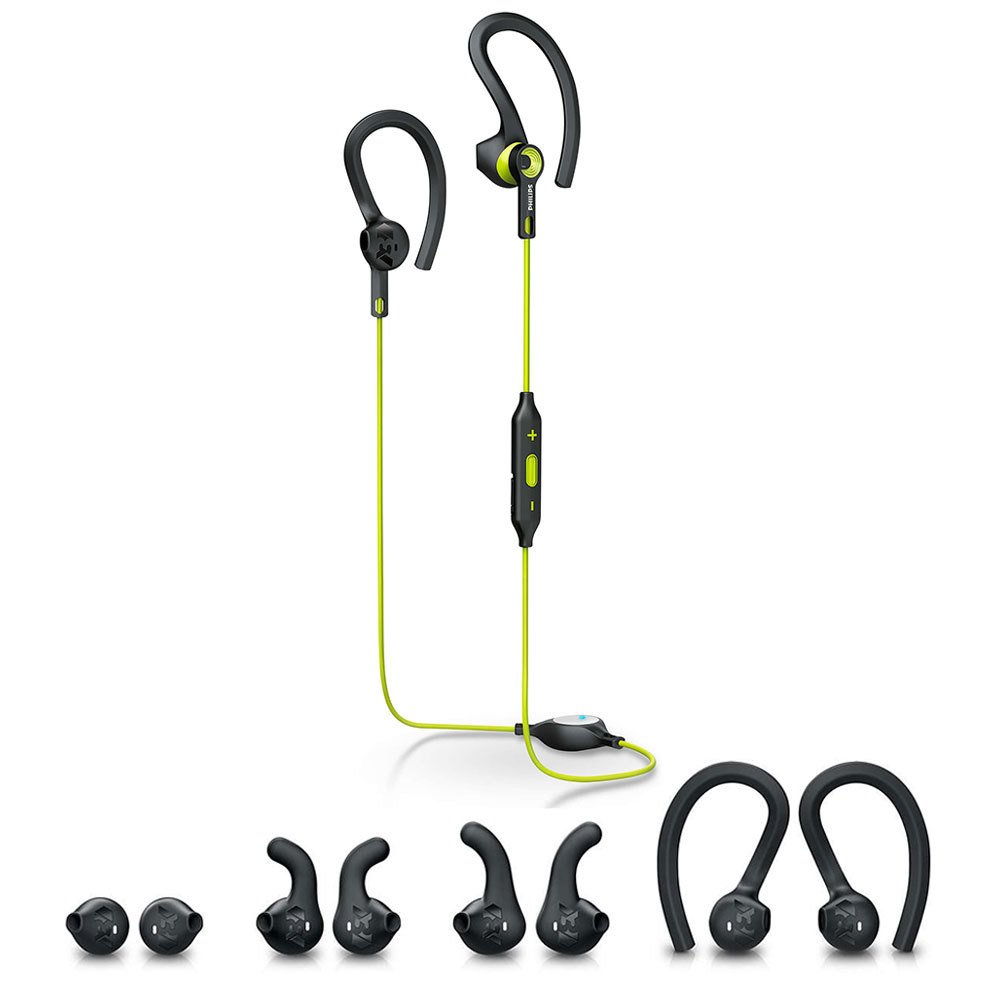
Image: The Philips SHQ7900CL headphones shown alongside their protective storage pouch.
6. Risoluzione Dei Problemi
Se riscontri problemi con le cuffie, fai riferimento ai seguenti problemi comuni e alle relative soluzioni:
- Headphones do not turn on: Assicurarsi che le cuffie siano completamente cariche.
- Impossibile associare il dispositivo:
- Make sure the headphones are in pairing mode (flashing blue and red).
- Assicurati che il Bluetooth sia abilitato sul tuo dispositivo e che si trovi entro 10 metri dalle cuffie.
- Prova a eliminare il dispositivo dalle impostazioni Bluetooth del telefono e a riassociarlo.
- Riavviare sia le cuffie che il dispositivo.
- Nessun suono o volume basso:
- Controlla i livelli del volume sia delle cuffie che del dispositivo collegato.
- Assicurarsi che le cuffie siano correttamente associate e collegate.
- Verifica che sul tuo dispositivo sia selezionata l'uscita audio corretta.
- Connessione intermittente:
- Assicurati che non ci siano ostacoli tra le cuffie e il dispositivo.
- Avvicinati al tuo dispositivo (entro 10 metri).
- Evitare ambienti con forti interferenze Wi-Fi o altre interferenze wireless.
- Problema di ricarica:
- Ensure the USB cable is securely connected to both the headphones and the power source.
- Prova una porta USB o un adattatore di ricarica diversi.
7. Specifiche
| Caratteristica | Dettaglio |
|---|---|
| Nome del modello | SHQ7900CL |
| Marca | Philips |
| Tecnologia di connettività | Bluetooth 4.1 |
| wireless Range | Fino a 10 metri |
| Posizionamento dell'orecchio | Nell'orecchio |
| Impedenza | 32 Ohm |
| Sensibilità | 105 dB |
| Controllo del rumore | Isolamento acustico |
| Durata della batteria | Circa 6.5 ore |
| Livello di resistenza all'acqua | Impermeabile |
| Caratteristiche aggiuntive | Sweatproof, Tangle-Free Cable |
| Tipo di controllo | Volume Control, Touch (via multi-function button) |
| Dimensioni del driver audio | 13.5 millimetri |
| Peso dell'articolo | 0.02 chilogrammi |
8. Garanzia e supporto
Your Philips SHQ7900CL Bluetooth Sports Headphones come with a 1 year and 3 months warranty dalla data di acquisto.
For detailed warranty terms, technical support, or further assistance, please visit the official Philips support websito o contattare il loro servizio clienti.