
1. Prodotto finitoview
The JLab Epic 2 Wireless Bluetooth Sports Earbuds are designed for active lifestyles, offering a secure fit, robust sound, and durability. Featuring Bluetooth 4.0 connectivity, these earbuds provide up to 12 hours of playtime and are IP55 rated for splash and sweat resistance, making them suitable for various environments and activities. The proprietary Memory Wire design and multiple gel-tips ensure a comfortable and personalized fit.

Figure 1.1: JLab Epic 2 Wireless Bluetooth Sports Earbuds with inline remote.
2. Impostazione
2.1 Contenuto della confezione
Verifica che tutti gli articoli siano presenti nel tuo pacco:
- JLab Epic 2 Wireless Bluetooth Sports Earbuds
- Cavo di ricarica micro USB
- Custodia da viaggio
- Multiple Sets of Silicone Gel Tips (8 sets, including triple flange and shallow-fit)
- Cush Fins (2 sets)

Figure 2.1: Included accessories with the Epic 2 Earbuds.
2.2 Ricarica degli auricolari
Before first use, fully charge your Epic 2 Earbuds. The earbuds feature a 12-hour battery life on a full charge.
- Locate the micro USB charging port on the inline remote control.
- Connect the provided micro USB cable to the charging port and the other end to a USB power source (e.g., computer USB port, wall adapter).
- The LED indicator on the remote will illuminate during charging and change color or turn off when fully charged.
2.3 Associazione Bluetooth
To connect your Epic 2 Earbuds to a Bluetooth-enabled device:
- Assicurarsi che gli auricolari siano spenti.
- Tenere premuto il pulsante di accensione sul telecomando in linea finché l'indicatore LED non lampeggia in blu e rosso, indicando la modalità di associazione.
- Attiva il Bluetooth sul tuo dispositivo e cerca i dispositivi disponibili.
- Select "JLab Epic 2" from the list of devices.
- Una volta connesso, l'indicatore LED diventerà blu fisso o lampeggerà lentamente in blu.
The Epic 2 utilizes Beacon Signal Technology for enhanced skip-free connectivity.
2.4 Raggiungere la vestibilità perfetta
A proper fit is crucial for comfort, sound quality, and secure wear, especially during physical activity. The Epic 2 features a proprietary Memory Wire design and comes with various ear tips to customize your fit.
- Filo di memoria: Gently bend the Memory Wire over your ear to conform to your ear's shape, ensuring the earbuds stay securely in place.
- Gel Tips: Experiment with the different sizes and styles of gel tips (including triple flange and shallow-fit options) to find the best seal for your ear canal. A good seal enhances bass response and noise isolation.
- Cush Fins: The included Cush Fins provide additional stability and a snug fit within the ear's concha.

Figure 2.2: Selection of included gel tips for customized fit.
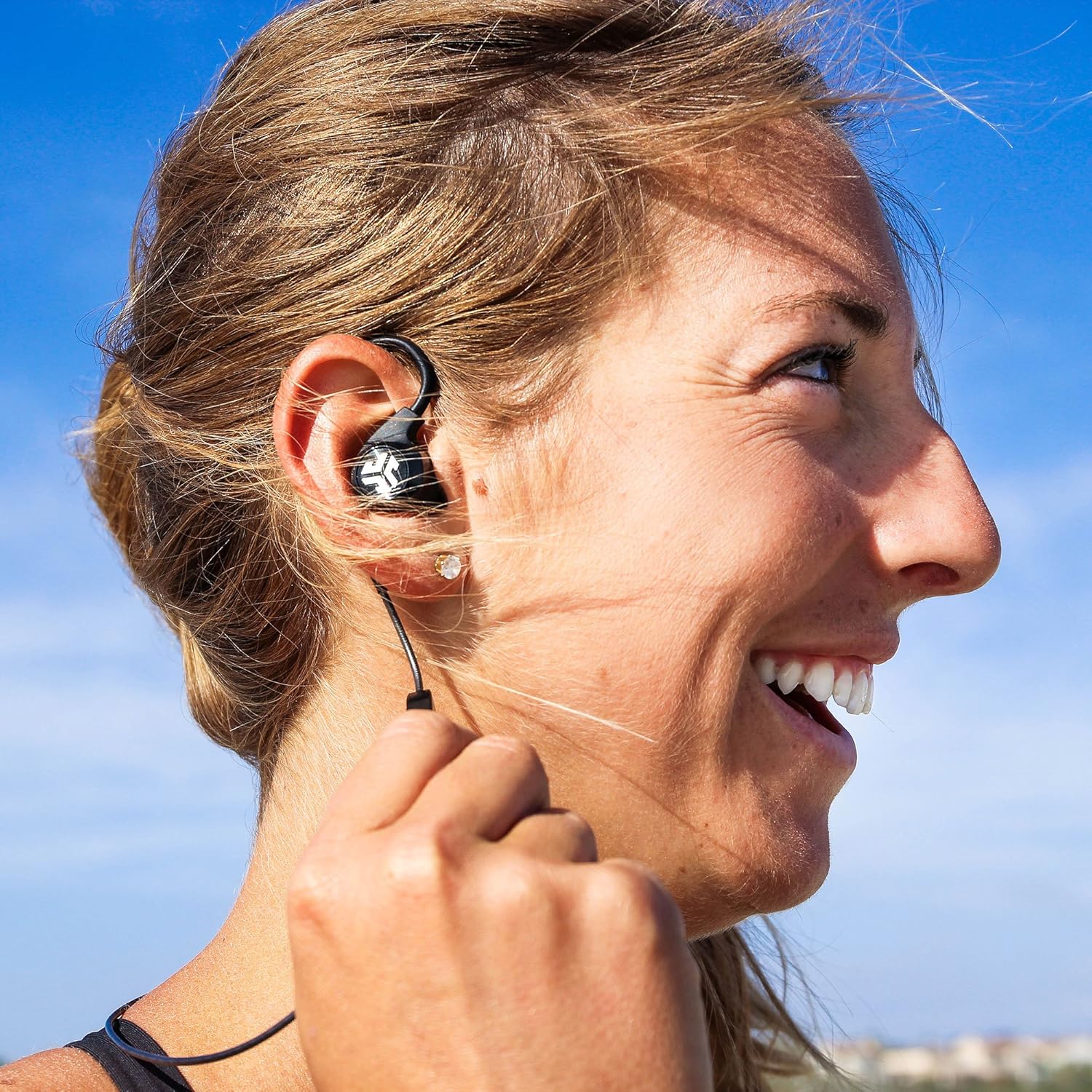
Figure 2.3: Proper earbud placement for optimal fit.
3. Istruzioni per l'uso
3.1 Controlli multimediali
Il telecomando in linea consente un comodo controllo dell'audio e delle chiamate:
- Accensione/spegnimento: Tieni premuto il pulsante centrale.
- Riproduci/Pausa: Premi una volta il pulsante centrale.
- Volume su/giù: Premere i pulsanti '+' o '-'.
- Traccia successiva: Premere e tenere premuto il pulsante '+'.
- Traccia precedente: Premere e tenere premuto il pulsante '-'.
- Rispondi/Termina chiamata: Premi una volta il pulsante centrale.
- Rifiuta chiamata: Tieni premuto il pulsante centrale.
3.2 Prestazioni audio
The Epic 2 Earbuds are equipped with 8mm drivers and C3 (Crystal Clear Clarity) technology, delivering a balanced sound profile with vibrant highs, clear mids, and a strong bass response. For optimal audio experience, ensure a tight seal with the chosen ear tips.
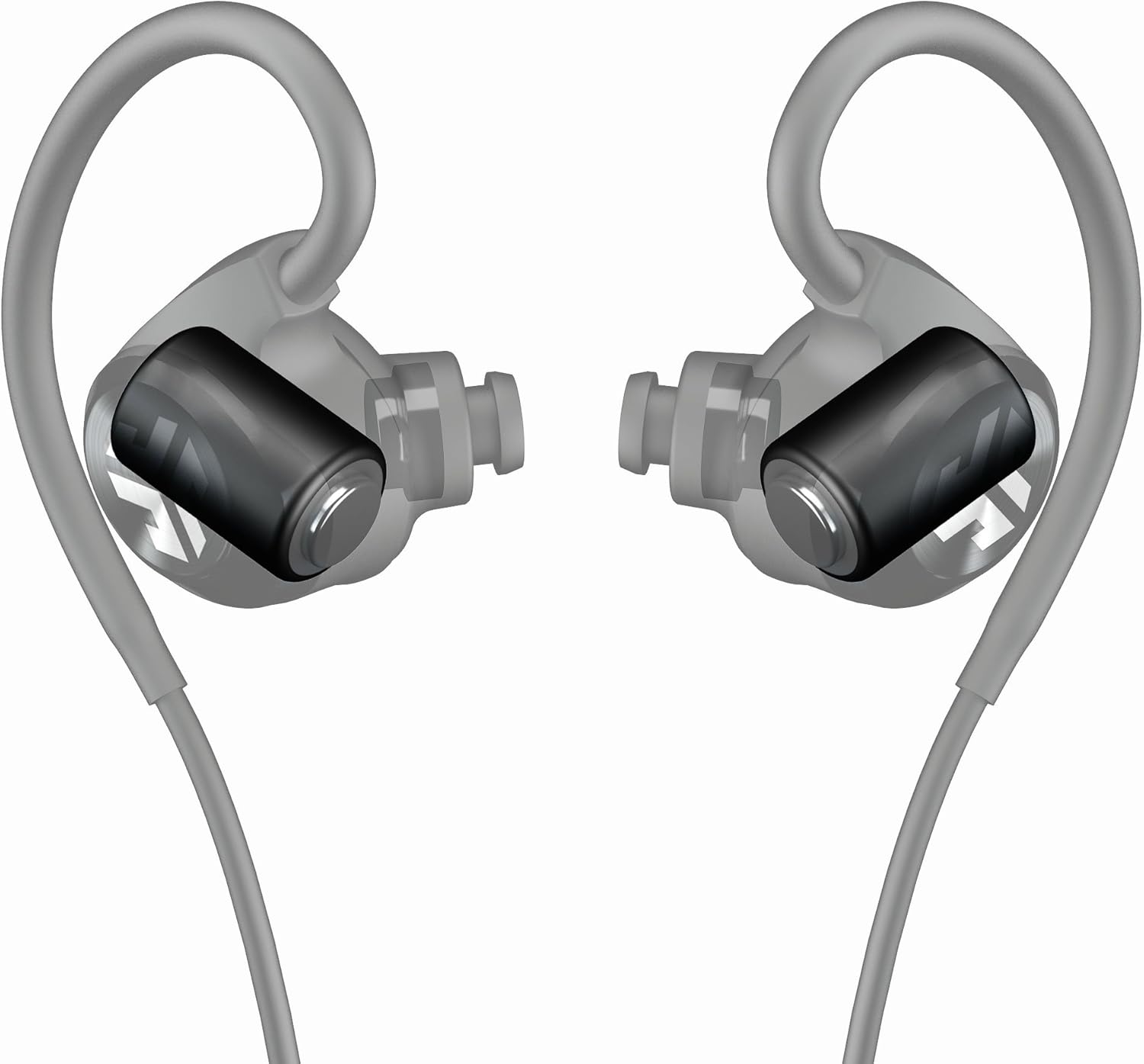
Figure 3.1: Internal driver placement for enhanced audio.
3.3 Resistenza all'acqua
The Epic 2 Earbuds boast an IP55 rating, making them 100 percent splash-proof, sweat-proof, and washable. This design ensures durability against moisture from workouts or light rain. After intense use, the earbuds can be rinsed under tap water for cleaning.

Figure 3.2: Earbuds designed to withstand splashes and sweat.
4. Manutenzione
4.1 Cura e pulizia
To ensure the longevity and optimal performance of your Epic 2 Earbuds, follow these care instructions:
- After workouts or exposure to sweat, rinse the earbuds under tap water to remove any residue.
- Wipe the earbuds dry with a soft, clean cloth before storing them or placing them in the charging case.
- Rimuovere periodicamente i gommini auricolari in silicone e pulirli con acqua e sapone neutro. Assicurarsi che siano completamente asciutti prima di riapplicarli.
- Avoid using harsh chemicals or abrasive materials for cleaning, as these can damage the earbuds.
- Store the earbuds in their provided travel case when not in use to protect them from dust and physical damage.
5. Risoluzione Dei Problemi
If you encounter issues with your JLab Epic 2 Earbuds, refer to the table below for common problems and their solutions.
| Problema | Possibile causa | Soluzione |
|---|---|---|
| Gli auricolari non si accendono. | Batteria scarica o assente. | Charge the earbuds fully using the provided USB cable. Ensure the charging port is clean and the cable is securely connected. |
| Impossibile associare il dispositivo. | Auricolari non in modalità di associazione; Bluetooth del dispositivo disattivato; dispositivo precedentemente associato che interferisce. | Ensure earbuds are in pairing mode (flashing blue/red). Turn off and on Bluetooth on your device. Forget previous pairings on your device. Move closer to the device. |
| Sound cuts in and out / Skipping audio. | Interference from other wireless devices; distance from source; physical obstructions. | Reduce distance between earbuds and device. Avoid areas with high wireless interference (e.g., crowded public spaces, strong Wi-Fi signals). Ensure no physical barriers between earbuds and device. |
| Poor sound quality / Lack of bass. | Improper ear tip fit; ear tips not creating a seal. | Experiment with different sizes and types of gel tips to find the best seal for your ear canal. Ensure earbuds are inserted correctly. |
| Charging port cover is difficult to open. | Tight seal for water resistance. | Use a thin, non-sharp object (e.g., a paperclip or fingernail) to gently pry open the charging port cover. Be careful not to damage the seal. |
6. Specifiche
Detailed technical specifications for the JLab Epic 2 Wireless Bluetooth Sports Earbuds:
| Caratteristica | Specificazione |
|---|---|
| Nome del modello | Epic2 |
| Tecnologia di connettività | Bluetooth |
| Tecnologia di comunicazione wireless | Bluetooth |
| Versione Bluetooth | 4.0 |
| Durata della batteria | 12 ore |
| Livello di resistenza all'acqua | Impermeabile (classificazione IP55) |
| Tipo di driver audio | Driver dinamico (8 mm) |
| Tipo di controllo | Controllo multimediale, remoto |
| Microfono | Incluso |
| Posizionamento dell'orecchio | Sopra l'orecchio |
| Fattore di forma | Nell'orecchio |
| Materiale | Titanium (Memory Wire) |
| Dimensioni del prodotto | 2 x 5 x 7.5 pollici |
| Peso dell'articolo | 3.2 once |
| Numero modello articolo | EPICBT2-BLUGRY-BOX |
| Codice UPC | 812887015455 |
7. Garanzia e supporto
7.1 Informazioni sulla garanzia
JLab offers a Garanzia limitata di 2 anno on the Epic 2 Wireless Bluetooth Sports Earbuds, covering defects in materials and workmanship from the original purchase date. Additionally, a Garanzia di rimborso di 30 giorni is provided to ensure customer satisfaction.
This warranty does not cover damage caused by misuse, accident, unauthorized modification, or normal wear and tear. Please retain your proof of purchase for warranty claims.
7.2 Assistenza clienti
For further assistance, technical support, or warranty claims, please visit the official JLab website or contact their customer service department. Refer to the product packaging or JLab's official websito per le informazioni di contatto più aggiornate.