
Introduzione
This manual provides essential information for the safe and effective installation and use of your Technical Precision replacement light bulb, specifically designed for the BELL & HOWELL LUMINA II LX38 projector. Please read this manual thoroughly before installation and retain it for future reference.
Informazioni sulla sicurezza
Per evitare lesioni o danni al prodotto, osservare sempre le seguenti precauzioni di sicurezza:
- Disconnessione dell'alimentazione: Always ensure the projector is unplugged from the power source and completely cooled down before attempting to replace the light bulb.
- Maneggiare con cura: Light bulbs, especially incandescent types, can become very hot during operation. Allow sufficient time for the old bulb to cool before handling.
- Evitare il contatto diretto: Do not touch the glass part of the new bulb with bare hands. Oils from your skin can create hot spots, leading to premature bulb failure. Use a clean cloth or gloves if necessary.
- Vol. correttotage e Wattage: Use only bulbs with the specified voltage (30V) e wattage (80W) for your BELL & HOWELL LUMINA II LX38 projector to avoid damage to the projector or the bulb.
- Disposizione: Smaltire le vecchie lampadine secondo le normative locali.
Configurazione e installazione
Follow these steps to safely install your new replacement light bulb:
- Spegnere e scollegare: Ensure the BELL & HOWELL LUMINA II LX38 projector is turned off and completely unplugged from the electrical outlet.
- Consenti raffreddamento: Wait for at least 15-30 minutes for the old bulb and projector housing to cool down completely.
- Locate Bulb Compartment: Refer to your projector's original manual to locate and open the lamp compartment cover. This usually involves unscrewing a few screws or releasinga latch.
- Rimuovere la vecchia lampadina: Carefully grasp the old bulb (if it's cool enough) and gently pull it straight out or twist it according to the projector's design. Avoid excessive force.
- Inserire la nuova lampadina: Without touching the glass, carefully insert the new Technical Precision replacement bulb into the socket. Ensure it is seated firmly and correctly. Do not force the bulb.
- Chiudi scomparto: Chiudere saldamente lamp compartment cover, ensuring all screws or latches are fastened.
- Accensione: Plug the projector back into the electrical outlet and power it on to test the new bulb.
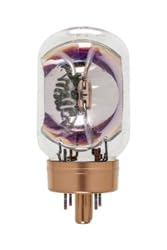
Image of the Technical Precision replacement incandescent light bulb, designed for BELL & HOWELL LUMINA II LX38 projectors. This image illustrates the general appearance of the bulb.
Istruzioni per l'uso
Once installed, the light bulb operates as an integral part of your BELL & HOWELL LUMINA II LX38 projector. Its operation is controlled directly by the projector's power functions.
- Accensione/spegnimento: The bulb will illuminate when the projector is powered on and extinguish when the projector is powered off.
- Ciclo di raffreddamento: Always allow the projector to complete its cool-down cycle after turning it off. This helps extend the life of the bulb.
Manutenzione
Proper maintenance can help prolong the life of your light bulb and ensure optimal performance:
- Pulizia: If the bulb's glass surface becomes dusty, gently wipe it with a soft, dry, lint-free cloth when the bulb is cool and the projector is unplugged. Do not use liquid cleaners.
- Filtri dell'aria: Regularly clean or replace the projector's air filters as recommended by the projector manufacturer. Clogged filters can lead to overheating and reduced bulb life.
- Sostituzione: Replace the bulb when its brightness significantly diminishes or if it fails to illuminate. Refer to the projector's manual for expected bulb life and replacement indicators.
Risoluzione dei problemi
If the light bulb does not function correctly after installation, consider the following:
- Lampadina non accesa:
- Ensure the projector is properly plugged into a working electrical outlet.
- Verificare che la lamp compartment cover is securely closed and all latches/screws are fastened. Some projectors have safety interlocks that prevent operation if the cover is open.
- Check if the bulb is correctly seated in its socket. Gently remove and reinsert it, ensuring proper alignment.
- Confirm the bulb is the correct type (30V, 80W) for your projector.
- If the issue persists, the bulb may be faulty, or there might be an issue with the projector itself.
- Luce fioca o tremolante:
- This often indicates the bulb is nearing the end of its lifespan and requires replacement.
- Ensure the projector's air filters are clean to prevent overheating, which can affect bulb performance.
Specifiche
| Caratteristica | Dettaglio |
|---|---|
| Marca | Precisione tecnica |
| Numero di modello | LUMINA II LX38 |
| Voltage | 30 Volt |
| Cosatage | 80 Watt |
| Tipo di sorgente luminosa | Incandescent |
| Materiale | Bicchiere |
| Quantità del pacchetto dell'articolo | 1 |
| ASIN | B01G93YY9Y |
Garanzia e supporto
For information regarding warranty coverage or technical support for your Technical Precision replacement light bulb, please refer to the packaging or contact Technical Precision customer service directly. Keep your purchase receipt as proof of purchase.
Note: This replacement bulb is designed to meet the specifications of the original BELL & HOWELL LUMINA II LX38 bulb. For projector-specific issues not related to the bulb, please consult your BELL & HOWELL projector's original user manual or manufacturer support.