
1. Prodotto finitoview
This manual provides essential instructions for the safe and efficient installation, operation, and maintenance of your ZOTAC GeForce GTX 1080 AMP Extreme graphics card. Please read this manual thoroughly before proceeding with installation.
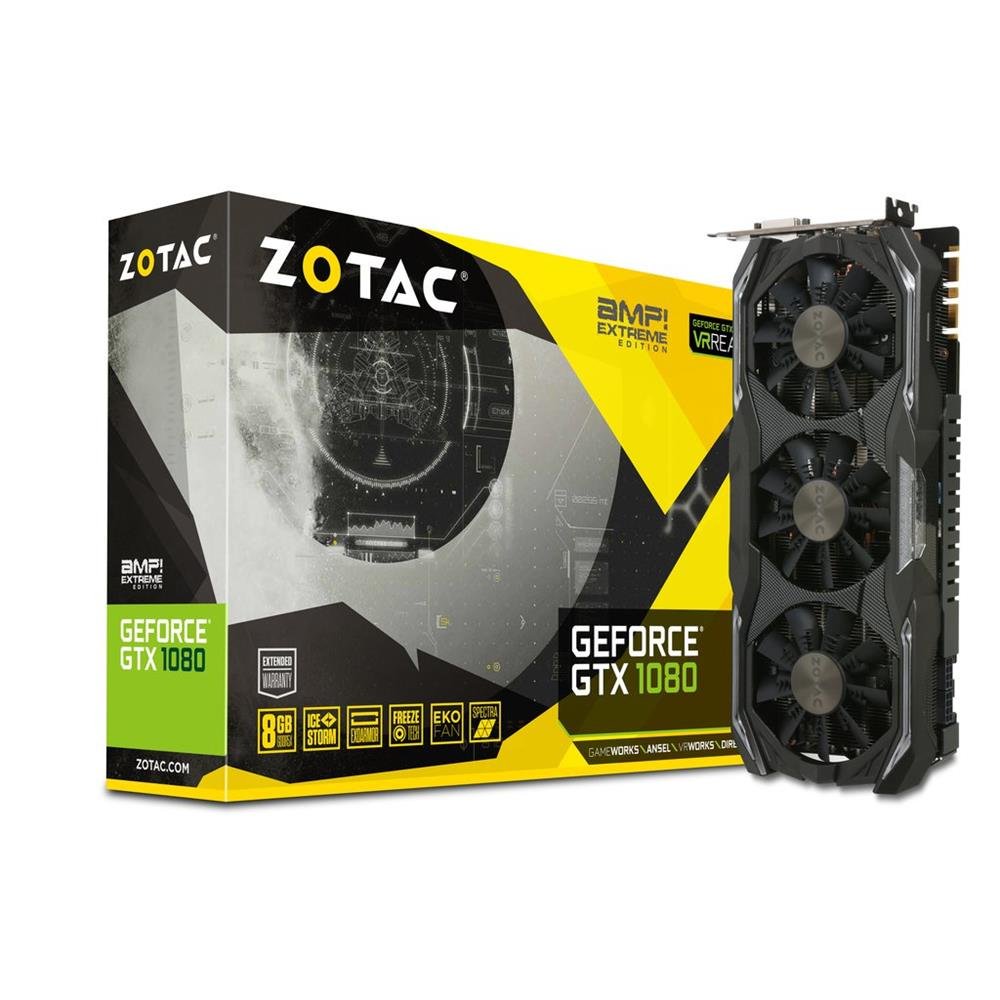
Image 1.1: ZOTAC GeForce GTX 1080 AMP Extreme Graphics Card. This image displays the front view della scheda grafica, evidenziandone il sistema di raffreddamento a tripla ventola e il design complessivo.
2. Contenuto della confezione
Verifica che tutti gli articoli elencati di seguito siano presenti nella confezione del prodotto:
- Scheda grafica ZOTAC GeForce GTX 1080 AMP Extreme Graphics Card
- Adattatore DVI-VGA
- Dual 6-pin to 4 x 2-pin Power Cable
- driver CD
- Manuale di istruzioni (questo documento)
3. Configurazione e installazione
3.1. Requisiti di sistema
- PCI Express x16 slot on a compatible motherboard.
- Minimum 500W power supply with two 8-pin (or 6+2 pin) PCIe power connectors.
- Compatible operating system (e.g., Windows 7/8/10/11).
- At least 4GB of system memory (8GB recommended).
3.2. Installazione fisica
- Spegni: Spegnere completamente il computer e scollegare il cavo di alimentazione dalla presa a muro.
- Caso aperto: Open your computer case to access the motherboard and expansion slots.
- Individuare lo slot PCIe: Identifica uno slot PCI Express x16 disponibile sulla tua scheda madre.
- Rimuovere il coperchio dello slot: Rimuovere il coperchio metallico dello slot dal retro del case del computer corrispondente allo slot PCIe scelto.
- Inserisci la scheda grafica: Carefully align the graphics card with the PCIe slot and press it firmly until it is fully seated. Ensure the retention clip on the slot locks into place.
- Carta sicura: Secure the graphics card to the computer case with a screw or retention mechanism.
- Connetti alimentazione: Connect the required PCIe power cables from your power supply to the graphics card. The ZOTAC GeForce GTX 1080 AMP Extreme typically requires two 8-pin (or 6+2 pin) power connectors. Use the provided dual 6-pin to 4 x 2-pin power cable if your power supply only has 6-pin connectors.
- Chiudi caso: Chiudere il case del computer e ricollegare il cavo di alimentazione.
3.3. Installazione del driver
- Sistema di avvio: Accendi il computer. Il sistema potrebbe avviarsi in modalità di visualizzazione di base.
- Installa i driver: Insert the provided Driver CD into your optical drive and follow the on-screen instructions to install the NVIDIA graphics drivers. Alternatively, download the latest drivers directly from the official ZOTAC or NVIDIA websito per prestazioni e compatibilità ottimali.
- Ricomincia: Riavviare il computer una volta completata l'installazione del driver.
3.4. Collegamento dei display
Connect your monitor(s) to the appropriate output ports on the graphics card. This model supports HDMI, DisplayPort, and DVI connections. Use the DVI-VGA adapter if your monitor only supports VGA input.
4. Istruzioni per l'uso
4.1. Funzionamento di base
Once the drivers are installed, your graphics card will automatically manage display output and graphics processing. You can adjust display settings, resolution, and refresh rates through your operating system's display settings or the NVIDIA Control Panel.
4.2. Configurazione multi-monitor
The ZOTAC GeForce GTX 1080 AMP Extreme supports multiple displays. Connect additional monitors to the available video output ports. Use the NVIDIA Control Panel to configure display modes such as extended desktop, duplicate displays, or NVIDIA Surround for an immersive gaming experience.
5. Manutenzione
Regular maintenance helps ensure optimal performance and longevity of your graphics card.
- Pulizia: Periodically clean the fans and heatsink to prevent dust buildup, which can impede airflow and lead to overheating. Use compressed air to gently remove dust from the cooling fins and fan blades. Ensure the system is powered off and unplugged before cleaning.
- Flusso d'aria: Ensure your computer case has adequate airflow to dissipate heat generated by the graphics card. Keep the area around your PC clear of obstructions.
- Aggiornamenti driver: Keep your graphics drivers updated by regularly checking the ZOTAC or NVIDIA websito per le versioni più recenti.
6. Risoluzione Dei Problemi
Se riscontri problemi con la scheda grafica, fai riferimento ai seguenti passaggi comuni per la risoluzione dei problemi:
- Nessuna uscita di visualizzazione:
- Ensure the monitor is correctly connected and powered on.
- Verificare che la scheda grafica sia completamente inserita nello slot PCIe.
- Check that all PCIe power cables are securely connected to the graphics card.
- Try connecting the monitor to a different video output port on the card or to the motherboard's integrated graphics (if available) to isolate the issue.
- Problemi con i driver:
- If you experience crashes, artifacts, or poor performance, try reinstalling the graphics drivers. Use a driver uninstaller utility to completely remove old drivers before installing new ones.
- Ensure you are installing the correct drivers for your operating system and graphics card model.
- Problemi di prestazioni:
- Check system temperatures using monitoring software. Overheating can lead to performance throttling.
- Assicurati che il tuo alimentatore soddisfi il wattaggio minimotage requisiti per la scheda grafica e altri componenti del sistema.
- Verify that your system's BIOS/UEFI settings are configured correctly for a discrete graphics card.
7. Specifiche
| Caratteristica | Dettaglio |
|---|---|
| Marca | ZOTAC |
| Nome del modello | Scheda grafica GTX 1080 |
| Numero di modello | ZT-P10800B-10P |
| Coprocessore grafico | Scheda grafica NVIDIA GeForce GTX 1080 |
| Dimensione RAM grafica | 8 GB GDDR5X |
| Velocità di clock della memoria | 10800 MHz |
| Engine Clock Speed | 1771 MHz (Base), 1911 MHz (Boost) |
| Interfaccia di uscita video | HDMI, DisplayPort, DVI |
| Interfaccia video | PCI-Espresso |
| Risoluzione massima dello schermo | 7680x4320 |
| Numero di fan | 3 |
| Uso consigliato | Gioco d'azzardo |
| Peso dell'articolo | 1.6 chilogrammi |
| Codice UPC | 816264016721 |
8. Garanzia e supporto
8.1. Garanzia del prodotto
This ZOTAC graphics card comes with a Garanzia di 24 mesi dalla data di acquisto. Si prega di conservare la prova d'acquisto per eventuali reclami in garanzia. La garanzia copre difetti di fabbricazione e malfunzionamenti in condizioni di normale utilizzo. Non copre danni causati da uso improprio, incidenti, modifiche non autorizzate o installazione non corretta.
8.2. Supporto tecnico
For technical assistance, driver downloads, or further information, please visit the official ZOTAC websito:
You may also refer to the FAQ section on the ZOTAC website for solutions to common issues.