
ACDelco Tools ARM303-4A-340
ACDelco ARM303-4A-340 Digital Torque Wrench User Manual
Model: ARM303-4A-340
Introduzione
The ACDelco ARM303-4A-340 is a heavy-duty digital torque wrench designed for high-precision torque and angle measurements. This tool is engineered for professionals requiring exceptional accuracy and reliability in automotive, motorcycle, and industrial applications. It features a clear LCD display, multiple measurement units, and an advanced alert system to ensure precise fastening.

Image: The ACDelco ARM303-4A-340 Digital Torque Wrench, showcasingrazie al suo design robusto e al display digitale.
Informazioni sulla sicurezza
Always observe the following safety precautions when operating the digital torque wrench:
- Read and understand this entire manual before using the tool.
- Wear appropriate personal protective equipment, including eye protection, when operating the wrench.
- Do not exceed the maximum torque capacity of the wrench (250.7 ft-lbs).
- Ensure the wrench is clean and free from oil or grease before use to maintain a secure grip.
- Non usare la chiave come leva o martello.
- Quando non la si utilizza, conservare la chiave inglese nella sua custodia protettiva per evitare danni.
- Tenere le batterie fuori dalla portata dei bambini e smaltirle correttamente.
Caratteristiche del prodotto
The ARM303-4A-340 digital torque wrench incorporates several advanced features for precision and ease of use:
- Static Torque Measurement: Provides accurate readings for applied torque.
- Unità di misura multiple: LCD display shows measurements in Kg-cm, N-m, in-lbs., and ft-lbs.
- Funzionamento bidirezionale: Operates in both clockwise and counterclockwise directions.
- Ampia gamma di coppia: Measures from 12.5 to 250.7 ft-lbs.
- Alta precisione: Pre-set accuracy of +/- 1.5% for clockwise and +/- 2.5% for counterclockwise measurements.
- Testa a cricchetto a 72 denti: Precision-geared for smooth operation and durability.
- Audible & Visual Alert System: Buzzer and LED flash notifications alert the user when the desired torque is reached.
- Motional Alerting Vibration: Provides tactile feedback upon reaching target torque.
- Design ergonomico: Features an anti-slip industrial-grade grip for comfort and control.

Immagine: dettagliata view highlighting the quick release mechanism, visual LED alerts, audible buzzer, motional alerting vibration, and the LCD backlit display of the ARM303-4A digital torque wrench.
Contenuto della confezione
Dopo aver aperto la confezione, verificare che siano presenti tutti i seguenti elementi:
- ACDelco ARM303-4A-340 Digital Torque Wrench
- Manuale d'uso
- Durable Hard-Shell Case
- Certificate of Calibration (ISO 6789 Standards)
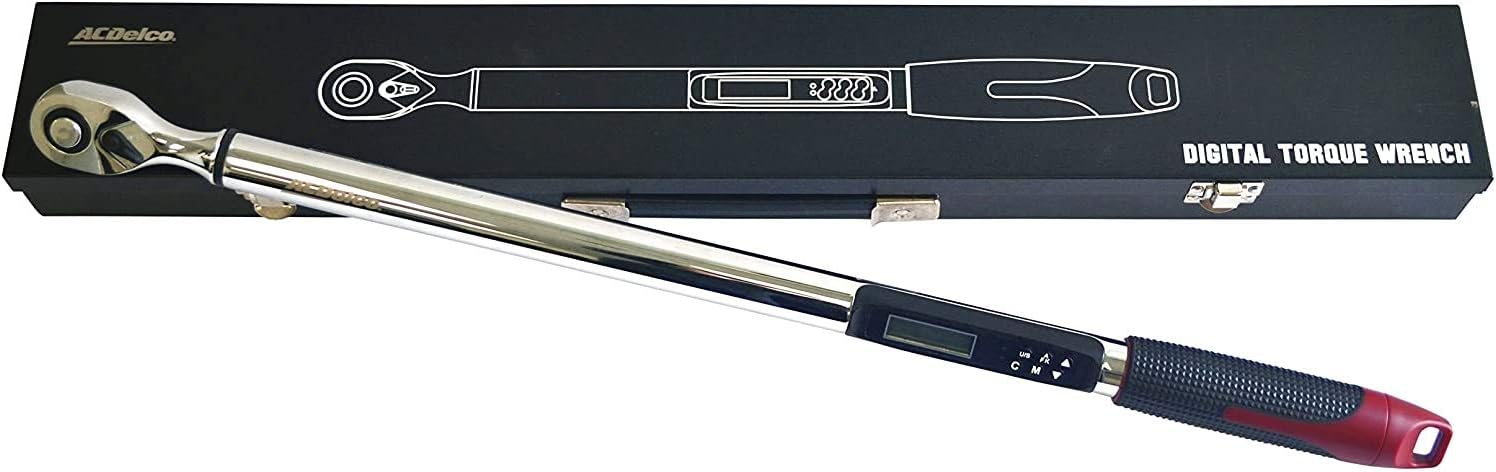
Image: The ARM303-4A-340 digital torque wrench neatly stored within its robust hard-shell case, as received in the package.
Impostare
Installazione della batteria
The ARM303-4A-340 requires 2 AA batteries (not included) for operation.
- Locate the battery compartment cover, typically at the base of the handle.
- Open the cover by twisting or sliding it according to the markings.
- Inserire 2 batterie AA, assicurandosi che la polarità sia corretta (+ e -) come indicato all'interno del vano.
- Chiudere saldamente il coperchio del vano batterie.
Accensione iniziale
Press the power button (usually marked 'ON/OFF') to turn on the wrench. The LCD display will illuminate and perform a self-test before showing the current measurement mode.
Istruzioni per l'uso
Accensione/spegnimento
Premere il tasto ACCESO/SPENTO button to power the wrench on or off. The wrench features an auto-shutoff function after approximately 3 minutes of inactivity to conserve battery life.
Selezione unità
Premere il tasto NOI (Unit/Setting) button to cycle through the available measurement units: ft-lbs, in-lbs, N-m, and Kg-cm. Select the desired unit before setting the target torque.
Impostazione della coppia
To set the target torque value:
- Ensure the wrench is in the desired measurement unit.
- Premere il tasto M (Mode) button to enter the torque setting mode.
- Utilizzare il Up E Giù arrow buttons to adjust the target torque value.
- Premere il tasto M button again to confirm the setting and return to measurement mode.
Measurement Modes (Peak Hold / Track)
The wrench typically offers two measurement modes:
- Modalità traccia: Displays the real-time torque being applied.
- Modalità di mantenimento del picco: Displays the maximum torque value reached during the application.
Cycle between these modes using the appropriate button (refer to the specific button labels on your device, often combined with the 'M' button).
Misurazione dell'angolo
For applications requiring torque-plus-angle (TTY) specifications:
- Set the desired torque value first.
- Premere il tasto A-F-K button (or similar) until the angle degree symbol appears on the display.
- Utilizzare il Up E Giù arrow buttons to set the target angle.
- Apply torque until the set torque value is reached, then continue rotating until the set angle is achieved. The wrench will provide alerts for both thresholds.
Applicazione della coppia
Attach the appropriate socket to the 1/2" drive head. Place the socket onto the fastener. Apply steady, smooth force to the wrench handle. The LCD display will show the real-time torque. When the set target torque is reached, the wrench will emit an audible beep, flash its LED lights, and vibrate.

Image: A user demonstrating the application of the ACDelco ARM303-4A-340 Digital Torque Wrench on a car wheel lug nut, ensuring proper fastening.
Manutenzione
Pulizia
Wipe the wrench clean with a soft, dry cloth after each use. Do not use abrasive cleaners or solvents, as they may damage the finish or electronic components.
Magazzinaggio
Store the digital torque wrench in its original hard-shell case in a dry, temperature-controlled environment. Remove batteries if the wrench will not be used for an extended period to prevent leakage.
Calibrazione
The ACDelco ARM303-4A-340 is calibrated to ISO 6789 standards and includes a Certificate of Calibration. For continued accuracy, periodic re-calibration by a certified service center is recommended, especially after heavy use or if the wrench has been dropped.
Risoluzione dei problemi
| Problema | Possibile causa | Soluzione |
|---|---|---|
| La chiave inglese non si accende. | Batterie scariche o installate in modo errato. | Sostituire le batterie con nuove batterie AA, assicurandosi della corretta polarità. |
| Letture di coppia imprecise. | Improper technique; wrench needs re-calibration. | Apply steady, smooth force. Ensure proper grip. Consider professional re-calibration. |
| Il display non funziona o tremola. | Low battery; internal connection issue. | Sostituisci le batterie. Se il problema persiste, contatta l'assistenza clienti. |
| Battery gets stuck in compartment. | Possible internal obstruction (e.g., screw too long). | Carefully inspect the battery compartment for any obstructions. If unable to resolve, contact customer support. |
| Wrench shuts off too quickly. | Auto-shutoff feature activated. | The wrench is designed to shut off after approximately 3 minutes of inactivity. Power on again to resume use. |
Specifiche
| Numero di modello | ARM303-4A-340 |
| Dimensioni della testa | 1/2 pollici |
| Gamma di coppia | da 12.5 a 250.7 piedi-libbre |
| Unità di misura | ft-lbs, in-lbs, N-m, Kg-cm |
| Accuracy (Pre-set) | CW +/- 1.5%, CCW +/- 2.5% |
| Testa a cricchetto | 72-tooth, Fixed Ratchet |
| Fonte di alimentazione | 2 batterie AA (non incluse) |
| Peso dell'utensile | 6.6 libbre (3.00 kg) |
| Lunghezza dell'articolo | 66.7 centimetri |
| Materiale | Acciaio legato |
| Fine | Lucido |
Garanzia e supporto
Informazioni sulla garanzia
The ACDelco ARM303-4A-340 Digital Torque Wrench comes with a Garanzia limitata di 1 annoLa presente garanzia copre i difetti di materiali e fabbricazione in condizioni di normale utilizzo. Si prega di conservare la prova d'acquisto per eventuali reclami in garanzia.
Assistenza clienti
For technical assistance, warranty service, or to inquire about re-calibration services, please contact ACDelco Tools customer support. Refer to the contact information provided on the product packaging or the official ACDelco Tools websito per i dettagli di supporto più aggiornati.
Ask a question about this manual
Ask about setup, troubleshooting, compatibility, parts, safety, or missing instructions. Manuals+ will review the question and use this page’s manual context to help answer it.