
LyxPro SPA-5.5
Manuale di istruzioni per monitor con altoparlante PA piccolo LyxPro SPA-5.5
Model: SPA-5.5
1. Introduzione
This manual provides detailed instructions for the proper setup, operation, and maintenance of your LyxPro SPA-5.5 Small PA Speaker Monitor. Please read this manual thoroughly before using the device to ensure optimal performance and safety.
The LyxPro SPA-5.5 is a compact and powerful active speaker system featuring a Class-D amplifier, a 3-channel mixer, and a 3-band equalizer. It is designed for various applications including vocal and instrument monitoring, public address, and as a guitar amplifier or karaoke system.
2. Istruzioni di sicurezza
- Fonte di energia: Connect the unit only to the specified power supply (100V – 240V AC). Ensure the power cord is not damaged or pinched.
- Ventilazione: Non ostruire le aperture di ventilazione. Garantire un adeguato flusso d'aria attorno all'unità per evitare il surriscaldamento.
- Acqua e umidità: Non esporre l'unità a pioggia, umidità o liquidi. Non posizionare oggetti contenenti liquidi sull'unità.
- Fonti di calore: Tenere l'unità lontana da fonti di calore quali termosifoni, bocchette di ventilazione, stufe o altri apparecchi che producono calore.
- Pulizia: Pulire solo con un panno asciutto. Scollegare l'alimentazione prima della pulizia.
- Manutenzione: Non tentare di riparare questo prodotto da soli. Affidare tutte le operazioni di manutenzione a personale di assistenza qualificato.
- Posizionamento: Place the unit on a stable surface. If mounting on a microphone stand, ensure the stand is stable and capable of supporting the unit's weight.
3. Contenuto della confezione
Verificare che tutti gli articoli siano presenti nel pacco:
- LyxPro SPA-5.5 Speaker Monitor
- Cavo di alimentazione
- Microphone Stand Mounting Hardware
- Manuale dell'utente (questo documento)
4. Caratteristiche del prodotto
- 125W RMS / 150W Peak Class-D Amppiù vivace
- Integrated 3-Channel Mixer
- 3-Band Equalizer (Bass, Mid, Treble)
- +48V Phantom Power Supply for Condenser Microphones
- Multiple Inputs: XLR, 1/4" (6.35mm), RCA, and 3.5mm (1/8") Aux
- Instrument Switch for Direct Instrument Connection
- XLR Thru Connection for Daisy-Chaining
- Controllo dell'eco
- Connettività Bluetooth integrata
- Compatibilità scheda SD
- Mounts on Standard Microphone Stands
- Durable and Compact Design
5. Controlli e collegamenti
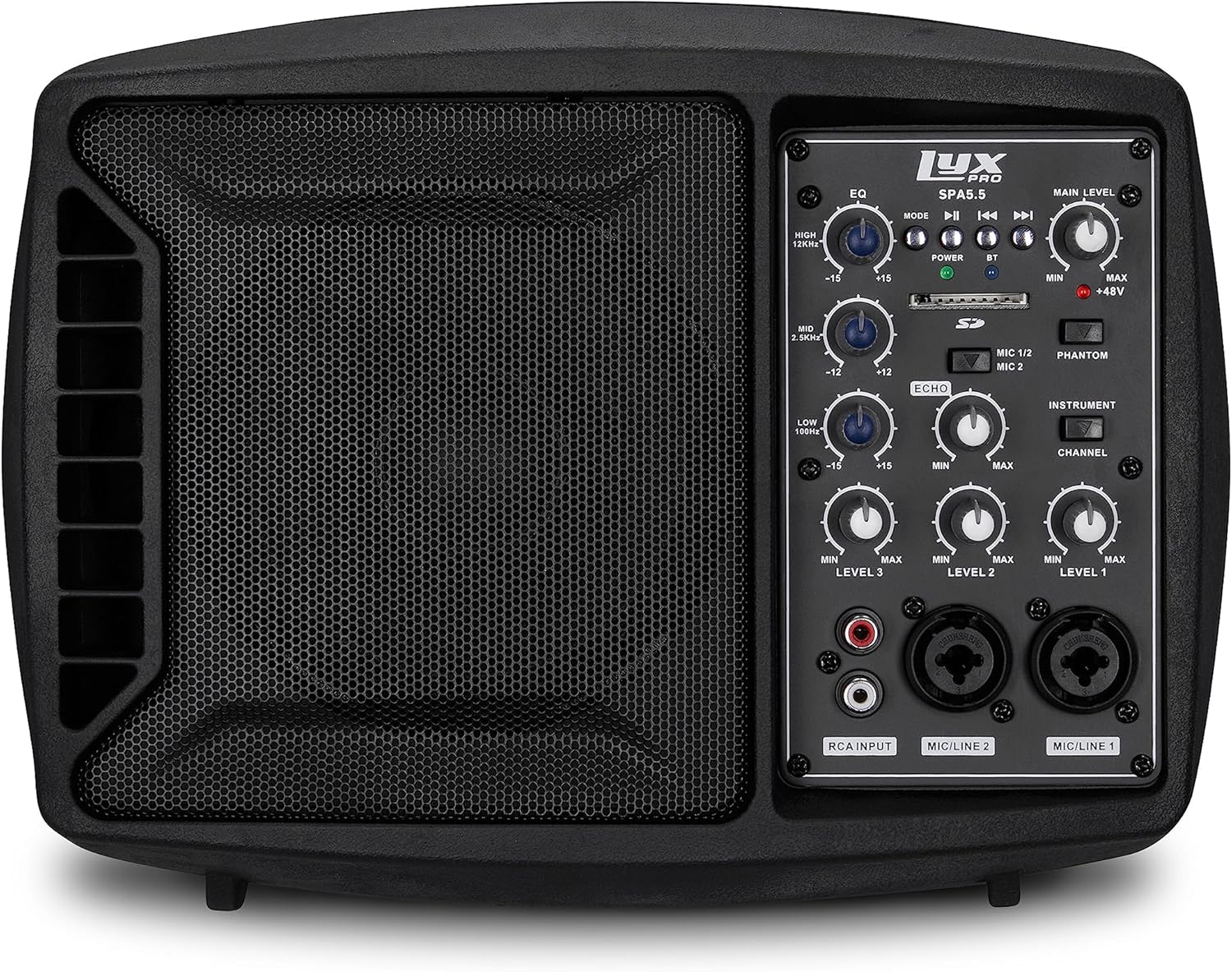
Figura 5.1: Fronte view of the LyxPro SPA-5.5 speaker monitor, showing the speaker grille and control panel.
5.1 Controlli del pannello frontale

Figure 5.2: Detailed diagram of the LyxPro SPA-5.5 front control panel with labeled components.
- Equalizzatore (EQ):
- HIGH (12kHz): Adjusts high frequencies. Range: ±15dB.
- MID (2.5kHz): Adjusts mid frequencies. Range: ±15dB.
- LOW (80Hz): Adjusts low frequencies. Range: ±15dB.
- Livello principale: Controlla il volume di uscita complessivo dell'altoparlante.
- Luce di alimentazione: Indica quando l'unità è accesa.
- BT (Bluetooth) Light: Indica lo stato della connessione Bluetooth.
- Slot per scheda SD: Per riprodurre l'audio files da una scheda SD.
- Interruttore di alimentazione Phantom (+48 V): Activates +48V phantom power for condenser microphones connected to MIC 1 or MIC 2.
- MIC 1/2 Switch: Selects between MIC 1 and MIC 2 inputs for Channel 1.
- Interruttore strumenti: Optimizes input impedance for direct connection of instruments (e.g., guitar) to Channel 1.
- Controllo dell'eco: Adjusts the level of echo effect applied to microphone inputs.
- Channel Level Controls (LEVEL 1, LEVEL 2, LEVEL 3): Adjusts the individual volume for each input channel.
- RCA Input (LINE 3): Stereo RCA inputs for connecting devices like CD players, MP3 players, or keyboards.
- MIC/LINE 2 Input: Combo XLR/1/4" (6.35mm) input for microphones or line-level devices.
- MIC/LINE 1 Input: Combo XLR/1/4" (6.35mm) input for microphones or line-level devices.
5.2 Collegamenti del pannello posteriore

Figure 5.3: Detailed diagram of the LyxPro SPA-5.5 rear panel with labeled connections.
- MAIN IN (XLR): Main input for connecting external audio sources.
- MIC/LINE Level Switch: Selects between microphone or line level for the MAIN IN.
- THRU (XLR): XLR output for daisy-chaining to other speakers or sending the mixed signal to another device.
- Interruttore di alimentazione: Accende o spegne l'unità.
- INGRESSO CA: Power connector for the included AC power cable (100V – 240V AC).
6. Impostazione
6.1 Accensione iniziale
- Ensure all level controls (Main Level, Channel Levels) are set to minimum.
- Connect the provided AC power cable to the AC INPUT on the rear panel and then to a suitable power outlet.
- Flip the Power Switch on the rear panel to the "ON" position. The Power Light on the front panel will illuminate.
6.2 Opzioni di montaggio
The SPA-5.5 can be used in various configurations:
- Monitoraggio del pavimento: Place the unit on the floor in front of the performer, angled upwards.
- Da tavolo: Posizionare su una superficie piana e stabile.
- Montaggio del supporto per microfono: The unit includes hardware to mount it directly onto a standard microphone stand.

Figure 6.1: The LyxPro SPA-5.5 speaker monitor positioned on a microphone stand, demonstrating its use as a personal monitor for a musician.

Figure 6.2: A band performing outdoors, utilizing the compact LyxPro SPA-5.5 speaker for sound reinforcement.
7. Istruzioni per l'uso
7.1 Collegamento di microfoni e strumenti
- Microfoni: Connect dynamic or condenser microphones to the MIC/LINE 1 or MIC/LINE 2 inputs using XLR cables. If using a condenser microphone, activate the +48V Phantom Power Switch. Adjust the corresponding Channel Level control.
- Strumenti: Connect instruments (e.g., guitar, bass) directly to MIC/LINE 1 or MIC/LINE 2 using a 1/4" (6.35mm) cable. Engage the Instrument Switch for optimal impedance matching. Adjust the corresponding Channel Level control.
- Dispositivi a livello di linea: Connect devices like keyboards or audio interfaces to MIC/LINE 1 or MIC/LINE 2 using 1/4" (6.35mm) cables. Ensure the Instrument Switch is disengaged. Adjust the corresponding Channel Level control.
- Stereo Audio Sources: Connect CD players, MP3 players, or other stereo sources to the RCA Input (LINE 3). Adjust LEVEL 3.
7.2 Regolazione del suono
- Livelli dei canali: Use the LEVEL 1, LEVEL 2, and LEVEL 3 controls to balance the volume of individual inputs.
- Livello principale: Adjust the Main Level knob to control the overall output volume of the speaker.
- Equalizzatore (EQ): Use the HIGH, MID, and LOW knobs to shape the tone of your sound.
- Increase HIGH for brighter sound.
- Adjust MID for vocal clarity or instrument presence.
- Increase LOW for more bass.
- Controllo dell'eco: Turn the Echo knob to add a reverberation effect to the microphone inputs.
7.3 Media Playback (SD Card & Bluetooth)

Figure 7.1: Icons indicating SD card compatibility and built-in Bluetooth functionality on the LyxPro SPA-5.5.
- Scheda SD: Inserire una scheda SD contenente audio files into the SD Card Slot. The unit will automatically detect and begin playback. Use the built-in controls (Mode, Play/Pause, Skip) to manage playback.
- Bluetooth:
- Assicurarsi che l'unità sia accesa.
- Attiva il Bluetooth sul tuo dispositivo mobile.
- Cercare "LyxPro SPA-5.5" in your device's Bluetooth settings and pair. The BT light on the unit will indicate a successful connection.
- Play audio from your device. Adjust volume using both your device and the SPA-5.5's Main Level control.

Figure 7.2: A musician utilizing the LyxPro SPA-5.5 as a personal monitor in a studio environment.
8. Manutenzione
- Pulizia: Utilizzare un panno morbido e asciutto per pulire l'esterno dell'unità. Non utilizzare detergenti liquidi o spray.
- Magazzinaggio: Quando non viene utilizzato per lunghi periodi, conservare l'unità in un luogo fresco e asciutto, lontano dalla luce solare diretta e da temperature estreme.
- Sostituzione fusibile: If the unit does not power on, check the fuse located near the AC input. Replace with a fuse of the same type and rating (T 3.15 A H 250V). Refer to qualified personnel if unsure.
9. Risoluzione Dei Problemi
| Problema | Possibile causa | Soluzione |
|---|---|---|
| Nessun potere | Cavo di alimentazione scollegato; Interruttore di alimentazione spento; Fusibile bruciato | Check power cable connection; Turn power switch on; Replace fuse (refer to Maintenance section) |
| Nessuna uscita audio | Main Level or Channel Levels too low; Input device not connected or muted; Incorrect input selected | Increase Main Level and Channel Levels; Check input device connection and volume; Verify correct input is used |
| Suono distorto | Input signal too high; Main Level too high; EQ settings incorrect | Reduce input device volume; Lower Main Level; Adjust EQ settings |
| Microfono non funzionante (microfono a condensatore) | Alimentazione phantom non abilitata | Activate the +48V Phantom Power Switch |
| Il Bluetooth non si connette | Unità non in modalità di associazione; Dispositivo troppo lontano; Dispositivo selezionato non corretto | Ensure Bluetooth is active on SPA-5.5 and device; Move device closer; Select "LyxPro SPA-5.5" from device list |
10. Specifiche

Figure 10.1: Diagram illustrating the compact dimensions of the LyxPro SPA-5.5 speaker monitor.
| Caratteristica | Dettaglio |
|---|---|
| Potenza in uscita | 125 W RMS / 150 W Picco |
| Dimensioni dell'altoparlante | 5 pollici |
| AmpTipo lificatore | Class-D |
| Risposta in frequenza (-10dB) | Frequenza di campionamento: |
| Risposta in frequenza (-3dB) | Frequenza di campionamento: |
| massimo SPL | 114dB SPL @ 1M |
| Potenza fantasma | +48V |
| Impedenza di ingresso | 20 K Ω |
| EQ High (12kHz) | ±15 dB |
| EQ Mid (2.5kHz) | ±15 dB |
| EQ Low (80Hz) | ±15 dB |
| Ingresso volumetage | 100V - 240V AC |
| Consumo energetico | 180 W max. |
| Dimensioni (L x P x A) | 13.5" x 9" x 11.8" (34.3 cm x 22.9 cm x 30 cm) |
| Peso | 6.1 libbre (2.77 kg) |
11. Garanzia e supporto
For warranty information and technical support, please refer to the warranty card included with your product or visit the official LyxPro websito. Conserva la ricevuta d'acquisto come prova d'acquisto.
For further assistance, contact LyxPro customer support.
Ask a question about this manual
Ask about setup, troubleshooting, compatibility, parts, safety, or missing instructions. Manuals+ will review the question and use this page’s manual context to help answer it.