
Mastech MS-6450
Manuale utente del misuratore di distanza laser Mastech MS-6450
Modello: MS6450
1. Introduzione
Thank you for choosing the Mastech MS-6450 Laser Distance Meter. This manual provides essential information for the safe and efficient operation, maintenance, and troubleshooting of your device. Please read this manual thoroughly before using the meter and keep it for future reference.
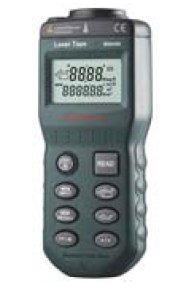
Figure 1: Mastech MS-6450 Laser Distance Meter. This image shows the compact black device with a digital display and multiple control buttons on its front face.
2. Informazioni sulla sicurezza
Per evitare lesioni e danni al dispositivo, osservare sempre le seguenti precauzioni di sicurezza:
- Non guardare direttamente nel raggio laser.
- Non smontare o modificare il dispositivo.
- Tenere il dispositivo lontano dall'acqua e da temperature estreme.
- Utilizzare solo batterie specificate.
- Conservare il dispositivo in un luogo fresco e asciutto quando non viene utilizzato.
3. Impostazione
3.1. Installazione della batteria
- Individuare il coperchio del vano batteria sul retro del dispositivo.
- Far scorrere il coperchio per aprirlo.
- Insert the required batteries (refer to specifications for type) observing the correct polarity (+/-).
- Chiudere saldamente il coperchio del vano batterie.
3.2. Accensione iniziale
Premere il tasto ENERGIA button to turn on the device. The display will illuminate, showing the current measurement mode and battery status.
4. Istruzioni per l'uso
4.1 Misurazione di base
- Puntare l'apertura del laser verso la superficie bersaglio.
- Premere il tasto LEGGERE premere una volta il pulsante per attivare il laser.
- Premere il tasto LEGGERE button again to take a measurement. The distance will be displayed on the screen.
4.2. Modalità di misurazione
The MS-6450 supports various measurement modes. Use the MODALITÀ pulsante per scorrere tra di essi:
- Singola misura: Misurazione standard della distanza.
- Misurazione continua: Displays real-time distance as the device moves.
- Misurazione dell'area: Measure length and width to calculate area.
- Misurazione del volume: Measure length, width, and height to calculate volume.
- Misura pitagorica: Misurazione indiretta mediante il teorema di Pitagora.
4.3. Conversione unità
Premere il tasto UNITÀ button to switch between measurement units (e.g., meters, feet, inches).
5. Manutenzione
5.1. Pulizia
Wipe the device with a soft, dry cloth. Do not use abrasive cleaners or solvents. Keep the laser lens clean for accurate measurements.
5.2. Conservazione
When not in use for extended periods, remove the batteries to prevent leakage. Store the device in its original packaging or a protective case in a cool, dry environment.
6. Risoluzione Dei Problemi
| Problema | Possibile causa | Soluzione |
|---|---|---|
| Il dispositivo non si accende. | Batterie scariche o esaurite; polarità della batteria errata. | Replace batteries; Check battery orientation. |
| Misurazioni imprecise. | Dirty laser lens; Unstable measurement surface; Environmental interference. | Clean lens; Ensure stable target; Avoid strong light sources. |
| Il display mostra "Errore". | Measurement out of range; Obstruction. | Ensure target is within range; Remove obstructions. |
7. Specifiche
- Modello: Modello MS-6450
- Campo di misura: Refer to product packaging for specific range. Typical range for similar devices is 0.05m to 40m.
- Precisione della misurazione: Refer to product packaging for specific accuracy. Typical accuracy for similar devices is ±2mm.
- Classe Laser: Classe II
- Tipo di laser: 635 nm, <1 mW
- Unità: Metri (m), Piedi (ft), Pollici (in)
- Tipo di batteria: Refer to product packaging for specific battery type. Commonly uses AAA batteries.
- Temperatura di esercizio: Refer to product packaging for specific operating temperature. Typical range is 0°C to 40°C.
- Dimensioni: Refer to product packaging for specific dimensions.
- Peso: Refer to product packaging for specific weight.
8. Informazioni sulla garanzia
Mastech products are designed for durability and quality. This product typically comes with a standard manufacturer's warranty against defects in materials and workmanship. Please refer to your purchase documentation or the official Mastech webPer i termini e le condizioni di garanzia specifici applicabili alla tua regione, consulta il sito. Conserva la prova d'acquisto per eventuali reclami in garanzia.
9. Assistenza clienti
For technical assistance, troubleshooting beyond this manual, or service inquiries, please contact Mastech customer support. You can typically find contact information on the official Mastech website or through your local distributor. When contacting support, please have your product model (MS-6450) and serial number (if applicable) ready.
Official Mastech Websito: www.mastech.com
Ask a question about this manual
Ask about setup, troubleshooting, compatibility, parts, safety, or missing instructions. Manuals+ will review the question and use this page’s manual context to help answer it.