
1. Introduzione
This manual provides essential information for the safe and efficient operation of your Argox OX-330 Barcode Monochrome Printer. Please read this manual thoroughly before using the printer and retain it for future reference. The Argox OX-330 is designed for direct thermal and thermal transfer printing, offering a resolution of 203 dpi for clear and precise label output.
2. Informazioni sulla sicurezza
- Alimentazione elettrica: Use only the power adapter supplied with the printer. Ensure the power outlet matches the voltage requisiti.
- Posizionamento: Posizionare la stampante su una superficie stabile e piana. Evitare luoghi eccessivamente polverosi, umidi o esposti alla luce solare diretta.
- Ventilazione: Do not block ventilation openings. Ensure adequate airflow around the printer.
- Gestione: Evitare di toccare la testina di stampa subito dopo la stampa, poiché potrebbe essere calda.
- Pulizia: Disconnect the power cord before cleaning the printer. Use a soft, dry cloth. Do not use liquid or aerosol cleaners.
- Riparazioni: Do not attempt to repair the printer yourself. Refer all servicing to qualified service personnel.
3. Prodotto finitoview
The Argox OX-330 is a compact desktop thermal label printer capable of both direct thermal and thermal transfer printing. It features 8MB DRAM (5MB user available) and 4MB Flash ROM (2MB user available) for efficient data processing and storage.
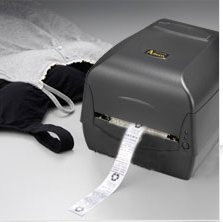
Figura 3.1: Argox OX-330 Barcode Monochrome Printer. This image shows the printer actively producing a label, demonstrating its primary function.
Componenti chiave:
- Testina di stampa: Responsible for transferring the image onto the label.
- Media Guides: Ensure proper alignment of labels.
- Pannello di controllo: Includes buttons and indicator lights for printer status and basic operations.
- Porta di alimentazione: Per collegare l'adattatore di alimentazione.
- Porte dati: For connecting to a computer (e.g., USB, Wi-Fi).
- Media Compartment: Where label rolls and ribbons (for thermal transfer) are loaded.
4. Impostazione
4.1 Disimballaggio
- Estrarre con cautela la stampante e tutti gli accessori dalla confezione.
- Verificare che tutti i componenti elencati nel contenuto della confezione siano presenti.
- Rimuovere eventuali pellicole protettive o materiali di imballaggio dalla stampante.
4.2 Collegamento dell'alimentazione
- Collegare l'adattatore di alimentazione alla porta di alimentazione della stampante.
- Collegare il cavo di alimentazione a una presa elettrica idonea.
- Do not power on the printer until all other connections are made.
4.3 Collegamento a un computer
The Argox OX-330 supports Wi-Fi connectivity for seamless integration with your PC.
- Connessione Wi-Fi: Refer to the separate Wi-Fi setup guide for detailed instructions on connecting your printer to a wireless network. This typically involves installing the printer driver and utility software on your PC.
- USB Connection (if applicable): If using a USB cable, connect one end to the printer and the other to an available USB port on your PC.
4.4 Loading Labels and Ribbon
The OX-330 supports both Direct Thermal and Thermal Transfer printing methods. The loading procedure varies slightly depending on the method.
- Aprire il coperchio superiore della stampante.
- Adjust the media guides to the width of your label roll.
- Place the label roll onto the media spindle, ensuring the labels feed correctly.
- Per Trasferimento termico printing, also load the ribbon according to the diagrams inside the printer's media compartment. Ensure the ribbon is taut and correctly threaded.
- Chiudere il coperchio superiore.
5. Istruzioni per l'uso
5.1 Accensione/Spegnimento
- Per accendere: Premere il pulsante di accensione situato sulla stampante. La spia luminosa si illuminerà.
- Per spegnere: Tenere premuto il pulsante di accensione finché la stampante non si spegne.
5.2 Installazione di driver e software
Before printing, install the appropriate printer drivers and label design software on your PC. These are typically provided on a CD with the printer or available for download from the Argox official websito. Seguire le istruzioni sullo schermo per l'installazione.
5.3 Stampa di un'etichetta
- Ensure the printer is powered on and connected to your PC (via Wi-Fi or USB).
- Open your label design software or application from which you wish to print.
- Crea o apri il tuo progetto di etichetta.
- Go to the 'Print' option in your software.
- Select the Argox OX-330 as your printer.
- Configure print settings such as label size, print quantity, and printing method (Direct Thermal or Thermal Transfer) if applicable. The printer supports a resolution of 203 dpi.
- Click 'Print'. The printer will begin printing your labels.
6. Manutenzione
Regular maintenance ensures optimal performance and extends the life of your Argox OX-330 printer.
6.1 Pulizia della testina di stampa
La testina di stampa è un componente fondamentale e deve essere pulita regolarmente, soprattutto se la qualità di stampa diminuisce.
- Spegnere la stampante e scollegare il cavo di alimentazione.
- Aprire il coperchio superiore per accedere alla testina di stampa.
- Using a lint-free cloth moistened with isopropyl alcohol (99% pure), gently wipe the print head surface.
- Lasciare asciugare completamente la testina di stampa prima di chiudere il coperchio e ricollegare l'alimentazione.
6.2 Pulizia generale
- Pulire la parte esterna della stampante con un panno morbido e asciutto.
- Use a soft brush or compressed air to remove dust and debris from inside the media compartment.
7. Risoluzione Dei Problemi
This section addresses common issues you might encounter with your Argox OX-330 printer.
7.1 Nessun potere
- Assicurarsi che il cavo di alimentazione sia collegato saldamente sia alla stampante sia alla presa elettrica.
- Verificare che la presa di corrente funzioni collegandovi un altro dispositivo.
7.2 Scarsa qualità di stampa
- Pulire la testina di stampa come descritto nella Sezione 6.1.
- Ensure you are using the correct type of labels for your printing method (Direct Thermal or Thermal Transfer).
- Check if the ribbon (for thermal transfer) is correctly loaded and not depleted.
- Adjust print darkness settings in your printer driver.
7.3 La stampante non risponde
- Check the connection between the printer and your PC (Wi-Fi or USB).
- Riavviare sia la stampante che il computer.
- Ensure the correct printer driver is installed and updated.
- Check the printer's status indicator lights for error messages.
7.4 Le etichette non vengono alimentate correttamente
- Ensure labels are loaded correctly and the media guides are adjusted to the label width.
- Check for any obstructions in the media path.
- Calibrate the printer for the label size if necessary (refer to printer utility software).
8. Specifiche
| Caratteristica | Specificazione |
|---|---|
| Marca | Argox |
| Nome del modello | BUE-330 |
| Tecnologia di stampa | Thermal (Direct Thermal & Thermal Transfer) |
| Risoluzione di stampa | 203 dpi |
| Uscita della stampante | Monocromo |
| Tecnologia di connettività | Wifi |
| Memoria | 8MB DRAM (5MB user available), 4MB Flash ROM (2MB user available) |
| Dispositivi compatibili | PC |
| Tipo di supporto di stampa | Etichette |
| Peso dell'articolo | 1800 grammi |
| Dimensioni del prodotto (P x L x A) | 16D x 6W x 10H centimetri |
| Caratteristica speciale | Compatto |
| Stampa fronte-retro | SÌ |
| Bifamiliare | Automatico |
9. Garanzia e supporto
9.1 Informazioni sulla garanzia
The Argox OX-330 Barcode Monochrome Printer comes with a Garanzia di 1 anno from the date of purchase. This warranty covers manufacturing defects under normal use. It does not cover damage caused by misuse, accidents, unauthorized repairs, or consumables.
9.2 Supporto tecnico
For technical assistance, troubleshooting beyond this manual, or warranty claims, please contact Argox customer support. Refer to the Argox official website or your purchase documentation for contact details and support resources.