
Introduzione
Thank you for choosing the KINGONE K5 Portable Wireless Bluetooth Speaker. This manual provides essential information for the proper setup, operation, and maintenance of your device. Please read it thoroughly before use to ensure optimal performance and longevity of your speaker.
Informazioni sulla sicurezza
- Non esporre l'altoparlante a temperature estreme, alla luce solare diretta o a elevata umidità.
- Evitare di far cadere o di sottoporre l'altoparlante a forti urti.
- Non smontare o tentare di riparare l'altoparlante da soli. Ciò invaliderà la garanzia.
- Keep the speaker away from water and liquids. While it is waterproof, prolonged submersion or exposure to high-pressure water jets should be avoided.
- Utilizzare solo il volume di carica specificatotage (CC 5 V).
Contenuto della confezione
- KINGONE K5 Portable Wireless Bluetooth Speaker
- Cavo di ricarica USB
- Manuale d'uso
Prodotto finitoview
Familiarizzare con i comandi e le porte dell'altoparlante.
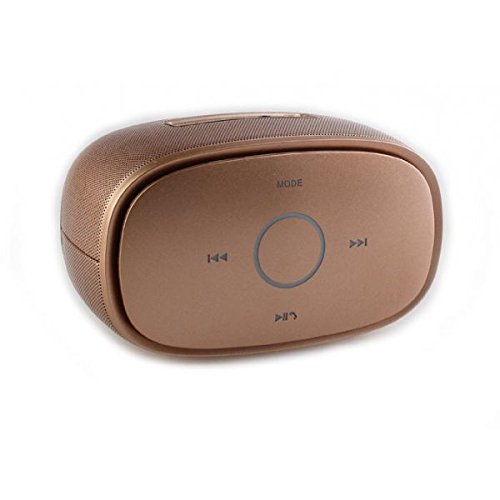
Immagine: Superiore view of the KINGONE K5 Portable Wireless Bluetooth Speaker. The image displays the speaker's top panel, which features a central circular play/pause button, surrounded by four other buttons: 'MODE' at the top, 'previous track' (left), 'next track' (right), and 'volume down/call answer' (bottom). The speaker has a metallic brown finish with a textured grille on the sides.
Pulsanti di controllo:
- DIREZIONI: Press to switch between Bluetooth, AUX, and other available modes.
- Traccia precedente (<<): Premere brevemente per passare alla traccia precedente.
- Traccia successiva (>>): Premere brevemente per passare alla traccia successiva.
- Riproduci/Pausa (►▮▮): Press to play or pause music. Long press for power on/off.
- Volume Down/Call Answer (▼): Short press to decrease volume. During an incoming call, press to answer.
- Volume Up/Call End (▲): Short press to increase volume. During a call, press to end. (Note: Volume Up button is not explicitly visible in the provided image but is a standard function for such devices, assuming it's paired with Volume Down or integrated.)
Porte:
- Porta di ricarica micro USB: Per caricare l'altoparlante.
- Porta AUX-in: Per la connessione audio cablata.
Impostare
1. Ricarica dell'altoparlante
- Collegare l'estremità più piccola del cavo di ricarica USB alla porta Micro USB dell'altoparlante.
- Connect the larger end of the USB cable to a USB power adapter (DC 5V, not included) or a computer's USB port.
- La spia di carica si illuminerà. Si spegnerà o cambierà colore una volta completata la carica.
- A full charge typically takes approximately 3-4 hours and provides up to 7 hours of playback.
2. Accensione/Spegnimento
- Per accendere: Long press the Play/Pause button until you hear an audible prompt or see an indicator light.
- Per spegnere: Long press the Play/Pause button again until you hear an audible prompt or the indicator light turns off.
3. Accoppiamento Bluetooth
- Ensure the speaker is powered on and in Bluetooth mode. If not, press the 'MODE' button to switch to Bluetooth mode. The indicator light will flash, indicating it's ready for pairing.
- Abilita il Bluetooth sul tuo smartphone, tablet o altro dispositivo abilitato Bluetooth.
- Cercare available Bluetooth devices. You should see "KINGONE K5" in the list.
- Select "KINGONE K5" to connect. Once paired, you will hear a confirmation sound, and the indicator light will stop flashing and remain solid.
- Una volta acceso, l'altoparlante tenterà automaticamente di riconnettersi all'ultimo dispositivo associato.
4. Connecting via AUX (Audio Input)
- Collegare un'estremità di un cavo audio da 3.5 mm (non incluso) alla porta AUX-in dell'altoparlante.
- Collegare l'altra estremità del cavo audio alla presa per le cuffie del dispositivo audio.
- The speaker will automatically switch to AUX mode, or you may need to press the 'MODE' button to select AUX.
Operativo
Riproduzione di musica
- Riproduci/Pausa: Premere il pulsante Riproduci/Pausa per avviare o mettere in pausa la riproduzione.
- Traccia successiva: Press the Next Track (>>) button to skip to the next song.
- Traccia precedente: Press the Previous Track (<<) button to go back to the beginning of the current song or to the previous song.
- Controllo del volume: Use the Volume Down (▼) and Volume Up (▲) buttons on the speaker to adjust the volume. You can also control the volume from your connected device.
Chiamata a mani libere
Se connesso tramite Bluetooth, l'altoparlante può essere utilizzato per chiamate in vivavoce.
- Rispondi alla chiamata: Press the Volume Down (▼) button once to answer an incoming call.
- Termina chiamata: Press the Volume Up (▲) button once to end an ongoing call.
- Rifiuta chiamata: Long press the Volume Down (▼) button to reject an incoming call.
Manutenzione
Pulizia
- Pulisci l'altoparlante con un panno morbido, asciutto o leggermenteamp stoffa.
- Non utilizzare detergenti abrasivi, alcol o solventi chimici.
Magazzinaggio
- Conservare l'altoparlante in un luogo fresco e asciutto, lontano dalla luce solare diretta e da temperature estreme.
- Se si prevede di non utilizzarla per un periodo prolungato, caricare periodicamente la batteria (ad esempio ogni 3 mesi) per mantenerla in buone condizioni.
Cura della batteria
- Evitare di scaricare completamente la batteria frequentemente.
- Do not leave the speaker connected to a charger for excessively long periods after it is fully charged.
Risoluzione dei problemi
| Problema | Possibile causa | Soluzione |
|---|---|---|
| L'altoparlante non si accende. | La batteria è scarica o esaurita. | Caricare l'altoparlante per almeno 30 minuti. |
| Impossibile accoppiarsi con il dispositivo Bluetooth. | Speaker is not in pairing mode. Bluetooth is off on your device. Speaker is already connected to another device. | Ensure speaker is in Bluetooth pairing mode (flashing indicator). Turn on Bluetooth on your device. Disconnect from other devices or restart the speaker. |
| Nessun suono o volume basso. | Volume is too low on speaker or device. Incorrect mode selected. | Increase volume on both the speaker and your connected device. Press the 'MODE' button to select the correct input (Bluetooth/AUX). |
| Distorsione del suono. | Volume too high. Device too far from speaker. | Reduce volume on speaker and/or device. Move the device closer to the speaker (within 10 meters). |
Specifiche
- Nome modello: KINGONE K5
- Numero modello articolo: KNG006
- Tecnologia di comunicazione wireless: Bluetooth
- Versione Bluetooth: V2.0 (as per product title)
- Tipo di altoparlante: Libreria (portatile)
- Dimensioni altoparlante: 2 pollici
- Modalità di uscita audio: Stereo (2.0 canali)
- Fonte di energia: Battery Powered (Built-in Li-ion battery)
- Volume nominaletage: CC 5V
- Risposta in frequenza: 3 dB
- Frequency Scope: Da 170 a 15 kHz
- Metodo di controllo: Tocco
- Impermeabile: SÌ
- Durata della batteria: Fino a 7 ore (circa)
- Dispositivi compatibili: Smartphone, Tablet
Garanzia e supporto
Per informazioni sulla garanzia o assistenza tecnica, consultare la documentazione fornita al momento dell'acquisto o contattare il rivenditore. Conservare la prova d'acquisto per eventuali reclami in garanzia.