
1. Introduzione
This manual provides detailed instructions for the proper installation and use of the LD Systems U500 RK 2 Rackmount Kit. This kit is designed to securely mount two LD Systems U500 half-rack receivers side-by-side into a standard 19-inch equipment rack. Please read this manual thoroughly before proceeding with installation to ensure safe and correct setup.
2. Informazioni sulla sicurezza
- Always ensure the rack is stable and capable of supporting the combined weight of all installed equipment.
- Utilizzare strumenti adeguati per l'installazione.
- Avoid over-tightening screws, which can damage equipment or the rack.
- Tenere le parti di piccole dimensioni lontano dalla portata dei bambini.
3. Contenuto della confezione
Verificare che tutti i componenti siano presenti prima di iniziare l'installazione:
- 1x Rackmount Panel (main bracket)
- 2x Short Brackets (for attaching receivers to the main panel)
- Screws for attaching receivers to brackets
- Screws for attaching the assembly to a 19-inch rack
- Questo manuale di istruzioni
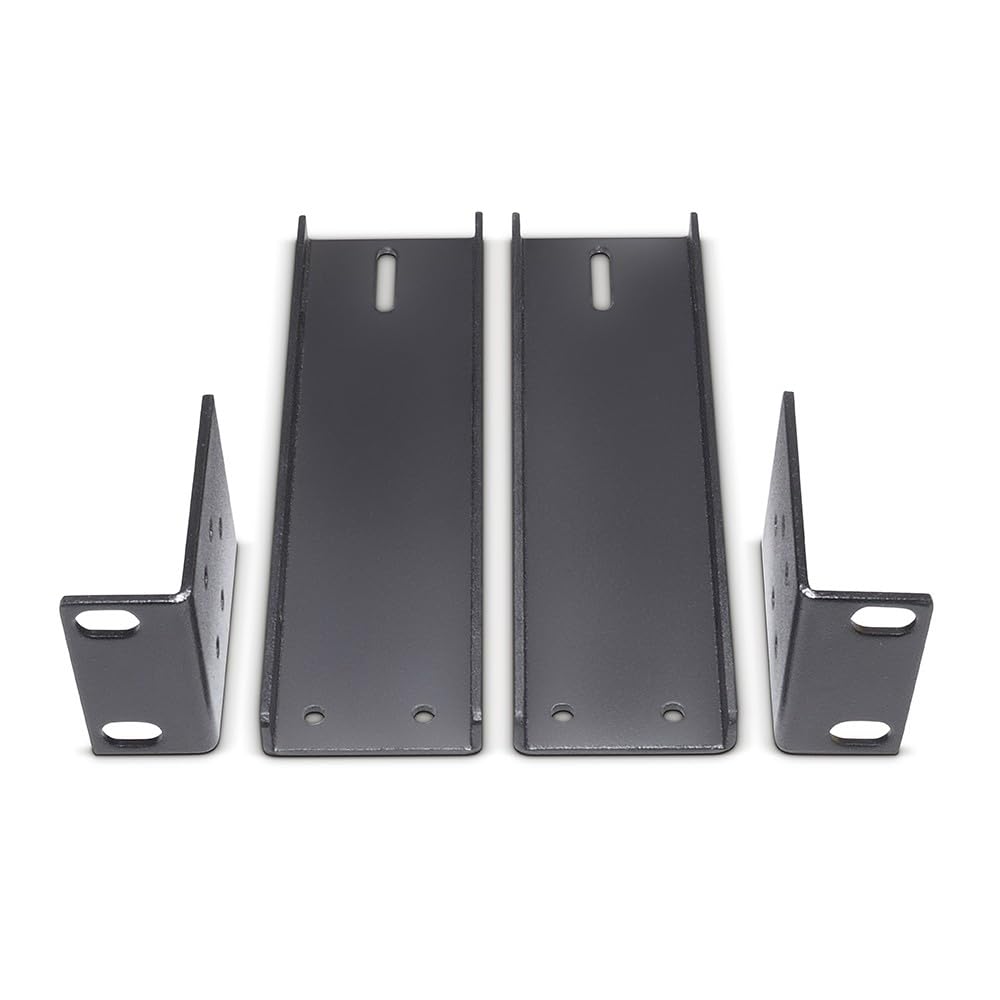
Image 1: Components of the LD Systems U500 RK 2 Rackmount Kit. This image shows the main rackmount panel, two short brackets, and various screws.
4. Configurazione e installazione
Follow these steps to install your U500 receivers into a 19-inch rack:
- Prepare Receivers: Ensure your two LD Systems U500 receivers are powered off and disconnected from all cables. Remove any existing rubber feet or side panels if they interfere with mounting.
- Attach Short Brackets: Take one U500 receiver and one short bracket. Align the screw holes on the side of the receiver with the holes on the short bracket. Secure the bracket to the receiver using the provided small screws. Repeat this for the second receiver and the other short bracket.
- Connect Receivers to Main Panel: Place the two receivers side-by-side. The short brackets should now be on the outer sides of the combined unit. Align the inner sides of the receivers with the mounting points on the main rackmount panel. Secure the receivers to the main panel using the remaining small screws. Ensure they are flush and stable.
- Mount into Rack: Carefully slide the assembled unit into your 19-inch equipment rack. Align the screw holes on the main rackmount panel with the rack rails. Secure the assembly to the rack using the larger rack screws. Tighten screws firmly but do not overtighten.
- Collegare i cavi: Once securely mounted, reconnect all necessary audio, antenna, and power cables to your U500 receivers.
Image 2: Illustrative image of the rackmount kit with two U500 receivers installed, ready for rack mounting. This image demonstrates how the receivers fit together with the kit.
5. Considerazioni operative
The LD Systems U500 RK 2 Rackmount Kit is a passive mounting solution. Once installed, its primary function is to provide a stable and organized housing for your U500 receivers within a standard equipment rack. Ensure adequate ventilation around the receivers to prevent overheating, especially in enclosed rack environments.
6. Manutenzione
The rackmount kit requires minimal maintenance:
- Pulizia: Periodically wipe the rackmount panel with a soft, dry cloth to remove dust. Avoid abrasive cleaners or solvents.
- Controllo delle viti: Occasionally check all mounting screws to ensure they remain tight. Vibrations can sometimes cause screws to loosen over time.
- Ventilazione: Ensure that the rack's ventilation paths are not obstructed, allowing proper airflow for the mounted receivers.
7. Risoluzione Dei Problemi
Se riscontri problemi durante o dopo l'installazione, tieni presente quanto segue:
- Kit Does Not Fit Rack: Ensure you are using a standard 19-inch equipment rack. Verify that the rack rails are not bent or damaged.
- Receivers Do Not Fit Kit: Confirm that you are using LD Systems U500 series half-rack receivers. This kit is specifically designed for these models.
- Vestibilità comoda dopo l'installazione: Double-check all screws connecting the receivers to the brackets and the brackets to the main panel, as well as the screws securing the assembly to the rack.
- Difficulty Aligning Screws: Ensure all components are correctly oriented before attempting to tighten screws. Do not force screws.
8. Specifiche
| Attributo | Dettaglio |
|---|---|
| Numero di modello | U500 RK 2 |
| Compatibilità | Two LD Systems U500 Series Half-Rack Receivers |
| Rack Standard | 19-inch standard equipment rack |
| Peso dell'articolo | 12.2 once (circa 346 grammi) |
| Dimensioni del pacco | 5.94 x 2.48 x 1.97 pollici (circa 15.1 x 6.3 x 5 cm) |
9. Garanzia e supporto
LD Systems products are designed for reliability and performance. For specific warranty information, please refer to the warranty card included with your original U500 receivers or visit the official LD Systems website. For technical support, replacement parts, or further assistance, please contact LD Systems customer service or your authorized dealer.
LD Systems Official Websito: www.ld-systems.com