
1. Introduzione
Thank you for choosing the Comelit Classic Monitor, Model 6101N. This manual provides essential information for the correct installation, operation, and maintenance of your video intercom monitor. Please read these instructions carefully before using the device to ensure safe and efficient operation.
The Comelit Classic Monitor is designed to provide reliable video and audio communication for door entry systems, enhancing security and convenience for your home or office.
2. Informazioni sulla sicurezza
- Sicurezza elettrica: Installation and maintenance should only be performed by qualified personnel. Disconnect power before performing any wiring or service.
- Ambiente: Do not expose the monitor to extreme temperatures, humidity, direct sunlight, or corrosive substances.
- Pulizia: Per la pulizia, utilizzare un panno morbido e asciutto. Non utilizzare detergenti abrasivi o solventi.
- Modifiche: Do not attempt to modify or repair the device yourself. Unauthorized modifications may void the warranty and pose safety risks.
3. Contenuto della confezione
Si prega di verificare che tutti i componenti siano presenti nella confezione:
- Comelit Classic Monitor (Model 6101N)
- Staffa di montaggio
- Viti di montaggio e tasselli
- Manuale di istruzioni (questo documento)
4. Prodotto finitoview
The Comelit Classic Monitor features a sleek design and intuitive controls for managing your door entry system. Below is an image of the monitor, highlighting its key features.
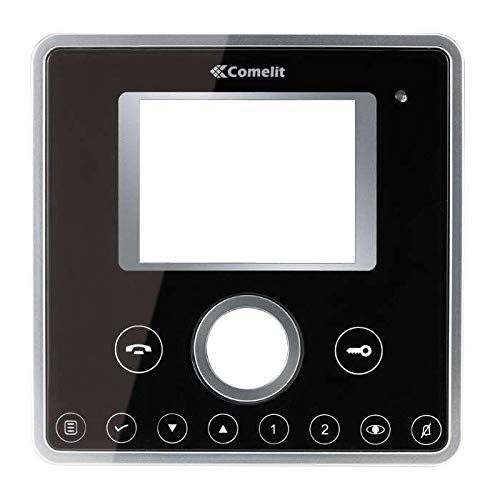
Figura 1: Fronte view of the Comelit Classic Monitor (Model 6101N). This image shows the monitor's display screen, handset, and control buttons. The monitor is black with a minimalist design.
I componenti chiave in genere includono:
- Schermo di visualizzazione: Mostra il feed video dall'unità esterna.
- portatile: Per la comunicazione audio.
- Pulsante di apertura della porta: Activates the electric lock to open the door.
- Pulsante ausiliario: May control additional functions (e.g., secondary door, stair light).
- Controllo del volume: Adjusts ringtone and communication volume.
5. Configurazione e installazione
Installation of the Comelit Classic Monitor requires electrical wiring and should ideally be performed by a qualified technician. Incorrect installation can lead to device malfunction or safety hazards.
5.1 Montaggio del monitor
- Choose a suitable location on an interior wall, away from direct heat sources or moisture.
- Secure the mounting bracket to the wall using the provided screws and wall plugs. Ensure the bracket is level.
- Refer to the system wiring diagram (provided with your outdoor unit or system documentation) for correct cable connections.
- Connect the system cables to the monitor's terminals as indicated in the wiring diagram. Ensure all connections are secure.
- Carefully attach the monitor to the mounting bracket, ensuring it clicks securely into place.
5.2 Accensione iniziale
Once installed, restore power to the system. The monitor should power on and display a standby screen or indicator light. Perform a test call from the outdoor unit to verify proper operation.
6. Istruzioni per l'uso
6.1 Rispondere a una chiamata
- When someone calls from the outdoor unit, the monitor will ring and display the video feed.
- Lift the handset to answer the call and begin two-way audio communication.
- To end the call, replace the handset.
6.2 Apertura della porta
During a call, or when the monitor is active, press the Pulsante di apertura della porta (often marked with a key symbol) to activate the electric lock and open the door.
6.3 Regolazione delle impostazioni
- Volume: Use the volume control (usually a rotary dial or buttons on the side/bottom) to adjust the ringtone and communication volume.
- Luminosità/Contrasto: Some models may have controls for adjusting screen brightness or contrast. Refer to specific model features if available.
7. Manutenzione
- Pulizia: Regularly wipe the monitor's surface and screen with a soft, dry, anti-static cloth. Do not use liquid cleaners directly on the screen or device.
- Ispezione: Controllare periodicamente eventuali collegamenti allentati o danni visibili. In caso di problemi, contattare un tecnico qualificato.
- Aggiornamenti software: If your system supports firmware updates, follow the manufacturer's instructions for applying them to ensure optimal performance and security.
8. Risoluzione Dei Problemi
| Problema | Possibile causa | Soluzione |
|---|---|---|
| Nessun video/audio dall'unità esterna. | Loose wiring, power issue, outdoor unit malfunction. | Check all connections. Ensure system has power. Contact technician if problem persists. |
| Il monitor non si accende. | No power supply, faulty wiring, monitor malfunction. | Verify power supply to the system. Check wiring. Contact technician. |
| L'apertura della porta non funziona. | Wiring issue to electric lock, faulty lock, monitor button malfunction. | Check wiring to the lock. Test the lock independently if possible. Contact technician. |
| Scarsa qualità video. | Dirty camera lens (outdoor unit), poor wiring, interference. | Clean outdoor camera lens. Check wiring for damage or interference. |
9. Specifiche
Below are the technical specifications for the Comelit Classic Monitor, Model 6101N:
- Numero modello: 6101N
- Produttore: Comelit
- Tipo di prodotto: Videocitofono Monitor
- ASIN: B01MSE76EO
- Numero di prodotti: 1
- Prima data disponibile: 2 febbraio 2017
- Note: Specific electrical and display specifications may vary by system configuration. Refer to your system's main documentation for full details.
10. Garanzia e supporto
Comelit products are covered by a manufacturer's warranty. For specific warranty terms and conditions, please refer to the warranty card included with your product or visit the official Comelit websito. Conservare la prova d'acquisto per eventuali reclami in garanzia.
For technical support, service, or further assistance, please contact your authorized Comelit dealer or visit the official Comelit support page:
Official Comelit Websito: www.comelitgroup.com
Please have your model number (6101N) and purchase details ready when contacting support.