
1. Introduzione
The XTUGA EW240 UHF 4-Channel Wireless Microphone System is designed for professional audio applications, offering reliable performance and clear sound transmission. This system features a robust metal receiver and four bodypack transmitters, each capable of operating on independent channels without interference. It is suitable for various events requiring multiple wireless microphones.
2. Caratteristiche principali
- Progettazione professionale: Durable metal construction for the receiver.
- Funzionamento a 4 canali: Four independent channels can operate simultaneously without interference.
- Controllo del volume individuale: Each channel on the receiver has its own volume control.
- Quiet Audio Circuitry: Designed for silent operation, reducing unwanted noise.
- Frequency Expansion Compression: Intrusive frequency expansion compression technique reduces noise and extends dynamic range.
- Ampia risposta in frequenza: 50 Hz - 15 kHz with very low distortion.
- Uscite multiple: One 1/4-inch mixed output and four individual 1/4-inch outputs.
- Campo di funzionamento: Fino a 65 metri (circa 213 piedi).
- Trasmettitori bodypack: Innovative design compatible with lavalier, headset, or instrument connectors.
3. Contenuto della confezione
The XTUGA EW240 system typically includes the following components:
- 1x XTUGA EW240 UHF 4-Channel Receiver
- 4x UHF Bodypack Transmitters
- 4 microfoni per cuffie
- 4 microfoni Lavalier
- 4 antenne riceventi
- 1x adattatore di alimentazione per ricevitore
- 1x 1/4-inch Audio Cable
- Manuale dell'utente (questo documento)
- Batteries for Transmitters (2x AA per transmitter, not always included)
4. Istruzioni per l'installazione
4.1 Receiver Placement and Connection

Immagine 1: Davanti view of the XTUGA EW240 receiver. This image shows the front panel of the receiver unit, featuring four antennas, two digital display screens for channels 1-2 and 3-4, and individual volume controls for each channel.

Immagine 2: Posteriore view of the XTUGA EW240 receiver. This image displays the back panel of the receiver, highlighting the individual 1/4-inch audio outputs (OUT A, OUT B, OUT C, OUT D), a mixed 1/4-inch output, antenna connections (ANT A, ANT B, ANT C, ANT D), and the DC power input.
- Posizionare il ricevitore: Place the receiver unit in a central location, away from large metal objects or other electronic devices that may cause interference. Ensure the antennas are fully extended and positioned vertically for optimal signal reception.
- Connetti alimentazione: Connect the provided AC power adapter to the DC 16V input on the rear of the receiver. Plug the adapter into a suitable power outlet.
- Collega l'uscita audio:
- For a mixed output of all four channels, connect a 1/4-inch audio cable from the "MIXED" output on the receiver to the input of your mixer or amppiù vivace.
- For individual channel control, connect 1/4-inch audio cables from "OUT A", "OUT B", "OUT C", and "OUT D" to separate inputs on your mixer or amppiù vivace.
4.2 Preparazione del trasmettitore
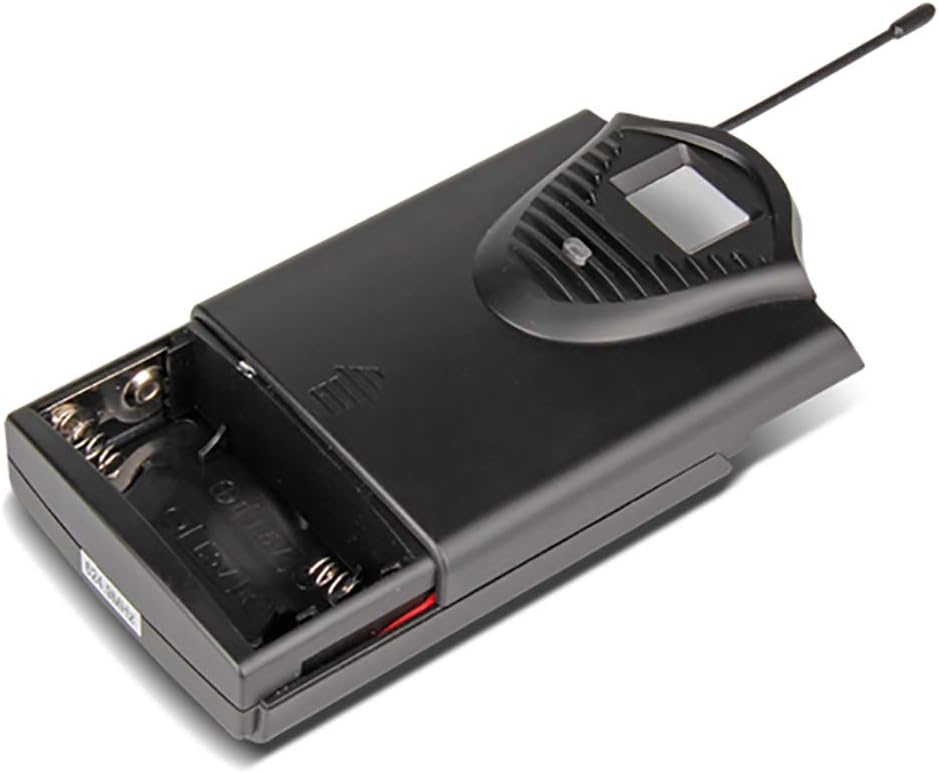
Immagine 3: Bodypack transmitter with battery compartment open. This image illustrates the battery compartment of the bodypack transmitter, designed to hold two 1.5V AA batteries.

Immagine 4: Two bodypack transmitters with connected microphones. This image shows two bodypack transmitters, one connected to a headset microphone and the other to a lavalier microphone, demonstrating the versatility of the system.
- Installa le batterie: Open the battery compartment of each bodypack transmitter. Insert two 1.5V AA batteries, ensuring correct polarity. Close the compartment securely.
- Collegare il microfono: Plug the 3.5mm connector of either a headset microphone or a lavalier microphone into the input jack on the top of the bodypack transmitter. Ensure the connection is firm.
- Trasmettitore sicuro: Attach the bodypack transmitter to clothing or a belt using the integrated clip. Position the microphone appropriately for the user (e.g., lavalier clipped to clothing, headset worn on head).
5. Istruzioni per l'uso
- Accendi il ricevitore: Press the power button on the front panel of the receiver. The display screens should illuminate, showing the channel frequencies.
- Accensione dei trasmettitori: Slide the power switch on each bodypack transmitter to the "ON" position. The transmitter's display should light up, indicating its operating channel and battery status.
- Sincronizzazione di frequenza: The EW240 system is designed for automatic frequency synchronization. Ensure the transmitter and receiver are on the same channel frequency. If channels are not synchronized, refer to the troubleshooting section or consult the full product manual for specific pairing instructions (not detailed in provided data).
- Regola volume: Slowly increase the master volume on your mixer/amplifier and then adjust the individual channel volume controls on the receiver to achieve the desired audio level. Speak into the microphone to test the sound.
- Prestazioni del monitor: Observe the signal indicators on the receiver to ensure a strong and stable connection.
- Spegni: After use, first turn off all bodypack transmitters, then power off the receiver.
6. Manutenzione
- Sostituzione della batteria: Replace transmitter batteries when the low battery indicator appears or when audio quality degrades. Always use fresh 1.5V AA batteries.
- Pulizia: Clean the receiver and transmitters with a soft, dry cloth. Do not use liquid cleaners or solvents.
- Magazzinaggio: When not in use for extended periods, remove batteries from transmitters and store the system in a cool, dry place, away from direct sunlight and extreme temperatures.
- Cura dell'antenna: Handle receiver antennas carefully to prevent bending or damage.
7. Risoluzione Dei Problemi
| Problema | Possibile causa | Soluzione |
|---|---|---|
| Nessun suono dal microfono. |
|
|
| Static, interference, or intermittent audio. |
|
|
| Poor sound quality (e.g., muffled, distorted). |
|
|
8. Specifiche
8.1 General System
- Numero di canali: 4
- Stabilità: ± 0.006%
- Normal Deviation: ± 22kHz
- Rapporto segnale/rumore: <120 dB
- THD: <0.6%
- Risposta in frequenza: 50 Hz - 15 kHz
- Campo di funzionamento: 65 metri (circa 213 piedi)
8.2 Ricevitore
- Sensibilità: > 80 dB
- Uscita audio: Balanced and Unbalanced (1/4-inch mixed, 4x 1/4-inch individual)
- Requisiti di alimentazione: AC 16 V, 400 mA
- Dimensioni: 440 x 210 x 40 mm (circa 17.3 x 8.3 x 1.6 pollici)
- Peso: Circa 1.3 kg (2.87 libbre)
8.3 Wireless Microphone (Bodypack Transmitter)
- Tipo di cartuccia: Dynamic (for included microphones)
- Uscita RF: <10mW
- Normal Deviation: ± 22kHz
- Deviazione massima: ± 80kHz
- Batteria: 2x 1.5V batterie AA
- Durata della batteria: > 8 ore
9. Garanzia e supporto
The XTUGA EW240 UHF Wireless Microphone System comes with a Garanzia di qualità di 2 anni. For technical support, warranty claims, or further assistance, please contact XTUGA customer service through their official channels or the retailer from whom the product was purchased.
Per maggiori informazioni, potete visitare il sito XTUGA Brand Store.