
SOMFY V250
Somfy V250 Video Intercom System User Manual
Modello: V250
1. Introduzione
Thank you for choosing the Somfy V250 Video Intercom System. This system allows you to communicate with visitors at your gate or door, view them on a 7-inch color display, and remotely control access. Additionally, the indoor monitor includes an integrated wireless control point for up to five Somfy RTS (Radio Technology Somfy) products, such as roller shutters, lighting, or garage doors.
Please read this manual carefully before installation and operation to ensure correct usage and to maximize the benefits of your V250 system.
2. Istruzioni di sicurezza
- Assicurarsi che tutti i collegamenti elettrici siano effettuati da un elettricista qualificato e siano conformi alle normative locali.
- Scollegare l'alimentazione prima di eseguire qualsiasi lavoro di installazione, manutenzione o riparazione.
- Do not expose the outdoor station to direct water jets or immerse it in water.
- Non aprire il dispositivo casings. There are no user-serviceable parts inside.
- Tenere il sistema lontano da forti campi elettromagnetici.
- Use only original Somfy accessories and spare parts.
- This product is designed for residential use. Do not modify the system for other applications.
3. Contenuto della confezione
Verificare che tutti i componenti siano presenti nella confezione:
- 1x Somfy V250 Indoor Monitor (7-inch color display)
- 1x Somfy V250 Outdoor Station (with camera and call button)
- Accessori di montaggio (viti, tasselli)
- Adattatore di alimentazione per monitor da interno
- Manuale d'uso
4. Componenti del sistema oltreview
4.1. Outdoor Station
The outdoor station is designed for external installation and includes:
- Telecamera: Captures video of visitors. Features night vision with white LEDs for clear visibility in low light.
- Microfono: Per la comunicazione audio bidirezionale.
- Oratore: Per l'uscita audio ai visitatori.
- Pulsante di chiamata: Avvia una chiamata al monitor interno.
- Targhetta: For displaying resident's name.
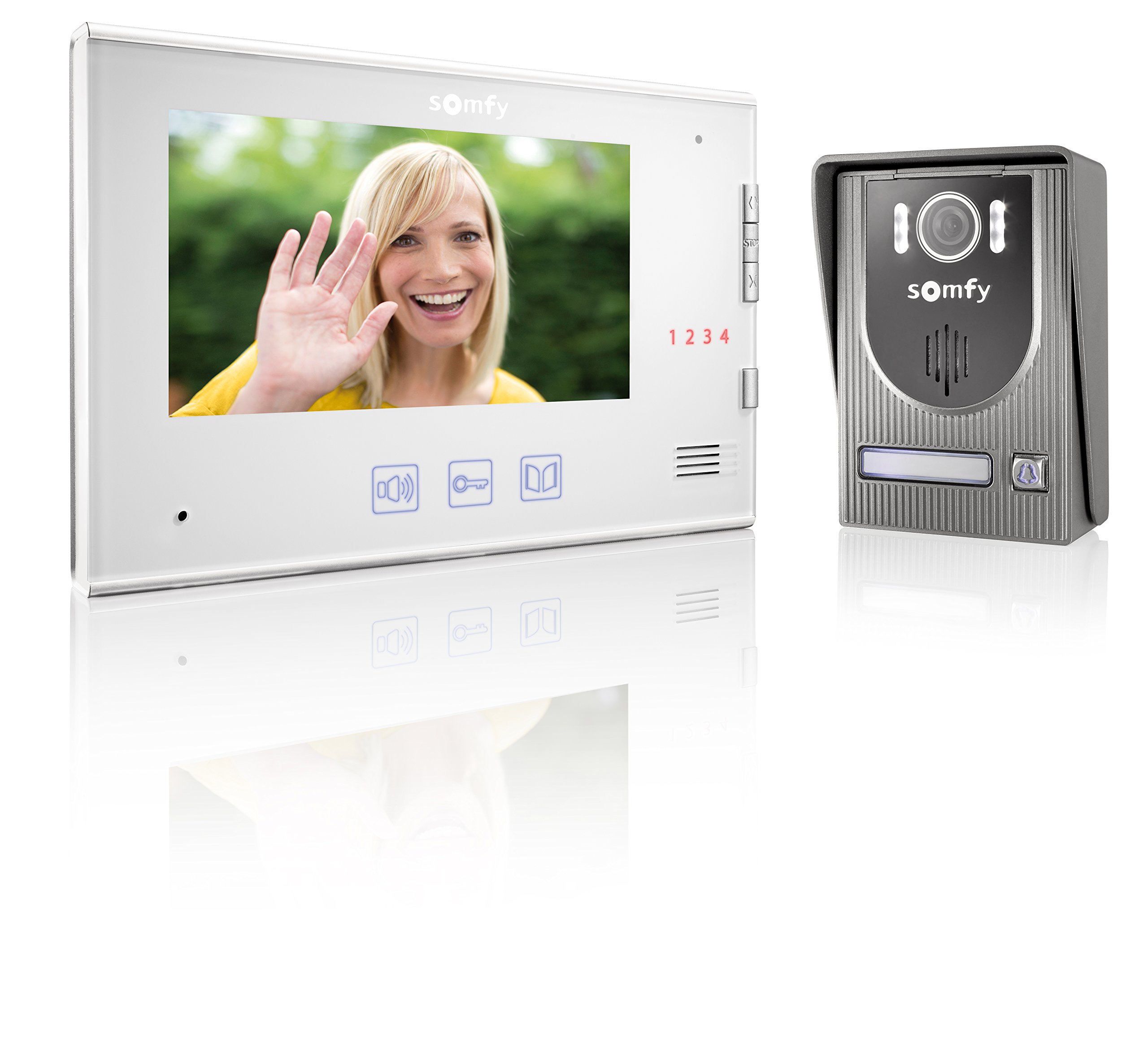
Image: Somfy V250 Outdoor Station with camera, LEDs, speaker, and call button.
4.2. Monitor interno
The indoor monitor is the central control unit inside your home and features:
- Display a colori da 7 pollici: Shows live video from the outdoor station.
- Pulsanti di controllo: For answering calls, opening gates/doors, and controlling RTS devices.
- Microfono e altoparlante: Per la comunicazione audio bidirezionale.
- RTS Control Point: Integrated module to manage up to 5 Somfy RTS products.

Image: Somfy V250 Indoor Monitor with 7-inch display and control buttons.
5. Installazione e configurazione
The Somfy V250 system uses a simple 2-wire connection between the indoor monitor and the outdoor station.
5.1. Preparazione del sito
- Choose a suitable location for the outdoor station, typically near your gate or main entrance, at a height of approximately 1.5 to 1.6 meters from the ground. Avoid direct sunlight or strong backlighting if possible.
- Select a convenient indoor location for the monitor, away from direct heat sources or moisture.
- Ensure the maximum distance between the monitor and the outdoor station does not exceed 100 meters.
5.2. Montaggio della stazione esterna
- Segnare i punti di foratura sulla parete utilizzando la staffa di montaggio come modello.
- Praticare i fori e inserire i tasselli.
- Fissare la staffa di montaggio alla parete.
- Connect the 2-wire cable from the indoor monitor to the designated terminals on the outdoor station. Ensure correct polarity if specified.
- Attach the outdoor station to the mounting bracket.
5.3. Montaggio del monitor interno
- Mark the drilling points for the indoor monitor's mounting bracket.
- Praticare i fori e inserire i tasselli.
- Fissare la staffa di montaggio alla parete.
- Connect the 2-wire cable from the outdoor station to the designated terminals on the indoor monitor.
- Collegare l'adattatore di alimentazione al monitor interno e inserirlo in una presa di corrente.
- Fissare il monitor interno alla sua staffa di montaggio.
5.4. Initial Power-Up and RTS Pairing
- Once all connections are secure, power on the indoor monitor.
- The monitor should display the live feed from the outdoor station or a standby screen.
- To pair Somfy RTS products: Refer to the specific instructions for your RTS device. Generally, you will need to put the RTS device into programming mode and then activate the pairing function on the V250 indoor monitor (usually by pressing a dedicated RTS button or navigating through a menu).
- Test the RTS control functionality after pairing.
6. Operating the Somfy V250 Intercom
6.1. Ricevere una chiamata
When a visitor presses the call button on the outdoor station:
- The indoor monitor will ring and display the live video feed from the outdoor camera.
- Premere il tasto Risposta button (often represented by a phone icon) on the monitor to establish two-way audio communication.
- Per terminare la chiamata, premere il tasto Termina chiamata button. The call will automatically end after a set duration if not answered or manually ended.

Image: A person pressing the call button on an outdoor intercom station.
6.2. Viewing Visitors (Monitoring)
Puoi manualmente view the outdoor station's camera feed at any time without a call:
- Premere il tasto Monitor pulsante (spesso rappresentato dall'icona di un occhio o di una telecamera) sul monitor interno.
- The display will show the live video feed. You can initiate two-way communication if desired.
6.3. Opening Gate/Door
During a call or while monitoring, you can open an electric gate or door connected to the system:
- Premere il tasto Sbloccare or Cancello aperto button (often represented by a key or gate icon) on the indoor monitor.
- The connected gate or door will activate.
6.4. Controlling Somfy RTS Products
The V250 monitor allows control of up to 5 paired Somfy RTS devices:
- Use the dedicated RTS control buttons or navigate through the monitor's menu to select and operate your paired RTS devices (e.g., open/close roller shutters, turn lights on/off).
- Refer to the monitor's on-screen interface for specific RTS control options.

Image: A modern house equipped with Somfy roller shutters, illustrating RTS product integration.
7. Manutenzione
- Pulizia: Utilizzare un morbido, damp cloth to clean the surfaces of the indoor monitor and outdoor station. Do not use abrasive cleaners, solvents, or chemical sprays.
- Stazione esterna: Periodically check the camera lens and microphone/speaker grilles for dirt or obstructions and gently clean them.
- Cablaggio: Assicurarsi che tutti i collegamenti elettrici siano sicuri e privi di danni.
- Aggiornamenti software: Check the Somfy website for any available firmware updates for your V250 system.
8. Risoluzione Dei Problemi
| Problema | Possibile causa | Soluzione |
|---|---|---|
| Nessuna immagine sul monitor interno. | Problema di alimentazione, cablaggio allentato, malfunzionamento della telecamera. | Check power connection. Verify 2-wire connection between monitor and outdoor station. Restart the system. |
| No sound during communication. | Volume too low, microphone/speaker obstruction, wiring issue. | Adjust volume on indoor monitor. Check for obstructions on outdoor station's speaker/mic. Verify wiring. |
| Gate/door not opening. | Incorrect wiring to gate/door opener, opener malfunction, system not receiving command. | Check wiring to the gate/door opener. Ensure the opener is functional independently. Consult an electrician. |
| RTS product not responding. | RTS product not paired, out of range, battery low (for battery-powered RTS devices). | Re-attempt RTS pairing. Ensure RTS product is within range of the monitor. Check battery if applicable. |
| Operazione intermittente. | Loose connections, electrical interference. | Check all wiring connections. Ensure no strong electrical interference sources are nearby. |
9. Specifiche tecniche
| Caratteristica | Dettaglio |
|---|---|
| Modello | Somfy V250 |
| Display del monitor interno | 7-inch (17.8 cm) Color Display |
| Telecamera per postazione esterna | Integrated with Night Vision (White LEDs) |
| Cablaggio | 2-wire connection between monitor and outdoor station |
| Max. Distance (Monitor to Outdoor Station) | 100 metri |
| Controllo RTS | Integrated wireless control for up to 5 Somfy RTS products |
| Colore | White (Indoor Monitor), Grey (Outdoor Station) |
| Materiale | Plastica |
| Peso dell'articolo | 1.16 chilogrammi |
| Dimensioni articolo (L x P x A) | 39 x 29 x 8.5 centimetri |
| Produttore | SOMFY |
10. Garanzia e supporto
Somfy products are designed for reliability and durability. For detailed warranty information, please refer to the warranty card included with your product or visit the official Somfy websito.
If you encounter any issues that cannot be resolved using the troubleshooting guide, or if you require technical assistance, please contact Somfy customer support:
- Supporto online: Visita www.somfy.com for FAQs, product documentation, and support contact details.
- Assistenza clienti: Contact information for your region can be found on the Somfy websito.
Please have your product model (V250) and purchase date ready when contacting support.
Documenti correlati - V250
 |
Odbiornik Somfy Universal RTS: Instrukcja Instalacji i Obsługi Szczegółowy przewodnik instalacji i programowania odbiornika Somfy Universal RTS, zawierający dane techniczne, funkcje automatyki słonecznej i wiatrowej oraz rozwiązywanie problemów. |
 |
Somfy WireFree Motor Databook: Specifications and Hardware Systems Technical databook for Somfy WireFree battery-powered motors, including Roll Up R28 RTS, Cord Lift CL32 RTS, and Tilt 50 RTS specifications, hardware systems, and accessories. |
 |
Guida all'installazione di Somfy Eolis 3D WireFree™ RTS Questa guida fornisce istruzioni per l'installazione, la configurazione e il funzionamento del Somfy Eolis 3D WireFree™ RTS, un sensore di movimento 3D wireless per la chiusura automatica delle tende da sole. |
 |
Databook Somfy Serie 500: Specifiche e applicazioni del motore Manuale completo che descrive in dettaglio i motori della serie 500 di Somfy, comprese le gamme Sonesse e LT50. Contiene specifiche tecniche, dimensioni, tecnologie di controllo (RTS, cablate, RS485) e accessori per tende automatizzate in ambienti residenziali e commerciali. |
 |
Manuale d'uso del telecomando Somfy Situo 1 e 5 RTS Una guida completa all'utilizzo e alla configurazione dei telecomandi Somfy Situo 1 RTS e Situo 5 RTS per tende da finestra. Scopri come selezionare i canali, aggiungere/eliminare telecomandi, impostare i limiti e montare a parete. |
 |
Motore per tende Somfy Movelite WireFree RTS USB-C - Caratteristiche e specifiche Scopri Somfy Movelite WireFree RTS, una soluzione versatile per motori per tende alimentata tramite USB-C che offre installazione wireless, integrazione con la casa intelligente, comando manuale e ricarica rapida per tutti i tuoi progetti di automazione delle tende. |
Ask a question about this manual
Ask about setup, troubleshooting, compatibility, parts, safety, or missing instructions. Manuals+ will review the question and use this page’s manual context to help answer it.