
Introduzione
The Audeze iSINE10 In-Ear Semi-Open Headphones deliver a unique audio experience through advanced planar magnetic technology. Designed for clarity and wide soundstage, these headphones are lightweight and offer versatile connectivity options for various devices. This manual provides essential information for setting up, operating, maintaining, and troubleshooting your iSINE10 headphones.

Image: Audeze iSINE10 headphones showcasing their semi-open design.
Impostare
1. Unboxing e componenti
Your Audeze iSINE10 headphones typically include:
- Audeze iSINE10 In-Ear Headphones
- Cipher Lightning Cable (with in-line amplifier and DAC)
- Standard 3.5mm Audio Cable
- Various Eartips for optimal fit
- Ear Hooks for secure placement
- Nylon Carrying Case
2. Montaggio delle cuffie
The iSINE10 offers two primary methods for secure and comfortable wear:
- Ear Clips: These hooks fit over your ear, similar to sunglasses, providing stability.
- Rubber Pieces: These inserts fit inside the ear, resting at the entrance of the ear canal, without deep insertion.
Experiment with the included eartips and ear hooks to find the most comfortable and secure fit for extended listening. Proper fit is crucial for both comfort and sound quality.
3. Connessione ai dispositivi
The iSINE10 headphones offer versatile connectivity:
- iOS Devices (Lightning Port): Use the included Cipher Lightning Cable. This cable features a built-in amplifier and 24-bit Digital-to-Analog Converter (DAC) for enhanced audio performance and allows access to the Audeze iOS app for customization.
- Standard Devices (3.5mm Audio Jack): Use the included 3.5mm audio cable to connect to any device with a standard headphone jack. Note that the sound characteristics may differ without the Cipher cable's built-in DSP/EQ.
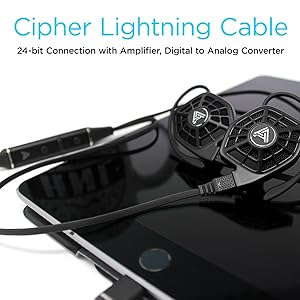
Image: iSINE10 headphones connected to an iPhone, demonstrating Lightning cable use.
Istruzioni per l'uso
1. Riproduzione audio di base
Once connected, simply play audio from your device. Adjust the volume using your device's controls or the in-line controls on the Cipher Lightning Cable.
2. Using the Cipher Lightning Cable (for iOS Devices)
The Cipher Lightning Cable is designed to optimize the iSINE10's performance with iOS devices. It includes:
- In linea Amplifier and DAC: Provides high-quality digital-to-analog conversion and amplificazione.
- DSP (elaborazione digitale del segnale): Applies an automatic, built-in frequency response correction for a balanced sound profile.
- Siri-Compatible Microphone: Allows for voice commands and hands-free communication.
- Controlli in linea: Manage playback, volume, and calls.
Nota importante:
- When using the Cipher Lightning Cable, you cannot charge your iOS device simultaneously through the same Lightning port.
- Some users may experience a faint noise with the V1 Lightning cable when no audio is playing. This typically disappears once audio playback begins.
3. Audeze iOS App for Customization
Download the official Audeze iOS app to unlock advanced audio customization features:
- Equalizzatore a 10 bande: Fine-tune the sound profile in base alle tue preferenze.
- Saveable EQ Presets: Store up to two custom equalizer settings for quick access.
Nota per gli utenti Android:
Currently, there is no official Android app available for firmware updates or EQ customization. These features require an iOS device.
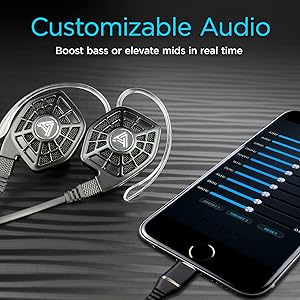
Image: iPhone screen showing the Audeze EQ app interface for audio customization.
4. Optional Bluetooth Cable
An optional Bluetooth cable is available directly from Audeze, allowing wireless connectivity to various devices while maintaining the intended sound profile (with appropriate DSP/EQ).
Video: Un oltreview of the Audeze iSINE10 In-Ear Semi-Open Headphones, highlighting key features and design elements.
Manutenzione
1. Pulizia
- Gently wipe the headphone bodies and cables with a soft, dry, lint-free cloth.
- Rimuovere gli inserti auricolari e pulirli con acqua e sapone neutro, se necessario. Assicurarsi che siano completamente asciutti prima di riapplicarli.
- Evitare l'uso di prodotti chimici aggressivi, solventi o materiali abrasivi.
2. Cura dei cavi
- Evitare di piegare bruscamente o tirare eccessivamente i cavi per evitare danni interni.
- Store cables neatly to prevent tangling.
3. Conservazione
When not in use, store your iSINE10 headphones in the provided nylon carrying case to protect them from dust, moisture, and physical damage.
4. Ganci per le orecchie
The plastic ear hooks, while designed for comfort, may not be highly durable. Handle them with care during attachment and removal to prolong their lifespan.
Risoluzione dei problemi
Nessun suono o volume basso
- Ensure the cable is securely connected to both the headphones and your audio source.
- Check the volume levels on your device and any in-line controls.
- Test with a different audio source or cable if possible to isolate the issue.
Audio distorto
- If using the 3.5mm cable, ensure your audio source is providing a clean signal. The iSINE10 is designed to benefit from the DSP/EQ of the Cipher cable.
- Reduce the volume on your device to check if distortion is due to overdriving the headphones.
- If using the Cipher cable, check the Audeze iOS app for any extreme EQ settings that might cause distortion.
Disagio durante l'uso
- Experiment with different sizes and types of eartips. Foam tips, if available, can sometimes improve comfort by distributing pressure more evenly.
- Adjust the ear hooks or rubber pieces to find a less intrusive position.
- Fate delle pause durante le lunghe sessioni di ascolto.
iOS App Issues
- Assicurati che il tuo dispositivo iOS utilizzi una versione compatibile di iOS.
- Restart the app or your iOS device.
- Ensure the Cipher Lightning Cable is properly connected.
Specifiche
| Caratteristica | Dettaglio |
|---|---|
| Numero di modello | 110-IE-1000-00 |
| Tipo di driver audio | Driver magnetico planare |
| Dimensioni del driver audio | 30 millimetri |
| Risposta in frequenza | 10 Hz - 50 kHz |
| Impedenza | 16 Ohm |
| Sensibilità | 110dB/1mW |
| Massima gestione della potenza | 500 mW RMS |
| Tecnologia di connettività | Wired (Lightning, 3.5mm Audio) |
| Comunicazione senza fili | Bluetooth (via optional cable) |
| Tipo di controllo | Controllo multimediale, App |
| Microfono | Siri-compatible (on Cipher cable) |
| Materiale | Plastica |
| Peso dell'articolo | 20 Grams (per pair) / 0.705 ounces |
| Dimensioni del prodotto | 1.38 x 0.79 x 1.22 pollici |
| Livello di resistenza all'acqua | Non resistente all'acqua |
| Materiale della custodia per il trasporto | Nylon |
Informazioni sulla garanzia
Audeze products are covered by a manufacturer's warranty. For detailed information regarding the warranty period, coverage, and terms and conditions, please refer to the official Audeze websito o la scheda di garanzia inclusa con il prodotto. Conservare la prova d'acquisto per eventuali reclami in garanzia.
Supporto
For technical assistance, product inquiries, or customer service, please visit the official Audeze support page on their website. You can typically find FAQs, troubleshooting guides, and contact information for their support team there.
Audeze Official Websito: www.audeze.com