
1. Introduzione
Grazie per l'acquistoasing the Auna Dr. Bang LED Portable Boombox. This device is designed to provide a versatile audio experience with its 2.1 channel sound, Bluetooth connectivity, multiple playback options (USB, SD, AUX, MP3), integrated LED light effects, and FM radio. It also features two microphone inputs for karaoke functions. Please read this manual carefully to ensure proper use and to maximize the performance of your device.
2. Istruzioni di sicurezza
Per evitare danni al dispositivo o lesioni personali, osservare le seguenti precauzioni di sicurezza:
- Non esporre il dispositivo a pioggia o umidità.
- Non smontare l'unità. Per qualsiasi intervento di manutenzione, rivolgersi a personale qualificato.
- Tenere il dispositivo lontano dalla luce solare diretta, da fonti di calore e da fiamme libere.
- Garantire un'adeguata ventilazione attorno all'unità.
- Per la ricarica utilizzare solo l'adattatore di alimentazione specificato.
- Non inserire oggetti nelle aperture del dispositivo.
- Evitare l'ascolto a livelli di volume elevati per periodi prolungati per evitare danni all'udito.
3. Contenuto della confezione
Carefully unpack your Auna Dr. Bang LED Portable Boombox and ensure all items are present and in good condition. The package should contain:
- Auna Dr. Bang LED Portable Boombox
- Cavo di ricarica USB
- Cavo AUX (jack da 3.5 mm)
- Manuale dell'utente (questo documento)
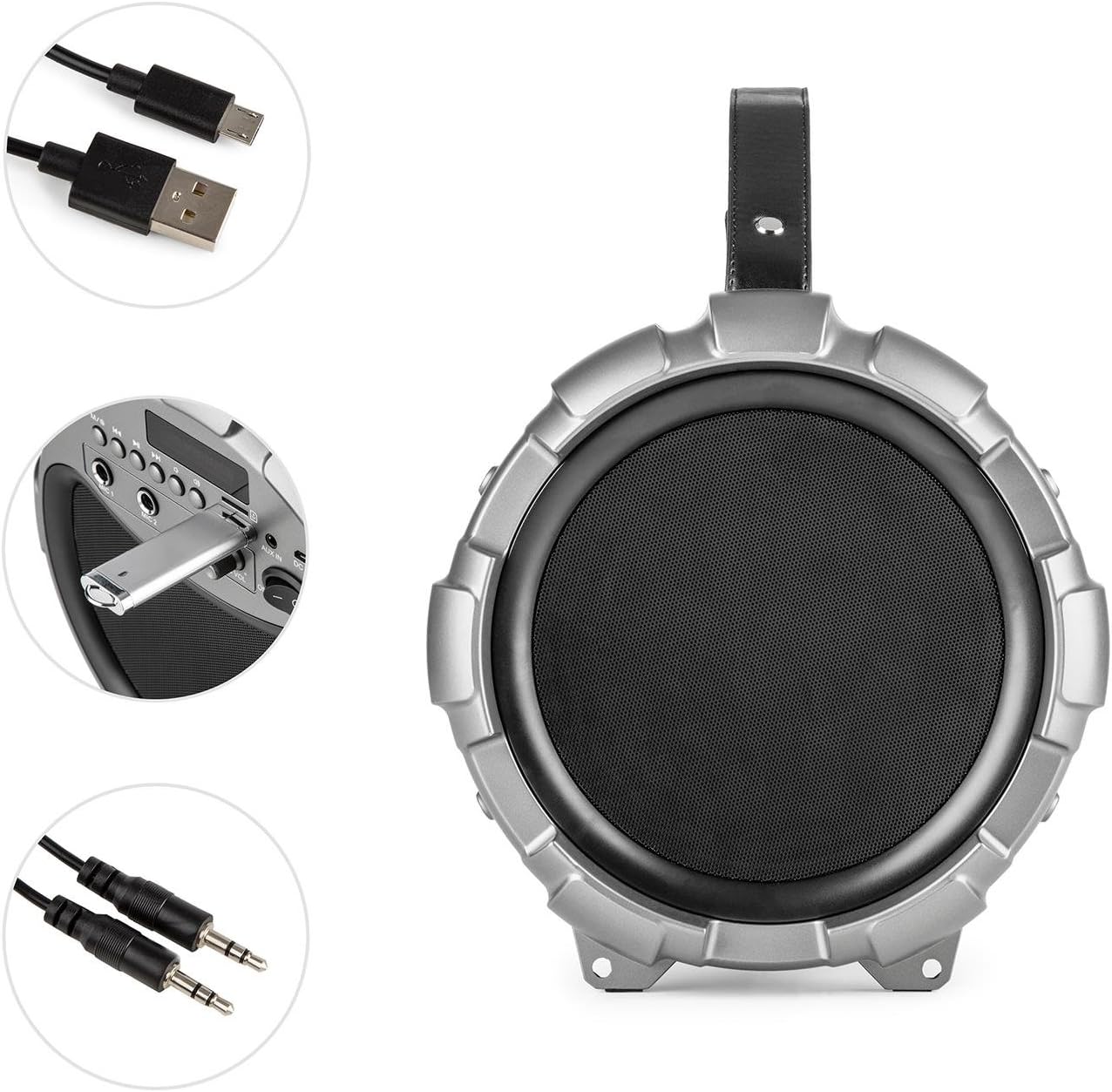
Image: The Auna Dr. Bang LED boombox shown with its included USB charging cable and 3.5mm AUX cable.
4. Prodotto finitoview
Prendi familiarità con le varie parti e i comandi del tuo stereo portatile.
4.1 Front View

Immagine: Frontale view of the Auna Dr. Bang LED boombox, highlighting the speaker grille and integrated LED lighting effects.
- Pannello luminoso a LED: Displays dynamic light effects during playback.
- Griglia dell'altoparlante: Protects the internal speakers.
4.2 Pannello di controllo

Image: Close-up of the control panel on the Auna Dr. Bang LED boombox, showing various buttons, ports, and the display.
- M/Mode Button: Passa da una modalità di input all'altra (Bluetooth, USB, SD, AUX, radio FM).
- Previous Track/Rewind Button: Premere brevemente per la traccia precedente, premere a lungo per tornare indietro.
- Pulsante Play/Pausa: Riproduce o mette in pausa l'audio corrente.
- Next Track/Fast Forward Button: Premere brevemente per la traccia successiva, premere a lungo per l'avanzamento rapido.
- Pulsante LED: Toggles LED light effects.
- Schermo di visualizzazione: Mostra la modalità corrente, le informazioni sulla traccia o la frequenza FM.
- Porta USB: Per la riproduzione tramite unità flash USB.
- Slot per scheda SD: Per la riproduzione su scheda SD.
- INGRESSO AUX: Ingresso audio da 3.5 mm per dispositivi esterni.
- CC 5V: Ingresso di alimentazione per la ricarica.
- Ingresso MIC 1: Ingresso microfono da 6.3 mm 1.
- Ingresso MIC 2: Ingresso microfono da 6.3 mm 2.
- Manopola MIC ECHO: Regola l'effetto eco del microfono.
- Manopola MIC VOL: Regola il volume del microfono.
- Interruttore ON/OFF: Accende o spegne l'unità.
- Manopola del volume: Adjusts the main playback volume.
5. Impostazione
5.1 Caricamento della batteria
The Auna Dr. Bang LED boombox is equipped with a built-in Lithium-Ion battery for portable use. Before first use, it is recommended to fully charge the battery.
- Connect the supplied USB charging cable to the DC 5V port on the boombox.
- Collegare l'altra estremità del cavo USB a un adattatore di alimentazione USB compatibile (non incluso) o alla porta USB di un computer.
- The charging indicator light (if present, usually near the DC 5V port or on the display) will illuminate to indicate charging.
- Una volta completata la carica, la spia potrebbe cambiare colore o spegnersi. Scollegare il cavo di ricarica.
Nota: The boombox can be operated while charging, but charging time may be longer.
5.2 Accensione iniziale
Per accendere il dispositivo, far scorrere il Interruttore ON/OFF to the "ON" position. The display will light up, and the unit will enter the default mode (usually Bluetooth).
6. Istruzioni per l'uso
6.1 Selezione della modalità
Premere il tasto M/Mode Button repeatedly to cycle through the available input modes: Bluetooth, USB, SD, AUX, and FM Radio. The current mode will be shown on the display.
6.2 Associazione Bluetooth
- Turn on the boombox and select Bluetooth mode using the M/Mode Button. The display will show "BLUE" and a blinking Bluetooth icon, indicating it's ready for pairing.
- Abilita il Bluetooth sul tuo dispositivo mobile (smartphone, tablet, ecc.) e cerca i dispositivi disponibili.
- Select "Auna Dr. Bang LED" from the list of devices.
- Once paired, the boombox will emit a confirmation sound, and the Bluetooth icon on the display will stop blinking.
- You can now play audio from your device through the boombox.
Nota: The boombox will automatically attempt to reconnect to the last paired device when in Bluetooth mode.
6.3 Riproduzione USB/SD
- Inserisci un'unità flash USB nel Porta USB o una scheda SD nel Slot per scheda SD. Ensure the media contains compatible audio files (ad esempio, MP3).
- The boombox should automatically switch to USB or SD mode and begin playback. If not, press the M/Mode Button per selezionare la modalità corretta.
- Utilizzare il Traccia precedente/Riavvolgi, Riproduci/Pausa, E Traccia successiva/Avanzamento veloce pulsanti per controllare la riproduzione.
6.4 Ingresso AUX
- Collegare un'estremità del cavo AUX da 3.5 mm al AUX IN porta sul boombox.
- Collegare l'altra estremità al jack delle cuffie o all'uscita audio del dispositivo audio esterno.
- Premere il tasto M/Mode Button per selezionare la modalità AUX.
- Control playback from your external device. The boombox's volume knob will control the output volume.
6.5 Radio FM
- Premere il tasto M/Mode Button to select FM Radio mode. The display will show the current frequency.
- Per eseguire la scansione automatica e salvare le stazioni disponibili, premere a lungo il tasto Pulsante di riproduzione/pausa. The boombox will scan and store stations automatically.
- To manually tune or select saved stations, use the Traccia precedente/Riavvolgi E Traccia successiva/Avanzamento veloce pulsanti.
Mancia: For better FM reception, try repositioning the boombox or extending any external antenna if available (not explicitly mentioned but common for boomboxes).
6.6 Utilizzo del microfono (Karaoke)
- Connect one or two microphones (not included) to the Ingresso MIC 1 e/o Ingresso MIC 2.
- Regola il volume del microfono usando il Manopola MIC VOL.
- Regolare l'effetto eco per i microfoni utilizzando Manopola MIC ECHO.
- You can sing along to music playing from any source (Bluetooth, USB, SD, AUX).
6.7 Effetti di luce LED
Premere il tasto Pulsante LED to toggle the integrated LED light effects on or off. The lights will synchronize with the music playback.

Immagine: Un angolo view of the Auna Dr. Bang LED boombox, showcasing its dynamic red and green LED light effects.
7. Manutenzione
7.1 Pulizia
- Prima di procedere alla pulizia, spegnere sempre il dispositivo e scollegarlo da qualsiasi fonte di alimentazione.
- Utilizzare un panno morbido e asciutto per pulire le superfici esterne.
- Non utilizzare detergenti abrasivi, cere o solventi poiché potrebbero danneggiare la finitura.
- Keep the ports and openings free of dust and debris.
7.2 Conservazione
- When not in use for extended periods, store the boombox in a cool, dry place, away from direct sunlight and extreme temperatures.
- It is recommended to charge the battery periodically (e.g., every 3-6 months) to maintain its lifespan.
8. Risoluzione Dei Problemi
If you encounter any issues with your Auna Dr. Bang LED boombox, please refer to the following common problems and solutions:
| Problema | Possibile causa | Soluzione |
|---|---|---|
| Nessuna alimentazione / L'unità non si accende. | La batteria è scarica. L'interruttore di alimentazione è spento. | Charge the battery. Ensure the ON/OFF switch is in the "ON" position. |
| Nessun suono. | Volume is too low. Incorrect mode selected. Device not properly connected (AUX/Bluetooth). | Increase the volume on the boombox and your source device. Select the correct input mode. Re-pair Bluetooth or re-connect AUX cable. |
| L'associazione Bluetooth non riesce. | Boombox not in pairing mode. Device too far. Bluetooth disabled on source. | Ensure boombox is in Bluetooth mode and "BLUE" is blinking. Move source device closer. Enable Bluetooth on your source device. |
| La riproduzione USB/SD non funziona. | Incorrect mode. Incompatible file formato. Supporto danneggiato. | Select USB or SD mode. Ensure files are MP3 format. Try a different USB drive or SD card. |
| Scarsa ricezione radio FM. | Segnale debole. Interferenza. | Reposition the boombox. Try auto-scanning again. Avoid placing near other electronic devices. |
| Il microfono non funziona. | Microphone not connected. MIC VOL knob too low. | Ensure microphone is securely plugged into MIC 1 or MIC 2. Increase the MIC VOL knob. |
9. Specifiche
| Modello: | BTS16-Dr. Bang LED |
| Marca: | AUNA |
| Dimensioni (L x A x P): | 22 x 31.5 x 22 cm (circa 8.7 x 12.4 x 8.7 pollici) |
| Peso: | 2.8 kg (circa 6.2 libbre) |
| Potenza di uscita dell'altoparlante: | 40 Watt (RMS) |
| Configurazione degli altoparlanti: | 2.1 canali |
| Connettività: | Bluetooth, USB, SD, AUX (3.5mm) |
| Ingressi microfono: | Jack da 2 x 6.3 mm |
| Fonte di energia: | AC (via adapter, not included) & Battery |
| Tipo di batteria: | Ioni di litio |
| Capacità della batteria: | 2600 mAh (nominale) |
| Dispositivi compatibili: | Computer personale, Smartphone |
| Compatibilità di montaggio: | Da tavolo |
10. Garanzia e supporto
AUNA products are covered by a manufacturer's warranty. For specific warranty terms and conditions, please refer to the documentation provided at the time of purchase or contact your local retailer. For technical support, troubleshooting assistance beyond this manual, or spare parts, please visit the official AUNA websito o contattare il loro servizio clienti.
Puoi trovare maggiori informazioni e supporto su AUNA Brand Store.