
1. Introduzione
This manual provides comprehensive instructions for the installation, operation, and maintenance of your MB Quart ZA2-1000.2 2-Channel Class SQ (Class A/B) Car Audio Amplifier. Please read this manual thoroughly before attempting installation or operation to ensure proper use and to prevent damage.
The ZA2-1000.2 is a full-range, bridgeable amplifier designed for high-quality car audio systems, featuring Q-Stasis Pre Amplificatore Stage circuitry and adjustable high and low pass filters.
2. Informazioni sulla sicurezza
Durante l'installazione e il funzionamento, osservare sempre le seguenti precauzioni di sicurezza:
- Prima di iniziare qualsiasi lavoro elettrico, scollegare il terminale negativo della batteria del veicolo.
- Assicurarsi che tutti i cavi siano correttamente instradati e fissati per evitare schiacciamenti o danni.
- Utilizzare cavi di calibro appropriato per i collegamenti di alimentazione, messa a terra e altoparlanti, come specificato.
- Montare il amplificatore in modo sicuro in un luogo che consenta un'adeguata ventilazione e sia protetto dall'umidità e dal calore eccessivo.
- Non azionare il amplifier se è danneggiato o malfunzionante. Consultare la sezione risoluzione dei problemi o contattare l'assistenza.
- Evitare di posizionare il amplificatore alla luce diretta del sole o vicino a fonti di calore.
3. Configurazione e installazione
3.1 Montaggio del Amppiù vivace
The MB Quart ZA2-1000.2 amplifier is designed for surface mounting. Choose a secure location in your vehicle that provides sufficient airflow around the amplifier to prevent overheating. Avoid mounting it in enclosed spaces without ventilation.
3.2 Collegamenti di cablaggio
Refer to the diagram below for proper wiring connections. Ensure all connections are tight and secure to prevent electrical shorts or poor performance.
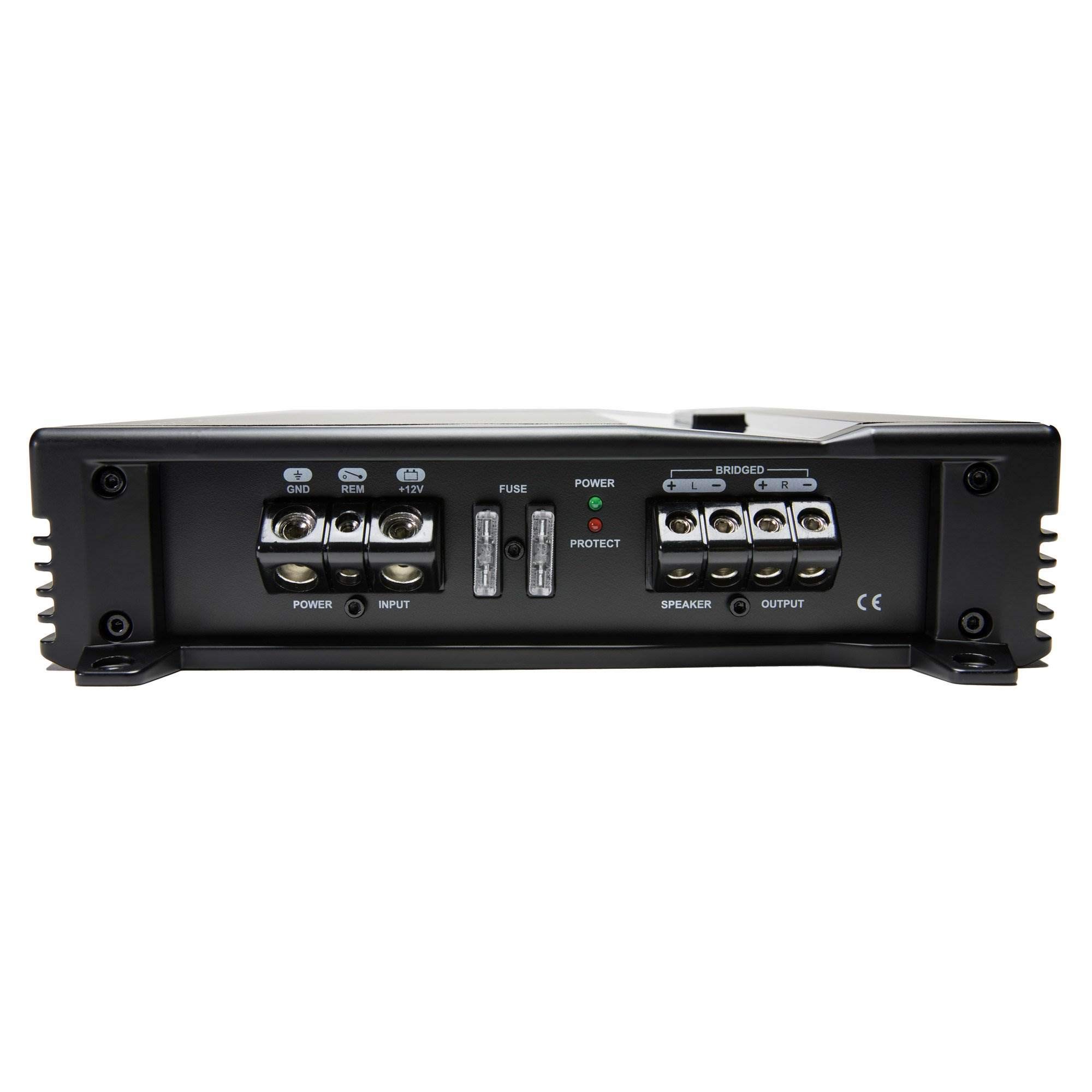
Figure 1: Power and Speaker Terminal Connections. This image displays the rear panel of the amplifier, highlighting the power input (GND, REM, +12V), fuse holders, and speaker output terminals (BRIDGED, +L, -L, +R, -R).
- Potenza (BATT +12V): Connect to the positive terminal of the vehicle's battery using 4 gauge wire. Install an appropriate fuse (20A x 1) within 18 inches of the battery.
- Terra (GND): Connect to a clean, unpainted metal surface of the vehicle chassis using 4 gauge wire. Ensure a solid electrical connection.
- Remoto (REM): Collegare al cavo di accensione remota dall'unità principale. Questo cavo accende il amplifier acceso e spento con il tuo stereo.
- Uscite altoparlanti: Connect your speakers to the designated speaker terminals using 12 gauge wire. Observe correct polarity (+ to + and - to -). For bridged mono operation, refer to the "Operating Instructions" section.
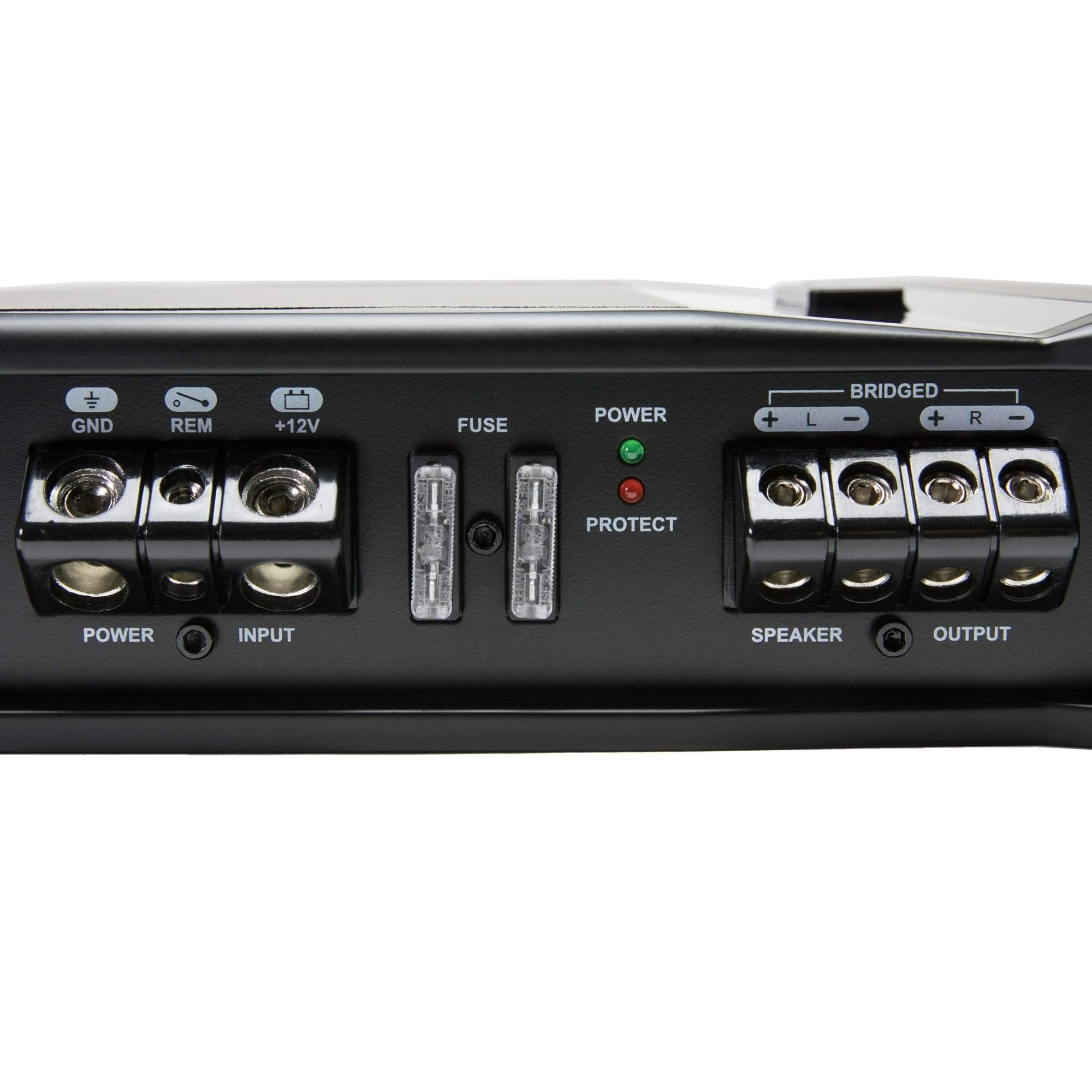
Figura 2: dettagliata view of Power and Speaker Terminals. This close-up shows the robust screw terminals for power, ground, remote, and speaker connections, along with the fuse slots.
3.3 Connessioni di ingresso audio
Collegare le uscite RCA dell'unità principale al amplifier's RCA input jacks. The amplifier also features a high-level input for head units without RCA outputs.
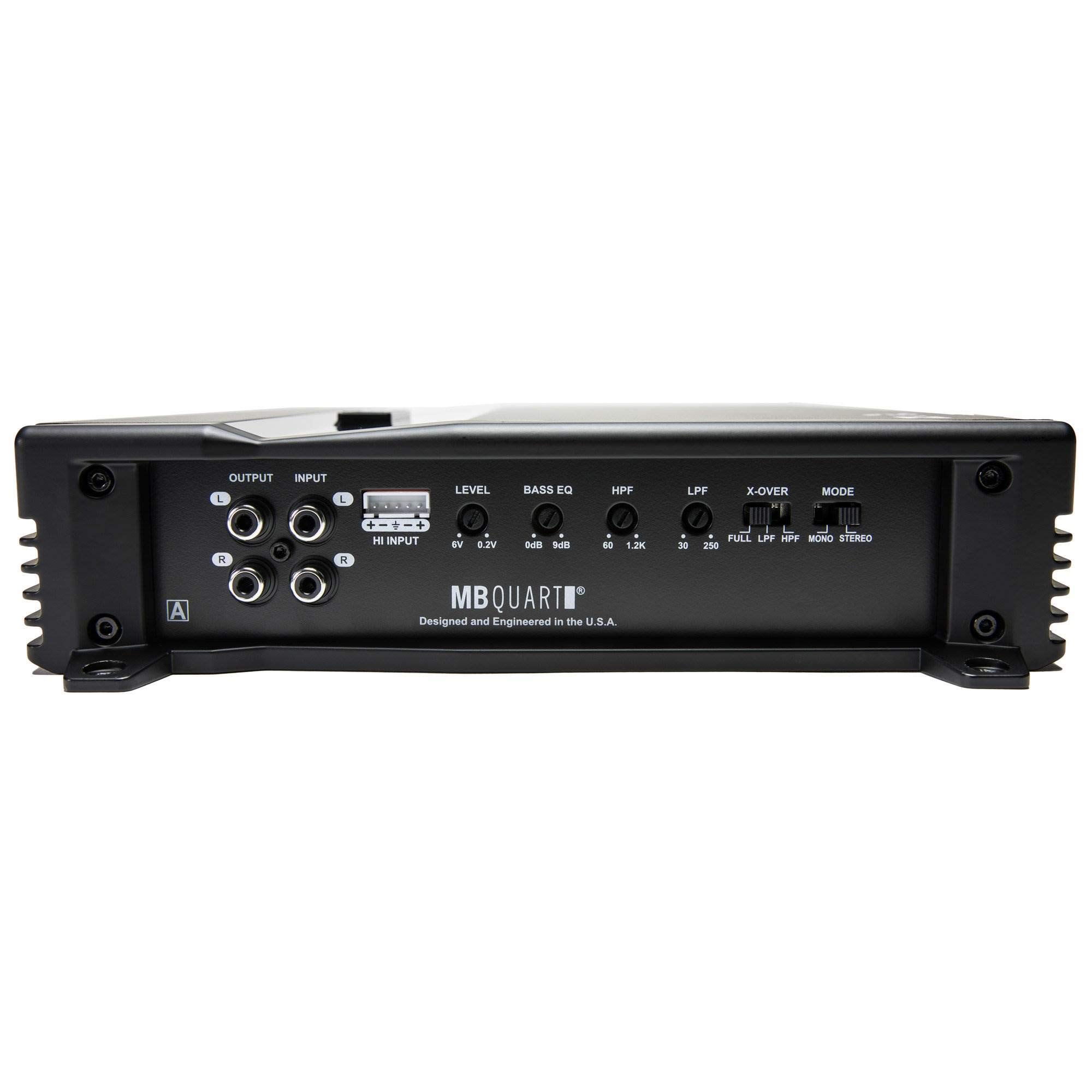
Figure 3: Audio Input and Control Panel. This image displays the rear panel, including the RCA input/output jacks, high-level input connector, and various control knobs for level, bass EQ, HPF, LPF, and X-OVER.
- Ingressi RCA: Collegare i cavi RCA dal pre-amplificatore dell'unità principaleamp uscite al amplifier's "INPUT" RCA jacks (1 Pair).
- Input di alto livello: If your head unit does not have RCA outputs, use the provided high-level input connector. Connect your speaker wires from the head unit to this connector.
- Uscite RCA: IL amplifier provides 1 Pair of RCA output jacks for connecting additional amplifiers in a daisy-chain configuration.

Figura 4: dettagliata view of Control Knobs and Inputs. A close-up of the amplifier's control section, showing the precise markings for LEVEL, BASS EQ, HPF, LPF, X-OVER, and MODE switches, along with the high-level input.
4. Istruzioni per l'uso
Una volta il amplifier is correctly installed and wired, you can adjust its settings for optimal audio performance.
4.1 Pannello di controllo Sopraview
IL amplifier features several adjustable controls on its rear panel:
- LEVEL (Input Gain): Regola la sensibilità in ingresso di amplifier to match the output of your head unit. Range: 6.0V - 0.2V. Start with the gain low and slowly increase until distortion is heard, then back off slightly.
- EQUALIZZAZIONE DEI BASSI: Provides a bass boost. Range: 0dB - 9dB. Use sparingly to avoid distortion.
- HPF (filtro passa alto): Filters out low frequencies, allowing only frequencies above the set point to pass. Range: 60Hz - 1.2KHz (12dB per octave). Useful for protecting full-range speakers from damaging bass.
- LPF (filtro passa basso): Filters out high frequencies, allowing only frequencies below the set point to pass. Range: 30Hz - 250Hz (12dB per octave). Typically used for subwoofers.
- X-OVER (Crossover Mode Switch): Selects the crossover operation.
- PIENO: Full range audio, no filtering applied.
- LPF: Low Pass Filter active.
- HPF: High Pass Filter active.
- MODE (Operation Mode Switch): Seleziona il amplifier's output configuration.
- MONO (Bridged): Combines the two channels into a single, more powerful mono output. Use for a single subwoofer. Refer to speaker terminal markings for bridged connection.
- STEREO: Standard two-channel operation for left and right speakers.
4.2 Accensione iniziale
Dopo aver effettuato tutti i collegamenti, ricollegare il terminale negativo della batteria del veicolo. Accendere l'unità principale. amplifier's power indicator light (green) should illuminate. If the protect light (red) illuminates, refer to the troubleshooting section.
5. Manutenzione
The MB Quart ZA2-1000.2 ampIl filtro richiede una manutenzione minima. Seguire queste linee guida per garantirne la longevità:
- Pulizia: Pulire periodicamente il ampl'esterno del filtro con un panno morbido e asciutto. Non utilizzare prodotti chimici aggressivi o detergenti abrasivi.
- Ventilazione: Assicurarsi che il amplifier's cooling fins are free from dust and obstructions. Good airflow is crucial for preventing overheating.
- Connessioni: Occasionally check all wiring connections (power, ground, remote, speaker, RCA) to ensure they remain tight and free from corrosion.
6. Risoluzione Dei Problemi
Se riscontri problemi con il tuo amplifier, consultare la seguente tabella prima di contattare l'assistenza tecnica.
| Problema | Possibile causa | Soluzione |
|---|---|---|
| Nessuna alimentazione (LED di alimentazione spento) |
|
|
| Protect LED on (Red) |
|
|
| Nessun suono |
|
|
| Suono distorto |
|
|
7. Specifiche
| Caratteristica | Specificazione |
|---|---|
| Modello | ZA2-1000.2 |
| Marca | MB Quarto |
| Ampclasse lifier | Class SQ (Class A/B) |
| Canali | 2 (Two channel and bridged mono operation) |
| Volume variabiletage | 6.0V - 0.2V |
| Risposta in frequenza | 10Hz - 45KHz |
| Tipo di crossover | Variable Electronic |
| Crossover passa-alto | 12dB per Octave: 60Hz - 1.2KHz |
| Crossover passa basso | 12dB per Octave: 30Hz - 250Hz |
| Aumento dei bassi | 0 - 9 dB |
| Power Output @ 2 Ohms | 2 x 500W |
| Power Output @ 4 Ohms | 2 x 250W |
| Mono Bridged @ 4 Ohms | 1 x 1000W |
| Ingressi audio | 1 Pair RCA Jacks, High-Level Input |
| Uscite audio | 1 Pair RCA Jacks |
| Calibro del filo del terminale di alimentazione | 4 gauge (12V/GND) |
| Speaker Terminal Wire Gauge | calibro 12 |
| Fusione | 20 A x 1 |
| Dimensioni (L x P x A) | 12.63 x 10.5 x 3.25 pollici (32 x 26.6 x 8.2 cm) |
| Peso | 5.5 libbre (2.4 kg) |
| Tipo di montaggio | Montaggio in superficie |
| Codice UPC | 806576227069 |
| ASIN | B06W52P84L |
8. Informazioni sulla garanzia
For detailed warranty information regarding your MB Quart ZA2-1000.2 amplifier, please refer to the official MB Quart websito o sulla scheda di garanzia inclusa con il prodotto. I termini e le condizioni della garanzia possono variare a seconda della regione e del rivenditore.
9. Assistenza clienti
If you require further assistance or have questions not covered in this manual, please visit the official MB Quart website for support resources, FAQs, and contact information. You may also contact your authorized MB Quart dealer.
10. Video ufficiali dei prodotti
Al momento non sono disponibili video ufficiali del venditore per questo modello.