
Introduzione
The Anderic RR3UNV is a versatile 3-device universal remote control designed to simplify the management of your entertainment systems. This remote can control up to three different devices, including TVs, DVD players, VCRs, cable boxes, satellite receivers, and audio systems. It features a learning function for expanded compatibility and glow-in-the-dark buttons for ease of use in low-light conditions. This manual provides detailed instructions for setup, operation, and maintenance of your RR3UNV remote control.
Impostare
1. Installazione della batteria
The Anderic RR3UNV remote requires two (2) AA batteries for operation. Ensure correct polarity when inserting the batteries.
- Aprire il coperchio del vano batterie situato sul retro del telecomando.
- Inserire due nuove batterie AA, facendo corrispondere i terminali (+) e (-) come indicato all'interno del vano.
- Chiudere saldamente il coperchio del vano batterie.

Immagine: Posteriore view of the Anderic RR3UNV remote control, showing the battery compartment cover at the bottom. The back is black with a textured grip area.
2. Programmazione del telecomando
The RR3UNV can be programmed using direct code entry or the learning function. Refer to the included code booklet for a list of compatible device codes.
2.1. Inserimento diretto del codice
- Accendi il dispositivo che desideri programmare (ad esempio, TV, lettore DVD).
- Premere e tenere premuto il pulsante del dispositivo desiderato (TV, DVD, O AUDIO) for approximately 5 seconds until the device button lights up and stays lit.
- Enter the 3-digit code for your device brand from the code booklet.
- If the code is valid, the device button light will blink twice and then turn off.
- Prova il telecomando premendo il tasto ENERGIA button. If the device turns off, the programming was successful. If not, repeat the process with the next code listed for your brand.
2.2. Funzione di apprendimento
The learning function allows the RR3UNV to learn commands directly from your original remote control.
- Place the RR3UNV and your original remote control head-to-head on a flat surface, approximately 1-2 inches apart.
- Premere e tenere premuto il pulsante del dispositivo desiderato (TV, DVD, O AUDIO) on the RR3UNV for approximately 5 seconds until the device button lights up and stays lit.
- Press and release the button on the RR3UNV that you want to program (e.g., ENERGIA). The device button light will start blinking slowly.
- Press and hold the corresponding button on your original remote control (e.g., ENERGIA).
- The device button light on the RR3UNV will blink rapidly three times and then stay lit, indicating successful learning.
- Repeat steps 3-5 for all other buttons you wish to program.
- To exit learning mode, press the device button again. The light will turn off.
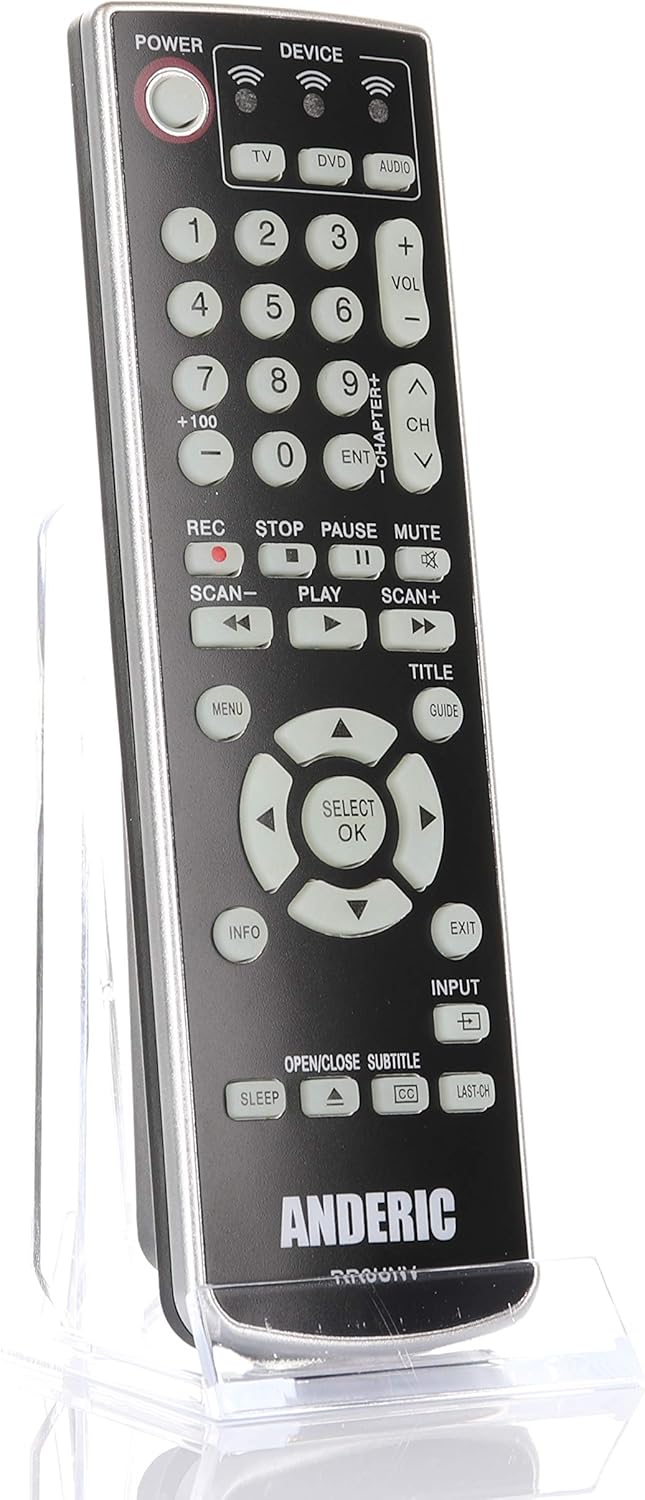
Immagine: Frontale view of the Anderic RR3UNV remote control. It is black with silver trim, featuring glow-in-the-dark buttons for power, device selection, number pad, volume, channel, playback, menu, and navigation controls.
Utilizzo del telecomando
Once programmed, the Anderic RR3UNV remote functions like your original remote. Select the desired device mode before sending commands.
- Selezione del dispositivo: Premere il tasto TV, DVD, O AUDIO button to select the device you want to control. The selected device button will light up briefly.
- Energia: Premere il tasto ENERGIA pulsante per accendere o spegnere il dispositivo selezionato.
- Controllo del volume: Utilizzare il Volume+ E vol- Pulsanti per regolare il volume.
- Controllo del canale: Utilizzare il CH+ E CH- pulsanti per cambiare canale.
- Disattiva audio: Premere il tasto MUTE pulsante per disattivare l'audio.
- Tastierino numerico: Use the number buttons (0-9) to directly enter channel numbers or other numerical inputs.
- Controlli di riproduzione: Pulsanti come GIOCARE, PAUSA, FERMARE, RICORDA, SCANSIONE-, E SCANSIONE+ control media playback functions.
- Navigazione: The directional arrow buttons and SELEZIONA/OK I pulsanti vengono utilizzati per la navigazione nel menu.
- Menu/Guide/Info/Exit: These buttons provide access to device-specific menus, program guides, information displays, and exit functions.
- Ingresso: IL INGRESSO button cycles through available input sources on your TV.
- Sonno: IL SONNO button may activate a sleep timer function on compatible devices.
- CC/Subtitles: IL CC/SOTTOTITOLI button toggles closed captions or subtitles.
Manutenzione
- Sostituzione della batteria: Replace batteries when the remote's performance degrades or if the device indicator light does not illuminate. Always replace both AA batteries at the same time with new ones.
- Pulizia: Clean the remote control with a soft, dry cloth. Do not use liquid cleaners or abrasive materials, as they may damage the remote's surface or internal components.
- Magazzinaggio: Store the remote in a dry place away from direct sunlight and extreme temperatures. If storing for an extended period, remove the batteries to prevent leakage.
Risoluzione dei problemi
| Problema | Possibile causa | Soluzione |
|---|---|---|
| Il telecomando non funziona affatto. | Batterie scariche o inserite in modo errato. | Sostituire le batterie con nuove batterie AA, assicurandosi della corretta polarità. |
| Il telecomando controlla alcune funzioni ma non altre. | Incorrect device code or incomplete learning. | Try a different code for your device brand or re-program specific buttons using the learning function. |
| Device does not respond to remote commands. | Remote not aimed correctly; obstruction; device not selected. | Ensure the remote is aimed directly at the device's IR sensor. Remove any obstructions. Press the correct device button (TV, DVD, AUDIO) before sending commands. |
| La funzione di apprendimento fallisce. | Original remote batteries low; remotes too far apart; ambient light interference. | Ensure original remote has fresh batteries. Place remotes 1-2 inches apart. Try learning in a dimly lit room. |
Specifiche
- Marca: Anderico
- Nome modello: RR3UNV
- Numero modello: RR3UNV
- Numero massimo di dispositivi supportati: 3
- Tecnologia di connettività: Infrarossi (IR)
- Tipo di batteria: 2 batterie AA (non incluse)
- Portata massima: Circa 25 piedi (7.6 metri)
- Quantità di pulsanti: 41
- Caratteristiche speciali: Universal compatibility, Learning function, Glow-in-the-dark buttons
- Dispositivi compatibili: TV, DVD, VCR, Cable, Satellite, Audio, DVD/VCR Combos, TV/DVD/VCR Combos
Informazioni sulla garanzia
Anderic products typically come with a limited warranty covering manufacturing defects. For specific warranty details, including duration and terms, please refer to the documentation included with your purchase or visit the official Anderic websito. Conservare la prova d'acquisto per eventuali reclami in garanzia.
Assistenza clienti
For technical assistance, programming help, or general inquiries regarding your Anderic RR3UNV remote control, please contact Anderic customer support:
- Websito: www.anderic.com
- Telefono: Numero di parte 1-855-573-6683
Please have your model number (RR3UNV) and a description of your issue ready when contacting support.