
SHARP LC-40U45
SHARP AQUOS LC-40U45 40-inch 4K HDR LCD TV User Manual
Model: LC-40U45 | Brand: SHARP
1. Introduzione
This manual provides essential information for the safe and efficient operation of your SHARP AQUOS LC-40U45 40-inch 4K HDR LCD TV. Please read these instructions thoroughly before using the product and retain them for future reference.
The LC-40U45 features a 4K low-reflection panel to minimize glare, 120-speed backlight technology for smooth motion, and the AQUOS 4K-Master Engine PRO II for high-definition image processing. Experience enhanced audio with the bass-reflex speaker box, Sound by ONKYO collaboration, and Eilex PRISM technology. The TV also includes a swivel stand for flexible viewangoli di inclinazione.
2. Informazioni sulla sicurezza
Quando si utilizza questo televisore, seguire sempre le precauzioni di sicurezza di base per ridurre il rischio di incendi, scosse elettriche e lesioni.
- Non esporre il televisore alla pioggia o all'umidità.
- Non ostruire le aperture di ventilazione.
- Assicurare la corretta messa a terra della spina di alimentazione.
- Scollegare il televisore durante i temporali o quando non viene utilizzato per lunghi periodi.
- Tenere le piccole parti e le batterie fuori dalla portata dei bambini.
3. Cosa c'è nella scatola
Verificare che tutti i seguenti elementi siano inclusi nella confezione del televisore:
- SHARP AQUOS LC-40U45 4K HDR LCD TV
- Telecomando (con 2 batterie AAA)
- Cavo di alimentazione
- Supporto da tavolo (se applicabile)
- AV Terminal Conversion Cable
- Manuale dell'utente (questo documento)
4. Impostazione
4.1 Physical Placement and Dimensions
Ensure the TV is placed on a stable surface or mounted securely. The dimensions of the TV with the stand are approximately 90.1 cm (width) x 27.1 cm (depth) x 55.8 cm (height). The weight is approximately 20.5 kg.

Figure 4.1: TV dimensions (Width: 90.1cm, Height: 55.8cm, Depth: 27.1cm) and recommended viewing distance of approximately 150cm.
4.2 Collegamento delle periferiche
Your TV offers various connection ports on the rear panel for external devices.

Figure 4.2: Rear panel connections including HDMI inputs, USB ports, headphone jack, AV input, LAN port, and antenna inputs.
- Ingressi HDMI (x4): Connect Blu-ray players, game consoles, or other HDMI-compatible devices. Input 1 supports HDR.
- Porte USB (x2): Collegare dispositivi di archiviazione USB per la riproduzione multimediale o un HDD esterno per la registrazione.
- PC Input (x1): Collega un computer.
- LAN Port (10BASE-T/100BASE-TX): Per la connessione internet cablata.
- Headphone Jack (3.5mm stereo mini-jack): Per l'ascolto privato.
- Ingresso AV: Use the provided AV terminal conversion cable for older devices.
- Ingressi dell'antenna: Connect terrestrial digital and BS/CS digital antennas.
- B-CAS Card Slot: Insert the B-CAS card to decrypt digital broadcasts.
4.3 Connessione di rete
The TV supports both wired and wireless (Wi-Fi) network connections. Built-in Wi-Fi allows for easy connection to your home network.
4.4 Swivel Stand
The TV features a swivel stand that allows you to adjust the screen angle left and right by 30 degrees. This provides flexibility for optimal viewing from various positions in the room and makes accessing rear ports easier for cleaning or connecting devices.

Figure 4.3: The swivel stand allows for 30-degree left/right adjustment, simplifying cleaning and access to rear connections.
5. Utilizzo della TV
5.1 Funzioni del telecomando
Use the provided remote control to navigate menus, change channels, adjust volume, and access smart TV features. The remote includes dedicated buttons for popular streaming services.
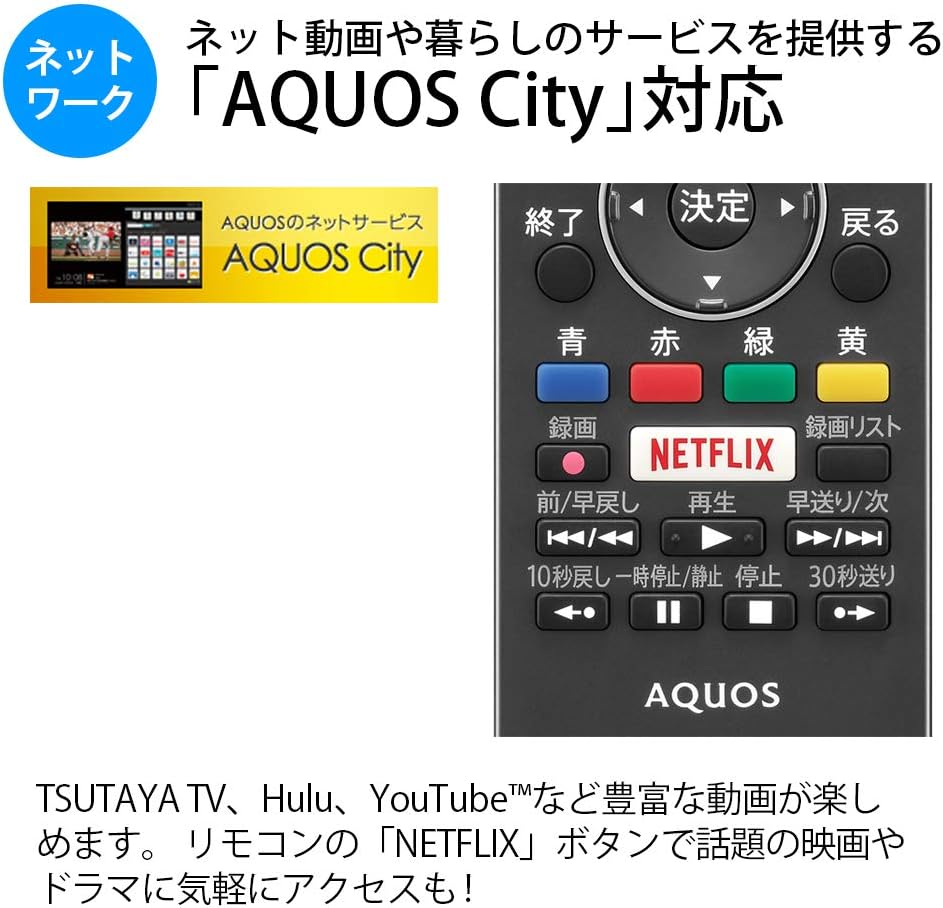
Figure 5.1: Remote control with a dedicated Netflix button and a view of the AQUOS City interface.
5.2 Smart TV Features (AQUOS City)
Your AQUOS TV supports "AQUOS City," providing access to various internet video services and lifestyle applications. Enjoy streaming content from platforms like NETFLIX, YouTube, Hulu, and TSUTAYA TV. Simply press the dedicated "NETFLIX" button on your remote for quick access.
5.3 4K Image Processing
The AQUOS 4K-Master Engine PRO II is a high-definition image processing circuit specifically designed for 4K LCD panels. It reduces noise and enhances contrast for a more immersive 4K viewesperienza di acquisizione.

Figure 5.2: The AQUOS 4K-Master Engine PRO II enhances 4K images by reducing noise and improving contrast.
5.4 Caratteristiche audio
The TV is equipped with a bass-reflex type speaker box, developed in collaboration with ONKYO, to deliver high-quality sound with enhanced high-frequency pressure and rich bass. Eilex PRISM technology expands the listening position and creates a sense of audio depth.

Figure 5.3: Illustration of the bass-reflex speaker box, designed for superior sound quality.
5.5 Low-Reflection Panel
The 4K low-reflection panel minimizes reflections from room lighting and external light sources, ensuring clear and comfortable viewing even in bright environments.

Figure 5.4: Visual comparison demonstrating how the low-reflection panel reduces glare compared to a conventional LCD panel.
5.6 Video Mirroring (Fire TV)
You can mirror your smartphone screen to the TV using Fire TV mirroring. This allows you to display photos, videos, or smartphone apps on the large TV screen. To use this feature, connect a Fire TV device to one of the TV's HDMI ports and ensure both devices are on the same Wi-Fi network. Refer to your Fire TV device's manual for specific mirroring instructions.
6. Manutenzione
Per garantire la longevità e le prestazioni ottimali del tuo televisore, segui queste linee guida per la manutenzione:
- Pulizia dello schermo: Pulire delicatamente lo schermo con un panno morbido e privo di lanugine. Per macchie ostinate, strofinare leggermenteampPulire il panno con acqua o con un detergente specifico per schermi. Non spruzzare il liquido direttamente sullo schermo.
- Pulizia dell'armadio: Per pulire il mobile TV, utilizzare un panno morbido e asciutto. Evitare l'uso di detergenti abrasivi o solventi.
- Ventilazione: Assicurarsi che le aperture di ventilazione del televisore non siano ostruite per evitare il surriscaldamento.
- Cavo di alimentazione: Controllare regolarmente il cavo di alimentazione per verificare la presenza di eventuali danni. In caso di danni, contattare personale di assistenza qualificato.
7. Risoluzione Dei Problemi
Se riscontri problemi con il tuo televisore, fai riferimento ai seguenti problemi comuni e alle relative soluzioni:
| Problema | Possibile causa/soluzione |
|---|---|
| Nessun potere | Verificare che il cavo di alimentazione sia collegato saldamente al televisore e alla presa a muro. Premere il pulsante di accensione sul telecomando o sul televisore. |
| Nessuna immagine, ma l'audio è presente | Assicurarsi che sia selezionata la sorgente di ingresso corretta. Controllare i collegamenti dei cavi ai dispositivi esterni. |
| Nessun suono, ma l'immagine è presente | Controllare il livello del volume e lo stato di disattivazione dell'audio. Assicurarsi che i cavi audio siano collegati correttamente. |
| Il telecomando non funziona | Sostituisci le batterie. Assicurati che non ci siano ostacoli tra il telecomando e il sensore IR del televisore. |
| Impossibile connettersi al Wi-Fi | Check your Wi-Fi router and network settings. Ensure the TV is within range of the router. |
8. Specifiche
| Caratteristica | Specificazione |
|---|---|
| Dimensioni dello schermo | 40 pollici |
| Tecnologia di visualizzazione | LCD |
| Risoluzione | Risoluzione: 3840 x 2160 (4K) |
| Supporto HDR | HDR compatible (HDMI Input 1) |
| Frequenza di aggiornamento | 120 Hz (120 Speed backlight technology) |
| Sintonizzatori | Terrestrial Digital x3, BS/CS Digital x3 |
| Uscita audio | 20W (10W + 10W) |
| Caratteristiche degli altoparlanti | Bass-reflex type, Sound by ONKYO, Eilex PRISM |
| Porte HDMI | 4 |
| Porte USB | 2 (USB-HDD recording compatible) |
| Ingresso PC | 1 |
| Connettività di rete | Wi-Fi built-in, LAN port |
| Tipo senza fili | Bluetooth, Wi-Fi, Miracast |
| Consumo energetico | Approx. 106W (Annual: 96Kwh/year) |
| Dimensioni (L x P x A) | 90.1 x 27.1 x 55.8 cm (con supporto) |
| Peso | 20.5 kg |
| Standard di montaggio VESA | 600 x 400 millimetri |
| Recommended Network Services | NETFLIX, YouTube, Hikari TV 4K, Hulu, TSUTAYA TV |
9. Garanzia e supporto
For warranty information, please refer to the warranty card included with your product or visit the official SHARP website. For technical support, troubleshooting assistance, or service requests, please contact SHARP customer service. Contact details can be found on the official SHARP websito o nella documentazione del prodotto.
Ask a question about this manual
Ask about setup, troubleshooting, compatibility, parts, safety, or missing instructions. Manuals+ will review the question and use this page’s manual context to help answer it.