Prodotto finitoview
The Eincar Android 6.0 Car Stereo is a versatile in-car entertainment and navigation system designed for a seamless driving experience. It features a 6.2-inch digital capacitive touchscreen, a 1.6GHz Quad-core CPU, 1GB RAM, and 16GB ROM, running on Android 6.0 Marshmallow. This unit supports a wide range of functionalities including GPS navigation, Bluetooth for hands-free calling and music streaming, Wi-Fi connectivity, USB and SD card media playback, and phone mirroring.
Le caratteristiche principali includono:
- Android 6.0 Marshmallow Operating System with Quad Core CPU and 16GB internal storage.
- 6.2-inch Digital Capacitive Touchscreen for high-definition display and responsive interaction.
- Built-in Wi-Fi for internet access and app downloads from Google Play Store.
- Integrated GPS for online and offline navigation with 3D maps and voice guidance.
- Bluetooth for hands-free calling and audio streaming, supporting both built-in and external microphones.
- Support for USB and SD card media playback, including 1080P HD video.
- Phone Mirroring function for both Android and iPhone devices.
- Compatibility with external OBD2 scanners for vehicle diagnostics (additional device required).
- Support for front and rear camera input for enhanced safety.
- Customizable startup logo, dynamic background, and multi-color button illumination.
- Compatibilità con i comandi al volante per un utilizzo più comodo.

Image: The Eincar car stereo displaying its Android 6.0 interface with various application icons such as Facebook, Gmail, GPS Test Plus, Maps, Music, and Radio.
Configurazione e installazione
This section provides instructions for the physical installation and initial setup of your Eincar car stereo.
1. Disimballaggio e controllo dei componenti
Disimballare con cura tutti i componenti dalla scatola. Assicurarsi che siano presenti tutti gli articoli elencati di seguito:
- Eincar Car Stereo Unit
- ISO Cable (Plug and Play)
- Microfono esterno
- Antenna GPS
- cavo AV
- Install Brackets (Pair)
- Manuale dell'utente (questo documento)
- Schemi elettrici
- Scheda di garanzia
- Certificato

Image: A diagram showing the dimensions of the Eincar car stereo unit and an illustration of all included accessories, such as the ISO cable, external microphone, GPS antenna, AV cable, installation brackets, user manual, wiring diagrams, warranty card, and certificate.
2. Installazione fisica
The unit is a standard 2 DIN size. Before installation, compare the stereo with your car's central console to ensure compatibility. Refer to the included Schemi elettrici for detailed connection instructions.
- Montaggio: Use the provided install brackets to secure the unit in your car's dashboard.
- Collegamento elettrico: Connect the ISO Cable to your vehicle's wiring harness. Ensure proper polarity.
- Collegamenti dell'antenna:
- Collegare il Antenna GPS to the designated port on the back of the unit. Position the antenna in a location with clear sky view per una ricezione ottimale del segnale.
- Connect your car's FM/AM radio antenna.
- Microfono esterno: Plug in the external microphone for clearer hands-free calls. Position it near the driver for best audio pickup.
- Connessioni USB/SD: If applicable, connect any external USB cables or insert SD cards into their respective slots.
- Ingresso telecamera (facoltativo): If installing front or rear cameras, connect them to the designated CAM-IN RCA ports. The unit supports automatic switching to the rear camera when reversing.
- Uscita audio (opzionale): Collega esterno amplifiers or subwoofers to the audio output RCA ports if desired.
3. Accensione iniziale e impostazioni di base
After physical installation, turn on your vehicle's ignition to power on the unit.
- Lingua e ora: Navigate to "System Settings" to set your preferred language and synchronize the time via network or manually.
- Connessione Wi-Fi:
- Vai su "Impostazioni" > "Wi-Fi".
- Turn on Wi-Fi and search for available networks.
- Select your desired network and enter the password to connect.

Image: The car stereo screen illustrating Wi-Fi connectivity and the option to connect via 3G/4G dongle for internet access.
For 3G/4G connectivity, an external USB 3G/4G Dongle and a local Internet SIM card are required (not included). Connect the dongle to a USB port on the unit.
- Configurazione GPS: The unit supports online and offline navigation apps. While a map isn't pre-installed, you can download your preferred navigation application from the Google Play Store.
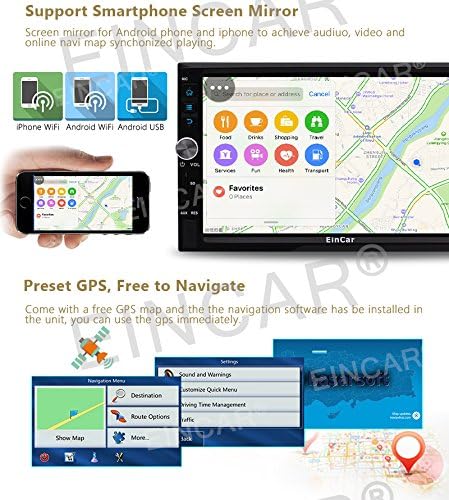
Image: The car stereo displaying a GPS navigation map and an illustration of smartphone screen mirroring functionality.
- Controllo del volante: If your vehicle supports steering wheel controls, navigate to "System Settings" > "Steering Wheel Control" to configure the buttons. Follow the on-screen prompts to map each function.

Image: A composite image showing various user interface elements of the Eincar car stereo, including the radio tuner, car logo selection, wallpaper settings, steering wheel control configuration, illuminating light button options, and system settings menu.
- Customize Startup Logo/Wallpaper: You can personalize the unit by setting a custom startup logo or changing the screen background image through the system settings.
Istruzioni per l'uso
This section details the various functions and how to operate your Eincar car stereo.
1. Navigazione e controlli di base
The unit features a capacitive touchscreen for intuitive control. Physical buttons and knobs are also available for common functions.
- Manopola del volume: Ruota per regolare il volume. Premi per disattivare/riattivare l'audio.
- Pulsante di accensione: Press and hold to turn the unit on/off. Short press to toggle screen on/off.
- Pulsante Home: Ritorna alla schermata principale di Android.
- Pulsante Indietro: Torna alla schermata o al menu precedente.
- Apps/Widgets: Access installed applications and widgets from the main interface.
2. Navigazione GPS
The unit supports various navigation applications. Once a navigation app is installed (e.g., Google Maps, iGO), launch it from the app menu.
- Inserisci la tua destinazione utilizzando la tastiera sullo schermo.
- Select your preferred route.
- Follow voice guidance and on-screen directions.
- The unit supports dual zone function, allowing radio/Bluetooth/USB/SD playback while navigating.
3. Funzioni Bluetooth
Collega il tuo smartphone tramite Bluetooth per effettuare chiamate in vivavoce e ascoltare musica in streaming.
- Abbinamento:
- Abilita il Bluetooth sul tuo smartphone e sull'autoradio (tramite l'app Bluetooth).
- Cercare available devices on your phone and select "EinCar" (or similar device name).
- Confermare il codice di associazione su entrambi i dispositivi.
- Chiamate in vivavoce: Una volta associato, puoi comporre numeri, rispondere alle chiamate e view call history directly from the stereo's screen. The unit supports built-in and external microphones for clear calls.
- Musica Bluetooth: Stream audio from your paired smartphone to the car stereo. Control playback (play/pause, skip tracks) from the stereo or your phone.

Image: The car stereo displaying its 9-band equalizer settings for sound customization and the Bluetooth interface for hands-free calling, including a dial pad and contact synchronization.
4. Riproduzione multimediale
L'unità supporta diverse fonti multimediali:
- USB/scheda SD: Insert a USB drive or SD card (up to 32GB, some models support up to 64GB) containing audio or video files. The unit supports formats like RMVB, AVI, MOV, RM, FLV, MKV for video, and MP3, MP4, WMA, WAV, APE, FLAC, MPC for audio.
- Lettore DVD/CD: Insert a DVD or CD into the disc slot for playback.
- Radio AM/FM: Access the radio tuner application. The unit has 3*6 FM and 2*6 AM stations preset capability. Use the scan function to find local stations.
- Online Video/Streaming: With Wi-Fi connected, you can access online video platforms or stream content through installed apps.

Image: The car stereo displaying video playback from a USB/SD card, along with illustrations of USB and Micro SD card inputs, and the dual zone function allowing simultaneous navigation and media playback.
5. Phone Mirroring (Easy Connection)
Mirror your smartphone screen onto the 6.2-inch display. This feature supports both Android phones and iPhones.
- Launch the "Easy Connection" or "Phone Mirror" app on the stereo.
- Follow the on-screen instructions to connect your phone via USB or Wi-Fi.
- Once connected, your phone's screen will be displayed on the stereo, allowing for audio and video synchronization.
6. Ingresso telecamera
The unit supports both front and rear camera inputs. When a rear camera is connected, the display will automatically switch to the rear view quando il veicolo è in retromarcia.
- Ensure cameras are properly connected to the RCA ports.
- Accedi alla fotocamera view manually through the dedicated camera app if available, or it will activate automatically for the rear camera.
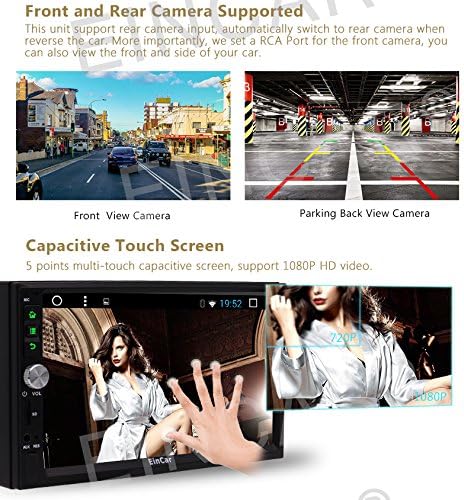
Image: A split image showing examples of a front view camera display and a parking back view camera display on the car stereo, along with an illustration demonstrating the multi-touch capacitive screen functionality.
7. OBD2 (diagnostica di bordo)
The unit is compatible with most Bluetooth type OBD2 scanners (sold separately). This allows you to monitor real-time data and trouble codes from your vehicle's computer.
- Connect your Bluetooth OBD2 scanner to your vehicle's OBD-II port.
- Pair the OBD2 scanner with the car stereo via Bluetooth.
- Launch a compatible application like "Torque" (if not pre-installed, you may obtain the APK file from the manufacturer).
- View vehicle data and diagnostic information through the app.
Manutenzione
Proper maintenance ensures the longevity and optimal performance of your Eincar car stereo.
- Pulizia dello schermo: Utilizzare un panno morbido e privo di lanugine per pulire delicatamente il touchscreen. Per le macchie ostinate, strofinare leggermenteampPulisci il panno con acqua o un detergente per schermi. Evita materiali abrasivi o sostanze chimiche aggressive.
- Pulizia generale: Mantenere l'unità e l'area circostante libere da polvere e detriti. Utilizzare una spazzola morbida o aria compressa per pulire le prese d'aria e le fessure dei pulsanti.
- Aggiornamenti software: Controllare periodicamente la presenza di aggiornamenti software dal sito ufficiale del produttore website or through the unit's system settings (if an update feature is available). Updates can improve performance and add new features.
- Evitare temperature estreme: Non esporre l'unità a temperature estreme per periodi prolungati, poiché ciò potrebbe danneggiare i componenti elettronici.
- Proteggere dai liquidi: Evitare che liquidi penetrino nell'unità, poiché potrebbero causare gravi danni.
Risoluzione dei problemi
Questa sezione affronta i problemi più comuni che potresti incontrare e fornisce soluzioni.
| Problema | Possibile causa | Soluzione |
|---|---|---|
| L'unità non si accende. | Nessuna alimentazione; fusibile bruciato; cablaggio errato. | Check vehicle's ignition; Inspect the unit's fuse and replace if necessary; Verify all power and ground wires are correctly connected according to the wiring diagram. |
| Nessun suono dagli altoparlanti. | Volume troppo basso; Disattivazione audio attivata; Cablaggio altoparlanti non corretto; Ampproblema del lifier (se esterno). | Increase volume; Check if mute is active; Verify speaker connections; Check external amppotenza e connessioni del lifier. |
| Segnale GPS debole o assente. | GPS antenna not properly connected or obstructed; Poor satellite visibility. | Ensure GPS antenna is securely connected; Relocate antenna to a position with clear sky view (e.g., dashboard, outside); Try again in an open area. |
| Il dispositivo Bluetooth non riesce ad associarsi. | Bluetooth not enabled on unit or phone; Device too far; Incorrect pairing process. | Ensure Bluetooth is enabled on both devices; Keep devices within close range; Restart both devices and try pairing again; Check pairing instructions in the manual. |
| Connessione Wi-Fi instabile o non funzionante. | Incorrect password; Weak signal; Router issues. | Verify Wi-Fi password; Move closer to the Wi-Fi hotspot; Restart the Wi-Fi router/hotspot; Try connecting to a different network. |
| Il touchscreen non risponde. | Temporary software glitch; Screen calibration issue. | Restart the unit by turning off the vehicle ignition and turning it back on; If issue persists, perform a system reset (refer to system settings, note this may erase data). |
| Le app si bloccano o hanno prestazioni lente. | Troppe app in esecuzione; spazio di archiviazione insufficiente; bug del software. | Close unused apps; Clear cache for problematic apps; Free up storage space; Check for system software updates. |
Se il problema persiste dopo aver provato queste soluzioni, contattare l'assistenza clienti.
Specifiche
| Caratteristica | Dettaglio |
|---|---|
| Numero di modello del prodotto | a-BR.AN395GNN1 |
| Sistema operativo | Versione Android 6.0 Marshmallow |
| processore | Quad Core da 1.6 GHz |
| Memoria RAM | 1 GB |
| ROM (memoria interna) | 16 GB |
| Dimensioni dello schermo | 6.2 pollici |
| Tipo di visualizzazione | Digital Capacitive Touchscreen (LCD) |
| Risoluzione | High Definition (supports 1080P HD video) |
| Connettività | Bluetooth, USB, Wi-Fi |
| Supporto per tipo di supporto | SD Card, USB Drive (up to 32GB/64GB), DVD, CD |
| Uscita audio | Support Subwoofer/Audio Output (Optional) |
| Connettività Internet | Built-in Wi-Fi, supports external USB 3G/4G Dongle (Optional) |
| Ingresso telecamera | Supports Front and Rear Camera (CAM-IN) |
| Compatibilità OBD2 | Most Bluetooth type OBD2 scanners (Optional) |
| Caratteristiche speciali | Phone Mirroring, Steering Wheel Control, Customizable Startup Logo/Wallpaper, Multi-color Button Light, Dual Zone Function |
Informazioni sulla garanzia
Your Eincar car stereo comes with a warranty. Please refer to the included Scheda di garanzia for specific terms, conditions, and duration of the warranty period. Keep your proof of purchase for warranty claims.
The warranty typically covers manufacturing defects and malfunctions under normal use. It does not cover damage caused by improper installation, misuse, accidents, unauthorized repairs, or natural disasters.
Assistenza clienti
For technical assistance, troubleshooting beyond this manual, or warranty inquiries, please contact Eincar customer support.
Prima di contattare l'assistenza, tieni a portata di mano le seguenti informazioni:
- Numero modello prodotto: a-BR.AN395GNN1
- Data di acquisto
- Descrizione dettagliata del problema
- Any troubleshooting steps you have already attempted
Le informazioni di contatto per l'assistenza sono in genere reperibili sul sito ufficiale del produttore websito o sulla scheda di garanzia inclusa con il prodotto.