
1. Introduzione
The AVerMedia AM310 is a plug-and-play USB microphone designed for high-quality audio recording. It is suitable for various applications including podcasting, streaming, gaming, and vocal performances. This manual provides detailed instructions for setting up, operating, and maintaining your AM310 microphone to ensure optimal performance.

Figure 1: AVerMedia AM310 USB Microphone
2. Prodotto finitoview
2.1 Caratteristiche principali
- Driver-Free and Plug-and-Play: Easy setup on PC or Mac without additional driver installation.
- Cardioid Condenser Microphone: Records sound sources directly in front of the microphone, providing detailed and clear audio.
- Jack per cuffie da 3.5 mm: Allows real-time audio monitoring or playback of computer audio.
- Controlli integrati: Features a volume knob and mute button for convenient audio management.
2.2 Componenti
Familiarize yourself with the main components of your AM310 microphone:

Figure 2: Labeled components of the AM310 USB Microphone
- Indicatore LED: Displays microphone status (Blue: Powered on, Red: Muted).
- Manopola del volume delle cuffie: Regola il volume delle cuffie collegate.
- Montare: Connects the microphone to the base or other compatible stands.
- Base and Shaft: Provides stable support for the microphone.
- Headphone Mode Switch: Toggles between PC Audio Playback and Microphone Monitoring.
- Jack per cuffie da 3.5 mm: Output for connecting headphones.
3. Impostazione
The AVerMedia AM310 is designed for quick and easy setup. Follow these steps to get started:
- Montare il microfono: Attach the microphone unit to the provided base and shaft. Ensure it is securely fastened.
- Connessione al computer: Plug the USB cable from the AM310 microphone into an available USB port on your PC or Mac. The microphone is driver-free and will be automatically recognized by your operating system.
- Collegare le cuffie (facoltativo): If you wish to monitor your audio, plug your 3.5mm headphones into the headphone jack on the microphone.
- Seleziona come dispositivo di input: In your computer's sound settings, select the AVerMedia AM310 as your default audio input device.

Figure 3: Connection diagram for AM310 USB Microphone

Figure 4: AM310 compatibility with Mac and Windows operating systems
3.1 Guida video di installazione
For a visual guide on setting up and using your AVerMedia AM310 microphone, please watch the official product video below.
Video 1: AVerMedia AM310 USB Microphone Overview e configurazione
4. Istruzioni per l'uso
4.1 Adjusting Volume and Muting
The AM310 features an integrated volume knob and mute button for easy control:
- Manopola del volume: Rotate the knob to adjust the headphone output volume.
- Tasto muto: Press the knob to mute or unmute the microphone. The LED indicator will change from blue (powered on) to red (muted) when activated.

Figure 5: Volume knob and LED indicator
4.2 Monitoraggio delle cuffie
The 3.5mm headphone jack allows you to monitor your audio in two modes:
- PC Audio Playback: Slide the switch to the 'PC' position to hear audio playing from your computer through your headphones.
- Monitoraggio del microfono: Slide the switch to the 'MONITOR' position to hear your own voice in real-time through your headphones, which is useful for adjusting your speaking volume and clarity.

Figure 6: Headphone mode switch (PC/Monitor)

Figure 7: User utilizing the AM310 for streaming with headphones
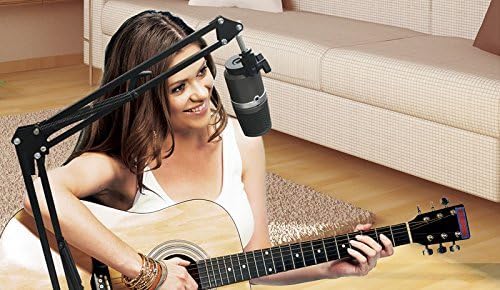
Figure 8: User recording music with the AM310 microphone
5. Specifiche
Below are the technical specifications for the AVerMedia AM310 USB Microphone:
| Caratteristica | Specificazione |
|---|---|
| Tipo | Uni-directional Condenser Microphone |
| Modello polare | cardioide |
| Sampla tariffa | 48 kHz |
| Velocità in bit | 16 bit |
| Potenza richiesta | USB (5 V CC) |
| Sensibilità | -60 ± 5 dB (at 1 kHz) |
| Risposta in frequenza | Frequenza |
| Sensibilità Audio | 60 decibel |
| Impedenza | 600 Ohm |
| Signal-to-Noise Ratio | 80 dB |
| Piattaforma hardware | PC |
| Numero di canali | 1 |
| Tecnologia di connettività | USB |
| Tipo di connettore | USB |
| Peso dell'articolo | 1.03 libbre |
| Dimensioni del prodotto | 10 x 4 x 6 pollici |
| Materiale | Alluminio |
6. Risoluzione Dei Problemi
If you encounter issues with your AVerMedia AM310 microphone, please refer to the following common troubleshooting steps:
- Nessun input audio:
- Ensure the microphone is securely plugged into a USB port.
- Verify that the AM310 is selected as the default input device in your computer's sound settings.
- Check if the microphone is muted (red LED indicator). Press the volume knob to unmute.
- Try a different USB port or a different computer to isolate the issue.
- Basso volume:
- Adjust the input gain for the microphone in your computer's sound settings or recording software.
- Ensure you are speaking directly into the front of the microphone, as it has a cardioid polar pattern.
- Statico o rumore:
- Ensure the USB cable is not damaged and is properly connected.
- Avoid placing the microphone near sources of electromagnetic interference (e.g., power cables, unshielded electronics).
- Consider using a pop filter to reduce plosive sounds and a shock mount to minimize vibrations.
- Problemi di monitoraggio delle cuffie:
- Check the headphone volume knob on the microphone.
- Verify the Headphone Mode Switch is set to the desired position (PC or MONITOR).
- Assicurati che le cuffie siano completamente collegate al jack da 3.5 mm.
7. Manutenzione
To ensure the longevity and optimal performance of your AVerMedia AM310 USB Microphone, follow these maintenance guidelines:
- Pulizia: Use a soft, dry cloth to clean the exterior of the microphone. Avoid using liquid cleaners or solvents, as they may damage the finish or internal components.
- Magazzinaggio: Quando non in uso, conservare il microfono in un luogo fresco e asciutto, lontano dalla luce solare diretta e da temperature estreme.
- Gestione: Maneggiare il microfono con cura. Evitare di farlo cadere o di sottoporlo a forti urti, che potrebbero danneggiare i delicati componenti interni.
- Cura del cavo: Non piegare o schiacciare eccessivamente il cavo USB. Quando lo si scollega, afferrare sempre la spina, non il cavo.
8. Garanzia e supporto
For warranty information, technical support, or further assistance with your AVerMedia AM310 USB Microphone, please visit the official AVerMedia websito o contattare il servizio clienti.
Puoi trovare maggiori informazioni e risorse di supporto su AVerMedia Store.