
1. Introduzione
Thank you for choosing the Master Lock 653D Set-Your-Own-Combination Padlock. This manual provides detailed instructions for setting and resetting your personal combination, operating the lock, and maintaining its performance. This padlock features a durable metal body and a hardened steel shackle for enhanced security.

Image 1.1: Master Lock 653D Set-Your-Own-Combination Padlock.
2. Prodotto finitoview
The Master Lock 653D padlock is designed for various security needs, offering a convenient keyless solution. Key features include:
- Costruzione durevole: 2-inch (50mm) wide metal body for strength.
- Grillo in acciaio temprato: 1/4 inch (6mm) diameter, 15/16 inch (24mm) long shackle for cut resistance.
- Set-Your-Own Combination: Allows for personalized security codes.
- Soft Touch Grips: Bottom and side grips provide a no-slip hold.
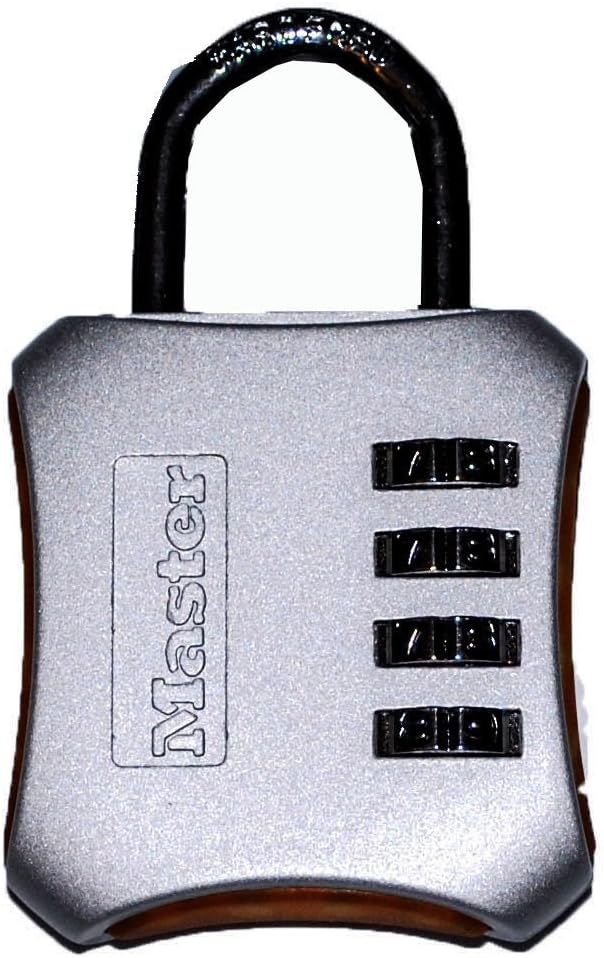
Immagine 2.1: anteriore view of the Master Lock 653D padlock.
3. Impostazione della combinazione
Your Master Lock 653D padlock comes preset to 0-0-0-0. Follow these steps to set your personal combination:
- Aprire la serratura: Ensure the padlock is set to the current combination (factory default is 0-0-0-0) and pull up the shackle to open the lock.
- Ruotare la maniglia: Rotate the shackle 90 degrees counter-clockwise (or 1/4 turn) from the open position.
- Premere verso il basso la maniglia: With the shackle rotated, press the shackle down firmly into the lock body.
- Imposta nuova combinazione: While holding the shackle down, turn the dials to your desired new combination. Ensure the numbers are aligned with the indicator marks.
- Grillo di rilascio e ritorno: Release the shackle and return it to its original open position (90 degrees clockwise).
- Close the Lock: Push the shackle down to close the lock. Scramble the dials to lock it.
La tua nuova combinazione è ora impostata. It is crucial to remember your combination as there is no master key or override.
4. Utilizzo del lucchetto
4.1. Opening the Lock
- Allinea i quadranti alla tua combinazione personale di 4 cifre.
- Pull up on the shackle to release it from the lock body.
4.2. Closing the Lock
- Insert the shackle back into the lock body.
- Per bloccare la serratura, combina i quadranti con una serie casuale di numeri.
5. Manutenzione
The Master Lock 653D padlock is designed for durability and requires minimal maintenance. To ensure optimal performance:
- Pulizia: Wipe the lock body and shackle with a clean, dry cloth periodically to remove dirt and grime.
- Lubrificazione: If the dials become stiff or difficult to turn, apply a small amount of graphite lubricant or a silicone-based spray lubricant to the moving parts. Avoid oil-based lubricants as they can attract dust.
- Magazzinaggio: Store the padlock in a dry environment when not in use to prevent corrosion, especially if exposed to harsh weather conditions.
6. Risoluzione Dei Problemi
6.1. Lock Will Not Open
- Combinazione errata: Double-check that you have entered the correct 4-digit combination. Ensure each number is precisely aligned with the indicator marks.
- Dials Stiff: Se i quadranti sono rigidi, provare ad applicare un lubrificante come descritto nella sezione Manutenzione.
- Combinazione dimenticata: Unfortunately, if you have forgotten your combination, there is no way to reset it without knowing the current code. The lock will need to be replaced.
6.2. Shackle Does Not Press Down During Combination Setting
- Ensure the shackle is rotated exactly 90 degrees from the open position. It must be fully rotated and aligned with the notch inside the lock body to allow it to be pressed down.
- Verify the lock is currently set to the correct combination (or factory default 0-0-0-0) before attempting to rotate and press the shackle.
7. Specifiche
| Caratteristica | Dettaglio |
|---|---|
| Numero di modello | 653D |
| Larghezza del corpo | 2 pollici (50 mm) |
| Diametro della maniglia | 1/4 di pollice (6 mm) |
| Shackle Length (Vertical Clearance) | 15/16 di pollice (24 mm) |
| Shackle Width (Horizontal Clearance) | 3/4 di pollice (19 mm) |
| Materiale | Acciaio legato, metallo |
| Tipo di blocco | Lucchetto a combinazione |
| Dimensioni articolo (L x P x A) | 5.56 x 3.5 x 0.9 pollici |
| Peso dell'articolo | 6.88 once |

Image 7.1: Master Lock 653D Padlock Dimensions.
8. Garanzia e supporto
Master Lock products are manufactured to stringent quality standards. The Master Lock 653D padlock comes with a garanzia a vita limitata, providing peace of mind against defects in material and workmanship.
For warranty claims, technical support, or further assistance, please visit the official Master Lock websito o contattare il servizio clienti. Conservare la ricevuta d'acquisto come prova d'acquisto.