
1. Introduzione
This manual provides detailed instructions for the setup, operation, and maintenance of your AmScope SM-4TZZ-FRL-5M3 Trinocular Stereo Microscope. This heavy-duty, highly-flexible microscope is designed for biological and industrial applications, offering ease-of-use and reliability. It features a wide zoom range and a double-arm boom-stand, making it suitable for various workshop or laboratory tasks.
Le caratteristiche principali includono:
- 3.5X-180X super widefield zoom magnification
- 8-inch large working distance and 2.5-inch field of view
- Fluorescent cool, even, and bright illumination
- 3D boom stand for flexible head positioning
- 5MP USB 3.0 digital camera for photos and videos on Windows, Mac, and Linux
2. Informazioni sulla sicurezza
Please read and understand all safety instructions before operating the microscope. Failure to do so may result in injury or damage to the equipment.
- Sicurezza elettrica: Ensure the power cord is properly connected to a grounded outlet. Do not operate with wet hands. Disconnect power before cleaning or servicing.
- Gestione: Handle the microscope with care. Avoid sudden impacts or dropping the unit.
- Ambiente: Use the microscope in a clean, dry, and stable environment. Avoid extreme temperatures, humidity, and dust.
- Componenti ottici: Do not touch optical surfaces with bare hands. Use only approved cleaning methods for lenses.
- Ventilazione: Ensure adequate ventilation around the fluorescent ring light to prevent overheating.
3. Contenuto della confezione
Verificare che tutti i componenti siano presenti e integri al momento del disimballaggio:
- Trinocular Stereo Microscope Head
- Double-Arm Boom Stand with Base
- Pair of WF10X/20 Eyepieces
- Fluorescent Ring Light (Model FRL8) with Power Cord
- 5MP USB 3.0 Digital Camera with USB Cable
- Copertura antipolvere
- Manuale dell'utente (questo documento)
4. Istruzioni per l'installazione
4.1. Boom Stand Assembly
Assemble the boom stand by securely attaching the vertical post to the heavy base. Then, attach the horizontal boom arm to the vertical post using the provided clamps and knobs. Ensure all connections are tight and stable.

Image 1: AmScope Trinocular Stereo Microscope assembled on its double-arm boom stand.
4.2. Microscope Head Installation
Carefully mount the trinocular stereo microscope head onto the boom arm. Secure it in place using the locking screw or clamp mechanism on the boom arm. Adjust the position for comfortable viewing.
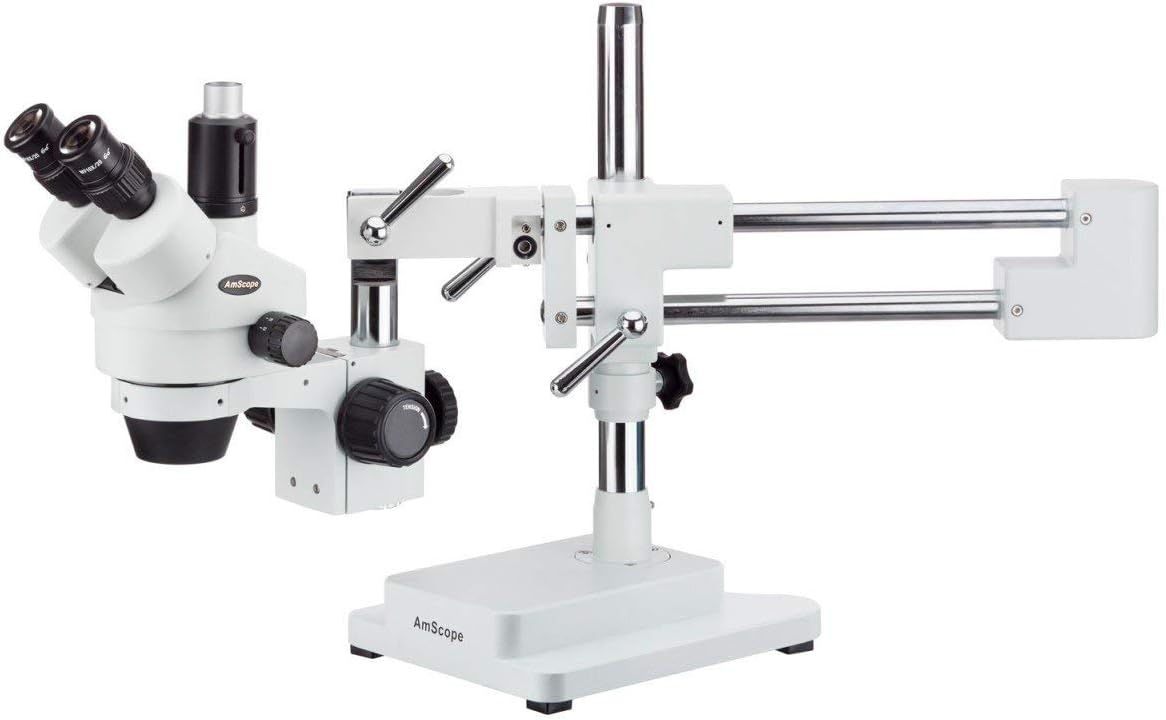
Immagine 2: Lato view of the AmScope Trinocular Stereo Microscope, showing the boom stand and microscope head assembly.
4.3. Installazione dell'oculare
Insert the WF10X/20 eyepieces into the two ocular tubes on the microscope head. Gently push them down until they are seated firmly.
4.4. Fluorescent Ring Light Attachment
Attach the fluorescent ring light to the objective housing of the microscope head. Ensure it is securely fastened and positioned to provide even illumination to the specimen area. Connect the ring light's power cord to a suitable electrical outlet.

Image 3: AmScope Fluorescent Ring Light (Model FRL8) with its power cord.
4.5. 5MP USB 3.0 Camera Connection
Remove the dust cap from the trinocular port on the microscope head. Insert the 5MP USB 3.0 digital camera into this port. Connect the camera to your computer using the provided USB cable. Install the necessary software drivers and application from the manufacturer's websito o media inclusi.
5. Istruzioni per l'uso
5.1. Accensione
Ensure all electrical connections are secure. Turn on the power switch for the fluorescent ring light. If using the camera, ensure your computer is on and the camera software is running.
5.2. Posizionamento di un campione
Place your specimen directly under the objective lens on the microscope's working stage. Adjust the boom arm to position the microscope head appropriately over the specimen.
5.3. Adjusting Magnification (Zoom)
Rotate the zoom knob located on the microscope head to change the magnification from 3.5X to 180X. The zoom is continuous, allowing for precise adjustment.
5.4. Messa a fuoco
Use the coarse and fine focus knobs on the microscope stand to bring the specimen into sharp focus. Start with the coarse adjustment for large changes, then use the fine adjustment for precise focusing.
5.5. Regolazione dell'illuminazione
The fluorescent ring light provides cool and even illumination. If your ring light has a dimmer, adjust it to achieve the desired brightness for optimal viewing.
5.6. Using the Digital Camera
Once the camera is connected and software installed, open the camera application on your computer. The live view from the microscope will be displayed. Use the software to capture images, record videos, and perform measurements as needed.
6. Manutenzione
6.1. Cleaning Lenses and Optical Components
Use a soft, lint-free cloth specifically designed for optical lenses. For stubborn smudges, a small amount of lens cleaning solution can be applied to the cloth, not directly to the lens. Avoid touching optical surfaces with fingers.
6.2. Pulizia generale
Wipe the exterior surfaces of the microscope and stand with a soft, damp cloth. Do not use harsh chemicals or abrasive cleaners. Ensure the microscope is unplugged before cleaning.
6.3. Conservazione
When not in use, cover the microscope with the provided dust cover to protect it from dust and debris. Store in a cool, dry place away from direct sunlight and vibrations.
7. Risoluzione Dei Problemi
- Nessuna immagine visibile: Check if the fluorescent ring light is on. Ensure the eyepieces are correctly installed. Verify the specimen is properly positioned and the focus knobs are adjusted.
- Immagine sfocata: Adjust the coarse and fine focus knobs. Ensure the eyepieces are clean. Check for any obstructions on the objective lens or specimen.
- Camera Not Connecting/No Live View: Ensure the USB cable is securely connected to both the camera and the computer. Verify that the camera drivers are installed correctly and the camera software is running. Try restarting the computer and camera software.
- Ring Light Not Working: Check the power connection to the ring light and the wall outlet. Ensure the power switch on the ring light is in the 'ON' position.
8. Specifiche
| Caratteristica | Specificazione |
|---|---|
| Numero di modello | SM-4TZZ-FRL-5M3 |
| Gamma di ingrandimento | 3.5X - 180X |
| Lente obiettivo | 0.7-4.5X |
| Oculari | WF10X/20 |
| Distanza di lavoro | 8 pollici (203 mm) |
| Campo di View | 2.5 pollici (63.5 mm) |
| Illuminazione | Fluorescent Ring Light |
| Telecamera | 5MP USB 3.0 Digital Camera |
| Fonte di alimentazione | Elettrico con cavo |
| Peso dell'articolo | 65 libbre (29.5 kg) |
| Dimensioni del pacco | 25.59 x 19.29 x 12.99 pollici |
| ASIN | B071L7FX4L |
| Codice UPC | 840979118401 |
9. Informazioni sulla garanzia
This AmScope product is covered by a manufacturer's warranty. Please refer to the warranty card included with your purchase or visit the official AmScope websito per termini e condizioni di garanzia dettagliati. Conservare la prova d'acquisto per eventuali reclami in garanzia.
10. Supporto
For technical assistance, troubleshooting not covered in this manual, or spare parts, please contact AmScope customer support. You can find contact information and additional resources on the official AmScope websito o tramite il loro negozio Amazon: