
1. Introduzione
This manual provides essential information for setting up, operating, maintaining, and troubleshooting your Microsoft Surface Pro Model 1796. The Surface Pro is a versatile 2-in-1 device designed to function as both a high-performance laptop and a portable tablet. Please read these instructions carefully to ensure optimal use and longevity of your device.
2. Prodotto finitoview
The Microsoft Surface Pro Model 1796 features a 12.3-inch PixelSense multi-touch display, an Intel Core i5 processor, 4GB of RAM, and a 128GB SSD. It operates on Windows 10 Pro, offering a full desktop experience in a portable form factor. The device supports a detachable keyboard (Surface Pro Signature Type Cover) and a digital pen (Surface Pen), both sold separately, to enhance its functionality.

Figure 2.1: Microsoft Surface Pro in tablet mode, displaying the lock screen.
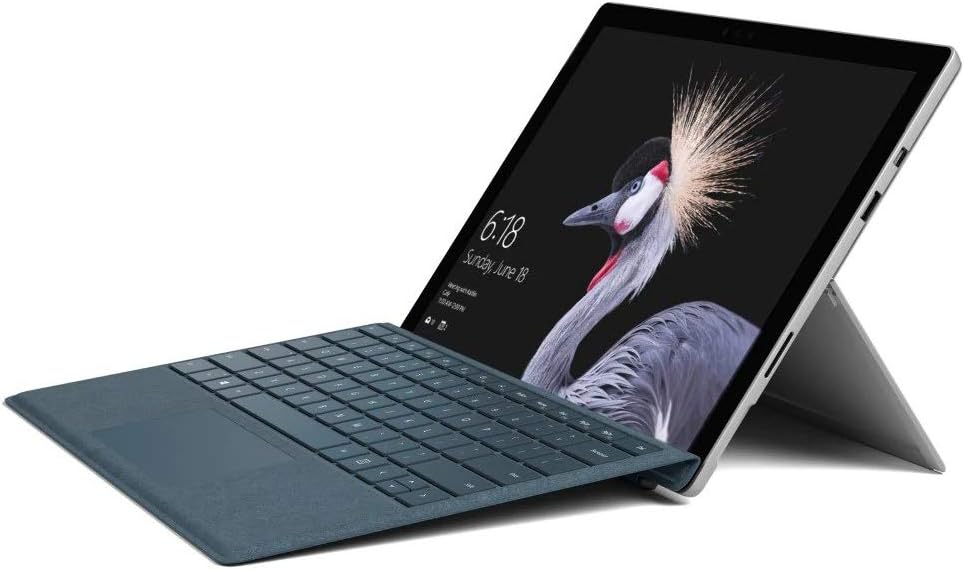
Figure 2.2: Microsoft Surface Pro with Signature Type Cover attached, configured as a laptop.

Figure 2.3: Microsoft Surface Pro tablet and detached Signature Type Cover.
3. Impostazione
3.1 Accensione iniziale
- Connect the power supply to the Surface Pro and a power outlet.
- Premere il pulsante di accensione situato sul bordo superiore del dispositivo.
- Seguire le istruzioni visualizzate sullo schermo per completare la configurazione iniziale di Windows 10 Pro, inclusa la selezione della lingua, la connessione di rete e la creazione dell'account utente.
3.2 Collegamento degli accessori
- Surface Pro Signature Type Cover: Align the Type Cover with the magnetic connector along the bottom edge of the Surface Pro until it clicks into place.
- Penna per Surface: The Surface Pen connects via Bluetooth. Go to Impostazioni > Dispositivi > Bluetooth e altri dispositivi to pair the pen.
3.3 Ricarica del dispositivo
Use the provided power adapter to charge your Surface Pro. The charging port is located on the right side of the device. A full charge provides approximately 13 hours of typical device usage.
4. Istruzioni per l'uso
4.1 Navigazione di base
- Tocco: Use multi-touch gestures on the PixelSense display for navigation, zooming, and scrolling.
- Copertina del tipo: Utilize the keyboard and trackpad for traditional laptop input.
- Penna per Surface: Write, draw, and annotate directly on the screen.
4.2 Funzionalità di Windows 10 Pro
Your Surface Pro comes with Windows 10 Pro, offering features such as:
- Windows Hello: For fast, secure, password-free sign-in using facial recognition.
- Cortana: Your personal digital assistant.
- Microsoft Edge: Il valore predefinito web browser.
- Modalità Tablet: Automatically or manually switch to a touch-optimized interface when the Type Cover is detached.
4.3 Impostazioni di visualizzazione
The 12.3-inch PixelSense display has a resolution of 2736 x 1824 pixels. You can adjust display settings such as brightness, resolution, and scaling through Impostazioni > Sistema > Schermo.
5. Manutenzione
5.1 Pulizia del dispositivo
- Utilizzare un panno morbido e privo di lanugine dampened with water or an approved screen cleaner to clean the display.
- For the device body, use a soft, dry cloth. Avoid harsh chemicals or abrasive materials.
5.2 Aggiornamenti software
Regularly check for and install Windows updates to ensure your device has the latest security patches and features. Go to Impostazioni > Aggiornamento e sicurezza > Windows Update.
5.3 Cura della batteria
- Evitare temperature estreme, poiché possono ridurre la durata della batteria.
- Per una salute ottimale della batteria, evitare di scaricarla completamente o di tenerla carica al 100% per periodi prolungati.
6. Risoluzione Dei Problemi
6.1 Problemi comuni
- Il dispositivo non si accende: Ensure the device is charged. Try holding the power button for 10-15 seconds to perform a force restart.
- Lo schermo non risponde: Restart the device. If the issue persists, check for driver updates.
- Problemi di prestazioni: Close unnecessary applications, check for Windows updates, or run a disk cleanup.
6.2 Contattare l'assistenza
For more complex issues or technical assistance, please visit the official Microsoft Support website or contact their customer service. Have your device's model number (FJU-00001) and serial number ready.
7. Specifiche
| Caratteristica | Specificazione |
|---|---|
| Nome del modello | FJU-00001 |
| Dimensioni dello schermo | 12.3 pollici |
| Risoluzione dello schermo | 2736 x 1824 pixel |
| Processore | Intel Core i5 (2.6 GHz) |
| Memoria RAM | 4 GB DDR3 |
| Magazzinaggio | SSD da 128 GB |
| Coprocessore grafico | Grafica Intel HD 620 |
| Sistema operativo | Windows 10 Pro |
| Tipo senza fili | 802.11b, 802.11g, 802.11n |
| Durata media della batteria | 13 ore |
| Peso dell'articolo | 1.7 libbre |
| Dimensioni del prodotto | 11.5 x 0.33 x 7.93 pollici |
| Posteriore WebRisoluzione della camma | 5 MP |
8. Garanzia e supporto
Your Microsoft Surface Pro Model 1796 is covered by a limited hardware warranty provided by Microsoft. For detailed warranty terms and conditions, please refer to the documentation included with your purchase or visit the official Microsoft support websito. Conservare la prova d'acquisto per eventuali reclami in garanzia.
For technical support, driver downloads, and service information, please visit support.microsoft.com. You may need to provide your device's serial number and model information.


