
1. Introduzione
This manual provides comprehensive instructions for the setup, operation, and maintenance of your Mount-It! Standing Desk Converter, model MI-7926. This height-adjustable desk riser is designed to transform your existing desk into a dynamic sit-stand workstation, promoting ergonomic flexibility and comfort.

Image 1.1: Mount-It! Standing Desk Converter MI-7926.
2. Informazioni sulla sicurezza
ATTENZIONE: Cancro e danni riproduttivi - www.P65Warnings.ca.gov
Leggere attentamente tutte le istruzioni prima dell'uso. Conservare il manuale per riferimento futuro.
- Assicurarsi che il convertitore da scrivania sia posizionato su una superficie stabile e piana.
- Non superare la capacità di peso massima di 33 libbre (15 kg).
- Keep hands and fingers clear of moving parts during height adjustment to prevent injury.
- Ensure all components are securely fastened before placing equipment on the converter.
3. Contenuto della confezione
Verificare che tutti i componenti siano presenti prima di procedere con l'assemblaggio:
- Mount-It! Standing Desk Converter Unit (Pre-assembled)
- Vassoio per tastiera
- Hardware for Keyboard Tray Attachment
4. Installazione e assemblaggio
The Mount-It! Standing Desk Converter is largely pre-assembled for your convenience. Only the keyboard tray requires attachment.
- Carefully remove the desk converter unit from its packaging and place it on your existing desk.
- Locate the keyboard tray and the included hardware (screws).
- Align the keyboard tray with the designated attachment points on the underside of the main desktop platform.
- Secure the keyboard tray using the provided screws. Ensure it is firmly attached.
Your standing desk converter is now ready for use. Place your monitors, laptop, and other accessories on the main desktop surface.
5. Istruzioni per l'uso
The MI-7926 features a manual lift system with gas spring assist for smooth height adjustments.
5.1 Regolazione dell'altezza
- Per alzare la scrivania: Simultaneously squeeze the two levers located on the sides of the desktop. While holding the levers, gently lift the desktop to your desired standing height. The gas spring mechanism will assist in the lift. Release the levers to lock the desk in place.
- Per abbassare la scrivania: Simultaneously squeeze the two levers located on the sides of the desktop. While holding the levers, gently press down on the desktop to your desired sitting height. The gas spring mechanism will provide controlled descent. Release the levers to lock the desk in place.

Image 5.1: Gas Spring Assist for easy height adjustment.

Image 5.2: Locking teeth mechanism for secure height settings.
5.2 Desktop Features
- Ampia superficie di lavoro: The main desktop measures 36.25" x 22", accommodating dual monitors or a monitor and laptop setup.
- Vassoio per tastiera: The lower keyboard tray measures 26.75" x 9", providing ample space for a keyboard and mouse.
- Tablet Slot: A built-in slot on the desktop allows for convenient placement of tablets or smartphones.

Image 5.3: Desktop with integrated tablet slot.
6. Manutenzione
Una manutenzione regolare garantisce la longevità e le prestazioni ottimali del tuo convertitore da scrivania.
- Pulizia: Pulire le superfici con un panno morbido, damp panno. Evitare detergenti abrasivi o solventi.
- Ispezione: Controllare periodicamente tutte le viti e i collegamenti per assicurarsi che siano ben serrati. Serrare nuovamente se necessario.
- Cura del meccanismo: Keep the gas spring mechanism and moving parts free from dust and debris. Do not lubricate unless specifically instructed by the manufacturer.
7. Risoluzione Dei Problemi
If you encounter issues with your desk converter, refer to the following common solutions:
- Difficoltà nella regolazione dell'altezza:
- Ensure both levers are fully squeezed simultaneously.
- Check for any obstructions around the lifting mechanism.
- Verify that the weight on the desktop does not exceed the 33 lb capacity. - Oscillazione o instabilità:
- Confirm the converter is placed on a flat, stable desk surface.
- Check all assembly screws, especially those for the keyboard tray, and tighten them if loose. - Desk Not Locking in Position:
- Ensure the levers are fully released after adjusting the height. The locking teeth should engage securely.
If problems persist, contact Mount-It! customer support for assistance.
8. Specifiche
| Caratteristica | Specificazione |
|---|---|
| Numero di modello | MI-7926 |
| Marca | Montalo! |
| Dimensioni del prodotto (P x L x A) | 22"P x 36.25"L x 17"A |
| Dimensioni della scrivania | 36.25"L x 22"P |
| Dimensioni del vassoio della tastiera | 26.75"L x 9"P |
| Gamma di regolazione dell'altezza | 6.25" (minimum) to 16.5" (maximum) |
| Capacità massima di peso | 33 libbre (15 kg) |
| Colore | Nero |
| Materiale di base | Metallo |
| Tipo di materiale superiore | Legna |
| Assemblaggio richiesto | No (Keyboard tray attachment only) |

Image 8.1: Detailed dimensions of the desk converter.
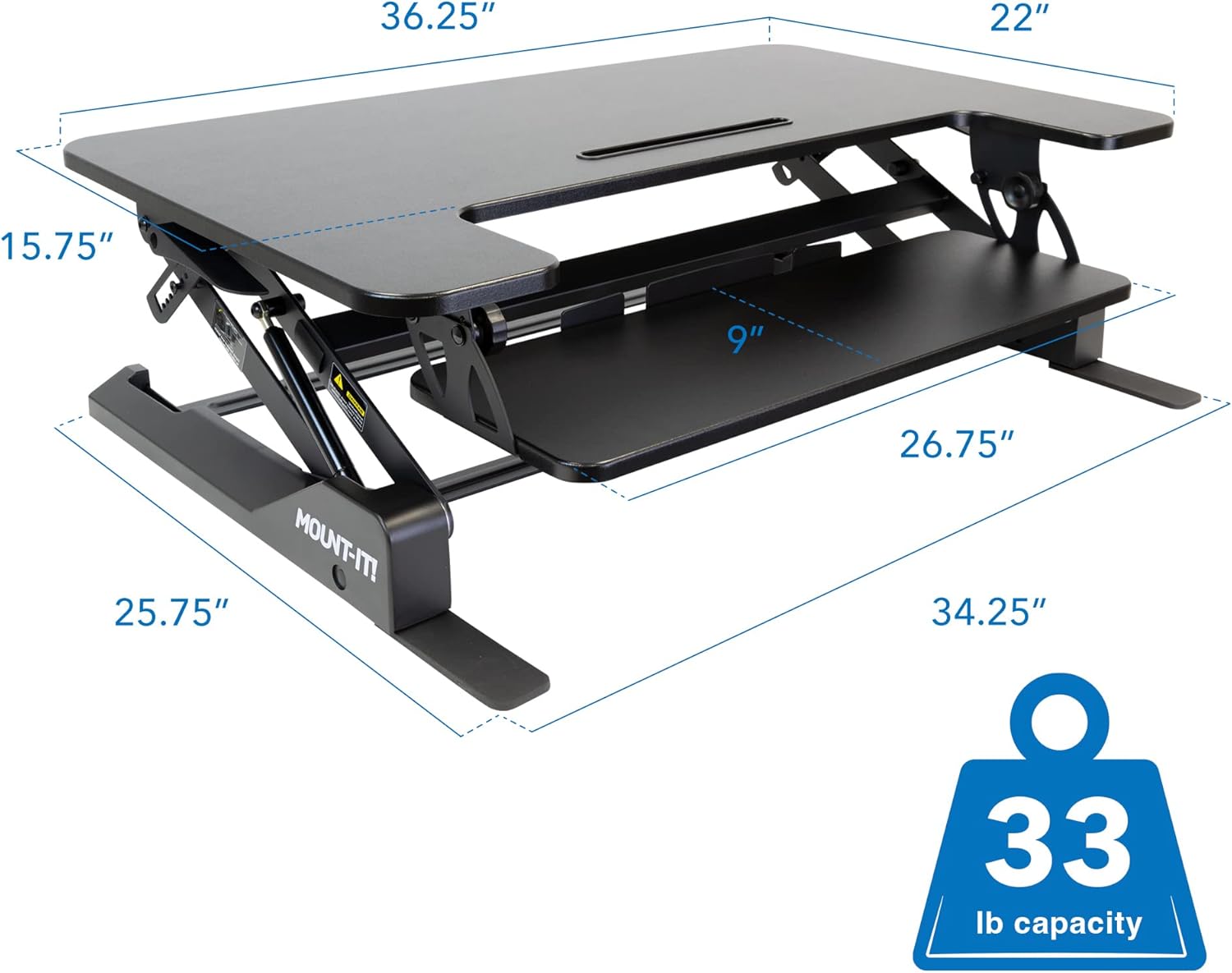
Image 8.2: Overall dimensions and weight capacity.
9. Garanzia e supporto
9.1 Informazioni sulla garanzia
This Mount-It! product is covered by a Garanzia limitata del produttore di 1 anno. This warranty covers defects in materials and workmanship under normal use. For specific terms and conditions, please refer to the warranty documentation included with your purchase or contact Mount-It! customer support.
9.2 Assistenza clienti
For technical assistance, warranty claims, or any questions regarding your Mount-It! Standing Desk Converter, please contact Mount-It! customer support through their official websito o le informazioni di contatto fornite con il prodotto.