
Introduzione
The Perixx PERIBOARD-313 is a wired, full-sized keyboard featuring an integrated touchpad and a 3-level LED backlight. Designed for convenience and efficiency, this keyboard combines typing and pointing functionalities into a single device, making it suitable for various computing environments. Its dimensions are approximately 456mm x 160mm x 30mm, with a touchpad measuring 57mm x 40mm.
This manual provides comprehensive instructions for the proper setup, operation, and maintenance of your PERIBOARD-313 keyboard to ensure optimal performance and longevity.
Contenuto della confezione
- 1 x Perixx PERIBOARD-313 Wired USB Backlit Keyboard with Touchpad
- Manuale dell'utente (questo documento)

Image: The Perixx PERIBOARD-313 keyboard, its USB cable, and the user manual shown next to the product packaging.
Requisiti di sistema
- Sistema operativo: Windows 7, 8 o 10
- Connectivity: Available USB port
Impostare
- Disimballare la tastiera: Carefully remove the PERIBOARD-313 from its packaging.
- Connessione al computer: Collega il connettore USB della tastiera a una porta USB disponibile sul tuo computer.
- Installazione del driver: La tastiera è plug-and-play. Il sistema operativo rileverà e installerà automaticamente i driver necessari. Non è richiesta l'installazione di software aggiuntivo.
- Verifica funzionalità: Once connected, the keyboard and touchpad should be immediately functional. Test by typing and moving the cursor.
Istruzioni per l'uso
Disposizione della tastiera
The PERIBOARD-313 features a standard full-size US English QWERTY layout with 104 keys, including a dedicated numeric keypad and function keys.

Image: Detailed diagram illustrating the full QWERTY keyboard layout, including the numeric keypad and integrated touchpad.
Funzioni del touchpad
The integrated touchpad provides precise cursor control and includes two buttons that function as left and right mouse clicks.
- Movimento del cursore: Slide your finger across the touchpad surface to move the cursor on the screen.
- Clic sinistro: Press the left button below the touchpad or tap once on the touchpad surface.
- Clic destro: Press the right button below the touchpad or tap with two fingers on the touchpad surface (if supported by OS settings).
- Scorrimento: Use two fingers to scroll vertically on the touchpad (if supported by OS settings).
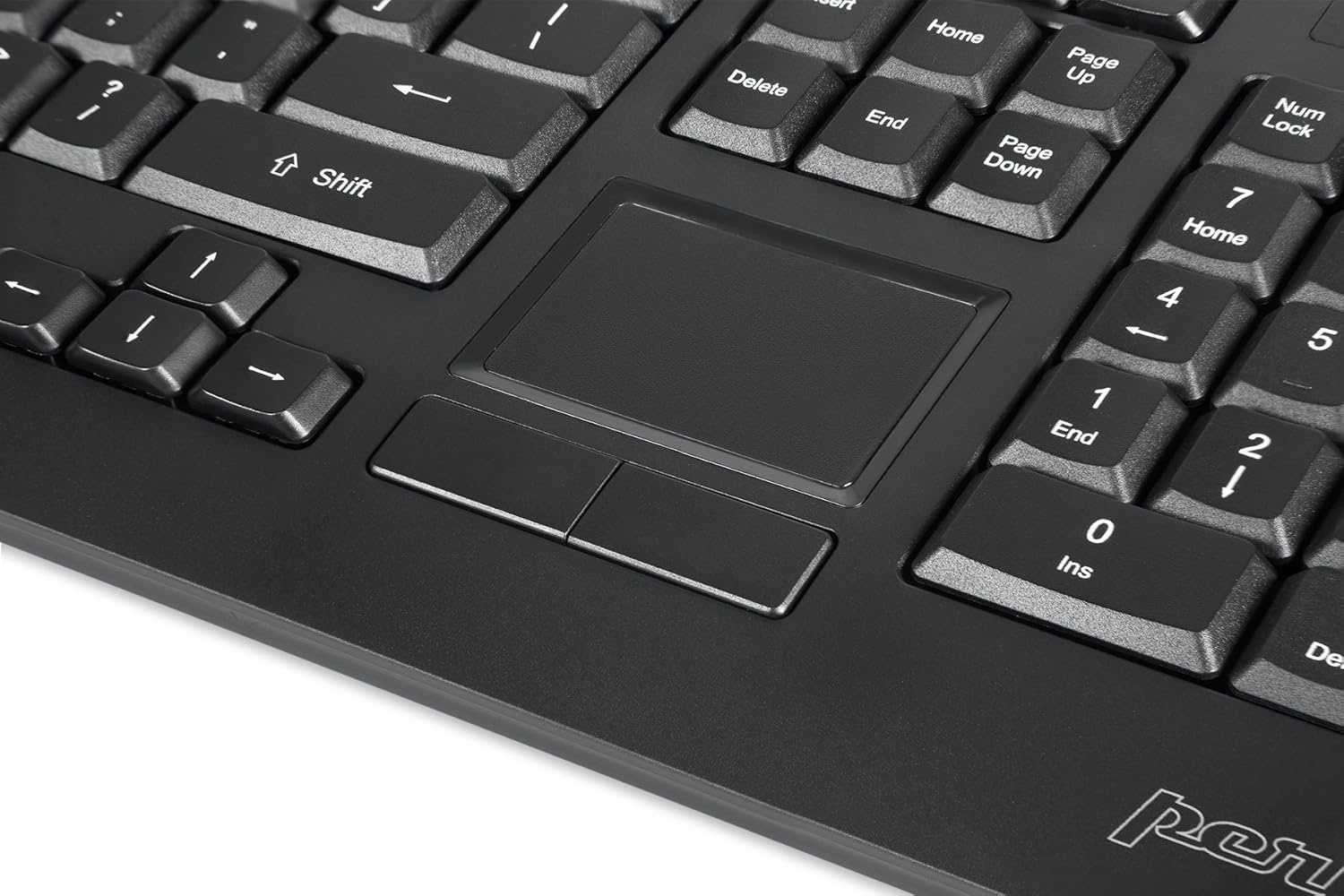
Image: A close-up of the integrated touchpad, highlighting its surface and the two dedicated click buttons.

Image: A user's hand interacting with the touchpad for cursor control.
Controllo della retroilluminazione
The keyboard features a white LED backlight with three adjustable brightness levels. Use the dedicated backlight control keys to adjust the illumination.
- Attiva/disattiva la retroilluminazione: Premere il tasto Tasto F12 combinazione di tasti.
- Regola luminosità: Premere Tasto F11 per scorrere i tre livelli di luminosità.
Tasti multimediali
The PERIBOARD-313 includes 10 multimedia function keys for quick access to media controls and internet features. These functions are activated by holding the Fn tasto e premendo il tasto funzione corrispondente (F1-F10).
- Fn+F1: Apri lettore multimediale
- Fn+F2: Abbassa il volume
- Fn+F3: Alza il volume
- Fn+F4: Muto
- Fn+F5: Traccia precedente
- Fn+F6: Traccia successiva
- Fn+F7: Riproduci/Pausa
- Fn+F8: Fermare
- Fn+F9: Aprire Web Navigatore
- Fn+F10: Apri client di posta elettronica
Hub USB integrati
The keyboard features two integrated USB 2.0 hubs, allowing you to connect additional USB devices directly to the keyboard for convenience.

Image: The side of the keyboard displaying the two built-in USB 2.0 ports for connecting peripherals.
Manutenzione
- Pulizia: Disconnect the keyboard from your computer before cleaning. Use a soft, damp cloth to wipe the surface. For deeper cleaning between keys, use compressed air to remove dust and debris. Avoid using harsh chemicals or abrasive cleaners.
- Magazzinaggio: Conservare la tastiera in un ambiente asciutto, lontano da temperature estreme e dalla luce solare diretta.
- Esposizione al liquido: This keyboard is not water-resistant. Avoid spilling liquids on it. If liquid exposure occurs, immediately disconnect the keyboard and allow it to dry completely before reconnecting.
Risoluzione dei problemi
| Problema | Possibile causa | Soluzione |
|---|---|---|
| La tastiera non risponde | Connessione USB allentata, porta USB difettosa, problema con il driver. |
|
| Il touchpad non funziona | Driver issue, touchpad disabled (unlikely for wired), physical damage. |
|
| Backlight not turning on/off or adjusting | Combinazione di tasti errata, conflitto software. |
|
| I tasti multimediali non funzionano | Combinazione di tasti errata, conflitto software. |
|
Specifiche
| Marca | Perixx |
| Nome del modello | PERIBOARD-313 US |
| Numero di modello | 11445 |
| Tecnologia di connettività | USB-A (cablato) |
| Descrizione della tastiera | QWERTY, Full-sized, Backlit |
| Caratteristica speciale | Backlit, Integrated Touchpad, USB Hubs |
| Colore | Nero |
| Colore della retroilluminazione della tastiera | Colore singolo (LED bianco) |
| Materiale | Plastica ABS |
| Numero di chiavi | 104 |
| Tipo di interruttore | Membrana |
| Dimensioni del touchpad | 57 mm x 40 mm (2.24" x 1.57") |
| Dimensioni della tastiera | 456mm x 160mm x 30mm (17.95 "x 6.30" x 1.18 ") |
| Peso dell'articolo | 1.85 libbre |
| Porte USB 2.0 totali | 2 (Integrated Hubs) |
Image: Technical drawing with key dimensions of the PERIBOARD-313 keyboard.
Garanzia
The Perixx PERIBOARD-313 comes with a Garanzia limitata di 1 anni from the date of purchase. This warranty covers manufacturing defects and workmanship under normal use. It does not cover damage caused by misuse, accident, modification, or unauthorized repair. Please retain your proof of purchase for warranty claims.
Supporto
For further assistance, technical support, or warranty inquiries, please visit the official Perixx websito o contattare il servizio clienti. Puoi trovare maggiori informazioni e recapiti sul Negozio del marchio Perixx su Amazon.