
ARTIX XJR
Manuale utente delle cuffie auricolari ARTIX Sport Workout XJR
Model: XJR
Brand: ARTIX
Introduzione
The ARTIX Sport Workout Earbuds Headphones XJR are designed for active individuals seeking high-quality audio performance during workouts, travel, running, and exercise. These lightweight, in-ear stereo wired earphones feature a built-in microphone and sweat-proof construction, ensuring durability and clear communication.
Key features include enhanced high-quality sound with natural clear acoustics and powerful bass, an ergonomic and stylish design with comfortable over-ear hooks, and integrated controls for music and calls. The noise-isolating earpods help minimize ambient background noise, providing an immersive listening experience.

Immagine: Frontale view of the ARTIX Sport Workout Earbuds XJR, highlighting their vibrant green color and ergonomic over-ear design.
Guida all'installazione
1. Scelta degli auricolari giusti
For optimal sound quality and comfort, it is crucial to select the correct size of silicone ear tips. The ARTIX XJR earbuds come with three sizes (Small, Medium, Large). Experiment with each size to find the one that provides a secure fit and good seal in your ear canal.
- Gently pull on the edge of the current ear tip to remove it from the earbud nozzle.
- Select a new ear tip size and firmly push it onto the nozzle until it clicks into place.
- Test the fit by inserting the earbuds into your ears. A good fit will block out most external noise and provide rich bass.
2. Indossare gli auricolari
The ARTIX XJR earbuds feature ergonomic over-ear hooks for a secure and comfortable fit, especially during physical activity. These hooks are removable if preferred, but are recommended for active use.
- Identificare gli auricolari sinistro (L) e destro (R).
- Place the earbud into your ear canal and gently loop the over-ear hook behind your ear.
- Regola l'auricolare e il gancio finché non risultano aderenti e comodi.
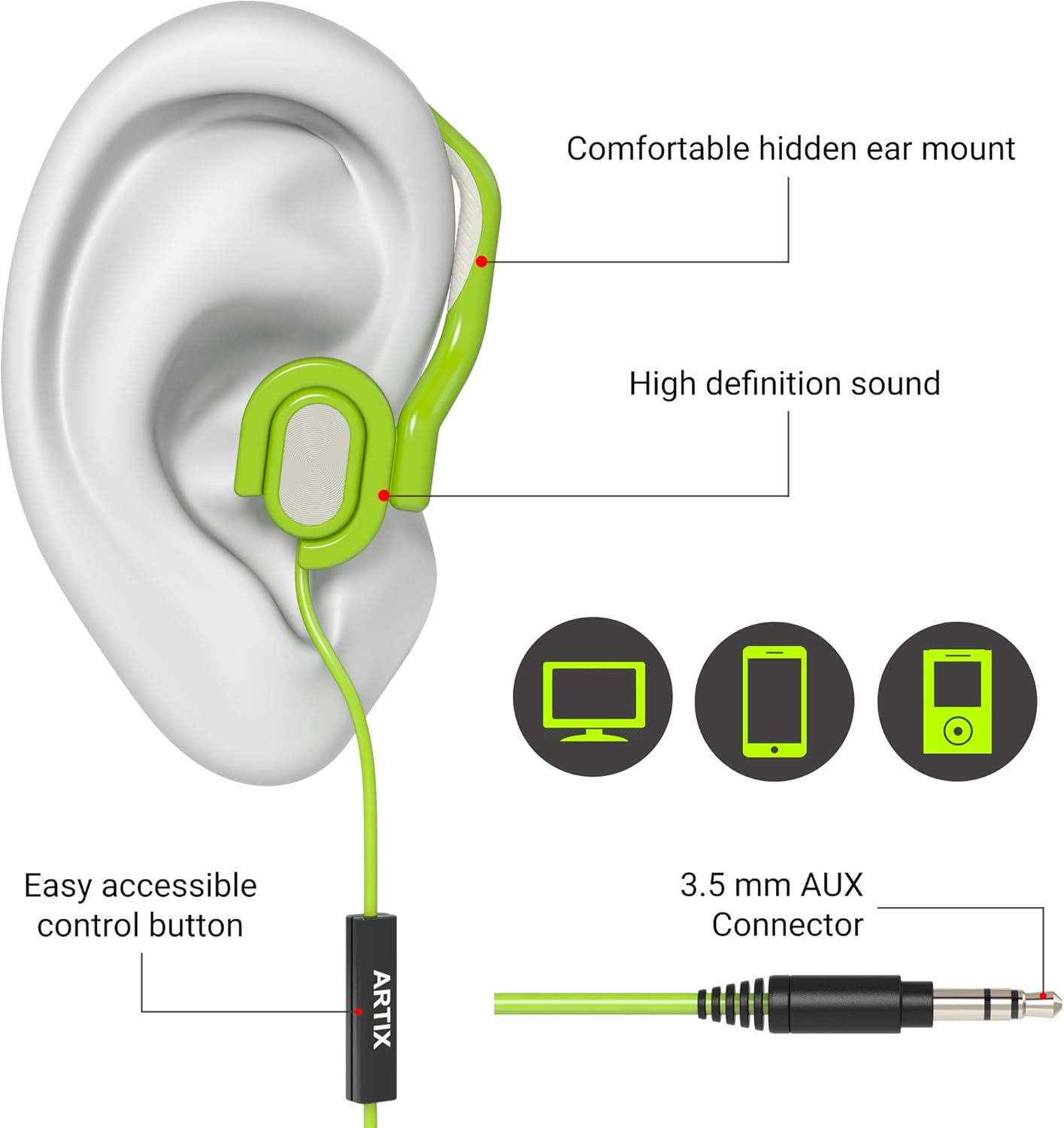
Image: A diagram illustrating the proper way to wear the earbud, showing the ear tip inserted into the ear canal and the over-ear hook securely positioned behind the ear. Labels point to the "Comfortable hidden ear mount" and "High definition sound".
3. Connessione al dispositivo
The ARTIX XJR earbuds connect via a standard 3.5mm audio jack. They are compatible with a wide range of devices.
- Locate the 3.5mm audio jack on your smartphone, tablet, MP3 player, laptop, or computer.
- Insert the 3.5mm connector of the earbud cable firmly into the device's audio jack.
- Ensure the connection is secure for uninterrupted audio.

Image: The ARTIX Sport Workout Earbuds XJR are shown connected to a smartphone, with running shoes in the background, illustrating their use with mobile devices for active lifestyles.
Istruzioni per l'uso
The ARTIX XJR earbuds feature an inline remote with a built-in microphone for convenient control of music playback and phone calls.
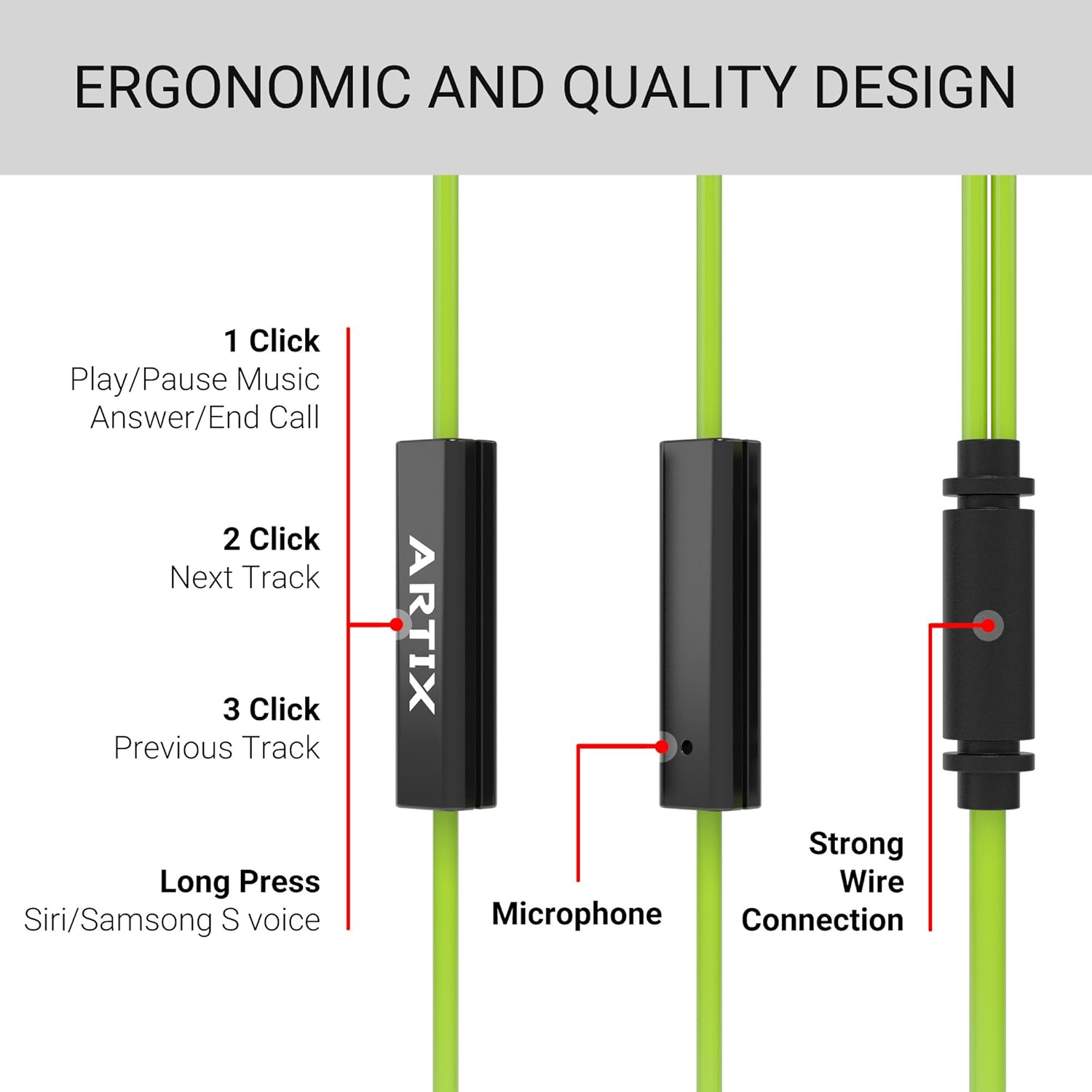
Image: A detailed diagram of the inline remote control, showing the single button and its various functions based on the number of clicks or duration of press.
Controllo della musica:
- 1 clic: Riproduci/metti in pausa la musica.
- 2 clic: Passa alla traccia successiva.
- 3 clic: Torna alla traccia precedente.
Controllo chiamate:
- 1 clic: Rispondi a una chiamata in arrivo o termina una chiamata in corso.
- Premere a lungo: Activate voice assistant (Siri/Samsung S voice) on compatible devices.
Il microfono integrato garantisce una trasmissione vocale chiara durante le chiamate.
Manutenzione e cura
To ensure the longevity and optimal performance of your ARTIX Sport Workout Earbuds XJR, follow these maintenance guidelines:
- Pulizia: Regularly wipe the earbuds, especially the ear tips and over-ear hooks, with a soft, dry cloth. For sweat or dirt, use a slightly damp panno e assicurarsi che siano completamente asciutti prima di riporli.
- Igiene degli inserti auricolari: Remove the silicone ear tips periodically and clean them with mild soap and water. Rinse thoroughly and allow them to air dry completely before reattaching.
- Cura del cavo: Avoid sharp bends or excessive pulling on the cable, as this can damage the internal wiring. Store the earbuds neatly to prevent tangling.
- Magazzinaggio: When not in use, store the earbuds in a clean, dry place, away from extreme temperatures and direct sunlight.
- Resistenza all'acqua: While sweat-resistant, these earbuds are not fully waterproof. Avoid submerging them in water or exposing them to heavy rain.
Risoluzione dei problemi
If you encounter any issues with your ARTIX Sport Workout Earbuds XJR, please refer to the following common troubleshooting steps:
| Problema | Possibile causa | Soluzione |
|---|---|---|
| Nessun suono o volume basso |
|
|
| Il microfono non funziona |
|
|
| Earbuds fall out during activity |
|
|
Se il problema persiste dopo aver provato queste soluzioni, consultare la sezione Supporto.
Specifiche
| Caratteristica | Dettaglio |
|---|---|
| Numero di modello | Modello XJR |
| Tecnologia di connettività | Cablato |
| Presa per cuffie | 3.5 mm Jack |
| Componenti inclusi | Cavo, cuscinetti auricolari |
| Materiale | Silicone |
| Usi specifici per il prodotto | Travel, Sports and Exercise, Studio |
| Dispositivi compatibili | Laptops, Desktops, Tablets, Cellphones, and other devices with a 3.5mm audio jack or compatible adapter |
| Tipo di controllo | Controllo multimediale |
| Caratteristica del cavo | Retrattile |
| Livello di resistenza all'acqua | Water Resistant (Sweat-proof) |
| Gamma di frequenza | Da 20 Hz a 20,000 Hz |
| Dimensioni del prodotto | 5.12 x 5.12 x 1.57 pollici |
| Peso dell'articolo | 3.84 once |
| Colore | Verde |
| Posizionamento dell'orecchio | Nell'orecchio |
| Fattore di forma | Nell'orecchio |
| Controllo del rumore | Isolamento acustico |
Prodotto finitoview Video
Guarda questo video ufficiale del prodotto per una panoramica visivaview of the ARTIX Sport Workout Earbuds XJR, demonstrating key features and usage scenarios.
Video: Un funzionario sopraview of the ARTIX Sport Workout Earbuds XJR, showcasing their design, features, and suitability for active use.
Garanzia e supporto
Informazioni sulla garanzia:
Please refer to the product packaging or the official ARTIX website for detailed warranty information regarding your ARTIX Sport Workout Earbuds XJR. Warranty terms and conditions may vary by region and purchase date.
Assistenza clienti:
For further assistance, technical support, or inquiries not covered in this manual, please visit the official ARTIX website or contact their customer service department. Contact details can typically be found on the product packaging or the brand's online presence.
Puoi anche visitare il ARTIX Store on Amazon per maggiori informazioni sul prodotto e risorse di supporto.
Ask a question about this manual
Ask about setup, troubleshooting, compatibility, parts, safety, or missing instructions. Manuals+ will review the question and use this page’s manual context to help answer it.