
Prodotto finitoview
This manual provides detailed instructions for the assembly, operation, and maintenance of your LINCO Lincostore Photo Video Studio Light Kit AM169. This comprehensive kit is designed to provide versatile lighting and backdrop solutions for photography and video production.
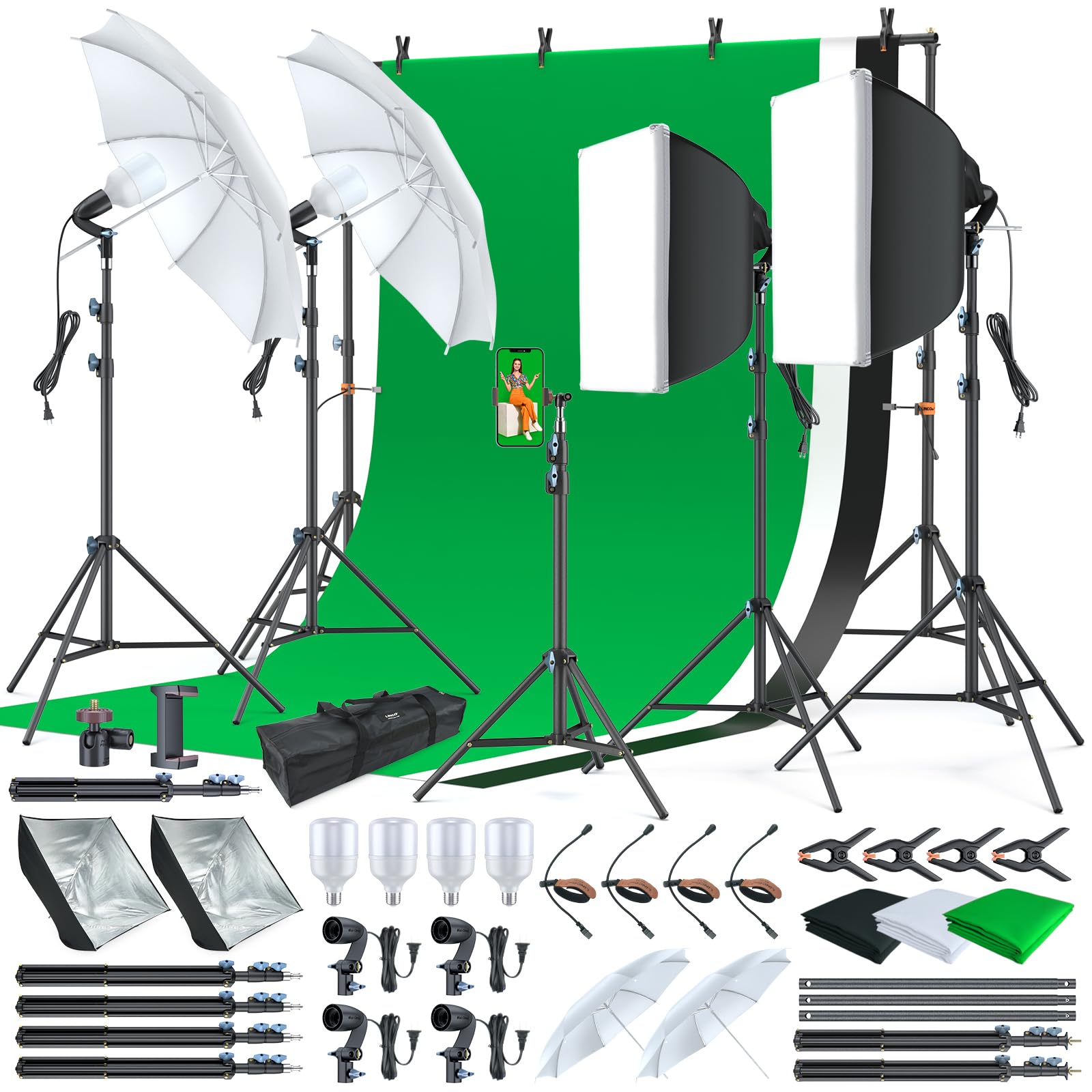
Image: The LINCO Lincostore Photo Video Studio Light Kit AM169, showcasing the complete setup with softboxes, umbrellas, and a green background in use. Smaller insets show the kit with black and white backgrounds.
Componenti del prodotto
Your LINCO Lincostore Photo Video Studio Light Kit AM169 includes the following items:
- (4) #5310-2 Mini-Cirrus Light Holder
- (4) #8806L Zenith 75" Light Weight Light Stand
- (2) #3012 High Quality White Umbrella Reflector
- (2) x 24" Silver Rotary Reflector Softbox
- (4) x 30W Premium Day-Light LED Light Bulb
- (1) Green Screen Backdrop Kit (6.7ft background support stands with crossbars, 3 color backdrops: black, white, green)
- (1) Premium Quality Carrying Bag for Photography Equipment
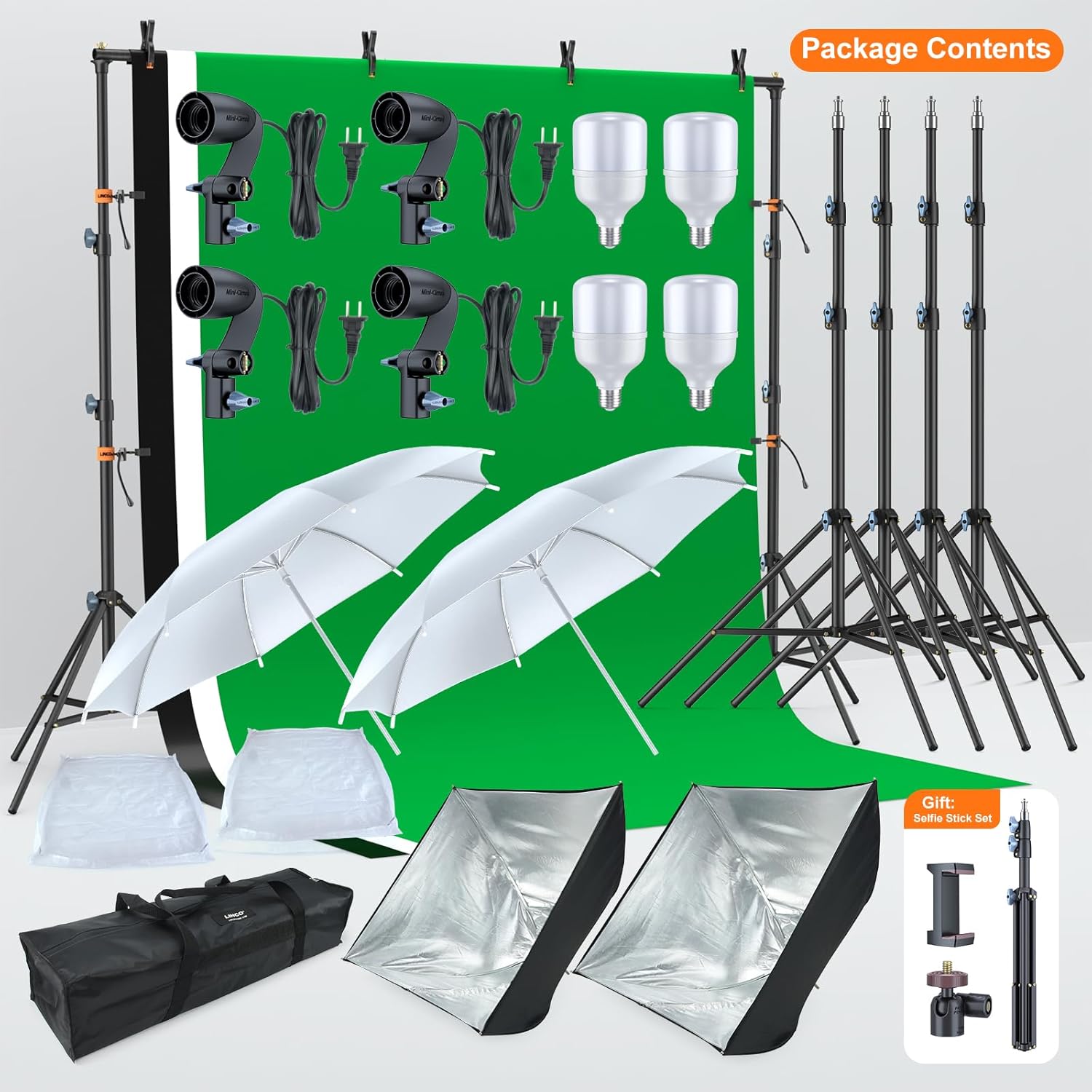
Image: A visual representation of all components included in the LINCO Lincostore Photo Video Studio Light Kit AM169, neatly arranged.
Istruzioni di installazione
1. Assembling the Light Stands
- Aprire le gambe del supporto luminoso finché non sono completamente estese e stabili.
- Extend the center column to the desired height and secure it using the locking knobs.
2. Attaching Light Holders and Bulbs
- Mount the Mini-Cirrus Light Holder onto the top of the light stand and tighten the securing screw.
- Carefully screw a 30W LED Light Bulb into the E26/E27 socket of the light holder. Avoid overtightening.

Image: Close-up of the 30W LED bulb, highlighting its energy efficiency and color accuracy, shown in a light holder.
3. Assembling the Softboxes
- Open the 24" Silver Rotary Reflector Softbox. The internal metal ribs will expand to form the box shape.
- Attach the softbox to the light holder. Ensure the light bulb is centered within the softbox.
- Secure the white diffuser cloth to the front of the softbox using the provided fasteners.

Image: Diagram illustrating how the softbox and light head can be adjusted to focus the light by sliding the light head closer or further from the softbox's rear spine.

Image: Two softboxes set up, demonstrating both floodlight and spotlight modes with 180-degree adjustability.
4. Setting Up the Umbrellas
- Insert the shaft of the 33" White Umbrella Reflector through the umbrella hole on the light holder.
- Adjust the umbrella's position to achieve the desired light diffusion.

Immagine: dettagliata view of the 33-inch translucent soft umbrella, light stand, light holder, and 30W LED bulb, showing its setup and adjustability.

Image: Two translucent umbrellas providing soft, even lighting for a product setup, demonstrating 180-degree adjustability.
5. Assembling the Backdrop Support System
- Assemble the two 6.7ft background support stands.
- Connect the crossbars to create the desired width (adjustable from 4.4 to 6.7ft).
- Drape the chosen muslin backdrop (black, white, or green) over the crossbar.
- Utilizzare la molla fornitaamps and string clips to secure the backdrop to the crossbar and stands, ensuring it is taut and wrinkle-free.

Image: Illustration of the 6.7x6.7ft backdrop stand system, showing the stands, crossbars, backdrop clamps, and string clips, with a green muslin backdrop.

Image: The three-color background setup, showing green, white, and black muslin backdrops with clamp-on design for quick setup.
Istruzioni per l'uso
1. Accensione/Spegnimento
Plug the light holders into a standard electrical outlet. Use the inline switch on the power cord to turn the lights on or off.
2. Adjusting Light Direction and Intensity
- Light Stands: Adjust the height of the light stands using the locking knobs on the center column.
- Light Holders: The light holders can be angled up to 180 degrees to direct light as needed.
- Softboxes: Fine-tune the light beam by sliding the light head closer to or further from the softbox's rear spine. This allows for adjustment between floodlight and spotlight modes.
- Umbrellas: Rotate the umbrella on its shaft to control the spread and softness of the light.
3. Utilizzo degli sfondi
- Schermo verde: Ideal for chroma keying in video production, live streaming, and creative content creation.
- Sfondo bianco: Provides a bright, clean canvas for classic studio photography, e-commerce listings, and portraits.
- Black Background: Creates a dramatic, distraction-free background for professional product shots and portraits.

Image: A green background cloth set up for chroma keying, demonstrating its use for video production and live streaming.

Image: A white background cloth providing a clean, bright setting for studio photography and e-commerce listings.

Image: A black background cloth creating a dramatic, distraction-free setting for product shots and portraits.
Manutenzione
- Pulizia: Wipe down light stands and holders with a soft, dry cloth. Muslin backdrops can be gently spot cleaned or machine washed on a delicate cycle if necessary. Iron on low heat to remove wrinkles.
- Magazzinaggio: Disassemble the kit components and store them in the provided carrying bag to protect them from dust and damage. Ensure bulbs are removed and stored safely.
- Manipolazione della lampadina: Always allow bulbs to cool before handling. Avoid touching the glass part of the bulb directly to prevent oil transfer, which can reduce bulb life.
Risoluzione dei problemi
| Problema | Possibile causa | Soluzione |
|---|---|---|
| La luce non si accende | Loose bulb, power cord not plugged in, faulty bulb, faulty light holder. | Ensure bulb is screwed in tightly. Check power connection. Test bulb in another working holder. Replace faulty bulb or holder. |
| Backdrop is wrinkled | Improper storage, material creases. | Gently iron the backdrop on a low setting or use a fabric steamer. Ensure it is stretched taut when clipped to the stand. |
| Softbox/Umbrella not opening correctly | Incorrect assembly, bent support rods. | Review assembly steps. Ensure all internal support rods are correctly positioned and not damaged. |
| Unstable light stand | Legs not fully extended, locking knobs loose, uneven surface. | Fully extend and lock all legs. Tighten all locking knobs. Place the stand on a flat, stable surface. |
Specifiche
- Dimensioni del prodotto: 80"P x 78"L x 78"A
- Peso dell'articolo: 27.3 libbre
- Numero modello articolo: AM169
- Marca: LINCO
- Materiale: Nylon (for softboxes and backdrops)
- Tipo di lampadina: 30W High Efficiency Daylight LED (E26/E27 socket)
- Softbox Size: 24 x 24 pollici
- Umbrella Size: 33 pollici
- Backdrop Stand Width: Regolabile da 4.4 a 6.7 piedi
- Backdrop Colors: Nero, Bianco, Verde
Garanzia e supporto
LINCO products are designed for durability and performance. For specific warranty details and customer support, please refer to the warranty card included in your product packaging or visit the official LINCO website. For immediate assistance with product issues or replacement parts, please contact your retailer or LINCO customer service directly.
Informazioni sui contatti: Please refer to the contact details provided with your purchase or on the official LINCO websito per le informazioni di supporto più aggiornate.