
1. Prodotto finitoview
The 7artisans 25mm F1.8 APS-C Manual Focus Fixed Lens is a compact and lightweight prime lens designed for Fujifilm X-mount cameras. It features a bright F1.8 maximum aperture, making it suitable for low-light photography and creating images with shallow depth of field. The lens construction includes 7 elements in 5 groups, ensuring optical quality. Its all-aluminum body and copper core contribute to its durability and portability.
Caratteristiche principali:
- Progettazione ottica: 7 elements in 5 groups.
- Gamma di apertura: F/1.8 to F16, with 12 diaphragm blades for smooth bokeh.
- Costruzione: Durable aluminum body with a copper core.
- Dimensioni compatte: Lightweight at approximately 143g (0.31oz).
- Compatibilità: Specifically designed for Fujifilm APS-C X-mount cameras. Not suitable for full-frame cameras unless used in APS-C mode.
2. Contenuto della confezione
Al momento della ricezione, controllare il contenuto del pacco per assicurarsi che siano presenti tutti gli articoli:
- 7artisans 25mm F1.8 APS-C Manual Focus Fixed Lens
- Copriobiettivo anteriore
- Copriobiettivo posteriore
- Manuale dell'utente (questo documento)
3. Identificazione delle parti
Familiarize yourself with the different parts of your 7artisans 25mm F1.8 lens:
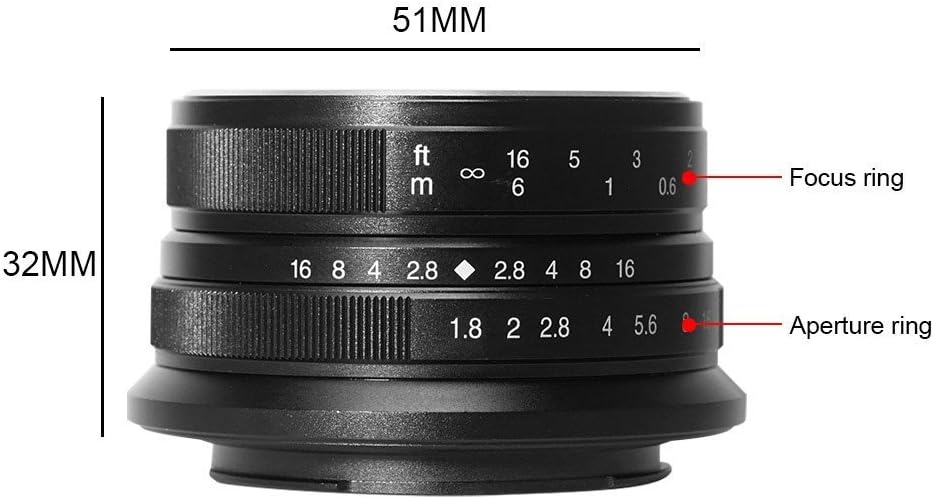
Figura 3.1: Lato view of the 7artisans 25mm F1.8 lens, highlighting the focus ring (top) and aperture ring (bottom) with their respective markings for distance (feet/meters) and f-stops (F1.8 to F16).
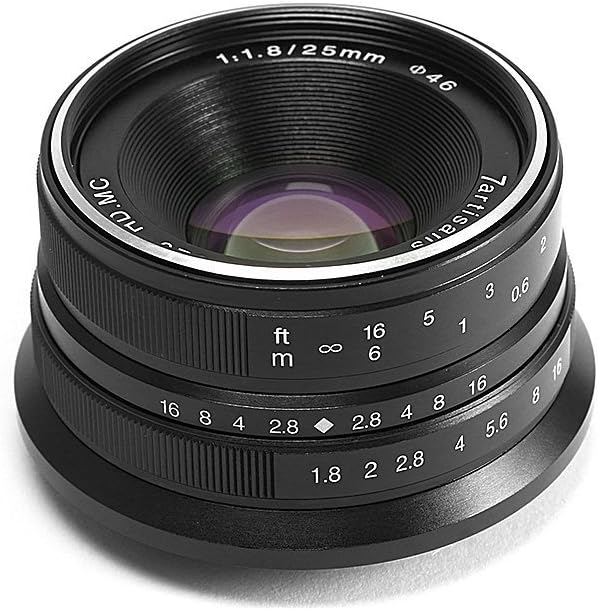
Figura 3.2: Davanti view of the 7artisans 25mm F1.8 lens, showing the front element, filter thread (Φ46), and lens markings including '7artisans', '1:1.8/25mm', and 'HD.MC'.
4. Impostazione
4.1 Montaggio dell'obiettivo
- Assicurati che la fotocamera sia spenta.
- Remove the rear lens cap from the 7artisans 25mm F1.8 lens and the body cap from your camera.
- Align the red dot on the lens with the corresponding red dot on your camera's lens mount.
- Inserire delicatamente l'obiettivo nel supporto della fotocamera e ruotarlo in senso orario finché non scatta in posizione. Non forzare l'obiettivo.
- Replace the front lens cap when not in use to protect the front element.

Figura 4.1: The 7artisans 25mm F1.8 lens correctly mounted on a Fujifilm X-mount camera body.
4.2 Full-Frame Camera Usage
This lens is designed for APS-C sensors. If you are using a full-frame camera, it is essential to change your camera's settings to APS-C mode (also known as crop mode) to avoid vignetting and ensure optimal image quality. Refer to your camera's instruction manual for specific steps on how to activate APS-C mode.
5. Istruzioni per l'uso
The 7artisans 25mm F1.8 is a fully manual lens, requiring manual adjustment of both focus and aperture.
5.1 Messa a fuoco manuale
- To adjust focus, rotate the focus ring (the ring closer to the camera body) until your subject appears sharp in the viewmirino o sullo schermo LCD.
- Many modern mirrorless cameras offer focus peaking and magnification features to assist with precise manual focusing. It is highly recommended to enable these features for best results.
- The focus distance scale (in feet and meters) on the lens can be used for zone focusing or pre-focusing.
5.2 Regolazione dell'apertura
- The aperture ring (the outer ring) allows you to control the amount of light entering the lens and the depth of field.
- Rotate the aperture ring to select your desired f-stop, ranging from F1.8 (widest aperture) to F16 (narrowest aperture).
- The lens features 12 diaphragm blades, which contribute to a smooth and pleasing bokeh (background blur) at wider apertures.

Figura 5.1: Illustration of the 12-blade aperture design, which helps create smooth out-of-focus areas.
5.3 Impostazioni di esposizione
Since this is a manual lens, you will need to set your camera to Manual (M) mode or Aperture Priority (A) mode. In Aperture Priority mode, you set the aperture on the lens, and the camera will automatically select the appropriate shutter speed. In Manual mode, you control both aperture and shutter speed, and ISO.
6. Manutenzione
Proper care and maintenance will extend the life and performance of your lens.
- Pulizia della lente: Use a soft, lint-free microfiber cloth specifically designed for optics to clean the lens elements. For stubborn smudges, use a small amount of lens cleaning fluid applied to the cloth, not directly to the lens. Use a blower brush to remove dust particles before wiping.
- Magazzinaggio: Store the lens in a dry, cool place away from direct sunlight and extreme temperatures. Always attach both front and rear lens caps when the lens is not in use. Consider using a desiccant pack in humid environments to prevent mold growth.
- Gestione: Avoid dropping or subjecting the lens to strong impacts. When changing lenses, do so in a clean environment to prevent dust from entering the camera body or settling on the lens elements.
7. Risoluzione Dei Problemi
Se riscontri problemi con l'obiettivo, fai riferimento alle seguenti soluzioni comuni:
| Problema | Possibile causa | Soluzione |
|---|---|---|
| Image appears dark or overexposed. | Incorrect aperture or shutter speed settings. | Adjust the aperture ring on the lens and/or the shutter speed/ISO on your camera to achieve proper exposure. |
| Le immagini sono sfocate o fuori fuoco. | Manual focus not set correctly. | Ensure the focus ring is adjusted precisely for your subject. Utilize focus peaking and magnification features on your camera. |
| Dark corners (vignetting) on images. | Using the lens on a full-frame camera without APS-C mode. | Switch your full-frame camera to APS-C (crop) mode. This lens is designed for APS-C sensors. |
| L'obiettivo non è fissato saldamente alla fotocamera. | Incorrect alignment or debris on mount. | Ensure the red dots on the lens and camera body are aligned. Check for any obstructions on the lens or camera mount. |
8. Specifiche
Detailed technical specifications for the 7artisans 25mm F1.8 lens:
| Caratteristica | Dettaglio |
|---|---|
| Marca | 7artigiani |
| Numero di modello | 25mm F1.8 for Fuji |
| Lunghezza focale | 25 millimetri |
| Tipo di lente | Wide Angle, Fixed Prime |
| Apertura massima | Foto/1.8 |
| Apertura minima | Foto/16 |
| Lame del diaframma | 12 |
| Progettazione ottica | 7 elementi in 5 gruppi |
| Supporti compatibili | Fujifilm X-mount (APS-C) |
| Peso dell'articolo | 5.1 once (circa 143 g) |
| Dimensioni del pacco | 5.47 x 4.61 x 3.23 pollici |
| ASIN | B073F81XWF |
| Data prima disponibilità | 28 giugno 2017 |
9. Video ufficiale del prodotto
Watch the official product video for a visual guide on the 7artisans 25mm F1.8 lens:
9.1 video: Ufficiale finitoview of the 7artisans 25mm F1.8 Manual Focus Prime Fixed Lens for Fujifilm cameras, demonstrating its features and usage.
10. Garanzia e supporto
For warranty information, technical support, or service inquiries, please contact 7artisans customer service through their official webo al rivenditore presso cui hai acquistato il prodotto. Conserva la prova d'acquisto per eventuali reclami in garanzia.